
Having drawn some distinctions between what Apple terms Spotlight and Core Spotlight, I’m now going to start a deeper dive into Core Spotlight, in a bid to gain insight into its indexing and how to diagnose its problems.
To assist, I’m here using log extracts obtained from a virtual machine running macOS 26.5.2 on my Mac mini M4 Pro, with log privacy disabled, to provide as much information as possible. As a VM, it lacks support for Apple Intelligence, and to simplify this further, the VM isn’t signed into an Apple Account and thus has no access to iCloud.
Indexing
In this VM, Spotlight indexing is quick and reproducible, for example when setting up a folder of test files for SpotTest.

The sequence of log entries, with times in seconds, is characteristically:
- 0.000 FSEvents reports the copying of files to create the test folder
- 1.100 spawning of
mdworker_sharedprocesses to extract metadata using appropriate mdimporters - 1.200 CGPDFService starts to extract text from PDFs
- 1.900
mds_storescompresses extracted content - 2.600
mds_storeshas completed indexing.
For comparison I consider two relatively simple Core Spotlight clients, Contacts and Notes.
The Contacts app appears to use an address book database, and doesn’t come with an Appex to support indexing. Each entry can contain values for many keys including data exposed to the user such as givenName, nickname, birthday, etc., as well as some that is intended for internal use, such as phoneticFamilyName. Contacts are identified using a UUID such as E17502A4-1CE0-44D7-AD11-AECD9C4054EB:ABPerson, which appears to be a version 4 UUID thus randomly generated, although Contacts prefers to look for nicknames and there’s even an IMNicknameProvider in Messages that can be consulted by Contacts. I can’t find any evidence in the log that Contacts maintains any separate index, and new entries appear to be added directly to its database.
Notes, with its rich contents and versioning, is considerably more complex, and has its own Appex, a Spotlight Index Extension, tucked away in the PlugIns folder in its app bundle. While the Notes app is responsible for saving new and changed notes, log entries reveal the involvement of corespotlightd:
2.731705 SearchIndexer com.apple.notes Saving indexing state for <ICModernSearchIndexerDataSource: 0x9120b57c0>: objectIDs=4 needsReindexing=0

2.733400 SearchIndexer com.apple.notes Search indexer state dictionary file size: 593 bytes.

2.881069 CoreSpotlight Start service name com.apple.spotlight.SearchAgent

2.881119 com.apple.corespotlight [qid=-483838876327084031][QoS=33] Starting <CSHashtagQuery:0x913ae2e00 qid=-483838876327084031 flag=0x200010 count=0 started=true userQuery:kMD...*<17 chars> queryString:kMD...*<17 chars>>

2.881275 corespotlightd new connection(0x70b3c5200) for service com.apple.spotlight.SearchAgent pid: 1211

2.881575 corespotlightd pid: 1211 bundleID: com.apple.Notes

2.881627 corespotlightd search startQuery pid: 1211

2.882681 CoreSpotlight [qid=-483838876327084031] Results type: SPQueryFinished

2.882683 CoreSpotlight [qid=-483838876327084031] Finished

3.387469 com.apple.notes Saving versioned document 0 with 0 future versions.

3.387890 com.apple.notes ICNote saveNoteData 158286187

3.388080 com.apple.notes Saving note data for <ICNote BFB69DDA-276C-4F72-BE4F-C84D6581B0AA[0xb97936fa5599e3d9 <x-coredata://8149EF6A-31C0-43E5-A0F5-BBD3C7E3542F/ICNote/p6>]>: 158286187

3.749184 com.apple.notes Reporting progress to Spotlight: <SearchIndexProgress total=5 pending=0 completed=5>
Searching
Searching from within the Contacts app is consistent with it being a database, and doesn’t directly involve Core Spotlight, for example:
0.714566 com.apple.contacts 00ce Entry point: unifiedContactWithIdentifier:keysToFetch:error:

0.714576 com.apple.contacts 00ce Request details: unifyResults=1, sortOrder=0, keysCount=1

0.714596 com.apple.contacts 00ce Predicate: <CNContactsWithIdentifiersPredicate: 0x928770480: kind=-[CNContact predicateForContactsWithIdentifiers:], identifiers (count)=1, identifiers=("E17502A4-1CE0-44D7-AD11-AECD9C4054EB:ABPerson")>

0.714597 com.apple.contacts 00ce Searching for 1 identifier: E17502A4-1CE0-44D7-AD11-AECD9C4054EB:ABPerson

0.714604 FetchingContacts
Entries from a search made within the Notes app don’t make any reference to Core Spotlight either, as in:
1.105814 com.apple.notes <ICSearchQueryOperation: 0x914092140>: ICMSearchQueryController searchForSearchString start: 0.521378

1.105824 com.apple.notes [ICMSearchQueryController(0x91490a490) searchForSearchString:tokens:suggestionsResponder:batchSize:modernResultsOnly:submitSearchResults:] Search string updated to: hash=1041, length=1. search suggestions are ()

1.105868 com.apple.notes <ICSearchQueryOperation: 0x914092140>: ICMSearchQueryController searchForSearchString end: 0.521436

1.105969 com.apple.notes <ICSearchQueryOperation: 0x914092140>: Prefix query start: 0.521528

1.106063 com.apple.notes (null): ICMMainWindowController searchNote end: 0.521640
How can you tell if an app uses Core Spotlight?
Perhaps the clearest way to distinguish between regular Spotlight and Core Spotlight is to perform a test search. In the app, add a new record or item with distinctive content that should be easy to find, and to distinguish from other sources. I prefer unusual words featuring the letter Z, as they’re normally rare. In this example I created a note with the heading Zanzibar, then searched for that using Spotlight’s dedicated window.
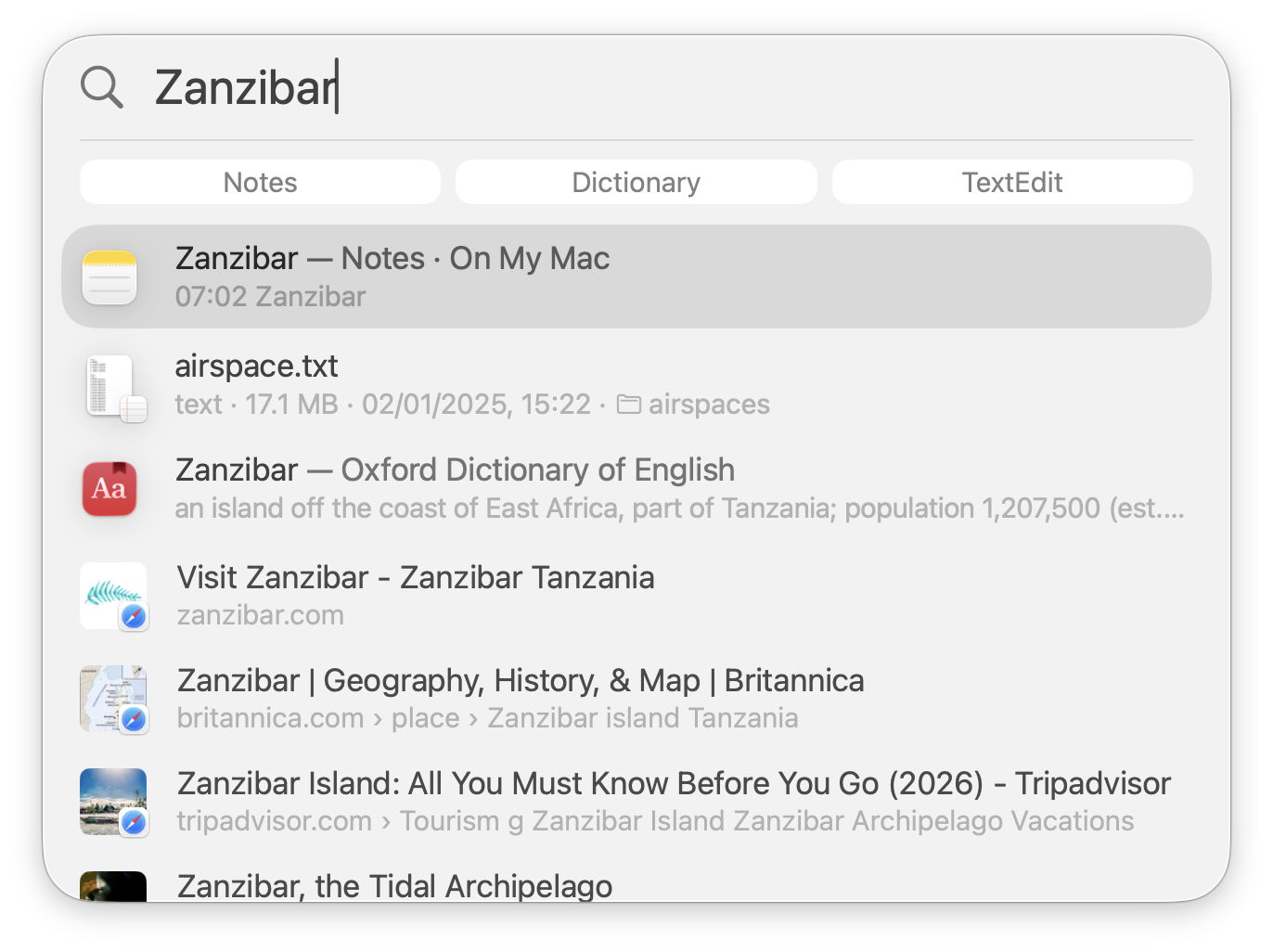
At the top of the list of hits is my test note. Spotlight search conducted here can be narrowed down to Apps, Files and Actions, but when assessing whether Core Spotlight is involved it’s better to use the default generic search. As I’ll explain in a future article, that launches separate searches for Apps, Metadata, GoToFiles, FileProviderServer, Folder, URL, Parsec (Spotlight suggestions), Dictionary, Calculator, WorldClock, and DDS, which probably refers to Data Delivery Services. In addition to those, it also launches known Appex-based Spotlight Index Extensions covering other apps including Notes.
Compare the results from in-app and Spotlight search with those of Find. Open a new Finder window, turn it into a search window using the Finder’s Find command, and try to find the same term in the metadata and content indexed by Spotlight in the volume indexes.
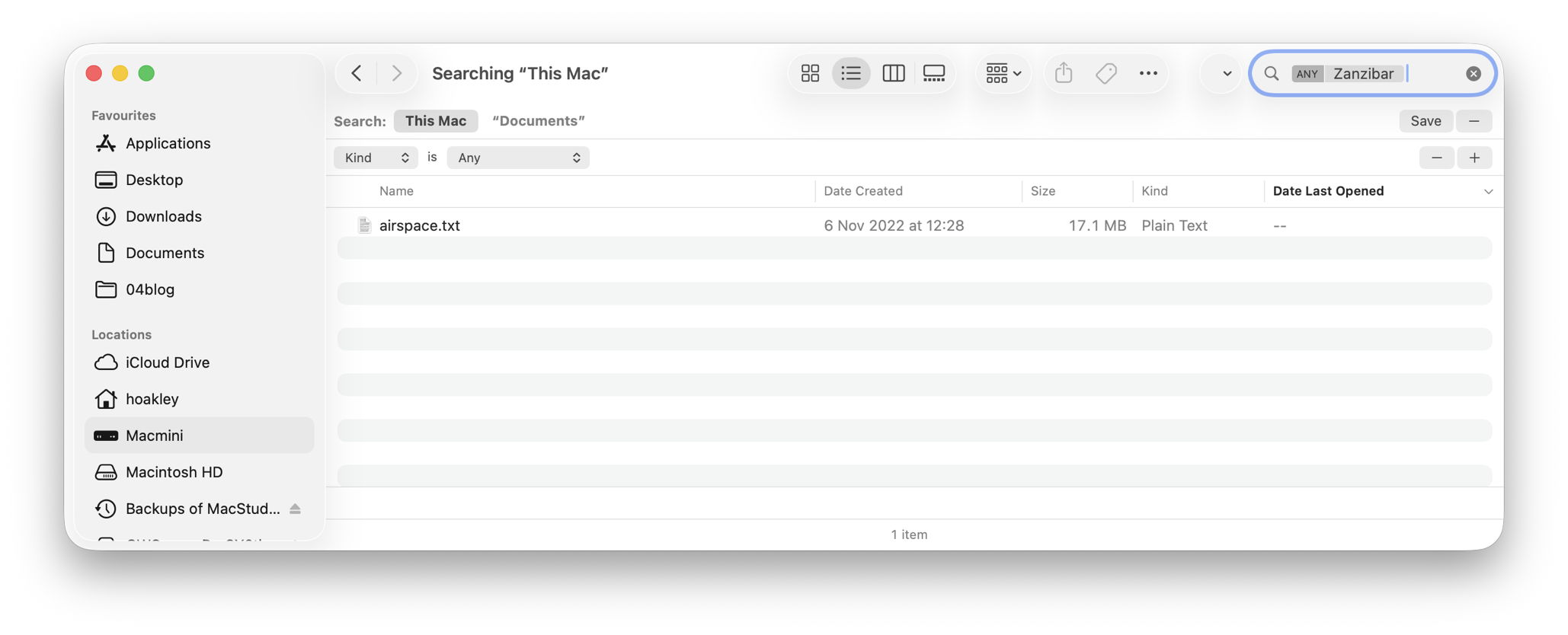
This found a single occurrence in an unrelated document, and was unable to look inside my Notes, confirming those are handled by Core Spotlight.
Apps may also provide clues in their contents and entitlements. Look inside the app bundle, particularly in its PlugIns folder, where you might find a Spotlight Index Extension as an Appex. Inspect its entitlements using Apparency, and you see further clues. In the case of Notes, there’s an unusual entitlement named com.apple.corespotlight.search.allowed.bundleIDs giving that app access to com.apple.reminders and com.apple.Photos.
Conclusions
- Core Spotlight isn’t a single group of discrete services like Spotlight, and its access and use varies widely between different client apps.
- As its services are controlled by its clients, in the first instance you need to establish which client app is using its services.
- Spotlight search using its dedicated window searches using a wide range of services, many of which depend on Core Spotlight.
- The Finder’s Find window searches using Spotlight and its per-volume metadata and content indexes.

