
With two types of CPU core, there are four schemes that macOS can use for the allocation of threads to core types:
- allocate threads to P cores when they’re available, then allocate them to E cores (normal mode);
- allocate threads to E cores when they’re available, then allocate them to P cores (not used);
- allocate threads only to P cores (not used);
- allocate threads only to E cores (background threads at low QoS).
This article looks at two special allocation modes now available, in Game Mode, and when virtualising macOS guests using lightweight virtualisation. The last of those four modes is covered in the previous two articles in this series:
The first of those contains a detailed account of the methods used, including source code for the test loads. If you’re not already familiar with it, I recommend that you read it first, or you may well be mystified by this article.
Virtualisation
I have described in detail how the virtual CPU cores in a macOS VM are managed on M1 chips, and there’s no evidence to suggest that this is fundamentally any different in the M3 Pro. Each virtual core is effectively mapped to real CPU cores to provide a single core’s worth of processing. Threads are allocated in normal mode, to P cores first, overflowing to E cores as necessary.
To assess the performance of VMs running on the M3 Pro chip, a Sonoma 14.1.1 VM was allocated 8 virtual cores and 16 GB of memory using my free virtualisation app Viable. My load test app AsmAttic was then run inside that VM to perform the same floating point and other tests used and described previously.
Measured performance expressed as a percentage of native M3 Pro performance was impressive: on floating point loops, running tests of 1-8 threads, the VM delivered 97-99% of native performance. Vector tests weren’t as good, though, only achieving 81% of native. However, VM performance on an M3 Pro chip was consistently and significantly better than native performance on M1 Pro or Max chips, even when two of the threads overflowed onto the host’s E cores.
The M3 Pro (and Max) offer a lot for those who want to virtualise macOS. While most would be reluctant to dedicate more than six cores to a VM running on an M1 Pro or Max, eight cores on an M3 Pro provides a lot of CPU power while ensuring the host still has four E cores to handle both background and other tasks.
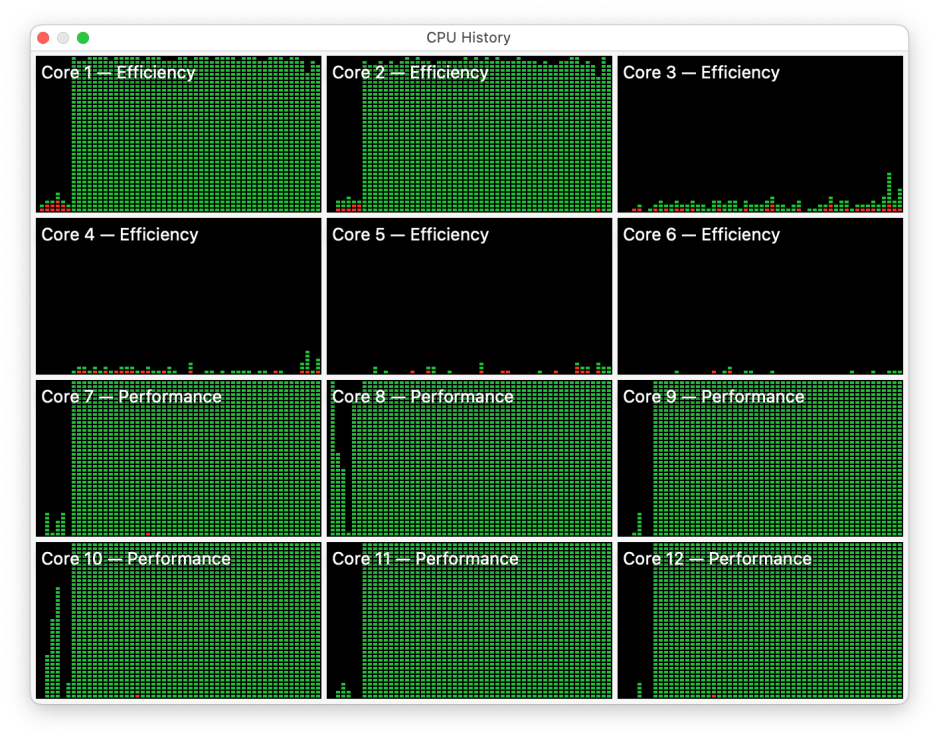
This CPU History window shows all eight virtual cores at full load running a prototype vDSP FFT test.
Although Apple restricts the number of macOS VMs that can be run simultaneously on any Mac to two, the prospect of running two 4-core VMs without compromising the host M3 Pro is very attractive.
Game Mode, CPU cores
My previous investigations of Sonoma’s new Game Mode are described here and here, and were undertaken on M1 Pro and Max chips, with their two E cores. Evidence there suggested that Game Mode gives exclusive access to those two E cores, highest priority access to the GPU, and uses low latency Bluetooth modes for input controllers and audio output. Given the six-core cluster of E cores, I wanted to discover how many of those were committed to Game Mode, and whether the M3 Pro’s GPU responded any differently to graphics and Compute loads.
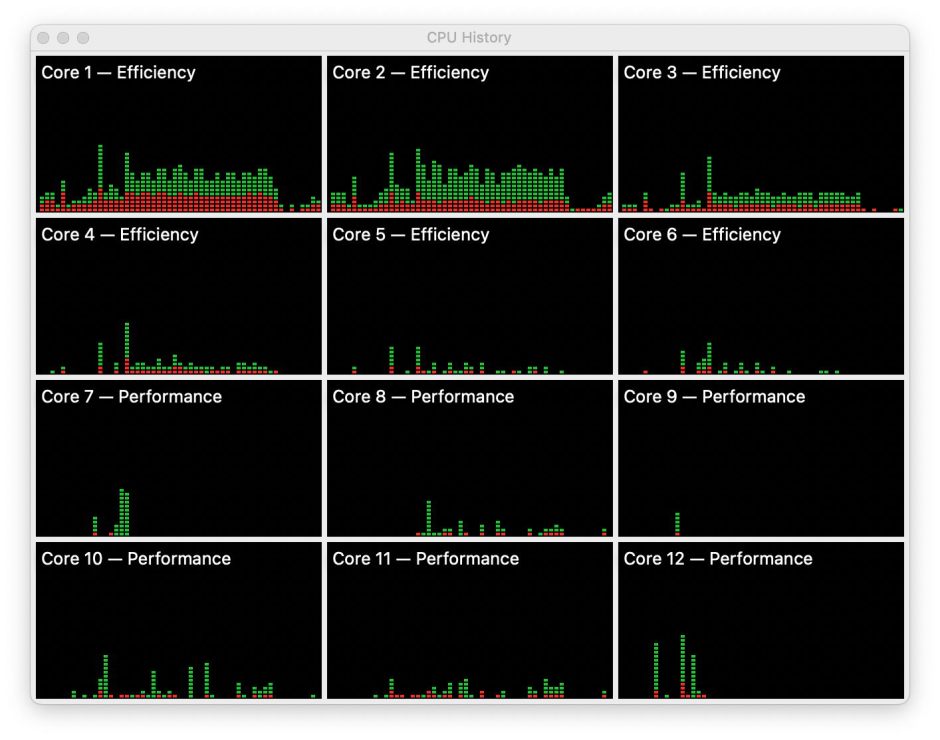
This CPU History window from Activity Monitor shows CPU % (for all its shortcomings) on an M3 Pro chip when running intensive graphics in Game Mode. Substantial use was made of the first three E cores (1-3), and very light use of the next three (4-6). However, powermetrics measurements made in Game Mode failed to show any distinctive pattern that might identify any of the six E cores as being dedicated in any way to a graphics-intensive app running in Game Mode.
I also used two copies of my AsmAttic loading app, one running in Game Mode, the other not, with different floating point loads at low QoS. No interactions between threads of the two apps could be detected, and both appeared to be scheduled normally on the E cores.
Game Mode, GPU
The same tests were used on the M3 Pro with its 18 GPU cores as on the M1 Max with 24 cores previously. These consist of a graphics load using the Modern Rendering with Metal example code from Apple’s sample code repository, and a Compute task involving particle simulation from the same collection.
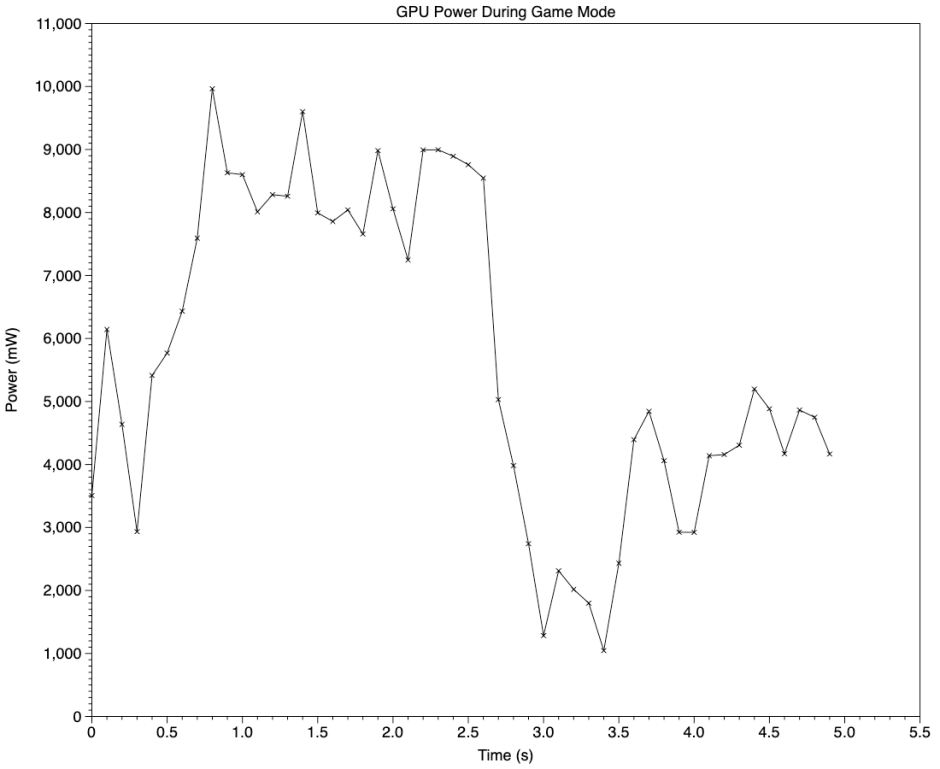
This chart shows power reported by powermetrics during the graphics load, which peaked at 8-10 W initially, before settling to 4-5 W. The M1 Max had peaked at 16-18 W with a steady level of about 11 W, while driving a larger Studio display. Maximum frequency for the GPU in the M3 Pro was reported as 1380 MHz, and active residency was typically held between 60-70%.
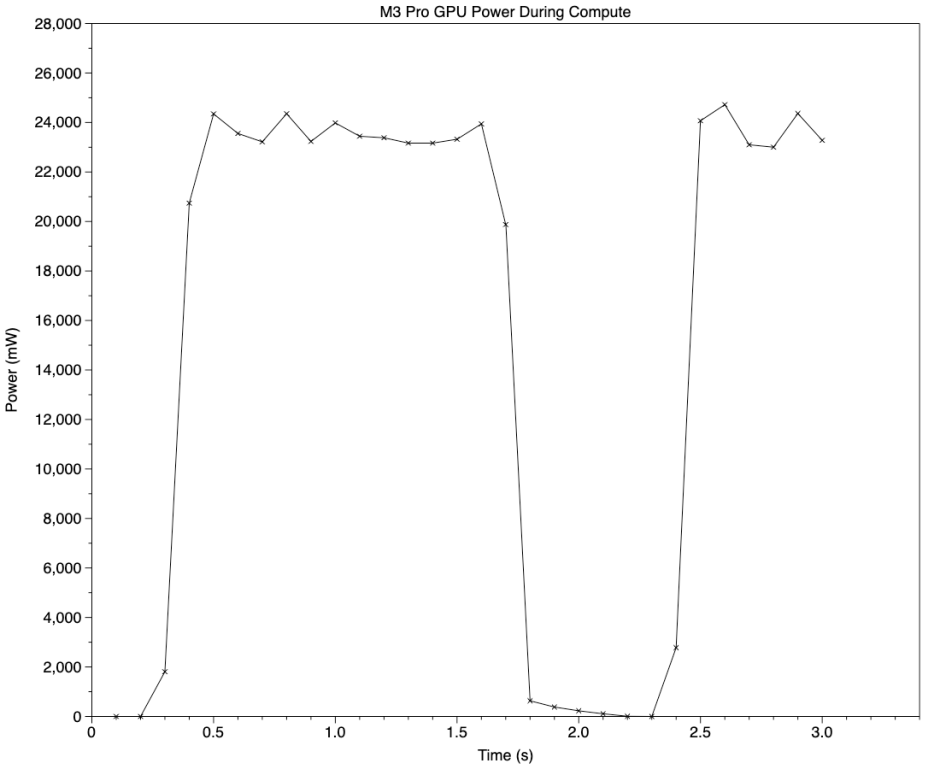
In contrast, the Compute load resulted in sustained maximum frequency with 100% active residency, and power use of 23-24 W. This load consists of a series of tests, each lasting about 1.2 seconds, hence the sharp fall in power use after about 1.6 seconds on the chart. In the M1 Max GPU, maximum GPU power remained below 18 W at all times.
powermetrics also reports GPU software states in terms of P values. For the GPU in the M3 Pro chip, those range from 1 to 13, although even in the Compute test no state was reported as exceeding P8.
Although this isn’t a quantitative comparison between the GPUs in an M1 Max and those in an M3 Pro, with only 75% of the GPU cores as the M1 Max, the M3 Pro appears to be at least as fast, although its higher maximum power use in the Compute test needs to be borne in mind when running on battery.
Conclusions
- Virtualisation of macOS on the M3 Pro delivers better CPU core performance than running native on an M1 Pro or Max.
- On an M3 Pro, it’s perfectly reasonable to allocate a total of 8 CPU cores to macOS VMs.
- There’s no evidence that Game Mode gains exclusive use of any E cores on an M3 Pro.
- The 18 GPU cores in an M3 Pro match or exceed the performance of the 24 in an M1 Max.
- When processing Compute tasks, the GPU in an M3 Pro can use a sustained 23-24 W, exceeding that of the M1 Max, and that needs to be considered in the power budget when running on battery. Intensive graphics tasks are more likely to use 4-10 W, though.

