
Many actions are triggered by a click of the mouse or a tap on the trackpad. Following my recent discussions of focus and selection, and the new feature in LogUI 1.3, I thought it might be interesting to trace through what happens in the chain between the tap or click, and the resulting action.
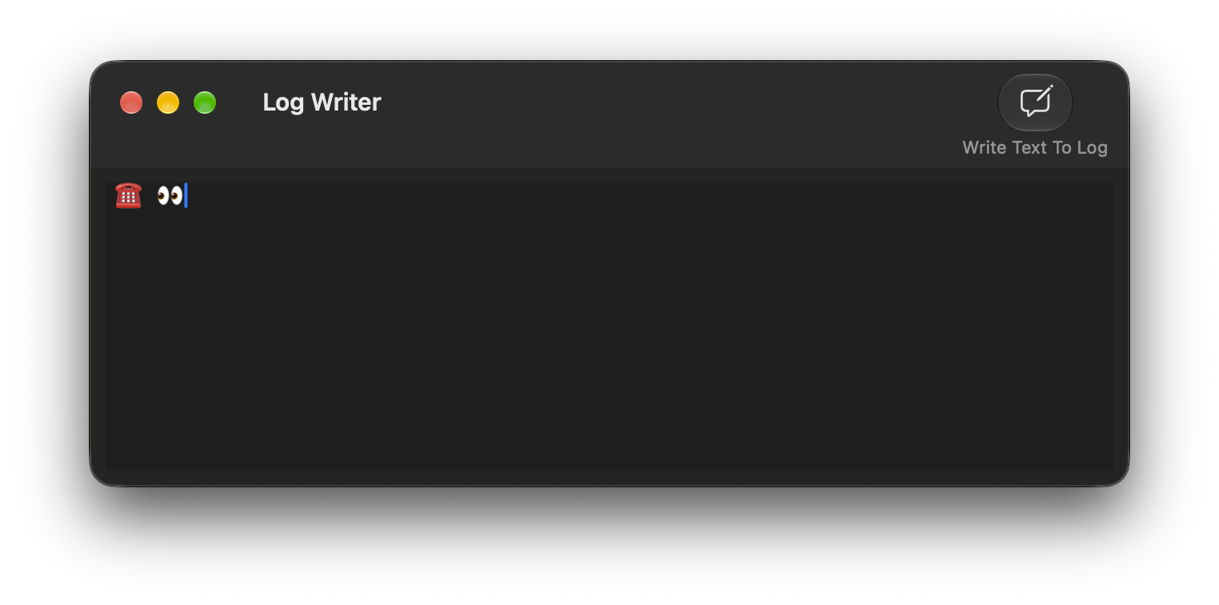
In this case, the action is going to be writing a log entry using LogUI’s new Log Writer feature. To do that, enter the text you want to write in the log in its editor view, then click the Write Text To Log tool.
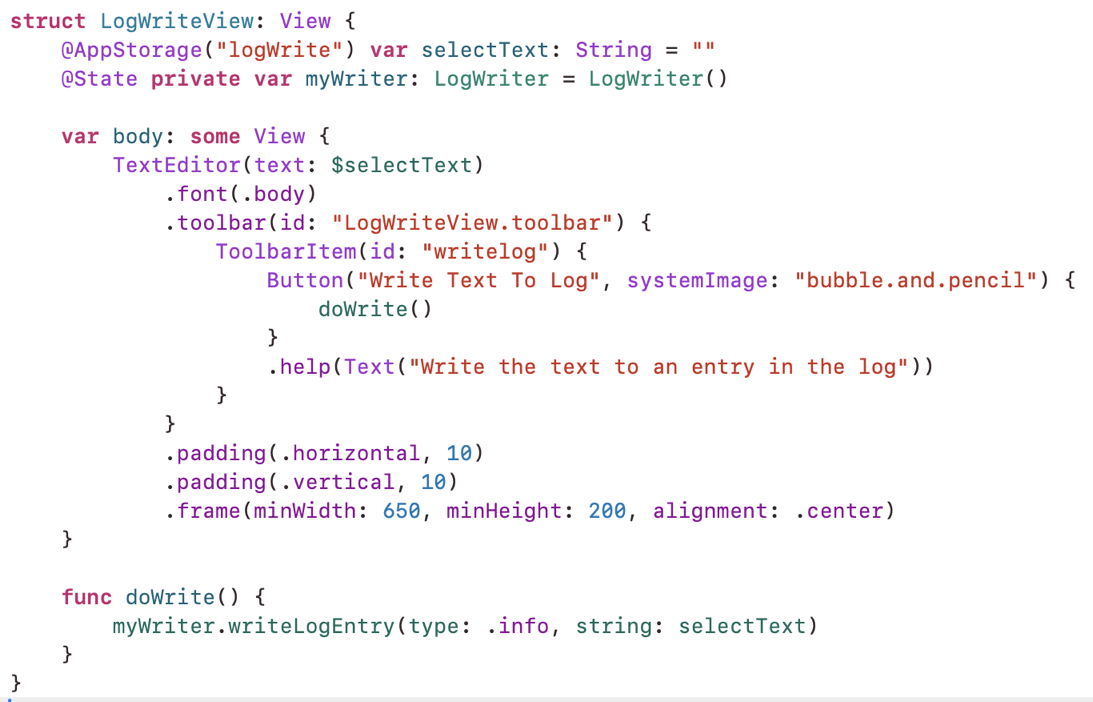
As this is coded in Swift and SwiftUI, it’s easy to understand what happens next. The toolbar of that view has a single button. When that’s clicked, it calls the doWrite() function, shown below the view definition, which calls another function writeLogEntry(), passing the selected text from that window.
One of the difficulties in reading the log is seeing the wood from the trees. To make this clearer, I omit entries from Bluetooth handling communications between my trackpad and Mac, and those involved in ordering windows, concentrating instead on actions and responses.
The first sign of my action in the log gives the name of my trackpad, and dispatches that event:
0.667041  E Howard N’s Magic Trackpad com.apple.Multitouch [TP] Dispatching digitizer event with 2 children, _eventMask=0x63 _childEventMask=0x62 Cancel=0 Touching=1 inRange=1

0.696960 com.apple.Multitouch [HID] [MT] -[TrackpadActuatorStage _handleActuationEvent:] Actuation(id=2) was requested

0.726982 com.apple.Multitouch [HID] [MT] -[TrackpadHIDEventProcessor logButtonState:fromSource:] [0x4000000635F1C77] Button event(mask=1) was dispatched from HostAlgs-Button
The first phase of the action is to focus that window and the button within it by activating them. This is handled by two subsystems, PKGCore and AppKit.
0.727801 com.apple.PKGCore [243] input event: beginImmediateActivation((1306.12890625, 378.5234375), startEventTime: 7803618769083, source: mouse)

0.727875 com.apple.PKGCore [243] output event: activateSpace((1306.12890625, 378.5234375))

0.727889 com.apple.PKGCore [243] output event: orderWindowFront(7803618769083)
This brings the Log Writer window to the front:
0.729706 com.apple.AppKit order window: 248 op: 0 relative: 0 related: 0

0.729882 com.apple.PKGCore [243] input event: deferredActivation(count: 0, activate: false, order: true, time: 7803618768833)

0.729891 com.apple.PKGCore [243] output event: orderWindowFront(7803618768833)
AppKit now starts assembling the gesture I’m making on the trackpad. At this stage, all it has to go on is the start of the tap/click, which is then passed as an action to the app:
0.730913 com.apple.AppKit Marking view [private] as exclusive.

0.731292 com.apple.AppKit Setting [private] state to Began

0.731713 com.apple.AppKit gestureNode:didUpdatePhase(.Possible), [private]

0.731717 com.apple.AppKit gestureNode:didUpdatePhase(.Began), [private]

0.731738 com.apple.AppKit [private]: performing action for state Began

0.731750 sendAction:

0.731771 com.apple.AppKit gestureNode:didUpdatePhase(.Possible), [private]

0.731772 com.apple.AppKit gestureNode:didUpdatePhase(.Began), [private]

0.731800 com.apple.AppKit [private]: performing action for state Began

0.731807 sendAction:

0.731810 sendAction:

0.731813 sendAction:
Now comes the second phase of the gesture, release of the tap/click. In other gestures, the initial tap/click might not be followed by release, making it a tap-hold gesture that might be followed by a drag. Instead, my finger released its pressure on the trackpad, ending the tap.
0.876930 com.apple.Multitouch [HID] [MT] -[TrackpadActuatorStage _handleActuationEvent:] Actuation(id=1) was requested

0.892220 com.apple.Multitouch [HID] [MT] -[TrackpadHIDEventProcessor logButtonState:fromSource:] [0x4000000635F1C77] Button event(mask=0) was dispatched from HostAlgs-Button

0.892289 E Howard N’s Magic Trackpad com.apple.Multitouch [TP] Dispatching pointer event with ButtonMask=0
The interval between those two phases is 0.225 seconds, the duration of the tap/click.
That ends my tap, allowing PKGCore and AppKit to determine it was a simple tap after all, so they can inform LogUI of the user action it should handle:
0.893157 com.apple.PKGCore [243] input event: endUserInteraction(immediate: false, source: mouse)

0.895450 com.apple.AppKit Setting [private] state to Ended

0.895635 com.apple.AppKit gestureNode:didUpdatePhase(.Ended), [private]

0.895661 com.apple.AppKit [private]: performing action for state Ended

0.895673 sendAction:

0.895717 com.apple.AppKit gestureNode:didUpdatePhase(.Ended), [private]

0.895754 com.apple.AppKit [private]: performing action for state Ended

0.895774 sendAction:

0.895781 sendAction:

0.895787 sendAction:
LogUI’s code calls the writeLogEntry() code, passing the text to be written to the log, using the following call:
static let gen_log = OSLog(subsystem: "co.eclecticlight.LogUI", category: "LogNote")

func writeLogEntry(type: OSLogType, string: String) {

os_log("%{public}@", log: LogWriter.gen_log, type: type, string)

}
That’s successful, and almost immediately my message appears in the log:
0.895887 co.eclecticlight.LogUI ☎️ 👀
With that, AppKit releases the view and stops collecting further information in case this is a gesture:
0.895900 com.apple.AppKit Marking view as no longer exclusive.

0.895944 com.apple.AppKit gestureNode:didUpdatePhase(.Idle), [private]

0.895945 com.apple.AppKit _resetGestureRecognizer [private]

0.896014 com.apple.AppKit gestureNode:didUpdatePhase(.Idle), [private]

0.896015 com.apple.AppKit _resetGestureRecognizer [private]
If that appears pedestrian, the latency from the first report of the tap/click to that of the second was 0.225 s, while that from the first report to the log entry was only slightly longer than that between the two reports, which was 0.229 s. By comparison, latency for a command line equivalent, blowhole, was much briefer at 0.016 seconds.
Other terms you may come across in this context are First Responder and the Responder Chain. In this case, the First Responder is the button that I clicked in the window’s toolbar, which is invited to handle that action first. If it doesn’t, then the next in the Responder Chain is invited, which would here be the toolbar. That would happen if I had clicked with the Control key held, when it would open the contextual menu to set options for the tools displayed there, for example.
Finally, if you’re following this in macOS Golden Gate 27.2, you may have noticed that, while it does fix most of the problems with focus and selection introduced in 27.0, the Finder misbehaves in other ways. Prior to 27.2, you could select a file or folder name to edit it using a repeated click, slow enough not to be interpreted as a double-click. That no longer works, and Tips states the only ways to do that are to select the item then either to press Return, or to Force Click its name. Of course, if you have Force Click disabled, there’s no choice.

