
I’m sure you’ll have noticed that when you run Disk Utility’s First Aid, it reports versions of tools used to format and modify the volumes it’s checking. As Apple doesn’t provide any information about those, this article explains how to interpret and use them.
Origin
Each APFS volume stores details of its history in the volume superblock apfs_superblock_t. Those include information on how that volume was created in apfs_formatted_by, and up to the last 8 times the volume has been modified by mounting read-write, in apfs_modified_by.
You’d need forensic disk analysis tools to get the full details, but some of that data is easy to access:
- The time and date that volume was last formatted is shown when you select it in the Finder and open its Get Info dialog.
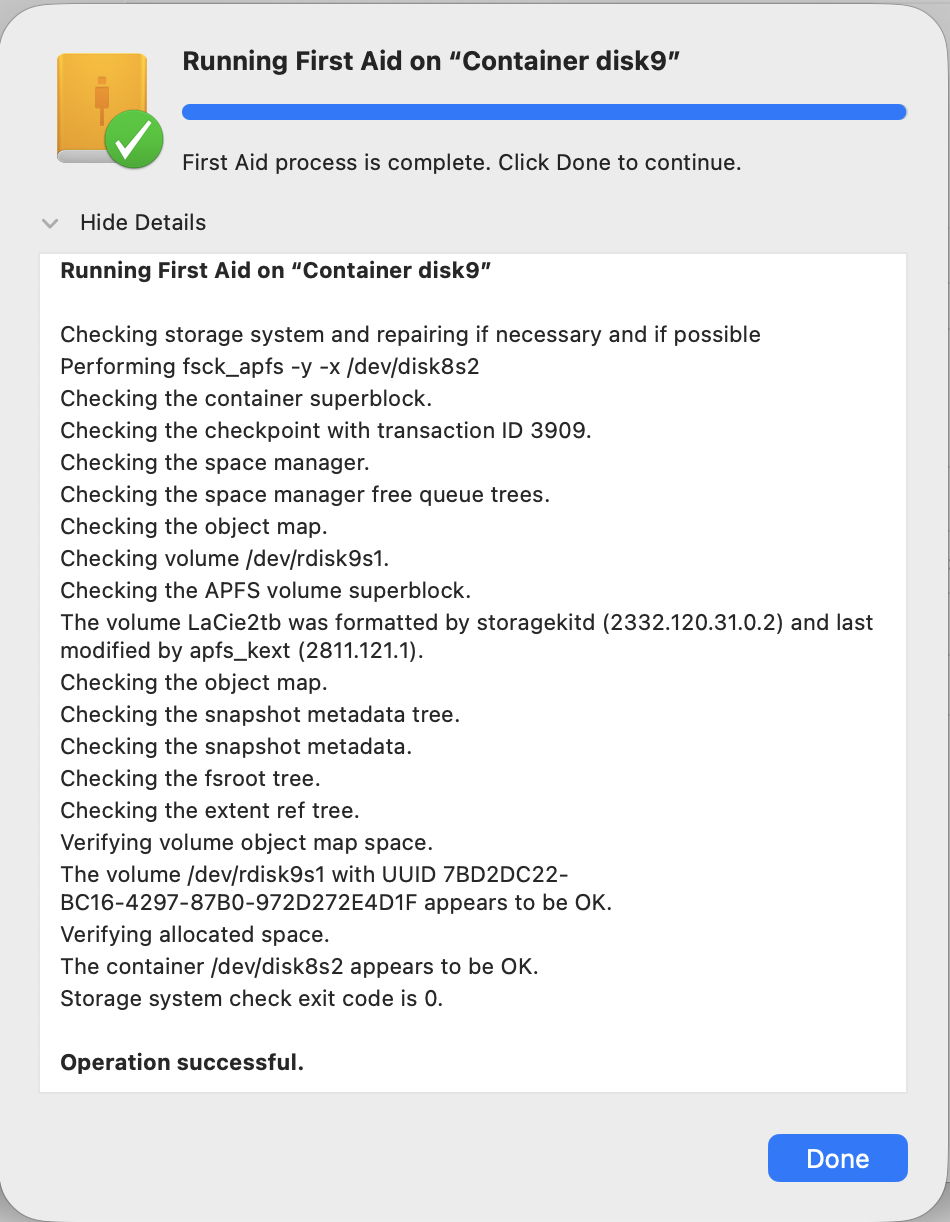
- The name of the service that last formatted that volume and its version number are given by First Aid or a command tool equivalent.
- The name of the service that last mounted the volume read-write and its version number are also given by First Aid or a command tool equivalent.
You can see identical information following the command
diskutil verifyVolume disk10
where disk10 is the device name for the container, obtained from Disk Utility. If you prefer you can use fsck_apfs directly, but verifyVolume should use that command’s options most efficiently.
One lingering problem you may encounter in Disk Utility is that it may still fail because it can’t unmount volumes for checking. If you encounter that error when trying to run First Aid on a container, try manually unmounting each volume within that container. If all else fails, diskutil verifyVolume appears to be better at handling the problem.
Analysis
Each of those methods should return standard text for each volume, similar to
The volume LaCie2tb was formatted by storagekitd (2332.120.31.0.2) and last modified by apfs_kext (2811.121.1).
Here APFS has reported the last time that volume was formatted as performed by its own formatting service storagekitd version 2332.120.31.0.2. Looking that up in the table below shows that came in late versions of macOS 15, specifically in 15.5 released on 12 May 2025 with APFS version 2332.120.31. As the Finder reports it was created on 16 July 2025, that matches expectations. In older versions of macOS the service reported here might be diskmanagementd instead.
The last modification made to that volume was by version 2811.121.1 of the APFS kernel extension apfs_kext. That came in macOS 26.5.2 released on 29 June 2026, and was running at the time of the check.
APFS versions
These change most with each major version of macOS, and usually change to a lesser extent with minor updates. Once a version of macOS is no longer current, and only receives security updates, the version number is unlikely to change any more.
Up to and including macOS Tahoe, a change in APFS version number requires a full macOS update or upgrade to create a new Signed System Volume, and can’t be accomplished by an RSR or BSI updating only cryptexes. A firmware update isn’t required for APFS to be updated, though.
For public releases of major versions:
- macOS 10.12 has APFS version 0.3 or 249.x.x, which shouldn’t be used at all.
- 10.13 has 748.x.x, which doesn’t support Fusion Drives, but has basic support for volume roles.
- 10.14 has 945.x.x, the first version to support Fusion Drives.
- 10.15 has 1412.x.x, the first version to support the multi-volume boot group, and introduces extended support for volume roles, including Data, Backup and Prelogin.
- 11 has 1677.x.x, the first version to support the SSV and Apple silicon. On M1 Macs, it doesn’t support the paired Recovery volume.
- 12 has 1933.x.x until 12.2, thereafter 1934.x.x, which support the paired Recovery volume on Apple silicon.
- 13 has 2142.x.x, and is probably the first to support trimming of UDRW disk images and their storage as sparse files.
- 14 has 2235.x.x, until 14.3, thereafter 2236.x.x to 2236.141.1 in 14.6 onwards.
- 15 has 2313.x.x until 15.2, thereafter 2317.x.x until 15.4, thereafter 2332.x.x to 2332.140.13 in 15.6 onwards.
- 26 has 2632.x.x until 26.4, thereafter 2811.x.x, as detailed below.
For public releases of macOS 26 Tahoe:
- 26.0 and 26.0.1 have 2632.0.84
- 26.1 has 2632.40.15
- 26.2 has 2632.40.17
- 26.3 and 26.3.1 have 2632.80.1
- 26.4 and 26.4.1 have 2811.101.1
- 26.5 and 26.5.1 have 2811.120.14
- 26.5.2 has 2811.121.1.
In addition to the new features noted above, some versions are known to have fixed bugs:
- 748.21.6 in macOS 10.13.1 fixed problems in snapshots
- 945.275.8 and 945.275.9 in macOS 10.14 security updates 2 and 2020-005 fixed unspecified bugs, probably vulnerabilities
- 1412.120.2 in macOS 10.15.5 fixed a serious bug preventing the transfer of very large amounts of data to RAID volumes.
Compatibility
Although APFS should be backward compatible, making it relatively safe to make changes to an older version of APFS from a newer system, forward compatibility could be more limited. Using older versions of Disk Utility or tools like fsck on newer versions of APFS risks errors, failure and at worst damage.

