
Since the release of Apple’s new M3 Macs, everyone has been debating their performance, with those fortunate enough to get their hands on one posting its benchmarks, for what they might be worth. As many of those sold will be MacBook Pro models, this article looks instead at their energy use, that determines their battery endurance. After all, there’s little point in having the fastest if it only lasts a couple of hours before it needs to be recharged. Although energy issues may not appear as relevant to desktop systems, higher energy use generates more heat, requiring more active cooling, noisy fans, and more.
Like M3 and M2 chips, the M1 Max tested here contains a combination of Efficiency (E) and Performance (P) cores, in this case two E cores in one cluster, and two clusters each containing four P cores. One of the primary ways that software helps macOS determine which type of core any given thread should be run on is by setting its Quality of Service (QoS). Threads with the lowest QoS of 9 are almost invariably run on E cores, while those with the highest QoS are normally run on P cores when they’re available; if not, then macOS may schedule them to be run on E cores instead.
Test results reported here are from running 1-10 CPU-intensive threads from the same app on an otherwise lightly loaded M1 Max in a Mac Studio, either at minimum or maximum QoS. Each thread was identical, and consisted of a fixed number of floating point arithmetic loops using registers without any memory access. Time taken to run each thread was recorded, and the command tool powermetrics collected information about CPU cores and power over 100 ms periods throughout each test run. The term active residency is the percentage of core time spent executing threads, as opposed to idling, so 100% active residency means a core that’s fully occupied running code.
Results
When a single thread was run at minimum QoS, it ran exclusively on the two E cores, with the active residency of each being more than 50%, and at an average frequency of 1200 MHz. Both clusters of P cores remained idle, with an active residency of 0% and a frequency of 600 MHz. Typical whole-CPU idle energy use was about 25 mW, and rose to around 79 mW when running the test thread, which took 3.8 seconds to complete. Thus, the test thread used about 54 mW over a period of 3.8 seconds, giving a total energy use of about 205 mJ.
Running two threads at minimum QoS, macOS increased the E core frequency to 2064 MHz, and each core had an active residency of 100%. The test completed in 2.2 seconds using a total of 220 mW power. The total energy used by each thread thus rose slightly to about 215 mJ. I have described this phenomenon before, which appears to compensate for the fact that only two E cores are available in this particular chip configuration.
When run at maximum QoS, a single thread was run exclusively on the second core of the first P cluster, at 100% active residency. As frequency is set by macOS for all cores within a cluster, that cluster had an average frequency of 3228 MHz, while the second P cluster was left idling at 600 MHz. Total CPU power was around 1011 mW for the thread to complete in 1.3 seconds, with a total energy use of about 1280 mJ. Thus, to complete running the thread in a third of the time taken on one E core required about 1280 mJ, six times the energy.
Eight threads at high QoS fully occupied the P cores in both clusters, which ran at 100% active residency and a frequency of 3036 MHz. Each thread completed in the same 1.3 seconds a single thread took on a single P core, with a total CPU power draw of around 7.4 W. Total energy used per thread was similar, though, at about 1200 mJ.
The final test loaded ten threads, one for every E and P core, and raised active residency of every core to 100%. The two E cores were run at a frequency of 2064 MHz, and the P cores at 3036 MHz. Time to complete rose slightly to 1.4 seconds, and total CPU power reached a peak of 7744 mW, although the total energy used per thread fell to about 1050 mJ because a fifth of the cores were E cores.
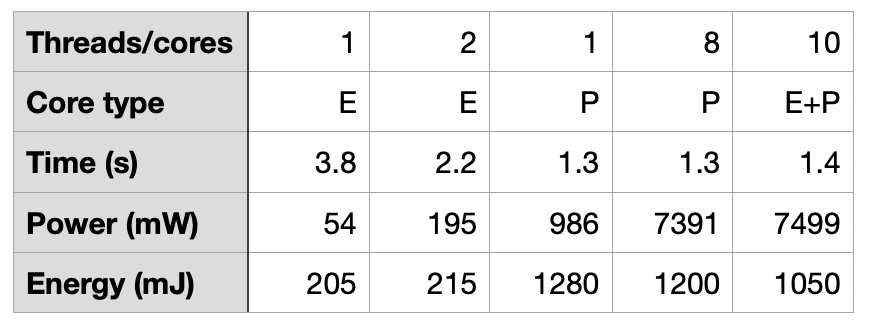
Those results are summarised in this table.
GPU
Making a direct comparison with the power drawn by the GPU is difficult, although it should be possible to code some Compute tasks normally run on the GPU so they can be run on CPU cores instead.
Running intensive graphics using Metal on the 24 GPU cores in the same Mac Studio resulted in 85-90% active residency of the GPU, at a peak frequency of 972 MHz and drawing about 7 W. A Compute task proved even more demanding, with 100% active residency at the maximum GPU frequency of 1296 MHz, and power use of 26-29.2 W.
Conclusions
As you’d expect, running threads on E cores requires considerably less power than on P cores, but isn’t as quick. In the test task here, P cores required a third of the time as E cores for the same task, but used six times the energy per thread.
Eight fully active P cores require similar power to intensive graphics running on the GPU, but a Compute task required four times as much.
Making more and better use of E cores will significantly extend battery endurance in notebooks, while unnecessary use of P cores will shorten it. But running Compute tasks on the GPU is the most demanding of all. Performance comes at a price, and is an important consideration when running a notebook from battery power.
 The Eclectic Light Company