
For those who haven’t yet started monitoring free space on their Mac’s backup storage and its boot container, I have a good reason for you to start doing so, with DeltaFree version 1.3, which greatly improves its interface. And those already doing that should find this a significant improvement.
DeltaFree collects and displays accurate measures of used and free space for each APFS container on mounted disks, including all three on an Apple silicon Mac’s internal SSD, and backup storage. By following changes in those, you can estimate how long it will be until your backup storage becomes full and needs to be replaced, and keep a watch on free space available for your Data volume.
Modern macOS and SwiftUI are quite eccentric. When you’re hunting in a window for a text box, there’s so little contrast with the background they’re tricky to see. But select an item in a list view and you get this wall of intense colour. This has overwhelmed the colour I use in the list of containers at the top of DeltaFree’s window, and it doesn’t matter which colours I choose for the text, at least some of it simply vanishes into that highlight colour.
The alternative is to go monochrome, and add emoji to distinguish elements within each row. This new version does just that, at the click of a tool, so you can choose which you prefer at any time. I’ve also juggled with the colours a little in the hope they might be more visible. Please thank Jim for nudging me to address this.
While I was in the code, I wanted to do something to help those of us who have now accumulated over three months of used and free space measurements, to provide a better overview. DeltaFree’s current scroller allows you to view as much as 28 days of data at a time in its plots, but that makes for a lot of scrolling without a full overview.
After several failed attempts to come up with a neat scroller hack (SwiftUI doesn’t seem to like them), I had a better idea, which you can try out in this new version. At the bottom right corner of the window is a button to switch its plots to condensed mode, shown below for my current dataset.
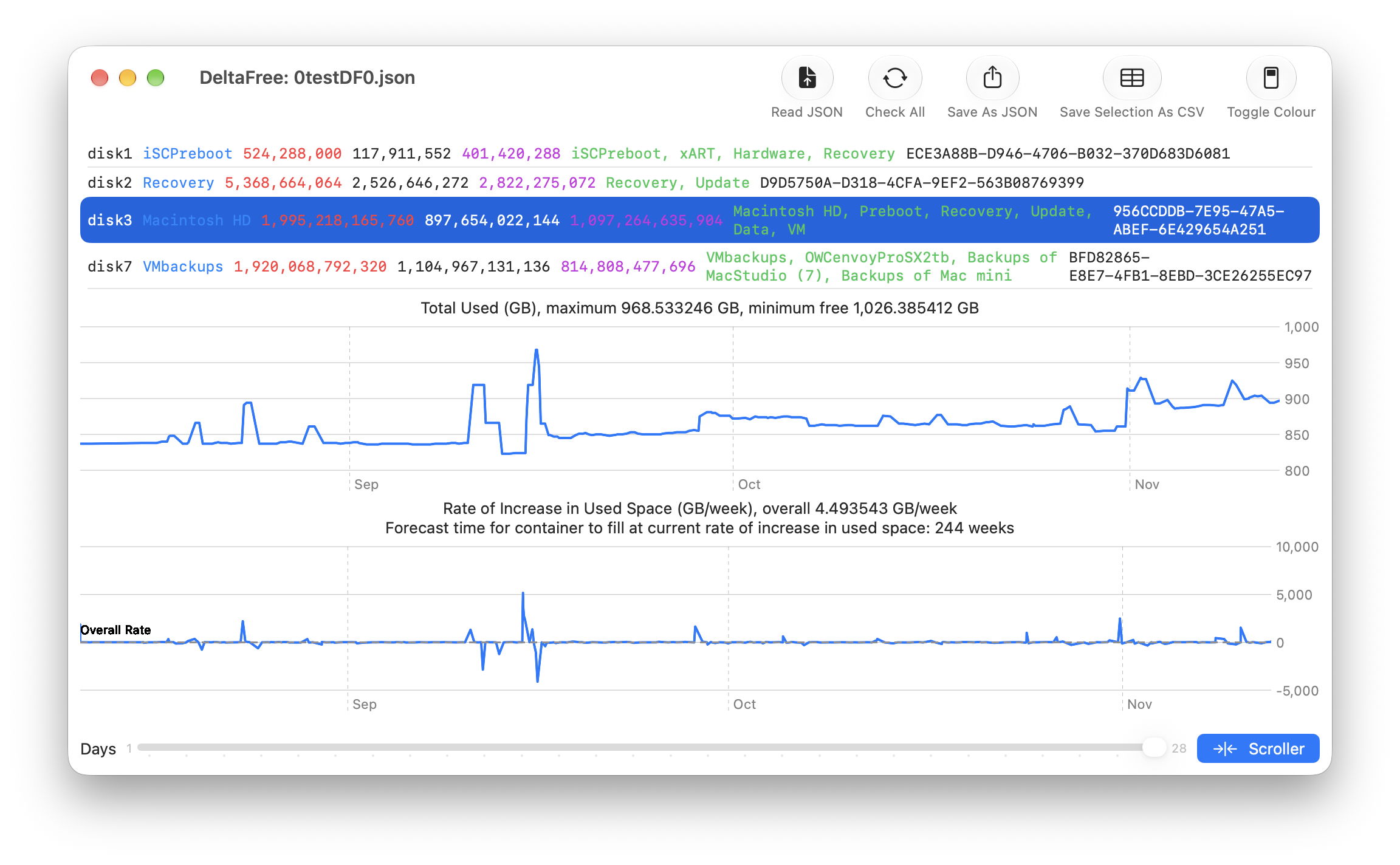
This squeezes the whole timeline into a single non-scrolling view, showing you every value from the first to the most recent. Displaying those with datapoints looked horribly fuzzy, so these are the lines on their own, shown month by month. To switch back to the normal scrolling plot mode, just click on that Scroller button again.
These changes are documented in full in DeltaFree’s Help book.
DeltaFree 1.3 for all Macs running macOS 14.6 and later is now available from here: deltafree13
from Downloads above, and will be appearing shortly on its new Product Page here.
Tomorrow I’ll be analysing my three months of measurements, with some important lessons on how free space can disappear when you least expect it.

