
As a result of its enhanced support for Sidecar, where an attached iPad can be used as an additional display and input device for a Mac, and the imminent arrival of the first touchscreen MacBook Pro model, macOS Golden Gate provides exceptionally detailed and informative log records for touch input, including use of a trackpad. This article looks at those in more detail, and follows my initial description, and further information here.
Log changes
To illustrate these changes, I performed identical Finder selections in two VMs, running Tahoe 26.7.2 and Golden Gate 27.2. The disadvantage of doing this in a VM is that the initial input event chain is simplified, as the work of the com.apple.Multitouch subsystem is performed in the host, then passed through Virtio to the guest. However, the rest of the input event chain continues much as it would on the host.
The log record in 27.7.2 was extremely brief, consisting of 11 entries from AppKit running an animation, then the prominent entry sending the action to the Finder:
Finder sendAction:
Immediately after that, QuickLook started work on the newly selected file’s preview.
In 27.2, the record contained 63 entries, starting with com.apple.PKGCore, a subsystem I have been unable to discover in logs prior to macOS 27. Salient entries, with times elapsed from the first, include
0.000000 com.apple.PKGCore [1b] input event: beginDeferredActivation((966.6484375, 539.96484375), hitPSN: Optional(PKGCore.ProcessSerialNumber(hi: 0, lo: 81940)), startEventTime: 84880503875, source: mouse)

0.005621 com.apple.AppKit [0x76b2e40480 _mouseUp] correct number of clicks - SUCCESS

0.005666 com.apple.AppKit [0x76b0226200 _mouseUp] correct number of clicks - SUCCESS

0.005816 Finder sendAction:

0.023031 com.apple.windowmanagement Window Server visible window list changed: [private]
The rest of this article explains what you can learn from all those additional log entries, and how they can be more generally useful.
Cast
- com.apple.Multitouch, the subsystem responsible for handling user interaction with a trackpad;
- SkyLight, the framework for window management, compositing the display image using WindowServer, and routing events within those contents. The latter is performed by SkyLight, as it knows which window is visible at every location within its composited image;
- com.apple.PKGCore, apparently a new subsystem acting as a middleman between user input and subsystems responsible for actioning changes;
- com.apple.AppKit, the subsystem responsible for GUI components and controls in apps in their views, windows and menus, even for those using SwiftUI.
Sequence
Finger pressure and movement on the trackpad are detected by com.apple.Multitouch, and those are dispatched as pointer and digitiser events. In this case, they go to com.apple.PKGCore. That reports events to BaseBoard’s gesture event collector, and sends output events for reordering windows to Skylight, where they’re passed to WindowManager to bring the window to the front and in focus. When com.apple.PKGCore has assembled a complete set of events to compose a deferred activation, that is passed to AppKit.
Having already brought the window to the front, AppKit marks its view as being exclusive, and starts assembling a gesture from the mouseDown and mouseUp events, counting those as clicks. Those take it through a series of states: Possible, Began, Failed, Cancelled and Ended. With the gesture complete, it sends that appropriate action, in this case a single click/tap, to the Finder for it to select the item under the pointer.
Those are detailed in the diagram below.
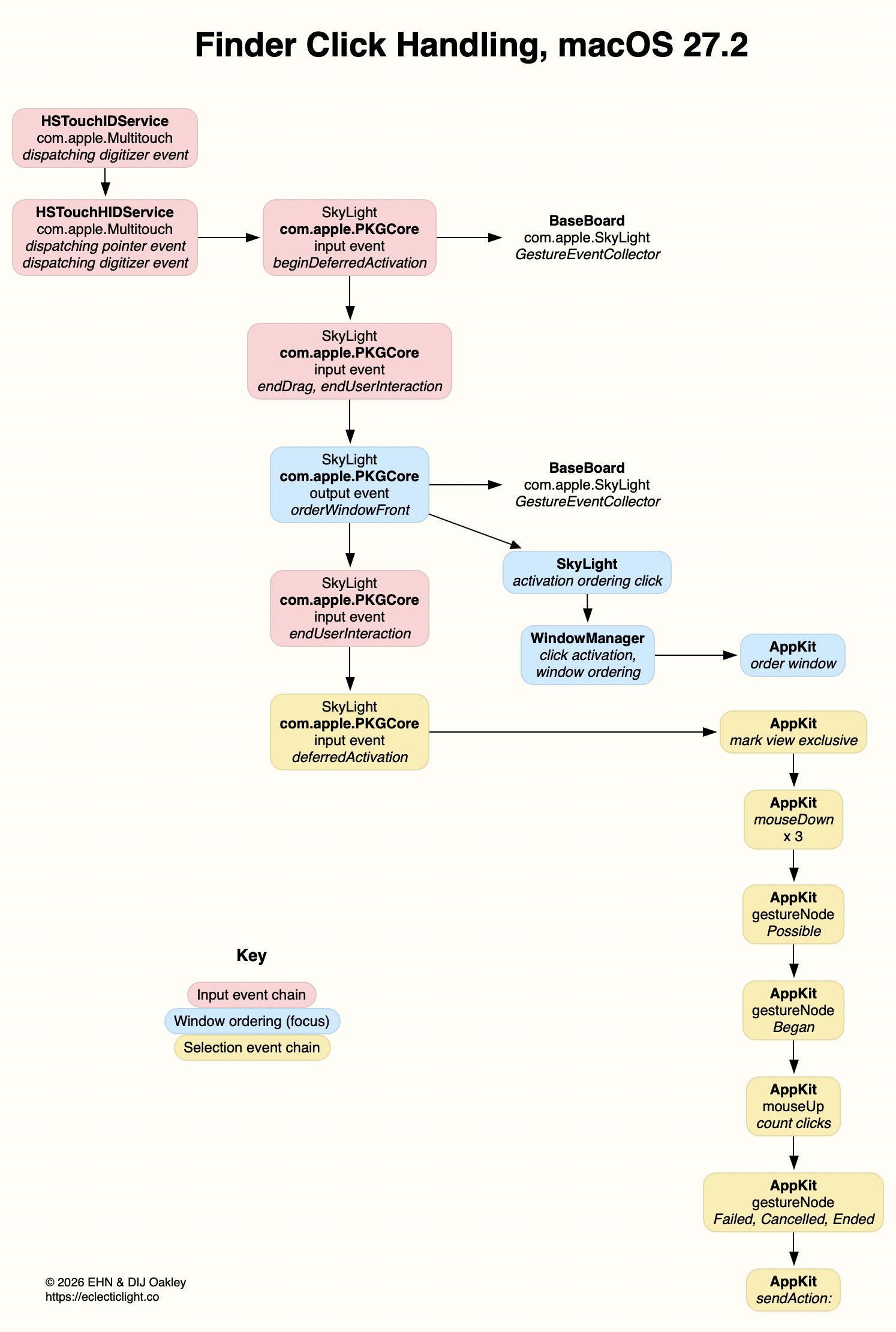
Key subsystems here are com.apple.PKGCore, which accepts input events and generates the output events that first bring the window to the front, ‘in focus’, then pass mouseDown and mouseUp events to AppKit to result in the Finder selecting the item under the pointer.
PKGCore
Using the subsystem com.apple.PKGCore as a predicate to search for log entries over more than an hour of logs from macOS Tahoe failed to find any. I therefore believe this subsystem is new in Golden Gate. Despite its name, it obviously has nothing whatsoever to do with PKG packages here, although search with the aid of AI fails to discover any other potential meaning. Although it doesn’t appear extensively in the log in macOS 27, it does appear reliably where there are trackpad interactions.
Most of its entries should be self-explanatory when used with the diagram above. Its first input event is particularly rich in content:
[1b] input event: beginDeferredActivation((966.6484375, 539.96484375), appears to give the display coordinates of the pointer at the time;
hitPSN: Optional(PKGCore.ProcessSerialNumber(hi: 0, lo: 81940)), suggests PKGCore maintains a list of active process ID numbers;
startEventTime: 84880503875, gives the Mach time of the initial event;
source: mouse) reports a trackpad as being a mouse!
AppKit
Although the com.apple.AppKit subsystem has contained some useful information in logs from previous versions of macOS, they are particularly frequent and rich in information in Golden Gate. Entries also have useful categories assigned (shown in LogUI in green). These can provide a detailed account of user interactions with apps that are hard to obtain elsewhere.
For example, here’s a sequence for an app being quit by the user:
1.725696 DelightEd com.apple.AppKit terminate:

1.728244 DelightEd com.apple.AppKit Attempting sudden termination (1st attempt)

1.728250 DelightEd com.apple.AppKit Checking whether app should terminate

1.728284 DelightEd com.apple.AppKit Asking app delegate whether applicationShouldTerminate:

1.728293 DelightEd com.apple.AppKit replyToApplicationShouldTerminate:YES

1.728323 DelightEd com.apple.AppKit App termination approved

1.728323 DelightEd com.apple.AppKit Termination commencing

1.728326 DelightEd com.apple.AppKit Attempting sudden termination (2nd attempt)

1.729639 DelightEd com.apple.AppKit Termination complete. Exiting without sudden termination.
AppKit entries are the most useful for tracing potential bugs in the new code in Golden Gate. It will be very interesting to see how the log reflects touchscreen use.

