
The macOS Unified log is unusual in many respects, including its retention policy. Most other log systems delete log files once they reach a certain age, so at any time you keep access to the last five days or so of system logs. The logd maintenance daemon in macOS instead removes old log files and entries largely to control their total size. This is made more complex by the fact that entries can be saved to tracev3 log files in any of four folders inside /private/var/db/diagnostics, and retention policies are different for each.
The end result is that retention is unpredictable, highly variable, and not easy to measure precisely, as I last explained six months ago. Then last week I heard that the log command tool makes impressive claims, of logs lasting two weeks, and easily measured using its stats -overview command. Could this really be true?
Log files are collected and maintained by logd in the following directories:
- Persist, main entries, written in files of similar size, and maintained so there are slightly more than 50 at any time, with older files being deleted whole by age.
- Special, various entries, many with extended message contents, of variable size. These are weeded according to the Time To Live (TTL) values set for each type of entry. Once empty,
logddeletes the remains. - Signpost, performance measurements, maintained separately and not part of the main Unified log.
- HighVolume, rarely used for very high rates.
As the rolling of Persist files is the main determinant of how long the useful log record goes back, my rule of thumb is that is set by the date and time of creation of the oldest Persist file present. That’s what I give in several of my apps, including LogUI, Mints and XProCheck, as
The oldest Persist log entry has a datestamp of 2026-10-15T00_48_00Z, 1.658 days ago.
At that time, the command
log stats -overview
returned for that same live log
start: Fri Oct  2 17:30:16 2026

end: Fri Oct 16 17:30:16 2026
a difference from my estimate of almost two weeks. If you use that command, be prepared for a long wait before you see any result. In my case, it took just over two minutes.
There’s something slightly uncanny about those start and end dates, as they’re exactly, to the second, two weeks apart.
I then set out to confirm what remained in the log from two weeks ago. Using LogUI, which obtains log records direct using the OSLog API rather than the log command tool, I then sampled all log entries for ten minute periods starting from 17:35:00 on 2 October 2026, every six hours until 17:35:00 on 16 October 2026, recording the number of entries LogUI could retrieve. For some of the more recent collections, I reduced that period to five minutes (after 23:35 on 14 October), and just one minute for the last collection, because of the numbers of entries.
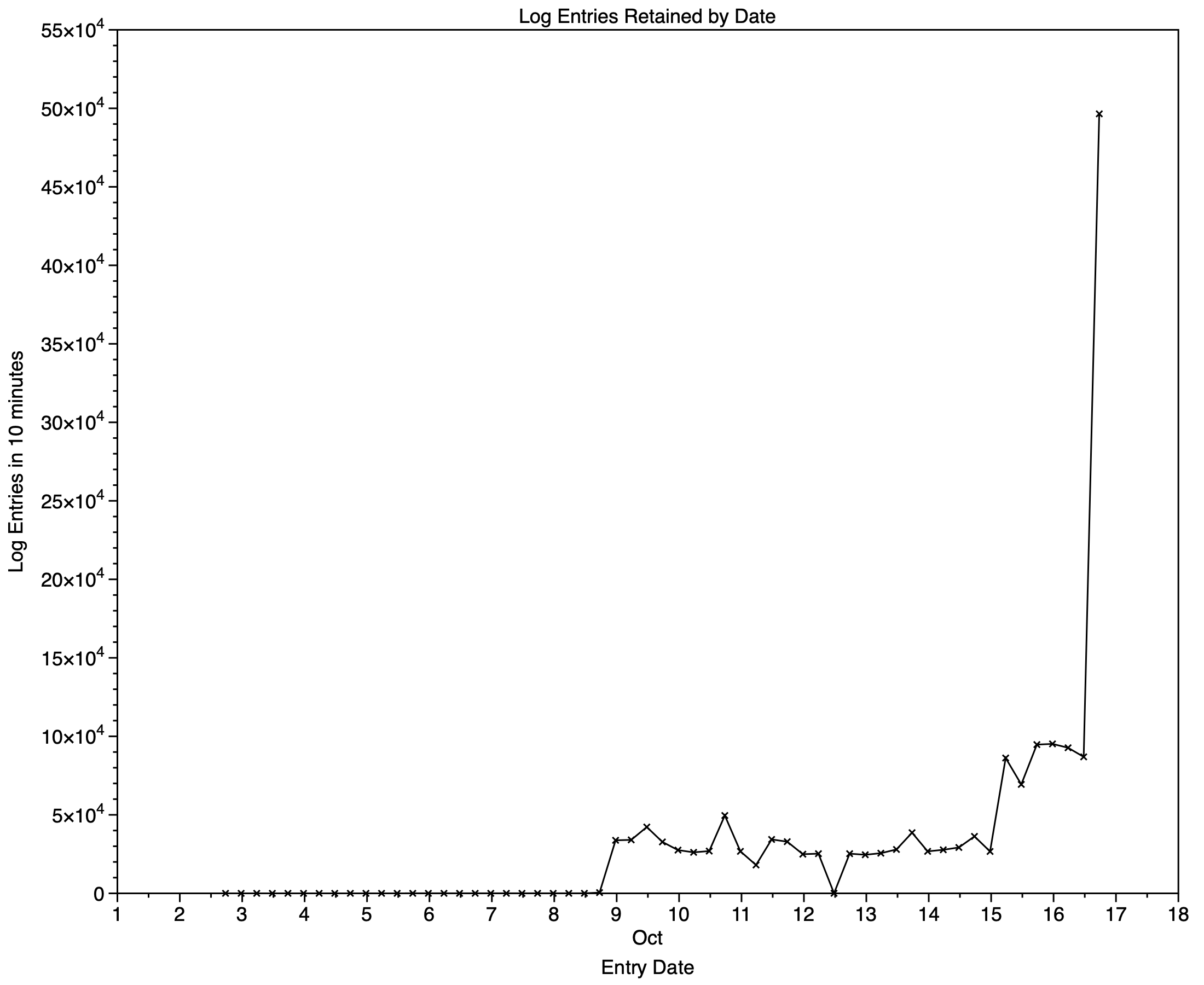
My first chart shows how the recovered log entry rate changed over those two weeks. Prior to 9 October, there were almost no log entries available. From 9 to 15 October, numbers varied around 3,000 entries/minute, then rose to about 8,000 /minute just over 24 hours before I started these measurements, and shot up to 50,000 less then an hour before.
Those may be a bit clearer using a logarithmic Y scale, as shown below. Of course, that doesn’t start until there were entries to be found in the log from 5 October.
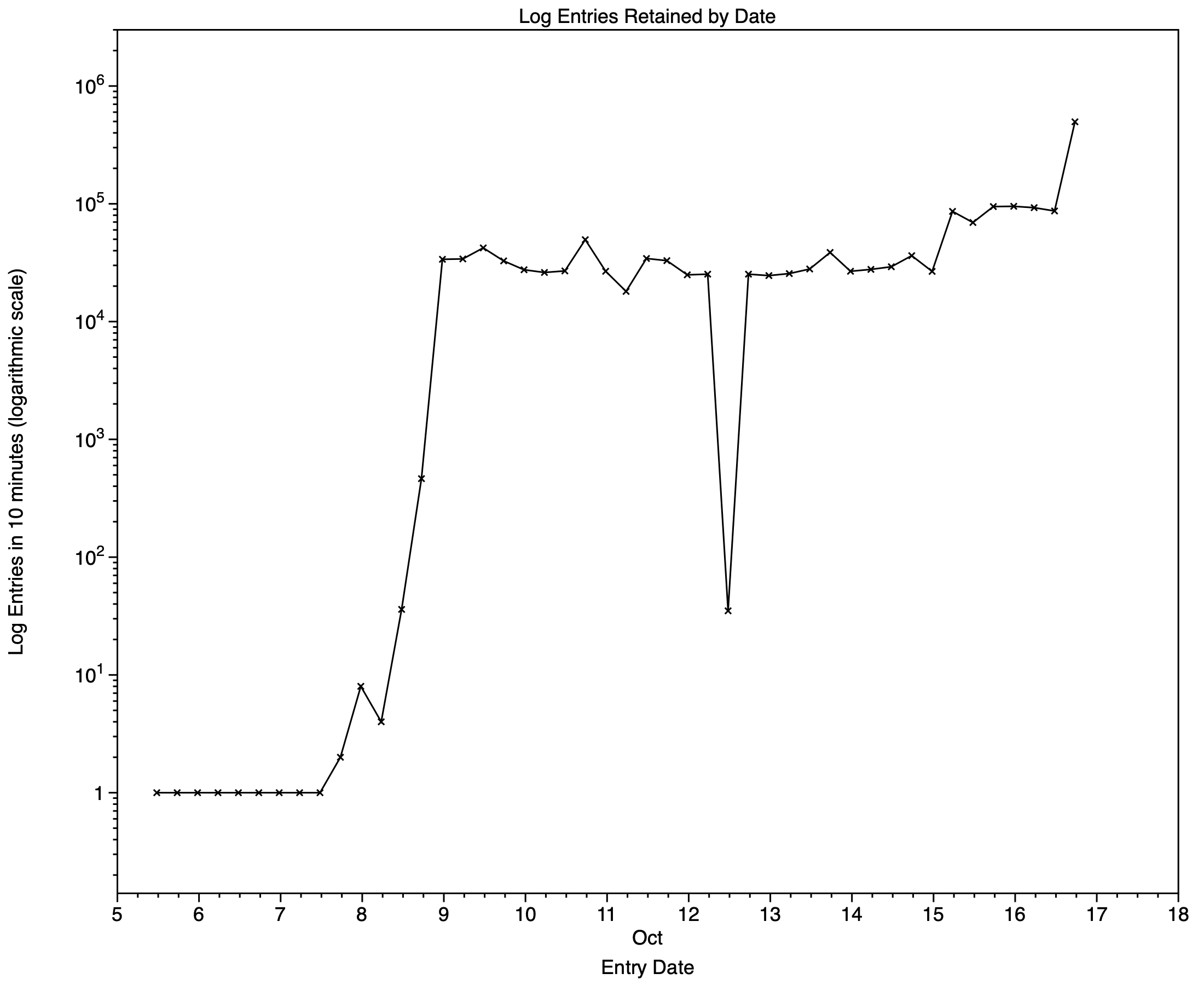
The reality is that, in this case at least, a fairly complete log record only started about 1.66 days ago, as estimated using the dates of creation of Persist files, and prior to that less than half the entries were still available. Go back more than a week, though, and all that remained were a few scraps, hardly worth searching.
This still didn’t explain how the log command arrived at a period of exactly two weeks.
Examining the first two log entries reveals all:
2026-10-02 17:41:29.506385+0100 === log class: TTL less than 14 days begins

2026-10-05 06:46:03.717224+0100 === system boot: A63D7575-34B2-45E9-87E5-97744D69CF22
The first of those is an administrative note recording the time at which entries with a TTL less than 14 days could start appearing in the log, in its Special files. It couldn’t have been written at that time, as even logd couldn’t have guessed that exactly two weeks later someone would be looking for that entry. In other words, it’s a measurement artefact added when running the log stats command. The true first remaining entry in the log when I inspected it didn’t occur until 5 October, nearly three days later.
I suspect if you run the same command on other live logs, you’ll see the same start time of exactly two weeks before the end. It’s pure fiction.
There’s another independent way of demonstrating the impossibility of the log command’s claim, and how much shorter the useful log record is, by estimating the space occupied by the log files if they did usefully stretch back for two weeks. As 1.66 days of Persist entries in my log require a total of 1.64 GB, adding just the space required for the extra Persist files would increase that to a total of 6.6 GB.
If you do want to know how far back the current active log goes, use the simple rule of thumb that it’s the date of creation of the oldest tracev3 file in /private/var/db/diagnostics/Persist. Go back before that and retention is patchy, and less than half of the original entries. The great thing with that method is it doesn’t take over two minutes to compute, and doesn’t involve any creative fiction with entries ‘written’ two weeks ago.

