
We each have our favourite time for upgrading macOS to the latest version. Some of us, myself included, start with the first developer beta in June, but avoid using it in production until its full public release. Many justify further delay on the grounds they prefer to wait until its initial bugs are fixed. One common choice is to wait until the third or fourth scheduled update, x.3 or x.4, in the first quarter of the following year.
A couple of days ago I showed evidence that the annual macOS cycle has been changing to bring more continuous development through the cycle, between x.0 and x.6 when that version finally passes to security-only updates, which could affect your choice.
The case for delay is generally based on great changes being made in the first public release x.0, bringing a raft of bugs. It’s claimed those are fixed over the following three or four scheduled updates, making x.3 or x.4 the first releases that have the most serious bugs fixed. As no one outside Apple has any objective figures for bugs and their fixes, this argument is based on anecdotal experience, assumptions about the frequency of bugs in novel and changed code, and ‘common sense’.
Although there’s no simple measure of novelty or change in macOS, one surrogate that is both measurable and should correlate with those is the change in number of public and Private Frameworks, as demonstrated over the last seven years. To give finer detail to the charts I showed last week, I’ve added intermediate scheduled updates (x.1-x.5) to those figures for macOS Sequoia 15.x and Tahoe 26.x in the charts below. Numbers given here have all been corrected to allow for the duplication artefact noted in raw bundle counts, as explained previously.
Public frameworks
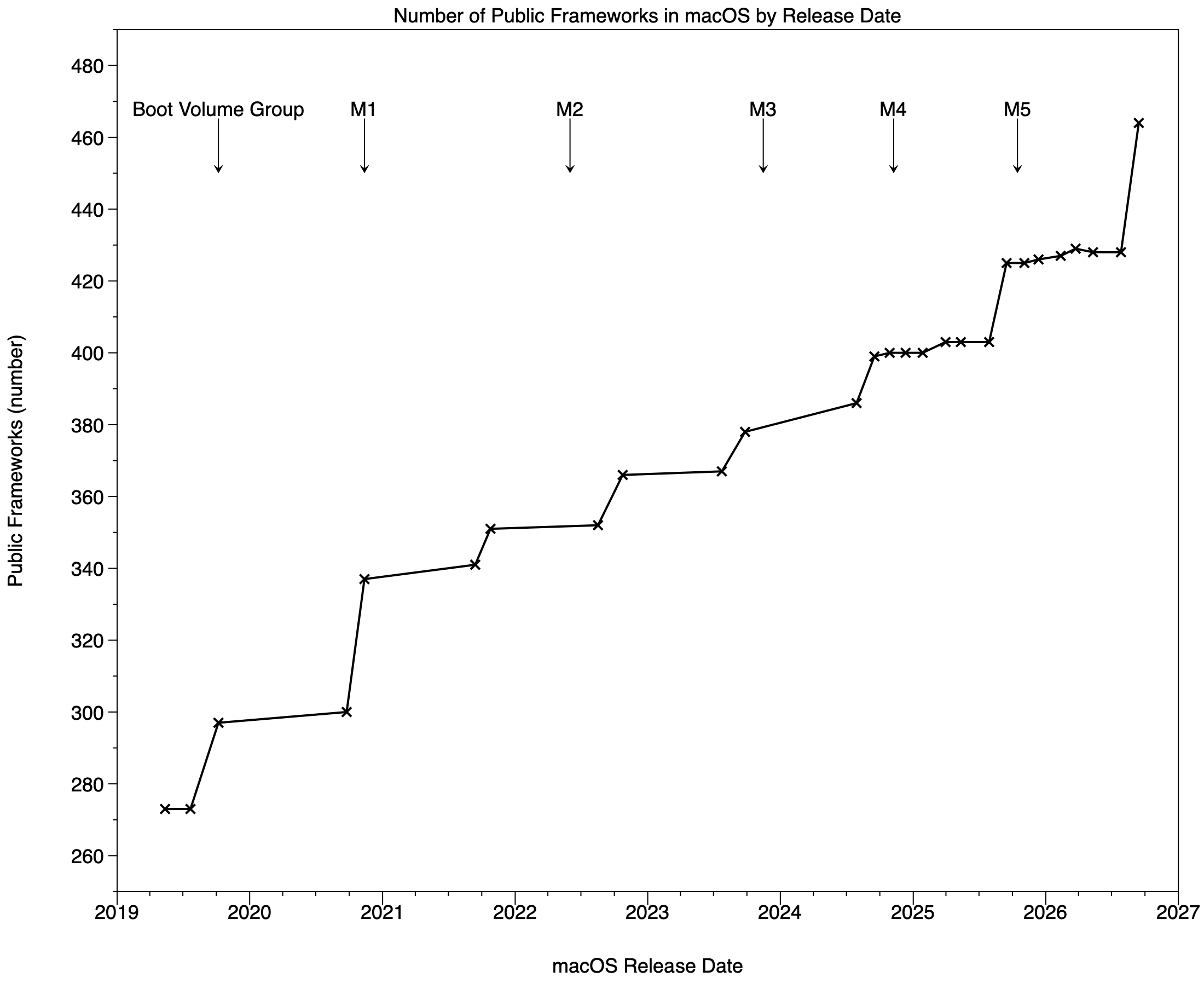
I’ll warm up with this chart of the total number of public Frameworks, with intermediate points shown for 15.x and 26.x at the right. Although there are small increases during each annual cycle, those appear to have changed little over the whole period, and more were added in-cycle in macOS 14.x than either 15.x or 26.x. This supports delaying upgrading to versions after x.2.
Private frameworks
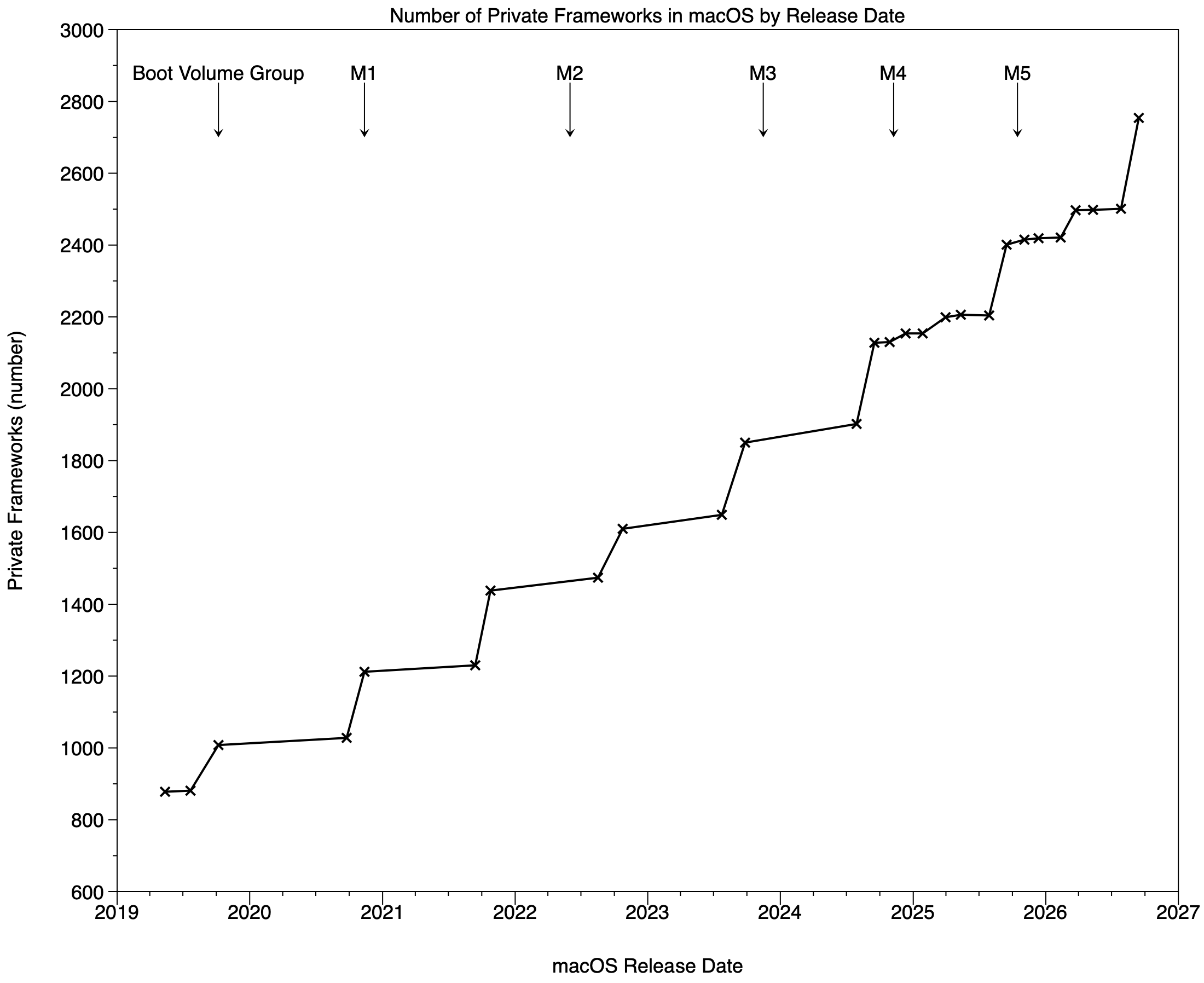
The pattern in Private Frameworks is very different. In 15.x and 26.x, numbers rise slowly in x.1-x.3, then there’s a substantial step increase in x.4. The increment there in 26.x was 76 Private Frameworks, almost 40% of the step upgrading from 15.6 to 26.0.
Total frameworks
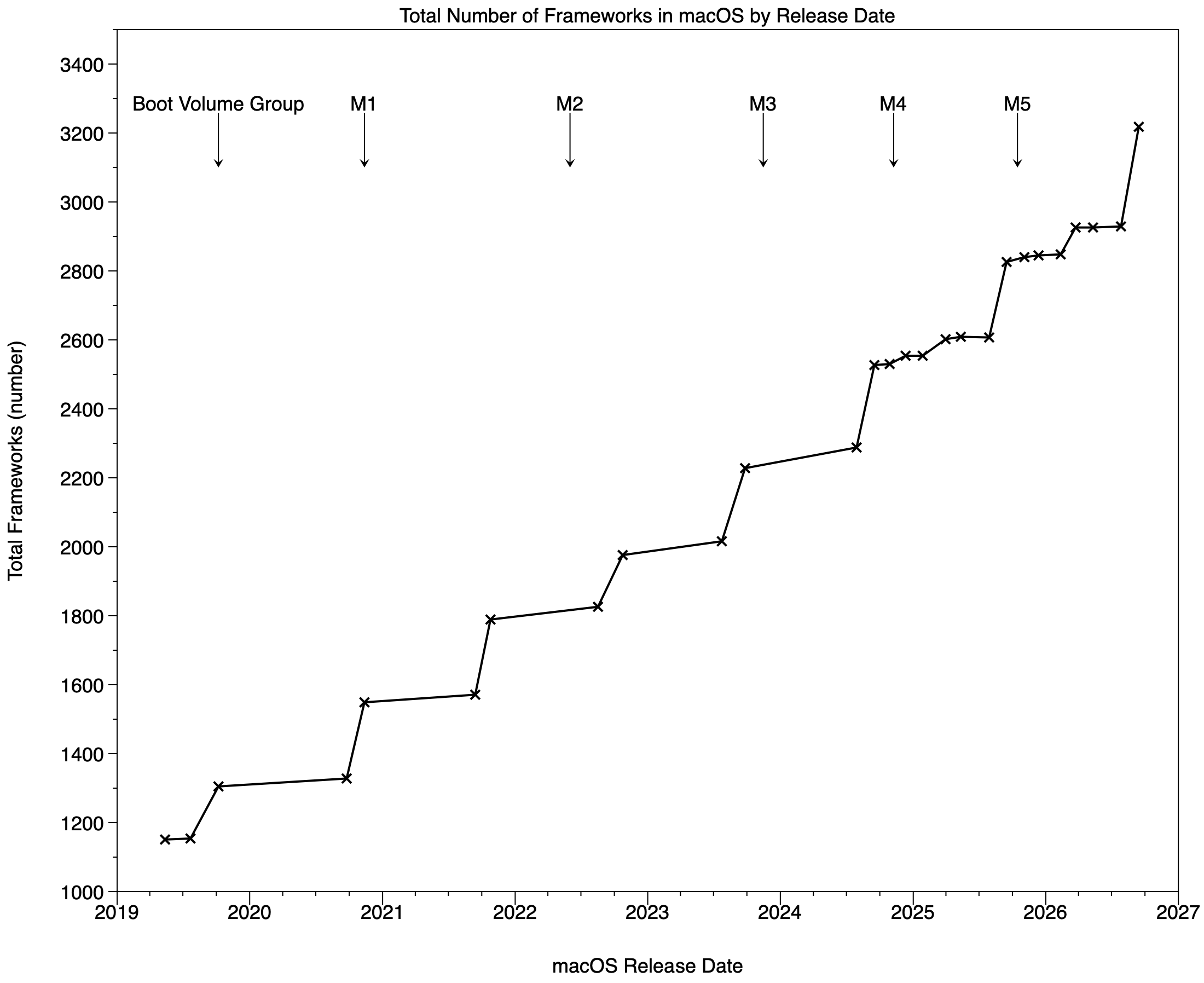
The same pattern is seen in the total number of frameworks in the chart above.
When to upgrade?
If increases in the numbers of frameworks are a useful and reasonably faithful indication of the frequency of fresh bugs, most bugs would be expected in early routine versions x.0 and x.1, and again in x.4 and x.5, following the second round of greater change. Accordingly, the best time to upgrade while minimising the risk of encountering serious bugs would be with x.2 or x.3, just before or after Christmas in a regular cycle.
Other factors that are seldom taken into account in making the decision include duration and depth of beta-testing and the severity of bugs. Testing is most thorough for the x.0 release, lasting three months for developers and two with the public. Fewer developers or users test betas for later versions of macOS, and the periods allowed can be much shorter.
Some features, such as Time Machine backups, are relatively little-tested before public release. There’s a bias towards testing in older and less capable models, that occasionally results in embarrassing incompatibilities with the latest hardware only appearing after release, as with unusual hardware combinations. Setups that are unlikely to have undergone such extensive beta-testing could be considered for longer delay before they undergo upgrade.
One factor that appears to have little if any importance in determining when to upgrade is documentation. Recent evidence of this comes in some of the major changes made in the macOS 26.4 update, such as those to login keychain security. Those were completely undocumented and largely undetected for six months after that update’s release. Just because release notes don’t arouse suspicions of major changes, we can’t assume such changes haven’t been made, with their potential for bugs, or to cause serious problems.
Key point
The x.4 update in recent macOS update cycles may bring substantial changes, with the potential for bugs or serious problems. If you plan to delay upgrading to a new version of macOS to reduce the risk of bugs or problems, you should take that into account.

