
What does your Mac get up to when you’re asleep at night? If it’s a desktop model left turned on and not allowed to sleep a wink, it doesn’t just sit there idle, poised ready for your first tap or click in the morning.
There was a time when, at various times in the small hours of each morning, Mac OS X ran daily, weekly and monthly housekeeping scripts using periodic. They performed routine maintenance such as rolling the log files and cleaning out temporary files. Although these lingered on in deprecation for many years, as their tasks were first transferred to launchd then became background tasks scheduled and dispatched by the DAS-CTS system, periodic itself was finally removed from macOS Sequoia 15.0.
Some time-consuming background tasks to support Spotlight, such as mediaanalysisd, photoanalysisd and CGPDFService, may take the opportunity to grind their way through analysing image and PDF files for indexing. XProtect Remediator scans can also be dispatched on their daily run while you’re in the land of nod. But much of what goes on in your Mac during the silent hours runs out of sight and out of mind.
In recent months, I’ve started getting glimpses, first through the log analysis performed by Logistician, and lately measuring changes in used disk space using DeltaFree.
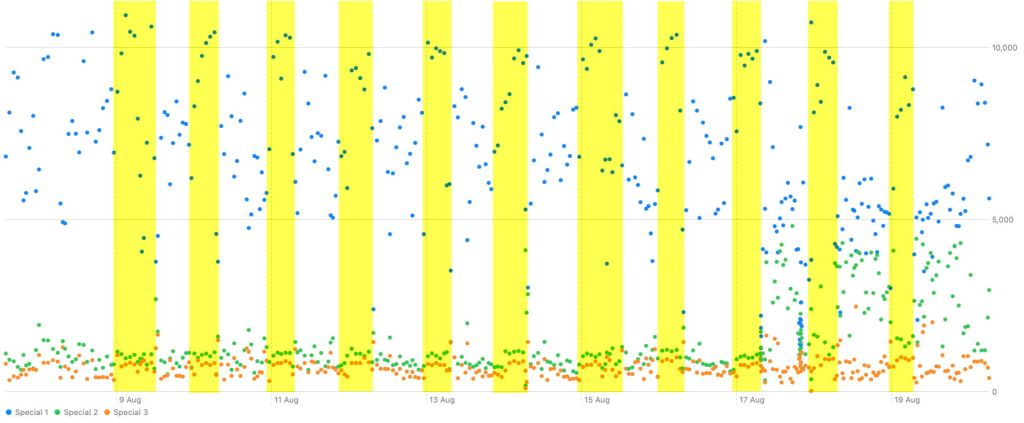
The charts below are taken from my main production Mac mini M4 Pro, running the current version of Tahoe. Each night, before I go to bed, I close all my apps and leave the Mac to continue making its hourly Time Machine backups without going to sleep. Otherwise it has no user-scheduled tasks to perform while it’s left alone. I’ve blocked in using yellow the approximate periods when I think I’ve been in bed.
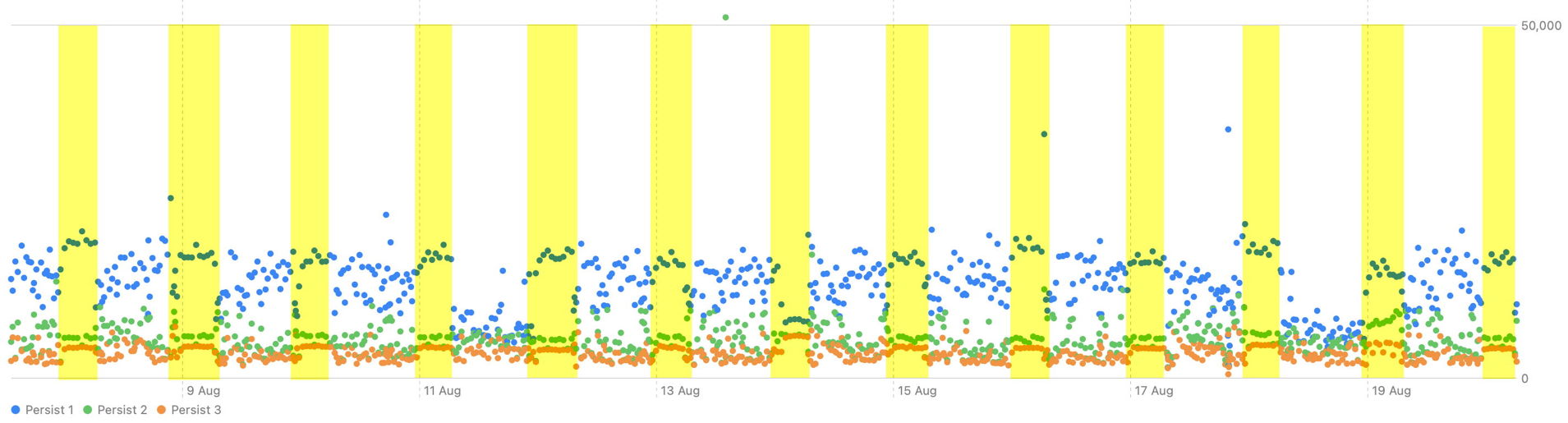
Far from its log entries dying down during the night, this record of the quantity of data written to the Persist logs over 13 days demonstrates how busy they remain overnight. Blue dots here give the total size of entries written by the most frequent source process, green for the second most frequent, and orange for the third. One salient event over this period was the macOS update to 26.6.2 late on 17 August. Although patterns at night appear different from those of daytime, the quietest periods in the log were during the days of 11 and 18 August, both Tuesdays, although I don’t do anything different on Tuesdays to account for that.
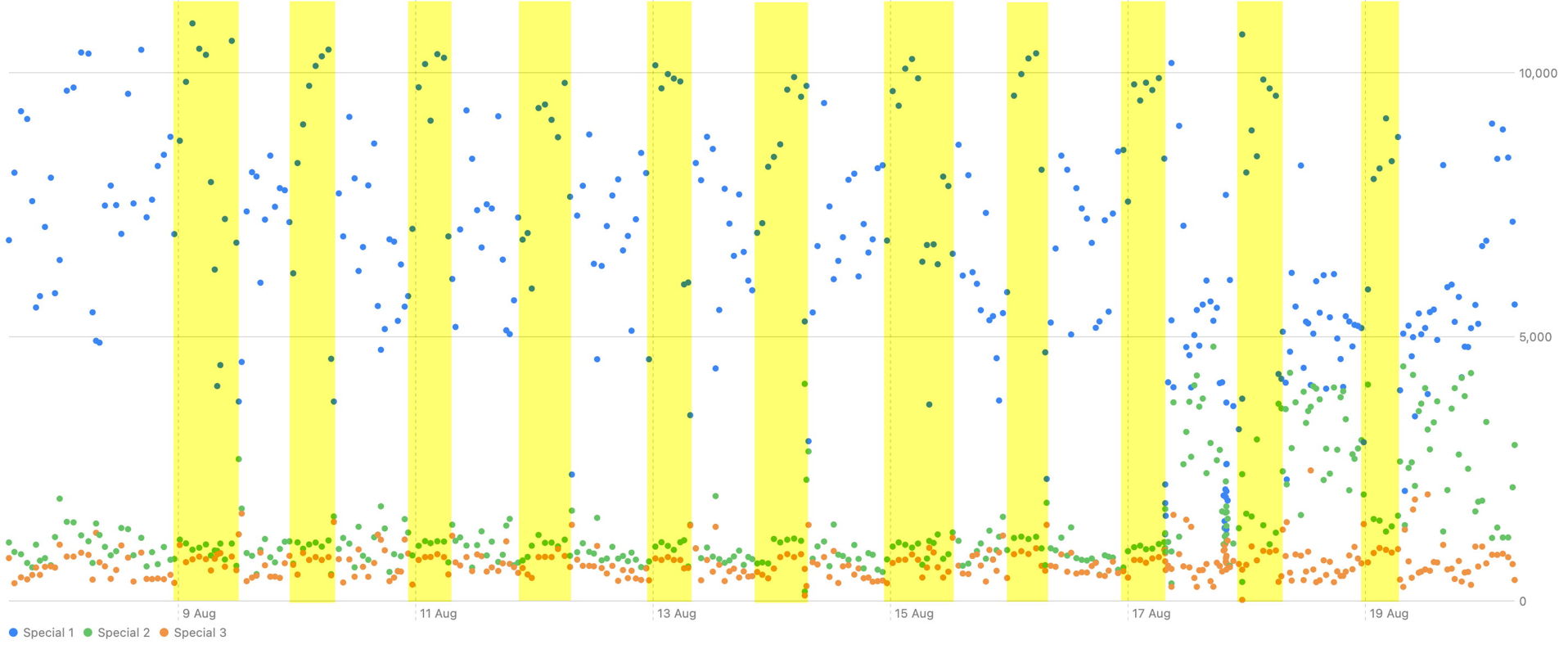
Quantities of data written to Special log files are similarly busy throughout the 24 hours, with no reduction at night. Although nighttime patterns don’t appear to change much, daytimes have changed from the morning of 17 August, prior to the macOS update. I don’t know what might account for that.
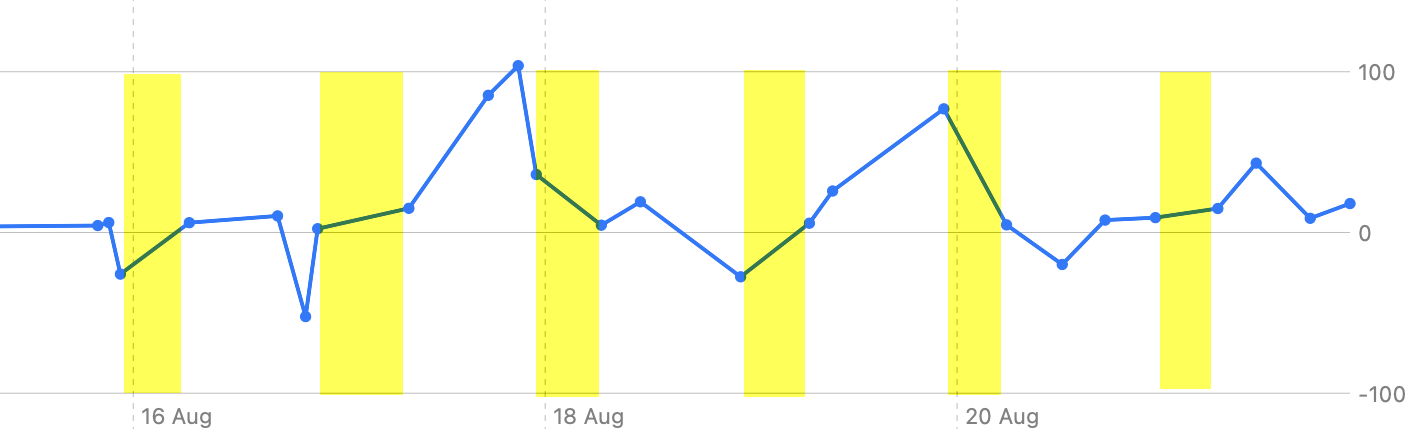
My shorter sequence of changes in used space in the Mac’s backup storage is different again, although no measurements were made during the nighttime period when I wasn’t present. Some nights, such as that of 18-19 August, backups grew in size, while the following night they reduced in size, presumably as a result of thinning of old backups.
Wouldn’t it interesting to have overnight measurements of CPU activity, and network transfers too?
There’s more to this than idle curiosity, wondering what is keeping my Mac occupied while I am asleep. Like many others, I have always left my main desktop Mac running for continuous periods of many days or weeks, even when doing so has been disadvantageous. For example, macOS Sierra had a bug in DAS-CTS that resulted in Time Machine backups becoming irregular and infrequent after a few days of continuous running, which wasn’t fixed until High Sierra.
By leaving my Mac running all the time, does that allow it to get these essential maintenance tasks out of the way when I’m not using it? If I were to shut it down before going to bed, would those then have to be rescheduled to run in the background when I was trying to get on with my work? Does continuous running improve Spotlight search by ensuring fuller indexing of images and PDFs?
Or, as my grandmother might have said, is this just a case of the devil making work for idle Macs?

