
Skip to content

The Eclectic Light Company

Macs & painting – 🦉 No AI content
Main navigation
  • Downloads
  • Freeware
  • All Macs
  • M1-M5 Macs
  • Troubleshooting
  • Painting
  • Mac Front Page
hoakley May 11, 2026 Macs, Technology

Does iCloud Drive now lose almost all metadata?

Cloud services have long differed in how they handle metadata, particularly that stored in extended attributes (xattrs). The one service you would expect to get this right is Apple’s own iCloud Drive, but it seems to have silently changed policy without rhyme or reason. It has been almost three years since I last tested iCloud Drive to assess which metadata it does preserve, and I’ve been shocked to discover that it now preserves almost no xattrs at all.

Testing

This used a Mac mini M4 Pro and a MacBook Pro M3 Pro, both running macOS 26.4.1 Tahoe, and connected to the same iCloud+ account, with a local Content Caching server active. On both Macs, iCloud Drive was configured in nonreplicating mode, with Optimise Mac Storage turned on. All files were downloaded locally when necessary before use.

A test suite of files with extensive metadata content in xattrs was moved to a folder in iCloud Drive on the Mac mini, and ample time was allowed for them to sync up to iCloud. Each was inspected on the Mac mini, then on the MBP, and their metadata was compared using xattred.

Results

All metadata was preserved in the original files that were stored locally on the Mac mini, even after evicting them and downloading their data to reconstitute them. There was no evidence that large xattrs were removed by eviction, as they have been in the past.

Only the following metadata was synced down from iCloud Drive to the MBP:

  • com.apple.metadata:_kMDItemUserTags (Finder Tag), which transferred complete with its custom label
  • com.apple.lastuseddate#PS
  • com.apple.quarantine
  • com.apple.TextEncoding
  • co.eclecticlight.dintch.hash#S and co.eclecticlight.dintch.time#S, custom xattrs used by Dintch and its relatives to check file integrity.

Metadata stored within a file’s data such as EXIF was also preserved, as would be expected.

Finder Comments were not synced to the MBP, either in their primary .DS_Store location, or as a xattr.

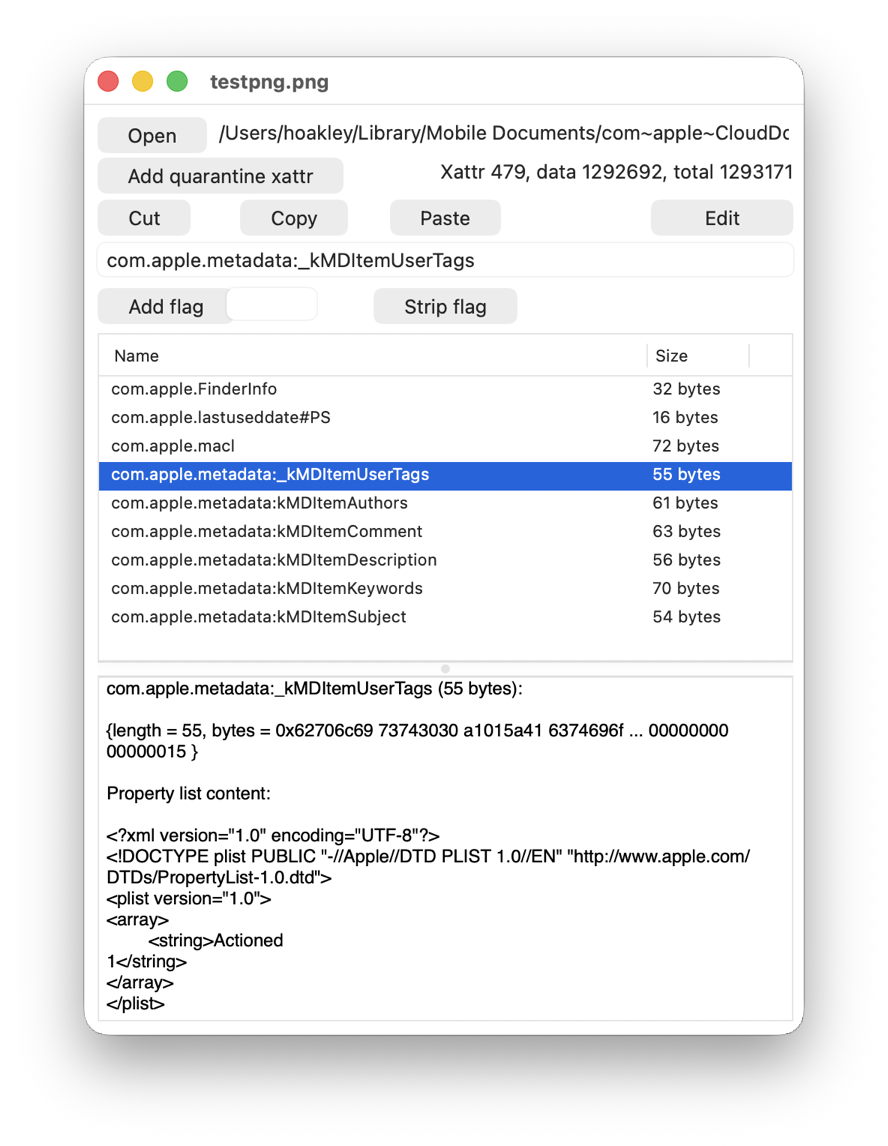
Two of the more obvious examples viewed in xattred are:
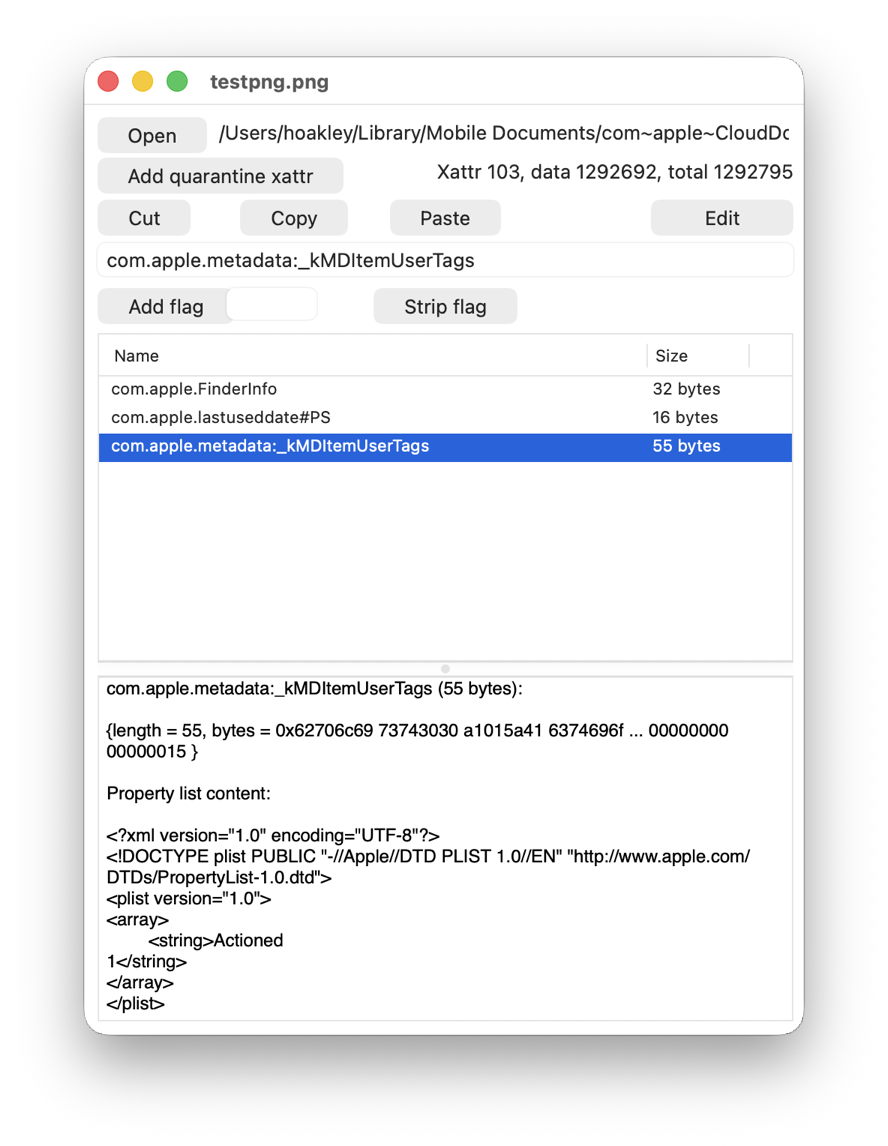
This is one of the test files I used recently when looking at xattrs suitable for metadata, with a Finder Tag added. Above is the original on the Mac mini, and below is the synced copy on the MBP. Every single com.apple.metadata: xattr has been stripped, except for com.apple.metadata:_kMDItemUserTags.
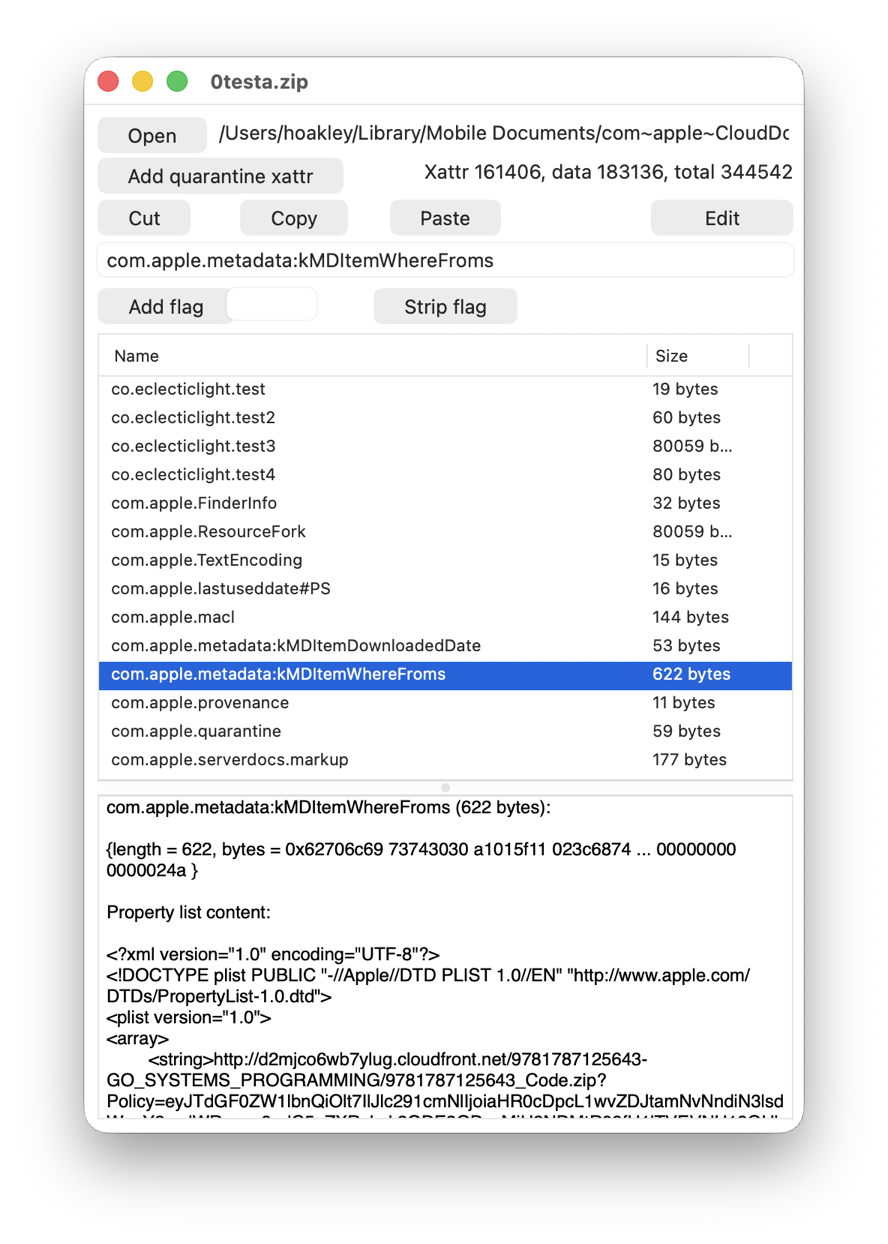
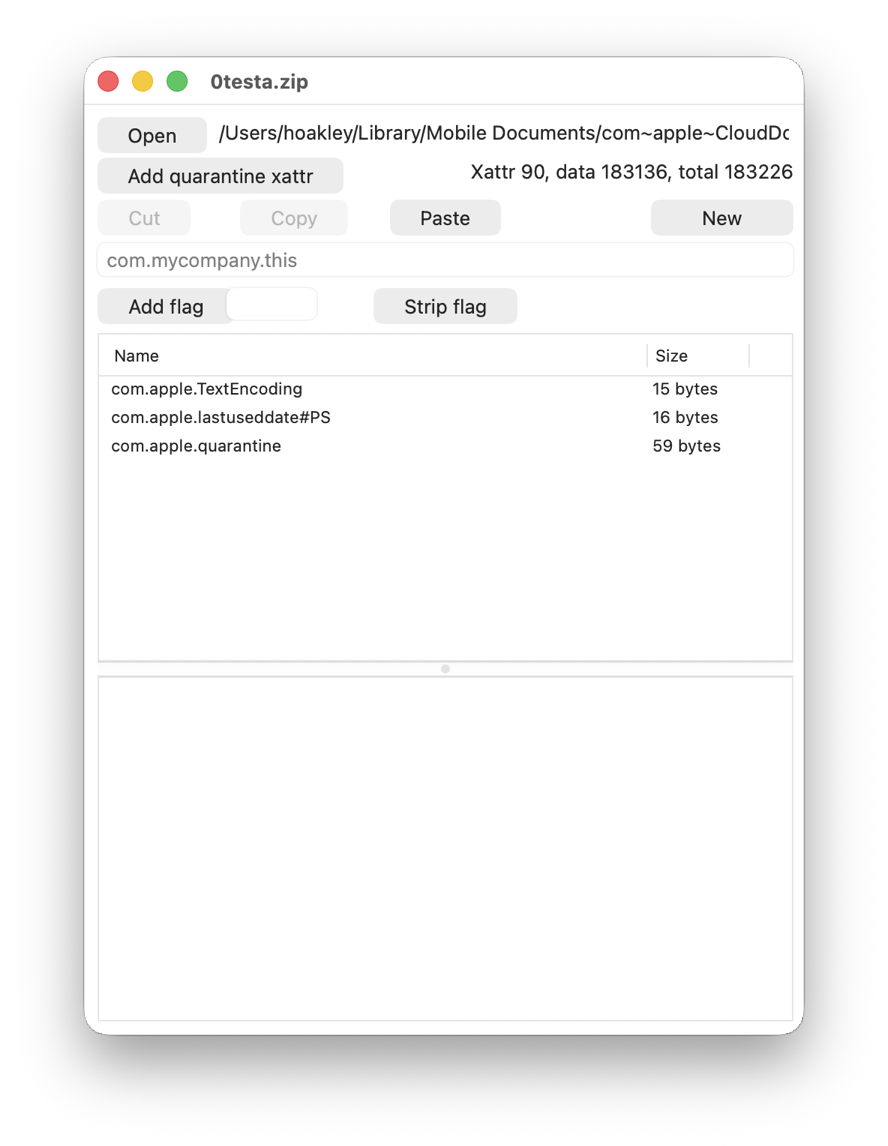
This is a crafted test suite that I have used for some years, above in its original on the Mac mini, and below as synced to the MBP, where just three xattrs have survived passage through iCloud Drive.
What should happen?

Policy for iCloud Drive appears to have changed over the last few years. When I first tested this between Sierra and High Sierra in 2018, few xattrs were synced, and even Finder Tags were stripped. Just over a year later, we realised this should be controlled by xattr flags, and when I tested this formally in a late version of macOS Sonoma in July 2023, com.apple.metadata: xattrs were preserved if they weren’t too large. However, eviction caused all large xattrs to be stripped even from the original source Mac.

Since then, iCloud Drive has continued to adopt the new File Provider framework, and Apple has further extended xattr flags, now described here. At no stage, though, does Apple appear to have documented which metadata and extended attributes should be preserved in iCloud Drive, so we can only speculate what it intends should happen.

Why has this changed?

Apple doesn’t appear to have made any relevant changes to the xattr flag system as detailed in the source of copyfile. Under that, almost all com.apple.metadata: xattrs should be treated as if they have PS flags attached, so should be “preserved during syncing with services such as iCloud Drive”.

One possible explanation is that the File Provider framework doesn’t respect xattr flags as laid out in copyfile, possibly because it doesn’t use copyfile but has its own independent mechanism. That would be in accord with Dropbox, which only appears to support syncing a few types of xattr. Information for Microsoft OneDrive is too vague for comparison, though.

Consequences

You should expect all metadata stored in xattrs to be stripped when synced via iCloud Drive. The exceptions to that include Finder Tags and those explicitly assigned an S flag, such as the custom integrity xattrs used here. Unfortunately, appending #S to well-known xattr types is likely to cause problems, as few apps handle those flags correctly, so won’t recognise the xattr type.

If you want to preserve that metadata, then you’ll either need to archive files using a method that preserves xattrs, or transfer it using a more conventional network method such as AirDrop, which does preserve almost all xattrs.

Currently, as far as metadata is concerned, iCloud Drive has no advantage over third-party cloud storage such as Dropbox.

Conclusions

  • When synced via iCloud Drive, expect all metadata stored in xattrs, with the exception of Finder Tags and those explicitly assigned an S flag, to be stripped when accessed from another Mac.
  • Xattrs and other metadata are faithfully preserved when moved between Macs using AirDrop. If you want to preserve their metadata, use that instead of iCloud Drive.

Share this:

  • Share on X (Opens in new window) X
  • Share on Facebook (Opens in new window) Facebook
  • Share on Reddit (Opens in new window) Reddit
  • Share on Pinterest (Opens in new window) Pinterest
  • Share on Threads (Opens in new window) Threads
  • Share on Mastodon (Opens in new window) Mastodon
  • Share on Bluesky (Opens in new window) Bluesky
  • Email a link to a friend (Opens in new window) Email
  • Print (Opens in new window) Print
Like Loading...

Related

Posted in Macs, Technology and tagged Dropbox, extended attributes, FileProvider, iCloud Drive, metadata, OneDrive, xattr. Bookmark the permalink.

3Comments

Add yours
  1. 1
    hstriepe's avatar
    hstriepe on May 11, 2026 at 7:03 am
    Reply

    What is wrong with Apple these days? This half-assed implementation would have been unacceptable years ago.

    LikeLiked by 3 people

    • 2
      joethewalrus's avatar
      joethewalrus on May 11, 2026 at 8:39 am
      Reply

      I am of the strong opinion that Apple is making the best computer hardware in the history of the industry, and some of the worst* software in the company’s 50-year history. I’m cautiously optimistic that the upcoming promotion of their hardware head to CEO might put them on what will surely need to be a multi-year path to fix this mess.

      *When I’m feeling particularly hyperbolic, I’ll add “and I used Mac OS 8” to this statement. But at least with that buggy crashing turd, the troubles were limited to one appliance in one corner of our house. Now it seems every waking hour involves at least one Apple device significantly misbehaving, either in my pocket, on my desk, on my TV, or on my wrist.

      LikeLiked by 2 people

  2. 3
    Alan B's avatar
    Alan B on May 11, 2026 at 7:36 am
    Reply

    Yes this omission is a pain. I often use Apple archive before submitting data to the iCloud Drive to minimise storage space , so hopefully most of the metadata is preserved and reconstituted on un-archiving to a Mac. Does the tar command as used in a Terminal window preserve metadata?

    LikeLiked by 1 person

Leave a comment Cancel reply

Quick Links

  • Free Software Menu
  • System Updates
  • Mac Troubleshooting Summary
  • M-series Macs
  • Painting

Search

Monthly archives

  • May 2026 (26)
  • April 2026 (73)
  • March 2026 (82)
  • February 2026 (71)
  • January 2026 (72)
  • December 2025 (75)
  • November 2025 (74)
  • October 2025 (75)
  • September 2025 (78)
  • August 2025 (76)
  • July 2025 (77)
  • June 2025 (74)
  • May 2025 (76)
  • April 2025 (73)
  • March 2025 (78)
  • February 2025 (67)
  • January 2025 (75)
  • December 2024 (74)
  • November 2024 (73)
  • October 2024 (78)
  • September 2024 (77)
  • August 2024 (75)
  • July 2024 (77)
  • June 2024 (71)
  • May 2024 (79)
  • April 2024 (75)
  • March 2024 (81)
  • February 2024 (72)
  • January 2024 (78)
  • December 2023 (79)
  • November 2023 (74)
  • October 2023 (77)
  • September 2023 (77)
  • August 2023 (72)
  • July 2023 (79)
  • June 2023 (73)
  • May 2023 (79)
  • April 2023 (73)
  • March 2023 (76)
  • February 2023 (68)
  • January 2023 (74)
  • December 2022 (74)
  • November 2022 (72)
  • October 2022 (76)
  • September 2022 (72)
  • August 2022 (75)
  • July 2022 (76)
  • June 2022 (73)
  • May 2022 (76)
  • April 2022 (71)
  • March 2022 (77)
  • February 2022 (68)
  • January 2022 (77)
  • December 2021 (75)
  • November 2021 (72)
  • October 2021 (75)
  • September 2021 (76)
  • August 2021 (75)
  • July 2021 (75)
  • June 2021 (71)
  • May 2021 (80)
  • April 2021 (79)
  • March 2021 (77)
  • February 2021 (75)
  • January 2021 (75)
  • December 2020 (77)
  • November 2020 (84)
  • October 2020 (81)
  • September 2020 (79)
  • August 2020 (103)
  • July 2020 (81)
  • June 2020 (78)
  • May 2020 (78)
  • April 2020 (81)
  • March 2020 (86)
  • February 2020 (77)
  • January 2020 (86)
  • December 2019 (82)
  • November 2019 (74)
  • October 2019 (89)
  • September 2019 (80)
  • August 2019 (91)
  • July 2019 (95)
  • June 2019 (88)
  • May 2019 (91)
  • April 2019 (79)
  • March 2019 (78)
  • February 2019 (71)
  • January 2019 (69)
  • December 2018 (79)
  • November 2018 (71)
  • October 2018 (78)
  • September 2018 (76)
  • August 2018 (78)
  • July 2018 (76)
  • June 2018 (77)
  • May 2018 (71)
  • April 2018 (67)
  • March 2018 (73)
  • February 2018 (67)
  • January 2018 (83)
  • December 2017 (94)
  • November 2017 (73)
  • October 2017 (86)
  • September 2017 (92)
  • August 2017 (69)
  • July 2017 (81)
  • June 2017 (76)
  • May 2017 (90)
  • April 2017 (76)
  • March 2017 (79)
  • February 2017 (65)
  • January 2017 (76)
  • December 2016 (75)
  • November 2016 (68)
  • October 2016 (76)
  • September 2016 (78)
  • August 2016 (70)
  • July 2016 (74)
  • June 2016 (66)
  • May 2016 (71)
  • April 2016 (67)
  • March 2016 (71)
  • February 2016 (68)
  • January 2016 (90)
  • December 2015 (96)
  • November 2015 (103)
  • October 2015 (119)
  • September 2015 (115)
  • August 2015 (117)
  • July 2015 (117)
  • June 2015 (105)
  • May 2015 (111)
  • April 2015 (119)
  • March 2015 (69)
  • February 2015 (54)
  • January 2015 (39)

Tags

APFS Apple Apple silicon backup Big Sur Blake Bonnard bug Catalina Consolation Console Corinth Delacroix Disk Utility Doré El Capitan extended attributes Finder firmware Gatekeeper Gérôme High Sierra history history of painting iCloud Impressionism landscape LockRattler log M1 Mac Mac history macOS macOS 10.12 macOS 10.13 macOS 10.14 macOS 10.15 macOS 11 macOS 12 macOS 13 macOS 14 macOS 15 malware Metamorphoses Mojave Monet Monterey Moreau myth narrative OS X Ovid painting performance Pissarro Poussin privacy Renoir riddle Rubens security Sierra SilentKnight Sonoma SSD Swift Time Machine Tintoretto Turner update upgrade Ventura xattr Xcode XProtect

Statistics

  • 22,269,697 hits
Blog at WordPress.com.
Footer navigation
  • About & Contact
  • Free Software Menu
  • Macs
  • Painting
  • Downloads
  • SilentKnight, Skint, SystHist, silnite, LockRattler & Scrub
  • XProCheck, T2M2, LogUI, Ulbow, blowhole and log utilities
  • Mints: a multifunction utility
  • xattred, SpotTest, Providable, Spotcord, Metamer & xattr tools
  • Versatility & Revisionist
  • DelightEd & Podofyllin
  • Precize, Alifix, UTIutility, Sparsity, alisma, Taccy, Signet
  • System Updates
  • Spundle, Cormorant, Stibium, DropSum, Dintch, Fintch and cintch
  • Virtualisation on Apple silicon
  • Cirrus & Bailiff
  • Text Utilities: Textovert, Disclipper, Nalaprop, Dystextia and others
  • sysctl information
  • Extended attributes (xattrs)
  • 32-bitCheck & ArchiChect
  • Keychains & Permissions
  • PDF
  • VisualLookUpTest
  • Updates
  • Long Reads
  • Mac Troubleshooting Summary
  • Saturday Mac Riddles
  • Last Week on My Mac
  • Painting topics
  • Mac problem-solving
  • M-series Macs
Secondary navigation
  • Search

Post navigation

Paintings of Beatrice Portinari: after 1862
Solutions to Saturday Mac riddles 359

Begin typing your search above and press return to search. Press Esc to cancel.

  • Comment
  • Reblog
  • Subscribe Subscribed
    • The Eclectic Light Company
    • Join 9,163 other subscribers
    • Already have a WordPress.com account? Log in now.
    • The Eclectic Light Company
    • Subscribe Subscribed
    • Sign up
    • Log in
    • Copy shortlink
    • Report this content
    • View post in Reader
    • Manage subscriptions
    • Collapse this bar

Loading Comments...

    %d