
Skip to content

The Eclectic Light Company

Macs & painting – 🦉 No AI content
Main navigation
  • Downloads
  • Freeware
  • All Macs
  • M1-M5 Macs
  • Troubleshooting
  • Painting
  • Mac Front Page
hoakley May 5, 2026 Macs, Technology

How to store and manage metadata in macOS

One of the design features of macOS is that a file’s metadata can be stored separately from that file’s data. This is normally achieved by extended attributes, xattrs, and to aid that there’s a rich and extendable range of them. This article explains what you can and can’t do with them, as of macOS 26.4.1.

More generally, most metadata are stored within a file’s data, to accommodate operating systems and file systems that don’t have such rich features. Most image formats, for example, incorporate standard collections of metadata such as EXIF information, which are saved with the image data. PDF and Word documents have similar features. These have the disadvantage that changing the metadata results in the file data being altered, and that makes it difficult to track and to guarantee the data’s integrity. This can result in damage or corruption to the data in a PDF file during editing of comment metadata, for example. When possible it’s far better to separate metadata.

Distinguishing between data and metadata can also be tricky at times. This is easiest with non-verbal data like images and audio, where text is clearly separate from data, but it can appear more arbitrary with written documents. Some content such as copyright information or an index is universally accepted as metadata, but abstracts and appendixes may vary. Some types of document, such as official standards, draw explicit distinctions, using qualifiers like normative and informative, to assist.

Finder Comments and Tags

These are the two standard types of metadata currently best supported in macOS, both being readily accessible in the Finder and applicable to any file or folder.

The main problem with Finder Comments is that they are primarily stored separately in the hidden .DS_Store file in the same directory as the item, although a secondary copy is written to a xattr attached to that file/folder. They’re easily accessed in the Finder’s Get Info dialog, and can be shown in List view windows, although that doesn’t work for multi-line comments. On balance, their strange storage makes them fragile and unsuitable for many uses.

Finder Tags are stored properly in a xattr, and are most widely distinguished by the coloured tag displayed. Although they can be repurposed to store text, their main value remains in categorisation. There’s a practical limit of 20-25 characters before their text label is cropped in most views, and labels for multiple items can only be shown in the Finder’s List view layout. For the majority, they are best used for allocating items to a limited number of categories, distinguished foremost by their tag colour, and aren’t suitable for more substantial text like even a brief summary.

Properties

To be generally suitable for storing text metadata for a file or folder in macOS, these should:

  • be attached to the file or folder as a xattr;
  • be capable of storing and displaying up to 3,804 bytes of UTF-8 text, the upper limit of data stored alongside the xattr;
  • use xattr flags to control their persistence;
  • be indexed by Spotlight so their contents can be searched;
  • be preserved in iCloud Drive, and when copied to a different volume;
  • be displayed and edited easily, ideally in the Finder, without the need for third-party software.

Which xattrs?

Of the dozens of xattrs available, I’m aware of just three that come closest to meeting all those requirements:

  • com.apple.metadata:kMDItemComment, known in Spotlight search menu as Comment, and different from Spotlight Comment, which is synonymous with Finder Comment;
  • com.apple.metadata:kMDItemKeywords, Spotlight Keywords;
  • com.apple.metadata:kMDItemSubject, Spotlight Subject.

These are sufficiently persistent as to be preserved in iCloud Drive, and when transferred between Macs using AirDrop. Although they can be displayed in the Finder, they each require third-party software for creation and management. As explained below, this doesn’t apply to image files, which are expected to store their metadata in EXIF information within the file, and not in xattrs.

Management

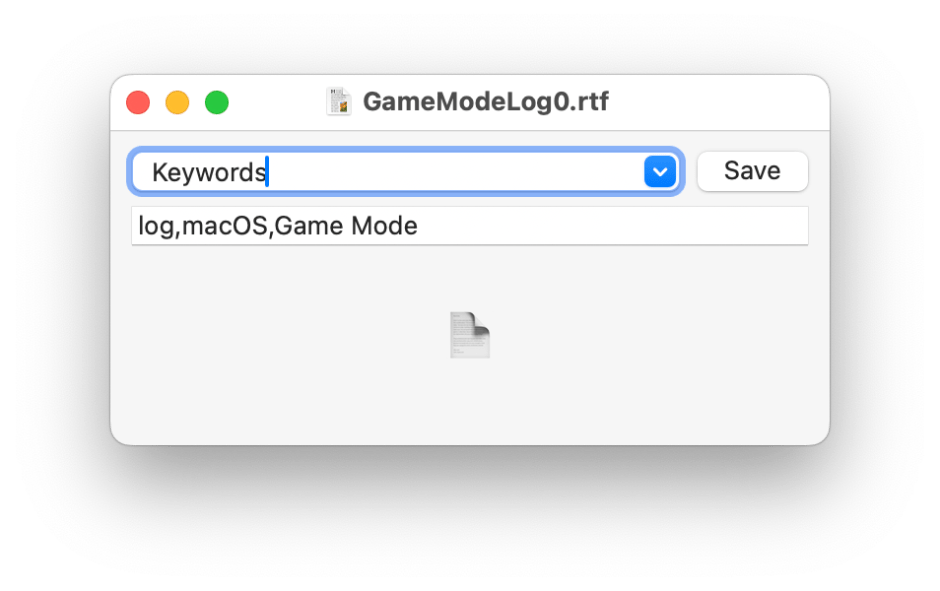
All three can be created and managed using my free Metamer, as well as with the more extensive features of xattred.
metamer131

Metamer is a lightweight drag-and-drop utility to create, edit and view many different types of xattr, including the three recommended. It uses a Combo box offering 16 of the most commonly used xattrs, and you can enter the full name of any other if you need. Although it can be used to edit multi-line text, it’s designed to work best with single lines.

xattred is a general xattr editor with more extensive capabilities, and ideal for checking all the xattrs attached to a file or folder. It doesn’t offer the conveniences of Metamer, though.

Display

Each of these three xattrs is displayed in the More Info section of the Get Info dialog, and depending on settings, they can also be shown in the Finder’s preview pane when enabled in Preview Options for that file type. The latter is explained in more detail here, and can appear counter-intuitive at times. However, they can only be added and displayed for supported file types. For example, JPEG and PNG image files can’t display these three xattrs in Get Info dialogs or in the preview pane, but PDF, RTF, text and many other file types can.

None of the three can be listed for multiple files in any of the Finder’s view layouts.

Spotlight

All three are available in the list of search terms available in the Other item at the foot of the search term menu in a Finder Find window, as listed above.

But

When researching this article, I discovered some odd behaviours that render some xattrs both invisible and undiscoverable by Spotlight search. I hope to describe those fully tomorrow if I can get my head around them.

Share this:

  • Share on X (Opens in new window) X
  • Share on Facebook (Opens in new window) Facebook
  • Share on Reddit (Opens in new window) Reddit
  • Share on Pinterest (Opens in new window) Pinterest
  • Share on Threads (Opens in new window) Threads
  • Share on Mastodon (Opens in new window) Mastodon
  • Share on Bluesky (Opens in new window) Bluesky
  • Email a link to a friend (Opens in new window) Email
  • Print (Opens in new window) Print
Like Loading...

Related

Posted in Macs, Technology and tagged extended attributes, Finder, metadata, Metamer, xattr, xattred. Bookmark the permalink.

4Comments

Add yours
  1. 1
    Thomas's avatar
    Thomas on May 5, 2026 at 6:10 pm
    Reply

    First of all, thanks for all the great content here, both Mac and art-related. Only recently found your blog, and I’m very impressed.

    Keywords obviously work best with a controlled vocabulary. Are you aware of any tools that would allow the user to build a kMDItemKeywords hierarchy and automatically apply parent keywords, much like many media asset management apps do?

    I’ve come across NeoFinder but it seems focussed on photos, videos and the like, and they mention a (maybe proprietary?) ‘NeoFinder Database’, so not sure if it uses kMDItemKeywords. Other tools use Finder tags, but that’s not what I’m looking for.

    LikeLiked by 1 person

    • 2
      hoakley's avatar
      hoakley on May 5, 2026 at 6:38 pm
      Reply

      I have a simple vocabulary builder in Spotcord. Otherwise I don’t know of any tools to help you, I’m afraid.
      Howard.

      LikeLike

  2. 3
    Joel's avatar
    Joel on May 5, 2026 at 7:44 pm
    Reply

    Thanks Howard. Would a utility that synchronised Comment and Finder Comment give some greater reliability, and constant visibility, for our comments, until such time (if ever) that this issue with .DS files is fixed? The trigger could be changes to a watched folder, or something that detects that a file has changed. Even a manual sweep of a nominated folder and sub-folders would be fine.

    Any existing file that has a Finder Comment would have that data copied to Comment. The contents of Comment could be retrieved back to Finder Comment at any time if required.

    Such a utility might even have a list browser to show the contents of Comment with the option to selectively restore or check against Finder Comment.

    It’s ridiculous to have to do any of this, obviously, but what are we to do, given the huge numbers of files we use all the time that have comments?

    LikeLiked by 1 person

    • 4
      hoakley's avatar
      hoakley on May 5, 2026 at 8:59 pm
      Reply

      Thank you, Joel, but I think that would make matters worse.

      Apple has had at least a decade to address this problem with Finder/Spotlight comments, and has done nothing, so I’d be really surprised if anything were to change now.

      Finder comments already have their own xattr, com.apple.metadata:kMDItemFinderComment, which is distinct from com.apple.metadata:kMDItemComment. As each can be changed independently of the other, trying to sync them would result in data loss sooner or later, probably for those who already use com.apple.metadata:kMDItemComment.

      com.apple.metadata:kMDItemComment already has its own place in the Finder, so would duplicate the Finder Comment display, and cause confusion.

      Funnily enough I’ve just written up the bugs I have found in these for publication in the morning, and I think you’ll agree these are confusing enough as they stand!

      I simply don’t use Finder Comments any more. What they gained in convenience they lose in unreliability.

      Howard.

      LikeLike

Leave a reply to Thomas Cancel reply

Quick Links

  • Free Software Menu
  • System Updates
  • Mac Troubleshooting Summary
  • M-series Macs
  • Painting

Search

Monthly archives

  • May 2026 (13)
  • April 2026 (73)
  • March 2026 (82)
  • February 2026 (71)
  • January 2026 (72)
  • December 2025 (75)
  • November 2025 (74)
  • October 2025 (75)
  • September 2025 (78)
  • August 2025 (76)
  • July 2025 (77)
  • June 2025 (74)
  • May 2025 (76)
  • April 2025 (73)
  • March 2025 (78)
  • February 2025 (67)
  • January 2025 (75)
  • December 2024 (74)
  • November 2024 (73)
  • October 2024 (78)
  • September 2024 (77)
  • August 2024 (75)
  • July 2024 (77)
  • June 2024 (71)
  • May 2024 (79)
  • April 2024 (75)
  • March 2024 (81)
  • February 2024 (72)
  • January 2024 (78)
  • December 2023 (79)
  • November 2023 (74)
  • October 2023 (77)
  • September 2023 (77)
  • August 2023 (72)
  • July 2023 (79)
  • June 2023 (73)
  • May 2023 (79)
  • April 2023 (73)
  • March 2023 (76)
  • February 2023 (68)
  • January 2023 (74)
  • December 2022 (74)
  • November 2022 (72)
  • October 2022 (76)
  • September 2022 (72)
  • August 2022 (75)
  • July 2022 (76)
  • June 2022 (73)
  • May 2022 (76)
  • April 2022 (71)
  • March 2022 (77)
  • February 2022 (68)
  • January 2022 (77)
  • December 2021 (75)
  • November 2021 (72)
  • October 2021 (75)
  • September 2021 (76)
  • August 2021 (75)
  • July 2021 (75)
  • June 2021 (71)
  • May 2021 (80)
  • April 2021 (79)
  • March 2021 (77)
  • February 2021 (75)
  • January 2021 (75)
  • December 2020 (77)
  • November 2020 (84)
  • October 2020 (81)
  • September 2020 (79)
  • August 2020 (103)
  • July 2020 (81)
  • June 2020 (78)
  • May 2020 (78)
  • April 2020 (81)
  • March 2020 (86)
  • February 2020 (77)
  • January 2020 (86)
  • December 2019 (82)
  • November 2019 (74)
  • October 2019 (89)
  • September 2019 (80)
  • August 2019 (91)
  • July 2019 (95)
  • June 2019 (88)
  • May 2019 (91)
  • April 2019 (79)
  • March 2019 (78)
  • February 2019 (71)
  • January 2019 (69)
  • December 2018 (79)
  • November 2018 (71)
  • October 2018 (78)
  • September 2018 (76)
  • August 2018 (78)
  • July 2018 (76)
  • June 2018 (77)
  • May 2018 (71)
  • April 2018 (67)
  • March 2018 (73)
  • February 2018 (67)
  • January 2018 (83)
  • December 2017 (94)
  • November 2017 (73)
  • October 2017 (86)
  • September 2017 (92)
  • August 2017 (69)
  • July 2017 (81)
  • June 2017 (76)
  • May 2017 (90)
  • April 2017 (76)
  • March 2017 (79)
  • February 2017 (65)
  • January 2017 (76)
  • December 2016 (75)
  • November 2016 (68)
  • October 2016 (76)
  • September 2016 (78)
  • August 2016 (70)
  • July 2016 (74)
  • June 2016 (66)
  • May 2016 (71)
  • April 2016 (67)
  • March 2016 (71)
  • February 2016 (68)
  • January 2016 (90)
  • December 2015 (96)
  • November 2015 (103)
  • October 2015 (119)
  • September 2015 (115)
  • August 2015 (117)
  • July 2015 (117)
  • June 2015 (105)
  • May 2015 (111)
  • April 2015 (119)
  • March 2015 (69)
  • February 2015 (54)
  • January 2015 (39)

Tags

APFS Apple Apple silicon backup Big Sur Blake Bonnard bug Catalina Consolation Console Corinth Delacroix Disk Utility Doré El Capitan extended attributes Finder firmware Gatekeeper Gérôme High Sierra history history of painting iCloud Impressionism landscape LockRattler log M1 Mac Mac history macOS macOS 10.12 macOS 10.13 macOS 10.14 macOS 10.15 macOS 11 macOS 12 macOS 13 macOS 14 macOS 15 malware Metamorphoses Mojave Monet Monterey Moreau myth narrative OS X Ovid painting performance Pissarro Poussin privacy Renoir riddle Rubens security Sierra SilentKnight Sonoma SSD Swift Time Machine Tintoretto Turner update upgrade Ventura xattr Xcode XProtect

Statistics

  • 22,238,360 hits
Blog at WordPress.com.
Footer navigation
  • About & Contact
  • Free Software Menu
  • Macs
  • Painting
  • Downloads
  • SilentKnight, Skint, SystHist, silnite, LockRattler & Scrub
  • XProCheck, T2M2, LogUI, Ulbow, blowhole and log utilities
  • Mints: a multifunction utility
  • xattred, SpotTest, Providable, Spotcord, Metamer & xattr tools
  • Versatility & Revisionist
  • DelightEd & Podofyllin
  • Precize, Alifix, UTIutility, Sparsity, alisma, Taccy, Signet
  • System Updates
  • Spundle, Cormorant, Stibium, DropSum, Dintch, Fintch and cintch
  • Virtualisation on Apple silicon
  • Cirrus & Bailiff
  • Text Utilities: Textovert, Disclipper, Nalaprop, Dystextia and others
  • sysctl information
  • Extended attributes (xattrs)
  • 32-bitCheck & ArchiChect
  • Keychains & Permissions
  • PDF
  • VisualLookUpTest
  • Updates
  • Long Reads
  • Mac Troubleshooting Summary
  • Saturday Mac Riddles
  • Last Week on My Mac
  • Painting topics
  • Mac problem-solving
  • M-series Macs
Secondary navigation
  • Search

Post navigation

The bicentenary of Frederic Edwin Church: 1857-77
Hero or hooligan: Perseus 1

Begin typing your search above and press return to search. Press Esc to cancel.

  • Comment
  • Reblog
  • Subscribe Subscribed
    • The Eclectic Light Company
    • Join 9,155 other subscribers
    • Already have a WordPress.com account? Log in now.
    • The Eclectic Light Company
    • Subscribe Subscribed
    • Sign up
    • Log in
    • Copy shortlink
    • Report this content
    • View post in Reader
    • Manage subscriptions
    • Collapse this bar

Loading Comments...

    %d