
Skip to content

The Eclectic Light Company

Macs & painting – 🦉 No AI content
Main navigation
  • Downloads
  • Freeware
  • M-series Macs
  • Mac Problems
  • Mac articles
  • Macs
  • Art
hoakley January 24, 2026 Macs, Technology

How could logging out help?

When something’s not working right, one of the most common and effective solutions is to restart your Mac. What happens next is the Mac shuts down and immediately restarts, going through the full boot process. That’s not quite the same as shutting down, leaving your Mac a minute or so, then starting up, what’s sometimes referred to as a cold boot. But neither of those may be necessary, as it may be just as effective to log out and log back in again.

Whether logging out might help is determined by the processes it would restart, something you can see in Activity Monitor. In its View menu select the My Processes command, switch to the CPU view and order those by % CPU. Those are being run on your behalf, with you as the user, they should be closed when you log out and started up again when you log back in. Change the View to All Processes, then order the list by User, and you’ll see that the majority of processes running are yours. If you need to restart processes running as root, or the likes of _windowserver, then only a restart will help.

This can sometimes fix problems with WindowServer, even though it isn’t normally shut down when you log out, neither is the troublemaker cfprefsd. Contrary to what you might expect, some user processes continue running uninterrupted even after you’ve logged out. However, in the recent past macOS itself has used user logout as a way to restart WindowServer without rebooting. In more recent versions of macOS, particularly on Apple silicon Macs, the only reliable way to fix WindowServer problems is by restarting the whole of macOS.

cfprefsd is a particular nuisance here, as there are normally both root and user copies running to handle all those preferences. You wouldn’t expect the root copy to be affected by logging out, but at least the user copy could have the decency to do so. This means that, if you’re trying to slip a manual change to a preference file past cfprefsd, a full restart is likely to be required.

Another useful clue as to what’s likely to be restarted by logging out and back in again is given in their Process ID. With Activity Monitor still showing All Processes, order them by PID.

At the top with PID 0 you’ll see kernel_task, followed by launchd with a PID of 1. Next you’re likely to see the logd service responsible for writing and maintaining the Unified log. On Intel Macs that’s likely to have a PID of around 96, while it’s higher on Apple silicon Macs at around 368. That’s because of the many hardware-related processes that are run during startup to initialise all the features built into the chip.
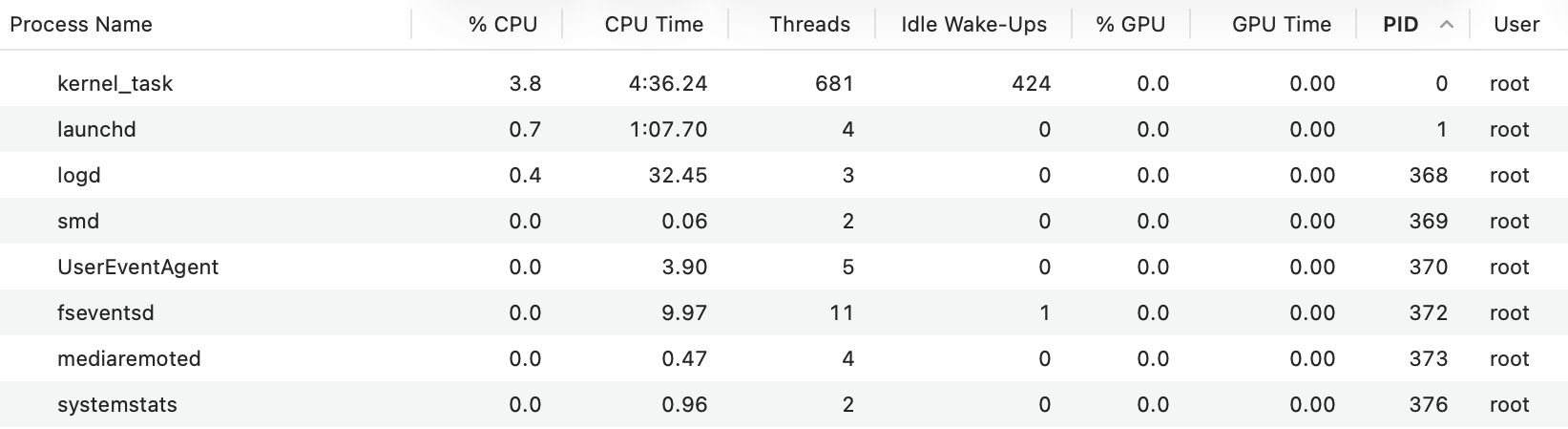
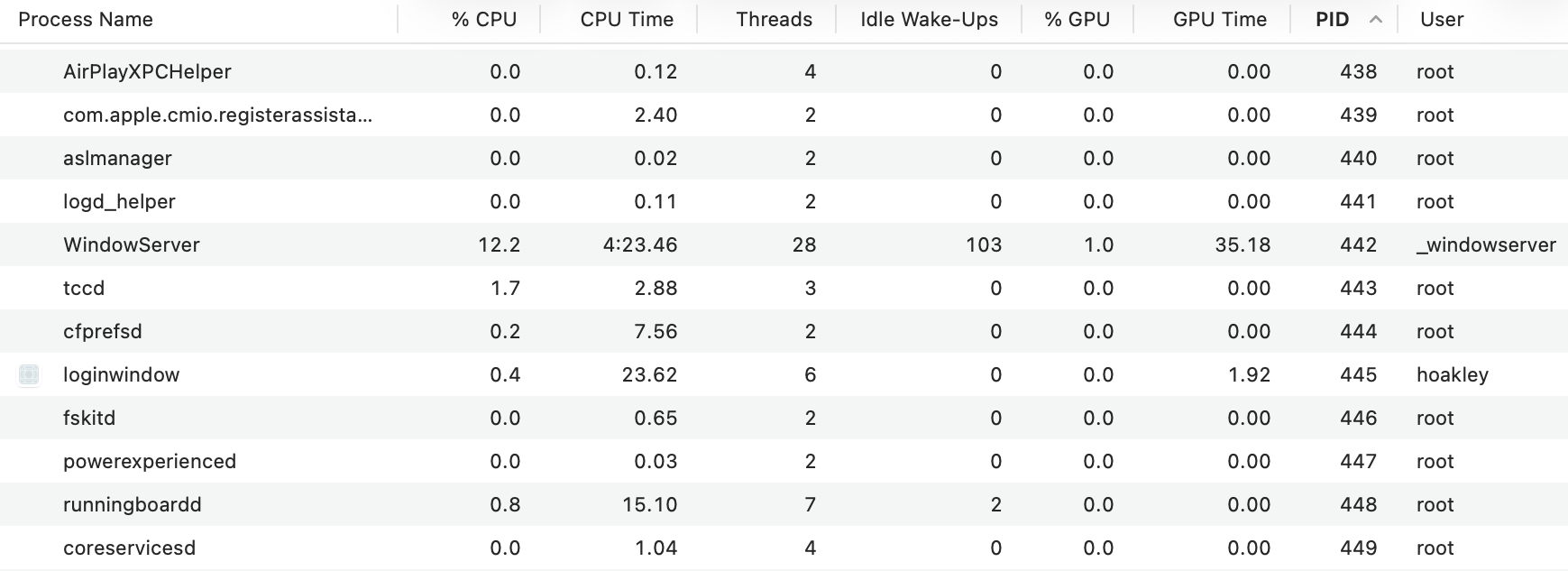
As these PIDs are assigned in simple numerical order, they reveal the sequence of process startup. Find WindowServer in the list, and it’ll generally have a PID of around 442 (166 on Intel). Not too far below it you should see the first user process, loginwindow, at about 445 (205 on Intel); that’s also the first process to be given its own icon at the start of the line. Processes with lower PIDs were all started before login, and those with higher PIDs, including some running as root, were started afterwards.

Many of those user processes, and many with PIDs greater than loginwindow, should be shut down when you log out, then be started up again as needed, when you log back in again. But if you try that and check PIDs again, and glance at the CPU Time column, it’s apparent that many user and other late-loading processes retain low PIDs and long CPU times. To refresh those a restart will be needed.

Normally, logging out and back in should only take a few seconds to complete. Because your Mac isn’t starting up from scratch, its Bluetooth remains working throughout, so there’s no frustrating delay before you can type your password in. With a bit of luck your Mac should then be back in fine fettle again, ready for you to resume work with the minimum of disruption.

What this doesn’t do, of course, is flush the caches and clean up any accumulated crud in your user account. For that, starting up in Safe mode remains the only solution. That’s a little less convenient on Apple silicon, where you have to shut down and start up in Recovery with the Power button held. Then select the startup disk you want your Mac to boot from, and hold the Shift key. The button underneath that disk icon then changes to read Continue in Safe Mode. Click on that and your Mac will restart into Safe mode. Although hardly onerous, if logging out and back in again does fix the problem, it will save you significant time.

Share this:

  • Share on X (Opens in new window) X
  • Share on Facebook (Opens in new window) Facebook
  • Share on Reddit (Opens in new window) Reddit
  • Share on Pinterest (Opens in new window) Pinterest
  • Share on Threads (Opens in new window) Threads
  • Share on Mastodon (Opens in new window) Mastodon
  • Share on Bluesky (Opens in new window) Bluesky
  • Email a link to a friend (Opens in new window) Email
  • Print (Opens in new window) Print
Like Loading...

Related

Posted in Macs, Technology and tagged Activity Monitor, log in, login, macOS, PID, root, users, WindowServer. Bookmark the permalink.

21Comments

Add yours
  1. 1
    Michele Galvagno's avatar
    Michele Galvagno on January 24, 2026 at 9:21 am
    Reply

    A wonderful resource, thank you!
    Would you explain — or have you already? — the difference between restarting and cold booting in real life? What advantages does that bring?

    LikeLiked by 2 people

    • 2
      Tony Collins's avatar
      Tony Collins on January 24, 2026 at 10:04 am
      Reply

      I’d like to second this question. On the surface, common sense tells me it makes no difference. But I’d really like to know if anyone knows of a material difference between the two types of restart

      LikeLiked by 2 people

      • 3
        hoakley's avatar
        hoakley on January 24, 2026 at 10:16 am
        Reply

        Hopefully I have answered that.
        Howard.

        LikeLiked by 1 person

    • 4
      hoakley's avatar
      hoakley on January 24, 2026 at 10:10 am
      Reply

      This is a theory, as I’ve never seen anyone demonstrate a difference in practice, that relies on the fact that memory and some components in Intel chipsets will retain some of their contents for several seconds after shutting down. So if you want to do a ‘thorough’ job, you should shut down, wait at least 10 seconds (although that’s even vaguer!), then start up.
      No one knows if that might apply to Apple silicon Macs. As pretty well all the parts of the SoC are booted afresh during normal startup, it seems hard to argue that this should make any difference there.
      Personally, I put it alongside the St Christopher charm and the lucky rabbit’s foot.
      Howard.

      LikeLiked by 2 people

  2. 5
    Enzo Vincenzo's avatar
    Enzo Vincenzo on January 24, 2026 at 9:34 am
    Reply

    Thanks, Howard. Putting myself in the shoes of a beginner attracted by your excellent article, I would like to take this opportunity to share a trick I use whenever my Mac freezes (fortunately rarely), provided I can still use the keyboard, with or without a physical connection to the Mac.
    First, I press CMD+SPACE to open the Spotlight window; then I type Terminal and press Enter.
    In the Terminal window, I type:
    sudo shutdown -h now
    I press Enter, enter my password, and the Mac shuts down immediately.
    You can also use
    sudo shutdown -r now
    if you want to restart directly instead of shutting down.
    Back in the days of Mac OS X, I also did this remotely, connecting to the locked Mac via the network, but I haven’t tried it since Yosemite and don’t know if it’s still possible using the network. I’d have to double-check because I can’t remember if I connected via SSH, TFTP, AFP or with some other method.

    LikeLiked by 2 people

    • 6
      Tony Collins's avatar
      Tony Collins on January 24, 2026 at 10:05 am
      Reply

      good tip. I think the “reboot” command does essentially the same thing and takes slightly less time to type. But I always forget about it

      LikeLiked by 2 people

    • 7
      hoakley's avatar
      hoakley on January 24, 2026 at 10:15 am
      Reply

      Thank you, Enzo.
      However, I’m not sure what you mean by ‘freezes’. It sounds like your old Macs were chilling but not quite frozen. On a frozen Mac, by definition, nothing changes on the display – not the clock, nor can you open windows or menus.
      Yes, you can remotely run over SSH the reboot or shutdown command. But to do that you have to allow others to connect to and control your Mac via SSH, and these days that’s considered unwise unless you have a very good reason.
      All recent and current Macs have a much better and more reliable way to shut them down – pressing and holding the Power button until they do so. That doesn’t involve any security risk, and is pretty well completely reliable too.
      Howard.

      LikeLiked by 2 people

      • 8
        Enzo Vincenzo's avatar
        Enzo Vincenzo on January 24, 2026 at 11:03 am
        Reply

        Thanks Howard! As always, you’re very helpful! I’ve always been afraid to shut down my Mac by holding down the power button until it turns off completely.
        I thought, in fact, this could corrupt files, important or not.
        But if you say that this is not dangerous, from now on I will use this method if necessary. Very thanks!
        Regarding freezing, I am referring to situations where I cannot do anything and the only thing possible is to do what I described in my previous post (but I repeat that this has not always been possible).

        LikeLiked by 1 person

        • 9
          hoakley's avatar
          hoakley on January 24, 2026 at 6:53 pm

          Forced shutdown using the Power button should be almost as safe as regular shutdown. It doesn’t tidy things up quite as well, and you can find apps opening that had been closed a while before you forced the shutdown, but it should flush caches to disks safely. Unfortunately it also loses a section of the log, so I can’t document exactly what does happen.
          It’s far better than turning the mains power off!
          Howard.

          LikeLiked by 1 person

  3. 10
    Brian's avatar
    Brian on January 24, 2026 at 4:28 pm
    Reply

    Thanks for the article and tip about checking processes with Activity Monitor on startup to see what the Mac is doing.

    Shutdown does solve one thing, stopping my Intel Mac from waking from sleep, which appears to be checking Bluetooth connections from the log some of the time, and I’ve disabled software updates. Restarting before putting it to sleep makes unexpected wakeups less likely, but I haven’t experimented with logging out or safe mode to clear caches as you suggest. Thanks for the ideas.

    LikeLiked by 1 person

    • 11
      hoakley's avatar
      hoakley on January 24, 2026 at 6:54 pm
      Reply

      Have you tried Sleep Aid?
      Howard.

      LikeLike

  4. 12
    ryegasps0p's avatar
    ryegasps0p on January 24, 2026 at 6:32 pm
    Reply

    Howard, may not be quite relevant here…what actually runs in the background while you are not logged into any user?

    LikeLiked by 1 person

    • 13
      hoakley's avatar
      hoakley on January 24, 2026 at 6:59 pm
      Reply

      It’s highly relevant, and easy to see.
      Open Activity Monitor, show All Processes, and order them by PID.
      Those listed with lower PIDs than loginwindow were started before loginwindow, so should be running when the Mac isn’t logged into any user. (There may be a few more, though.)
      Howard.

      LikeLike

  5. 14
    Rob's avatar
    Rob on January 24, 2026 at 10:04 pm
    Reply

    As always, well done.

    Does logging out unmount drives? (I could try this when I’m back in the office, but I don’t know if it is _supposed_ to unmount).

    Rob

    p.s. just discovered your art blog feed…quite enjoying that even though I have, to date, almost no interest in art

    LikeLiked by 1 person

    • 15
      hoakley's avatar
      hoakley on January 24, 2026 at 10:28 pm
      Reply

      Thank you.
      AFAIK logging out shouldn’t unmount volumes.
      Howard.

      LikeLike

    • 16
      jno310's avatar
      jno310 on January 28, 2026 at 9:24 pm
      Reply

      i used to have a midnight rsync command running on a user’s machine. what we found out if she logged out at end of work day, that drive unmounted and these backups failed.

      haven’t tested lately

      LikeLiked by 1 person

  6. 17
    ryegasps0p's avatar
    ryegasps0p on January 30, 2026 at 12:29 am
    Reply

    Howard, do you have discussion anywhere as to why Mac got rid of Verbose ModeI? Is there a command or place to see the verbose mode process on startup. I am a level one Mac user, but like the startup feature of the rolling text before it becomes the graphical interface. I still have it turned on, on my T2 Intel Mac mini.

    LikeLiked by 1 person

    • 18
      hoakley's avatar
      hoakley on January 30, 2026 at 11:54 am
      Reply

      No, I don’t. But if you want to see live log entries during startup, be prepared to see a stream of over 10,000 per second. Maybe that isn’t as useful as it was once?
      Howard.

      LikeLike

      • 19
        ryegasps0p's avatar
        ryegasps0p on January 30, 2026 at 1:51 pm
        Reply

        Ha! 10,000 per second! Thanks.

        LikeLiked by 1 person

      • 20
        Markus's avatar
        Markus on January 31, 2026 at 12:13 pm
        Reply

        Well, thousands of messages flying by is not the interesting thing, I agree. But when the boot process stalls due to whatever reason the log messages also stop scrolling up at high speed. And that is what makes verbose boot interesting. Also the messages form a graphical pattern on the screen that you can easily observe. Changes (or no changes) in these patterns might indicate a stalled boot or tell you that there is still something going on. There is no need to be able to read the log lines.

        Verbose boot still works on Intel machines, but as I do not yet have an ARM Mac I have no idea whether there is an equivalent to nvram boot-args=”-v”.

        LikeLiked by 1 person

        • 21
          hoakley's avatar
          hoakley on January 31, 2026 at 3:46 pm

          If there’s no need to read the log lines, there’s no meaning to their content. In that case a progress bar is far clearer and just as purposeful.
          I’m fascinated that you have seen stalled boot processes since Catalina. Now our Macs boot from the SSV, every boot is almost identical until the loginwindow, as until then it’s running almost entirely from the immutable SSV. The only deviation that I have ever observed is a kernel panic, which is blindingly obvious.
          In the current Apple silicon boot sequence, I’m not sure how far into that it would have to get before any log entries could be displayed. It would certainly be well after kernel boot was completed, and not too long before the loginwindow, which would make it of little value even if you could read and understand the log entries. That said, the approximate total number of log entries that would need to be displayed is well over 50,000 in that period of around 11-12 seconds.
          Things are different with (U)EFI, of course, but thankfully Apple never intended Apple silicon Macs to boot from that.
          Howard.

          LikeLike

Leave a reply to hoakley Cancel reply

Quick Links

  • Free Software Menu
  • System Updates
  • M-series Macs
  • Mac Troubleshooting Summary
  • Mac problem-solving
  • Painting topics
  • Painting
  • Long Reads

Search

Monthly archives

  • February 2026 (34)
  • January 2026 (72)
  • December 2025 (75)
  • November 2025 (74)
  • October 2025 (75)
  • September 2025 (78)
  • August 2025 (76)
  • July 2025 (77)
  • June 2025 (74)
  • May 2025 (76)
  • April 2025 (73)
  • March 2025 (78)
  • February 2025 (67)
  • January 2025 (75)
  • December 2024 (74)
  • November 2024 (73)
  • October 2024 (78)
  • September 2024 (77)
  • August 2024 (75)
  • July 2024 (77)
  • June 2024 (71)
  • May 2024 (79)
  • April 2024 (75)
  • March 2024 (81)
  • February 2024 (72)
  • January 2024 (78)
  • December 2023 (79)
  • November 2023 (74)
  • October 2023 (77)
  • September 2023 (77)
  • August 2023 (72)
  • July 2023 (79)
  • June 2023 (73)
  • May 2023 (79)
  • April 2023 (73)
  • March 2023 (76)
  • February 2023 (68)
  • January 2023 (74)
  • December 2022 (74)
  • November 2022 (72)
  • October 2022 (76)
  • September 2022 (72)
  • August 2022 (75)
  • July 2022 (76)
  • June 2022 (73)
  • May 2022 (76)
  • April 2022 (71)
  • March 2022 (77)
  • February 2022 (68)
  • January 2022 (77)
  • December 2021 (75)
  • November 2021 (72)
  • October 2021 (75)
  • September 2021 (76)
  • August 2021 (75)
  • July 2021 (75)
  • June 2021 (71)
  • May 2021 (80)
  • April 2021 (79)
  • March 2021 (77)
  • February 2021 (75)
  • January 2021 (75)
  • December 2020 (77)
  • November 2020 (84)
  • October 2020 (81)
  • September 2020 (79)
  • August 2020 (103)
  • July 2020 (81)
  • June 2020 (78)
  • May 2020 (78)
  • April 2020 (81)
  • March 2020 (86)
  • February 2020 (77)
  • January 2020 (86)
  • December 2019 (82)
  • November 2019 (74)
  • October 2019 (89)
  • September 2019 (80)
  • August 2019 (91)
  • July 2019 (95)
  • June 2019 (88)
  • May 2019 (91)
  • April 2019 (79)
  • March 2019 (78)
  • February 2019 (71)
  • January 2019 (69)
  • December 2018 (79)
  • November 2018 (71)
  • October 2018 (78)
  • September 2018 (76)
  • August 2018 (78)
  • July 2018 (76)
  • June 2018 (77)
  • May 2018 (71)
  • April 2018 (67)
  • March 2018 (73)
  • February 2018 (67)
  • January 2018 (83)
  • December 2017 (94)
  • November 2017 (73)
  • October 2017 (86)
  • September 2017 (92)
  • August 2017 (69)
  • July 2017 (81)
  • June 2017 (76)
  • May 2017 (90)
  • April 2017 (76)
  • March 2017 (79)
  • February 2017 (65)
  • January 2017 (76)
  • December 2016 (75)
  • November 2016 (68)
  • October 2016 (76)
  • September 2016 (78)
  • August 2016 (70)
  • July 2016 (74)
  • June 2016 (66)
  • May 2016 (71)
  • April 2016 (67)
  • March 2016 (71)
  • February 2016 (68)
  • January 2016 (90)
  • December 2015 (96)
  • November 2015 (103)
  • October 2015 (119)
  • September 2015 (115)
  • August 2015 (117)
  • July 2015 (117)
  • June 2015 (105)
  • May 2015 (111)
  • April 2015 (119)
  • March 2015 (69)
  • February 2015 (54)
  • January 2015 (39)

Tags

APFS Apple Apple silicon backup Big Sur Blake Bonnard bug Catalina Consolation Console Corinth Disk Utility Doré El Capitan extended attributes Finder firmware Gatekeeper Gérôme High Sierra history history of painting iCloud Impressionism landscape LockRattler log M1 Mac Mac history macOS macOS 10.12 macOS 10.13 macOS 10.14 macOS 10.15 macOS 11 macOS 12 macOS 13 macOS 14 macOS 15 malware Metamorphoses Mojave Monet Monterey Moreau myth narrative OS X Ovid painting performance Pissarro Poussin privacy Renoir riddle Rubens Sargent security Sierra SilentKnight Sonoma SSD Swift Time Machine Tintoretto Turner update upgrade Ventura xattr Xcode XProtect

Statistics

  • 21,451,763 hits
Blog at WordPress.com.
Footer navigation
  • Free Software Menu
  • About & Contact
  • Macs
  • Painting
  • Downloads
  • Mac problem-solving
  • Extended attributes (xattrs)
  • Painting topics
  • SilentKnight, Skint, SystHist, silnite, LockRattler & Scrub
  • DelightEd & Podofyllin
  • xattred, SpotTest, Providable, Spotcord, Metamer & xattr tools
  • 32-bitCheck & ArchiChect
  • XProCheck, T2M2, LogUI, Ulbow, blowhole and log utilities
  • Cirrus & Bailiff
  • Precize, Alifix, UTIutility, Sparsity, alisma, Taccy, Signet
  • Versatility & Revisionist
  • Text Utilities: Textovert, Disclipper, Nalaprop, Dystextia and others
  • PDF
  • Keychains & Permissions
  • Updates
  • Spundle, Cormorant, Stibium, DropSum, Dintch, Fintch and cintch
  • Long Reads
  • Mac Troubleshooting Summary
  • M-series Macs
  • Mints: a multifunction utility
  • VisualLookUpTest
  • Virtualisation on Apple silicon
  • System Updates
  • Saturday Mac Riddles
  • Last Week on My Mac
  • sysctl information
Secondary navigation
  • Search

Post navigation

Reading Visual Art: 241 Sculptor
Saturday Mac riddles 344

Begin typing your search above and press return to search. Press Esc to cancel.

  • Comment
  • Reblog
  • Subscribe Subscribed
    • The Eclectic Light Company
    • Join 9,003 other subscribers
    • Already have a WordPress.com account? Log in now.
    • The Eclectic Light Company
    • Subscribe Subscribed
    • Sign up
    • Log in
    • Copy shortlink
    • Report this content
    • View post in Reader
    • Manage subscriptions
    • Collapse this bar
 

Loading Comments...
 

    %d