

If you have been trying to use my free utility Providable on a non-English system and have been unable to get it to list apps installed there, you will want to download and use this new version 1.2, which should address that problem.
It’s available from here: providable12
and will shortly be getting its own place in a Product Page, and in Downloads above.
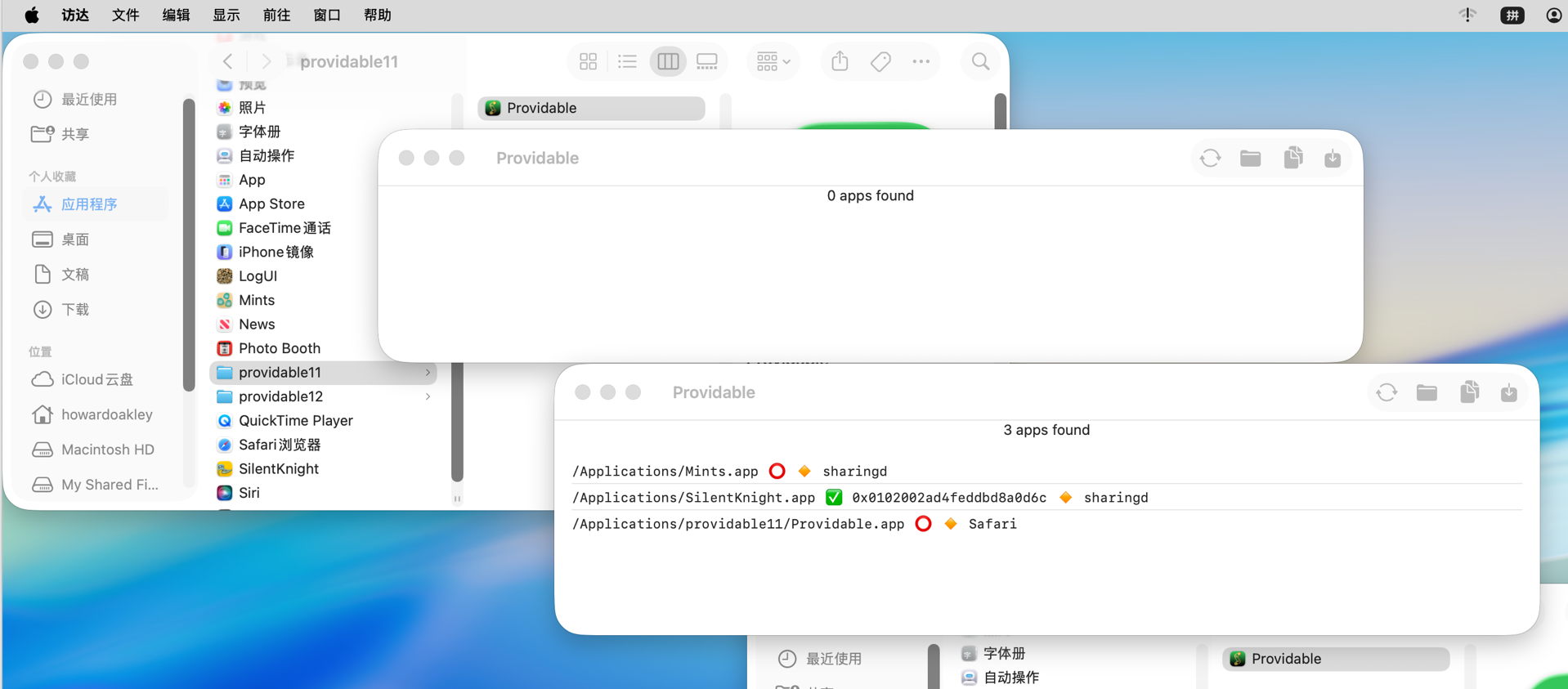
Just to demonstrate that Providable 1.2 does list apps correctly in non-English systems, here’s a screenshot of version 1.1 in the upper left showing no apps found, and 1.2 in the lower right with the three apps it should have identified. That’s in Tahoe 26.2 with Chinese set as the primary language.
The rest of this article explains why previous versions failed to list installed apps on non-English systems, why that has more general significance, and how it’s bad behaviour.
Listing apps
It’s curiously difficult to obtain a comprehensive list of apps installed on a Mac. If you look at proposed solutions, many involve iterating through popular locations such as Applications folders, or other time-consuming schemes. This turns out to be duplicated effort, as Spotlight already does that when indexing, and provides indexes you can search far more quickly.
The common recommendation is to use the mdfind command in the formmdfind "kMDItemKind == 'Application'"
which should find all items that Spotlight has indexed as being of the kind Application. There’s an equivalent available in the Finder’s Find window that demonstrates how well this can work.
As Apple doesn’t appear to explain any further about how Spotlight classifies items into these ‘kinds’, it’s reasonable to assume they are categories with standard names, although that proves to be incorrect when you try the same on a non-English system. You then realise that a ‘kind’ is just an arbitrary string that may be localised. Run that command in macOS localised to Chinese, and you won’t find any Application at all, and when localised to Italian you’ll need to use Applicazione instead.
The textbook solution to localisation problems like this is to provide a set of localised strings, and to pick the correct one depending on the current localisation setting. That may work when you have specialist teams, and can achieve comprehensive cover of all the possibilities, but here it’s impractical, as it would be when writing a script that uses that search command. It’s much better to cheat.
The most obvious way around this is to use a criterion that’s localisation-invariant such as a UTI. You can then search for .app bundles with the UTI of com.apple.application-bundle. I was disappointed to discover that too isn’t as simple as it could be, as UTIs are available in kMDItemContentType, but according to current documentation that returns a complete UTI ‘pedigree’, for an app something like com.apple.application-bundle/com.apple.application/com.apple.localizable-name-bundle/com.apple.package. That may not be correct, though, as using mdls to list metadata shows that the full pedigree is given in kMDItemContentTypeTree rather than kMDItemContentType.
Preparing for both cases, the correct search command should then bemdfind "kMDItemContentType == 'com.apple.application-bundle*'"
And that is exactly what Providable 1.2 does now.
Does Spotlight reindex when changing localisation?
My next question is what Spotlight actually indexes for kMDItemKind: is the string localised or not? As we don’t have direct access to those indexes, the closest we can come to inspecting them is by dumping metadata using mdls. Using Italian and English as my examples, when running with English as the primary language, kMDItemKind for an app is given as Application, but with Italian primary, it’s given as Applicazione instead.
This is the only metadata that appears localisation-dependent in this way, so either mdls is lying by returning a localised string, or Spotlight is rebuilding its index for kMDItemKind when the primary language changes. Neither behaviour is documented or expected.
Localisation overreach
This isn’t the first time that I’ve run into problems with localisation in command tools. If you use SilentKnight on Apple silicon Macs running non-English systems, you’ll be only too aware of my previous and apparently insoluble issue, where a major command tool can only return strings in localised form, effectively making their interpretation impossible. In that case it’s one of the many modules in system_profiler, returning key information about an Apple silicon Mac’s security status that isn’t readily available anywhere else.
Localisation is wonderful, and vital for many of us using macOS, but in some cases is now being applied too early. I wonder how anyone scripting with mdfind can possibly make use of kMDItemKind across different localisations. If its kinds were drawn from a set of non-localised strings, there would be no such problems. It makes good sense to localise the strings used in its GUI equivalent, but not for the command tool.
There are many examples of where localisation doesn’t take place, for example in UTIs, and in filename extensions. Can you imagine the consequences of localising the latter?
I’m very grateful to Hill-98 for helping me uncover these problems.
 The Eclectic Light Company