
As I have now been using DeltaFree on my main production Mac for over three months, I thought it might be helpful to tell you how it’s going so far.
Backup storage
The primary aim of DeltaFree is to enable you to estimate how long your Mac can continue to make backups to its current backup storage before that is expected to become full. For those already making backups, for example using Time Machine, that should prove more reliable than any of the commonly recommended rules of thumb.
At the moment, DeltaFree is reporting that my 2 TB SSD containing my Mac’s backups should be good for another 109 weeks, or two years. That’s based on a net backup rate of 7.4 GB per week, and just over 800 GB free space at present.
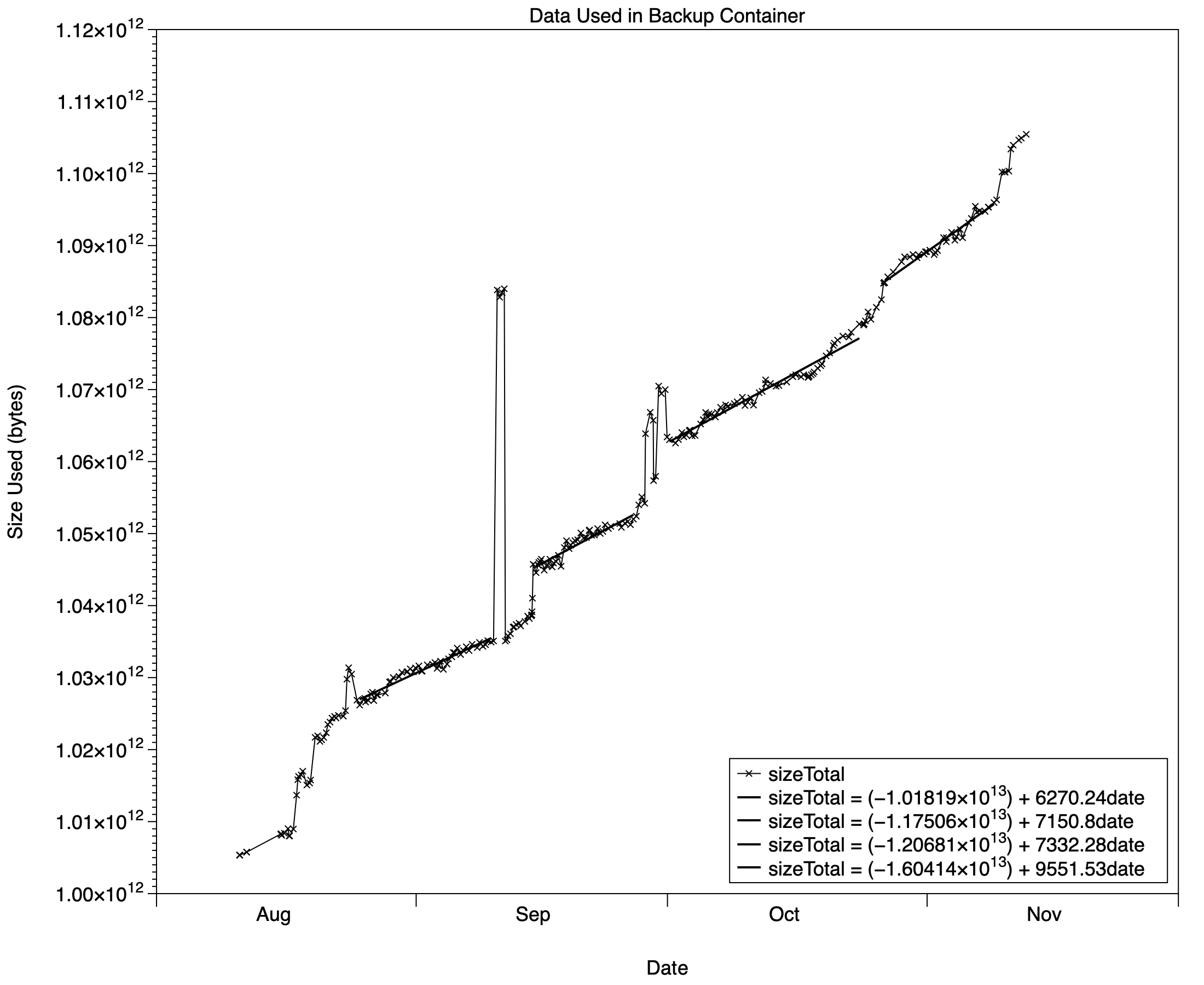
Looking at a more detailed record, extracted from DeltaFree in CSV format, there are signs that prediction may be over-optimistic. It’s based on the overall rate for the three months, and fitting straight lines to a series of segments of the data suggests the net rate may be increasing with more recent versions of Golden Gate, or maybe I’m just generating more fresh data. The slope of those lines started at 6.3 GB/week in macOS Tahoe, increased to just over 7 GB/week in the first versions of Golden Gate, but has most recently risen to 9.6 GB/week since macOS 27.2 at the end of October.
This is clearly worth watching, as I have another older set of backups sharing that SSD, and may need to thin those to free more space for my current backups.
Data volume
Although I try to keep my library of VMs and other very large files on external volumes, I do sometimes need to use them from the Macintosh HD container on the internal SSD. The result is occasional and temporary large rises in used space that normally settle back once local snapshots have been removed automatically. However, there’s a clear trend upwards, with steps associated with each macOS update, and DeltaFree currently predicts the Data volume will run out of free space in just under four years because of the upward trend.
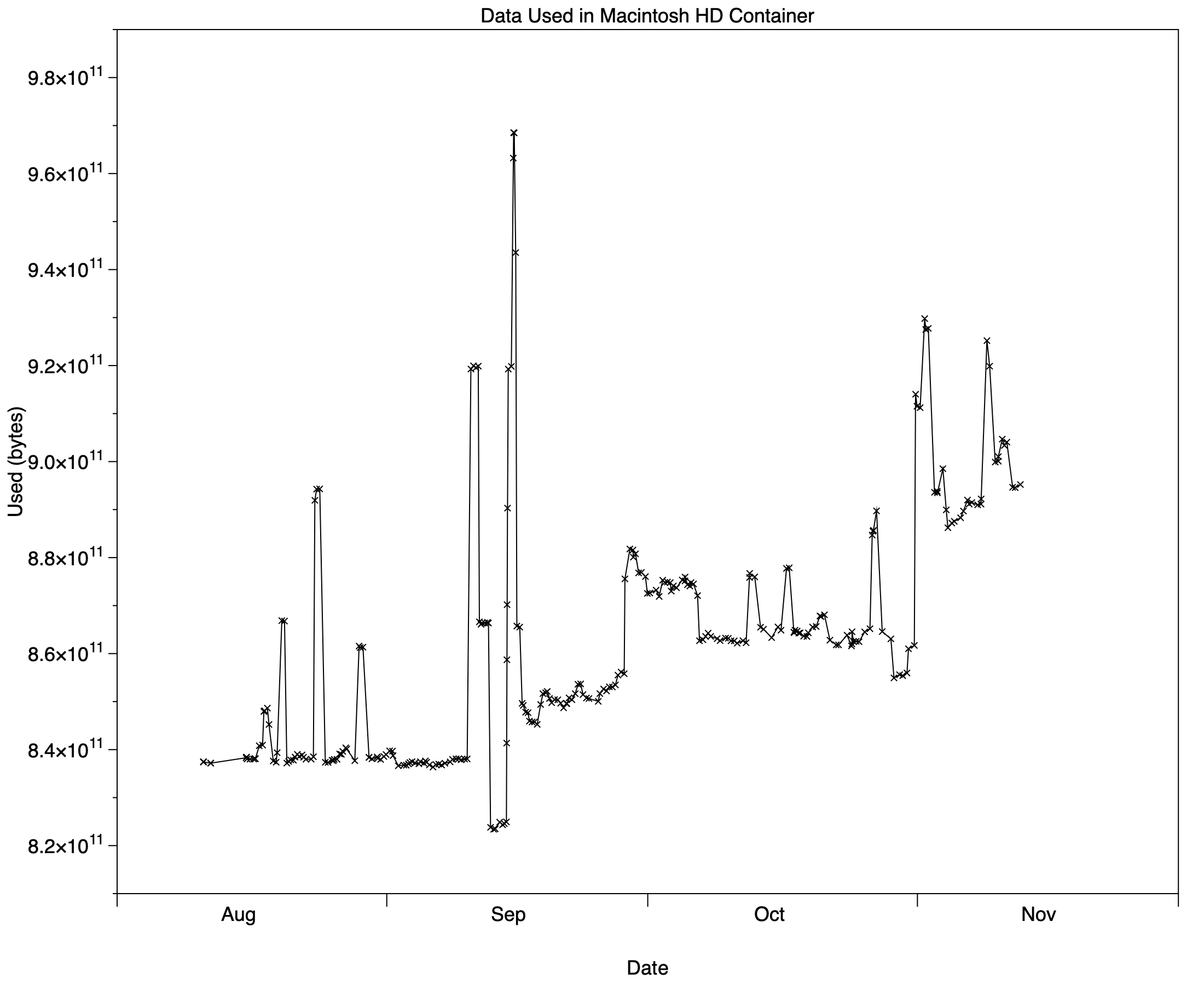
Looked at in more detail from a CSV export, there are many spikes, few of which I can associate with obvious causes such as VMs. Those have been more frequent most recently, when I have been working actively on Viable.
One of the tasks I have been testing frequently is downloading IPSW files using Viable, but to minimise impact on free space on the Data volume, those have been to an external SSD instead. To explain what is happening, I performed a download test, and obtained more frequent space estimates using DeltaFree.
IPSW download
I’ve lost count of the number of times I have recently used test versions of Viable to download the current 26 GB IPSW image file for Golden Gate. Like many apps that can download files of substantial size, it uses URLSession.shared.downloadTask() to do this in the background. That downloads the file to a temporary location, from where it must be copied to the final destination once downloading has completed, and that temporary location is almost invariably in the Data volume. To see how that affects free and used space I measured those on the Data volume, the destination SSD, and backup storage over the period of an hour that it took to download and move the file.
DeltaFree’s new condensed plot comes in handy here, as it shows measurements for the whole period. If that happens to be less than a day, it reveals finer detail than the single-day scrolling plot.
Here are the results from the three volumes concerned.
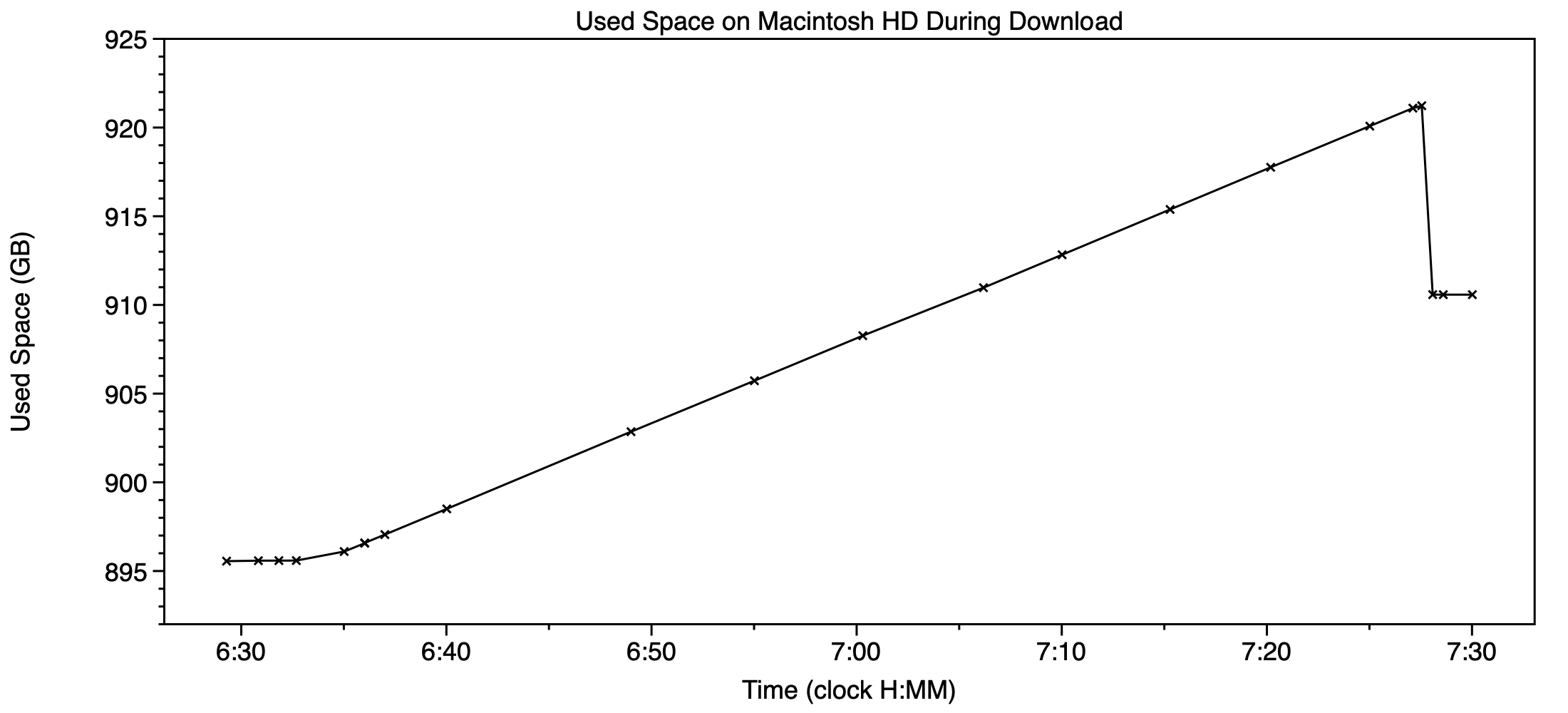
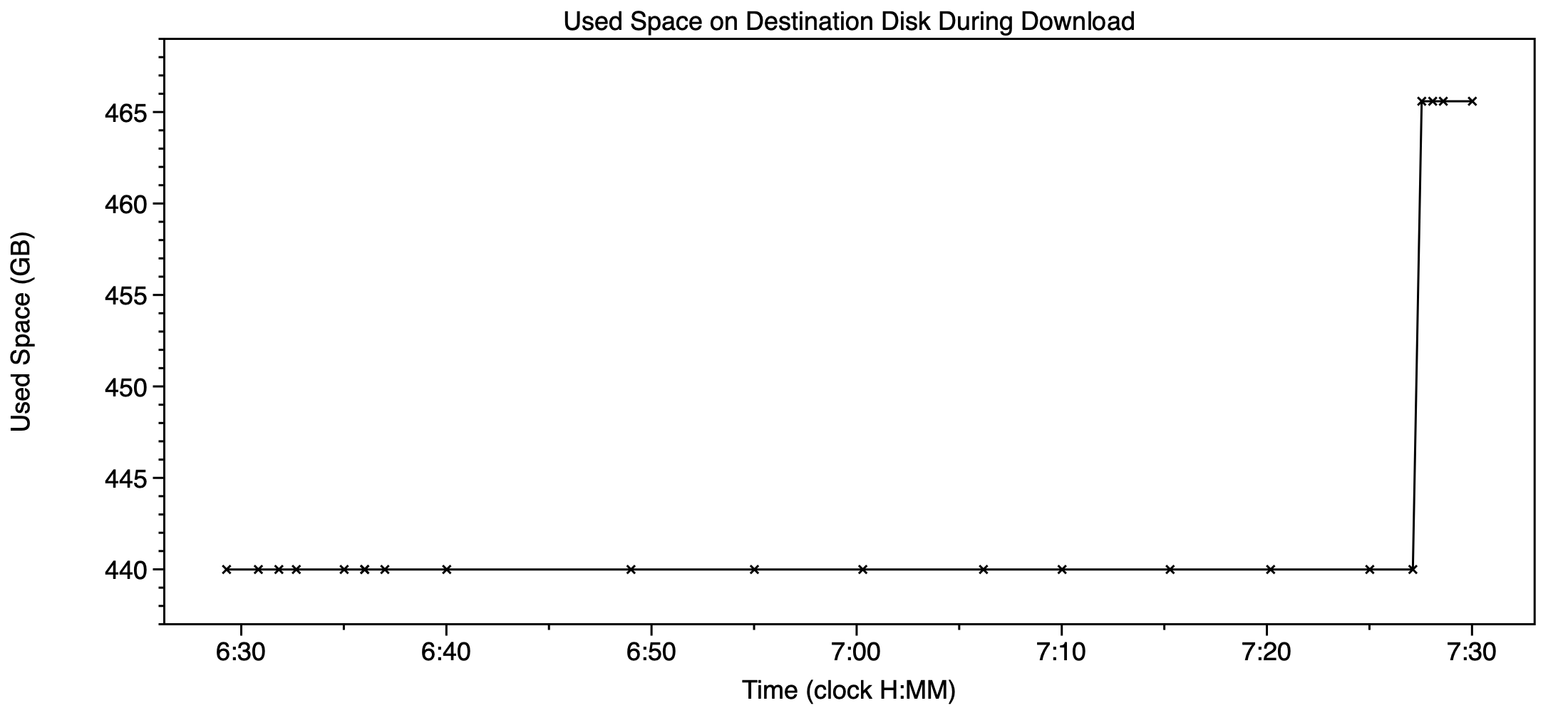
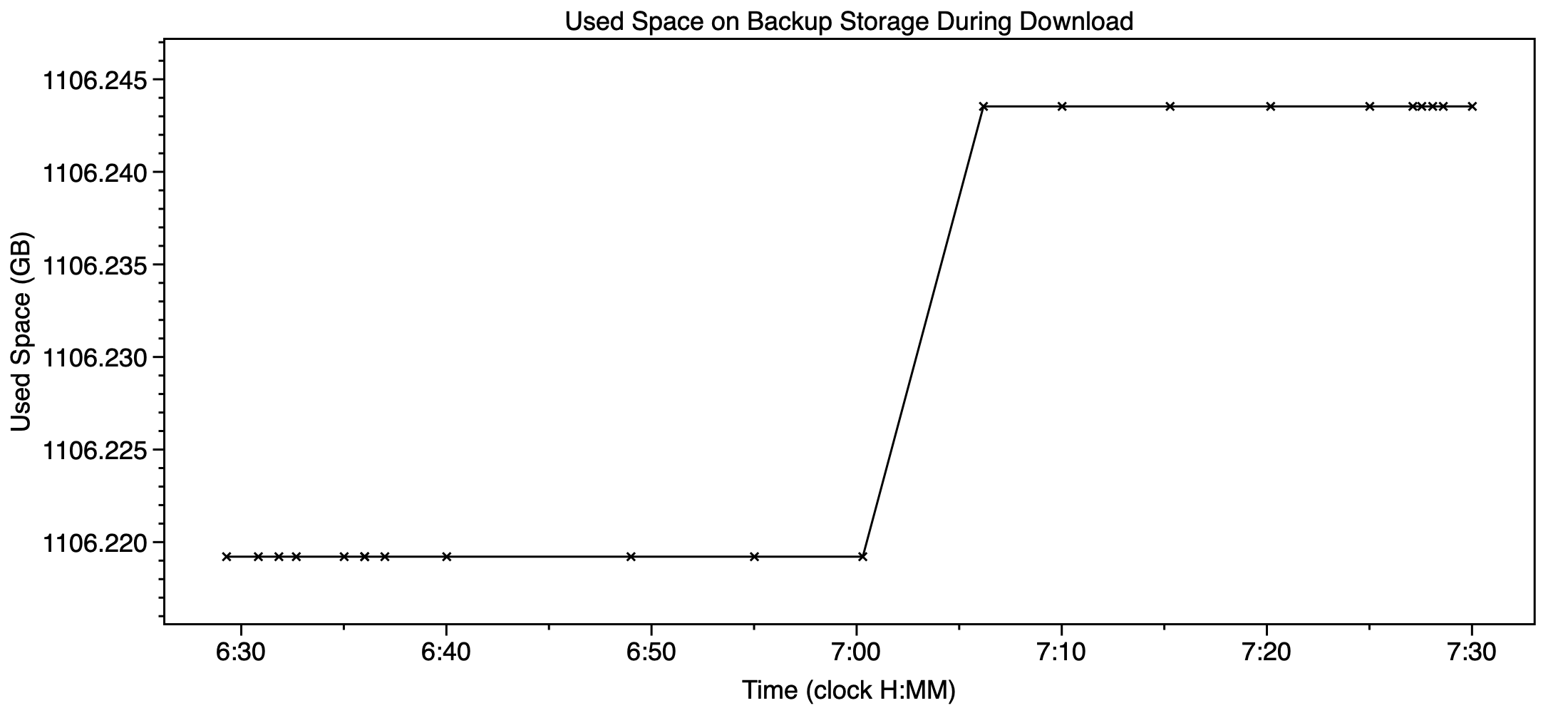
Download to the temporary location in the Data volume was started at 06:33, and between the measurements made at 06:32 and 07:27, used space increased by 25.64 GB. Once that was complete, the file was copied to appear on the destination SSD as 26 GB at 07:27. At that point the temporary download file should have been deleted from the Data volume, but its record shows that only 10.65 GB of free space was recovered from that.
The reason is shown in the record of used space on backup storage, which includes a rise at about 07:05 corresponding to Time Machine making an automatic backup of the Data volume. From the tiny size of the backup, just 24.3 MB, the temporary download file was successfully excluded from that backup, as it should have been. But at the same time a snapshot was made of the Data volume, and that contained some of the temporary download file.
Recall that a snapshot contains the data required to roll back to that volume at the time that snapshot was made. At about 07:05, only about 15 GB of the download had been saved to that temporary file. The balance of just over 10 GB was downloaded after the snapshot, and that’s all the space that could be recovered when that temporary file was deleted. The snapshot made at about 07:05 was thus 15.05 GB in size, as reported in Disk Utility for its ‘private’ size.
The remainder of the temporary download file won’t be deleted fully and its space recovered until the next backup after 07:05 the following day, once that snapshot is more than 24 hours old and will be deleted automatically. Until then, reported purgeable space will be about 15 GB greater.
Key points
- Keep an eye on changing backup rates, and their effect on predicted duration of free space on backup storage.
- Used space on the Data volume may change greatly, although most larger changes will settle when snapshots containing temporary files are removed after 24 hours.
- When a snapshot is made during a large download, even for files to be stored on another destination volume, it can include and capture substantial amounts of that download.
- If you work with large files, even if they’re stored on external volumes, keep plenty of free space for your Mac’s Data volume. It might need it at times.

