
Most file systems provide two methods for referring to files and directories: a numeric identifier most widely known as the inode number, and a path and name within a hierarchical directory system in the URL. As humans aren’t very good at remembering large and arbitrary numbers, we normally only use paths from URLs. These methods are also the basis for linking to files and directories, as hard and symbolic links respectively.
URLs and symlinks are so popular they’re almost universal, but suffer one huge disadvantage: they’re notoriously fragile. A minor change in one character in part of a file’s path is fatal and breaks the whole link.
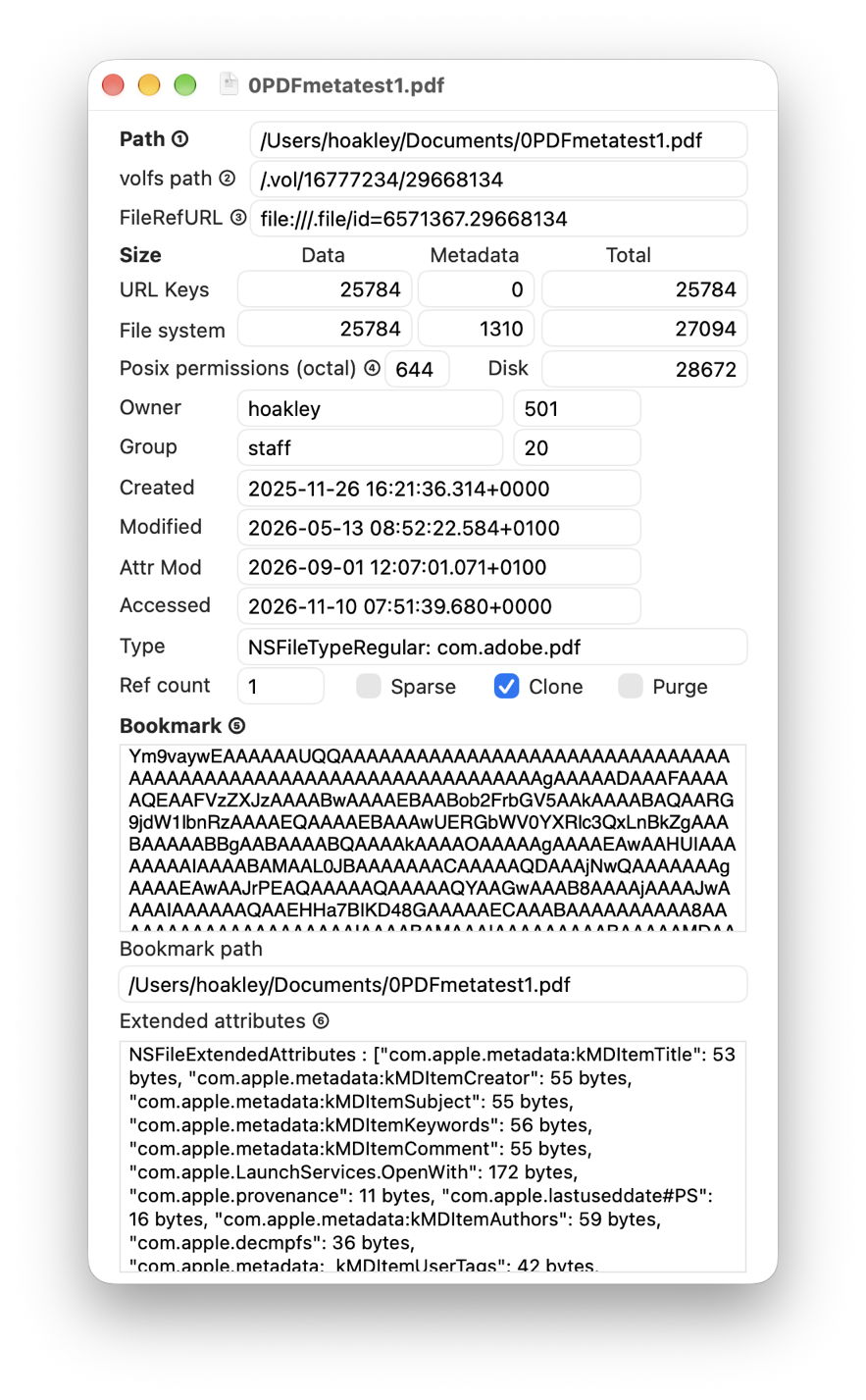
For example, I have a file in my Documents folder at the URL path of /Users/hoakley/Documents/0PDFmetatest1.pdf, with the inode number 29668134. A symlink or other reference to that file’s URL path breaks when I rename my Documents folder by dropping its last letter, or when I move that file to /Users/hoakley/OldDocuments. I could instead use that file’s volfs path, which gives a combination of volume ID and inode number, as /16777234/29668134, and is robust to most changes except moving the file to a different volume, when both will change.
More data
Aliases and Bookmarks are two formats for a more robust alternative. They contain more information about a file or folder, including:
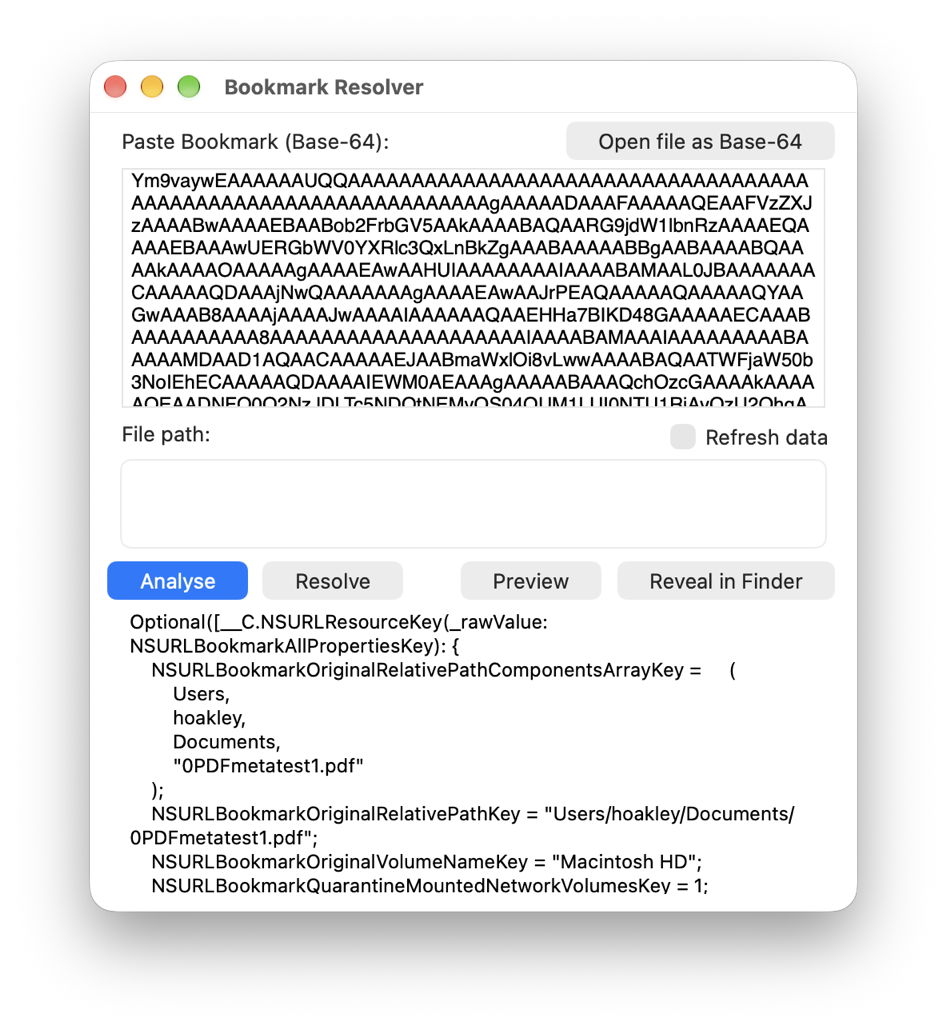
- NSURLBookmarkOriginalVolumeName = “Macintosh HD”
- NSURLBookmarkOriginalRelativePath = “Users/hoakley/Documents/0PDFmetatest1.pdf”, as might be used in a symlink
- NSURLBookmarkOriginalRelativePathComponentsArray = [Users, hoakley, Documents, 0PDFmetatest1.pdf]
- NSURLFileID = 29668134, that item’s inode number
- NSURLCreationDate = “2025-11-26 16:21:36 +0000”
- whether the item is a directory, regular file, symlink or volume.
A Finder Alias is a standalone file containing those data, and a Bookmark is essentially the same information encoded in Base-64 ready to be embedded inside another file such as a property list containing a list of files.
Instead of creating a symlink to a file or folder, you could instead create a Finder Alias to it. When LaunchServices adds the file 0PDFmetatest1.pdf to an app’s list of recently opened documents, it does so using a Bookmark to the file rather than a URL path. If you don’t open that app for the next six months, during which time that file moves about, when the app tries to open it as a recent item, its Bookmark will be used, and should resolve to locate that file in spite of those changes.
Resolution
With the additional data in an Alias or Bookmark, the process of identifying a file or folder can be made more robust to changes in the file system. First, it can attempt to resolve the current location of that item using the original path from its URL. If that doesn’t succeed, it can locate the item using its inode number instead. It could then fall back to looking at the path components to see if it can find an item with the same creation date and other details. Those currently can’t use a hash of the file’s data as a further check of its identity, as those are liable to change and are more fragile than others.
This becomes particularly important in what are known as security-scoped Bookmarks.
When an app runs in a sandbox, its entitlements limit its access to files outside that. If it needs access to a file of the user’s choice, through a file open or save dialog, that file can be referenced by a saved Bookmark. When the app then needs access to the same file later, as the user has already granted access to it, rather than repeating the process of obtaining access, it can use the saved Bookmark, referred to as a security-scoped Bookmark. This can survive restarting and other changes that make a plain path fail, and remain open to abuse.
Creating and resolving Bookmarks
Aliases can be created and resolved in the Finder, and as Bookmarks are normally saved as chunks of Base-64 encoded data without a direct method to create or resolve them. If you come across a Bookmark in a property list or elsewhere, you can do that using my free utility Precize.
Drag and drop a file or folder onto Precize and it reveals almost everything you might want to know about that item, including its volfs path with its inode number, and a Bookmark to that item already encoded in Base-64 that you can paste into a property list or other file.
Open its Resolver window and paste in the Base-64 representation of a Bookmark and you can have that analysed and resolved to reveal details of the file or folder it refers to.
Command line
Apple designed Aliases for use in the Finder and GUI, and Bookmarks for use within apps. Neither is officially supported in the command line, which I find surprising. However, my free command tool alisma creates Aliases and resolves them.
Refresh
Over time, changes made to the file system lead data in Aliases and Bookmarks to drift from their original URL paths. It can then be helpful to periodically refresh them by trying to resolve their Alias or Bookmark. If that’s successful, the new data can be saved to the Alias or Bookmark, a task you can perform for Finder Aliases using another free utility, Alifix.
Tools
Free utilities from here include:
- Precize, to create and resolve Bookmarks, and much more besides
- Alifix, to refresh Aliases and identify those that are broken
alisma, a command tool to create and resolve Aliases.
I hope you find these useful for working with Aliases and Bookmarks.

