
You’ll probably have heard that Apple is urgently reviewing privacy protection in macOS, and intends enforcing stricter use of Full Disk Access in Privacy & Security settings. This article explains what’s going on, and why we all need to be concerned.
Privacy protection
Over the last decade threats to the privacy of our data have both changed and grown substantially. Although some reflect the rising success of stealer malware, the greatest threats to most users come from the apparently benign services and apps we use daily. Rather than abandoning us to fend for ourselves in this increasingly hostile world, Apple wants its operating systems to provide the tools we need to protect our own privacy, and has been building them in since macOS Mojave.
Protecting privacy is complex, and macOS protections have become increasingly complex with time. One of the early distinctions made was in folders and locations that apps and services have access to. Although Apple doesn’t provide a single, coherent list or account, at present the following appear to be those most frequently encountered:
- ~/Documents
- ~/Downloads
- ~/Desktop
- removable volumes
- iCloud Drive
- third-party cloud storage
- network volumes.
The first three are by far the most common in the majority of Macs, with Removable Volumes close behind. Others are more dependent on your hardware configuration, for example whether you use network shares or third-party cloud services.
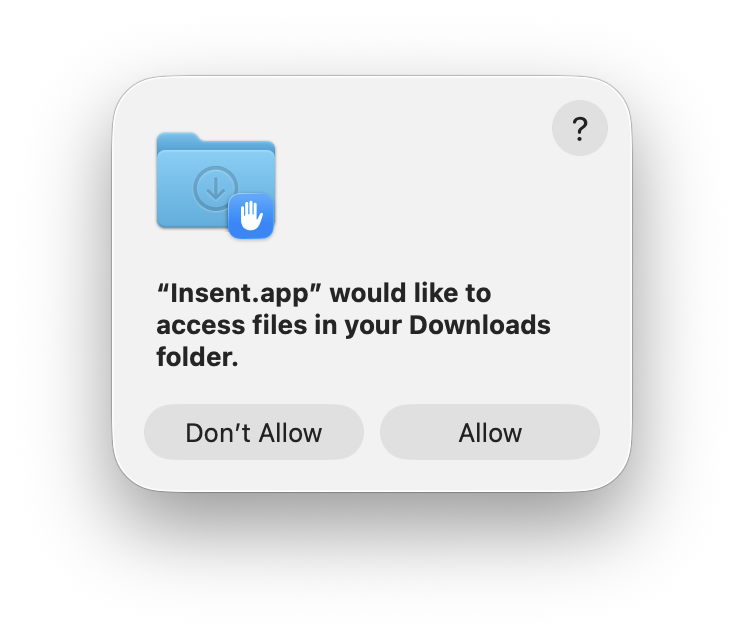
There are separate systems controlling different forms of access. When we explicitly select a file using the standard Open File dialog, we express our intent to read that file, and don’t need to separately grant that app access to that folder. Separate and tighter controls are applied to locations and files apps and services want to access without involving us, and that’s distinguished as occurring by consent, and controlled in those long lists in Privacy & Security settings.
Full Disk Access
Current settings are blunt tools. If you want an app to be able to crawl through folders inside your Home folder looking for particular types of extended attribute, or checking whether encoded Spotlight search can find files there, the only way is to give that app Full Disk Access.
This is common practice for Terminal, otherwise some of the commands we want to run won’t be allowed access to many folders or files. It’s also essential for backup utilities, or few of the files on our Macs would be backed up. Full Disk Access is sweeping, and gives access to some of the most sensitive data in the Home folder, such as the content of Messages and Mail.
AI agents
This has recently changed again with the introduction of AI agents, as available in the USA with Meta’s new app Muse. While these have some superficial similarities with features being introduced in Siri AI, there are important differences. Give Muse a goal, and it uses AI to work out how to achieve that, then runs that on your behalf. To be effective, it relies on having access to all your most private data. Muse isn’t unique, and ChatGPT agents and Microsoft Copilot assistants are rapidly heading in the same direction.
Meta states clearly that “your agent can also read info from the apps on your computer, such as iMessage, Notes, Reminders, Email and Calendar”. “To let your agent use your computer, you’ll be asked to grant Muse permissions that are set and controlled by macOS, not by Meta: Full disk access, so your agent can find, read or update files. This permission covers all the files on your Mac, but your agent only uses the files and app information that you ask it to work with.”
Vulnerabilities
These agents, like the whole of AI, make mistakes. Muse’s documentation recognises that agents “may be inaccurate or take unexpected actions”. What you may not realise is that you are solely responsible for those, and anything else its agents might do. Advice offered to those starting to use AI agents is to begin with “low-risk” tasks such as reading messages rather than sending them, and only giving the agent access to specific services as it needs them. The concept of low- and high-risk tasks should be ringing alarm bells.
Because of their nature, agents are also inherently vulnerable to external manipulation using techniques such as prompt injection, where crafted content is intentionally presented to the agent as directions that steer it away from its original intent. Muse has already had security vulnerabilities detected and reported by Patrick Wardle of the Objective-See Foundation.
AI agents maintain logs of their activity, but nothing as detailed and auditable as Apple Intelligence Reports. Even if you spend time studying those logs, they can only tell you what has already happened.
Changes coming
Whether or not you would ever want to unleash AI agents on your Mac, Apple does need to refine Full Disk Access as a matter of urgency. But its design and engineering cannot be rushed. Merely adding to the complexity of current Privacy settings wouldn’t help users, many of whom already find privacy protection confusing and opaque.
An alternative approach would be more radical, and that would be to consider AI agents as potentially malicious code, which they are by their vendors’ own admissions. Apple would then have good grounds for refusing to notarise them, and would be obliged to exclude them from its App Stores. Despite the strength of that case, I don’t see Apple being as confrontational, and it will try instead to refine the existing Full Disk Access to encourage users to limit the damage that AI agents could do. It remains to be seen whether that proves effective.
I don’t think any of us had expected macOS Golden Gate to restrict what AI can do.
Recommendation
According to its documentation, Muse’s AI agents “may be inaccurate or take unexpected actions”, but can be trusted to “only [use] the files and app information that you ask it to work with.” And if anything does go wrong, you are solely responsible. If you are tempted to try AI agents in Muse or any other third-party product, don’t grant them Full Disk Access until Apple has fully addressed the issue of privacy.

