
If you’ve arrived here expecting to read about urinary tract infections, this article may come as a surprise, as it’s about Uniform Type Identifiers in macOS.
Associating file types with apps is one of the fundamental requirements of the GUI in macOS, and has been since the first Macintosh. It’s most obvious when you double-click a document to open it in the app you expect, and pervades other features of the GUI. However, this only applies to the Finder and GUI; there are no inherent associations made for command tools, nor with internal access to files inside apps.
UTIs as a taxonomy
To be able to make these associations, every file (and equivalents such as bundles) accessible to the user has to be assigned a type, which macOS can then map to available apps. As there’s no generally agreed method for classifying files into types, or associating those with apps, macOS has its own system based on Uniform Type Identifiers, UTIs, which replaced its original scheme of OSTypes from Classic Mac OS.
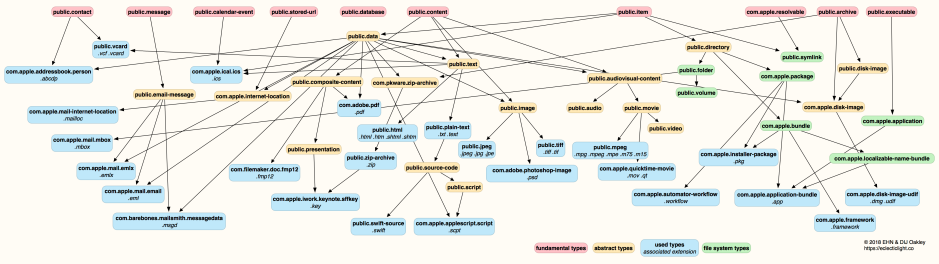
UTIs form a global object taxonomy that generalises far beyond file types. Like other taxonomies, it’s based on a hierarchy and uses structured naming conventions to accommodate new types. Names use reverse URL notation, although many common UTIs start with public, as in public.item and public.content, two of the fundamental UTIs. public.content then has children including public.image, and that in turn has public.jpeg and public.tiff, as well as vendor-specific UTIs like com.adobe.photoshop-image.
One valuable strength of this hierarchy is that macOS and apps can generalise in the types they handle by ascending the conformance tree to a more generic type, or specialise by descending the tree to vendor-specific types. Reverse URL format has the great advantage that it’s simple for developers to generate unique UTIs, as they use their own URL, so no global registry is necessary.
UTI library
macOS comes with a great many UTIs pre-defined to support many common types, and those used by bundled apps. Many of those aren’t public types, for example PDF files are still attributed to Adobe as com.adobe.pdf.
Additional UTIs are defined by apps in their Info.plist. For example, my app LogUI exports a type declaration for its custom document type co.eclecticlight.loguilog, described as a LogUI Log file, and conforming to (inherited from) public.json, as it uses standard conventions for that file format. An app’s Info.plist also declares any roles it assumes for specific UTIs, in this case as an editor of LogUI Log files with their custom UTI. That informs LaunchServices which document types it should be associated with.
Associations
A full UTI variable is a structure of UTIType containing the UTI itself, together with other information about it, and a tag specification with definitions of how it can be recognised. In this case, those include a filename extension (itself with a UTI of public.filename-extension) given as logui, and a MIME type (public.mime-type) of application/json. Together those are used by macOS to recognise files with the UTI of co.eclecticlight.loguilog as those with an extension of logui, or downloaded files with a MIME type of application/json.
If your Mac doesn’t have a copy of my LogUI app installed, it doesn’t know the UTI of co.eclecticlight.loguilog. Append the extension of logui to a file and macOS will associate it with an ad hoc dynamic UTI such as dyn.age81u8p4, and won’t know which app to associate it with. When a copy of LogUI is present, though, macOS will look up the UTI for any files with that extension, and recognise their UTI of co.eclecticlight.loguilog. This is why attaching information about a document’s UTI to a file serves no useful purpose, in the absence of LogUI.
When LogUI is installed, double-clicking a file with the extension logui results in LaunchServices looking that up in its database, where it’s associated with the one UTI co.eclecticlight.loguilog. LaunchServices thus recognises that it needs to open the file using LogUI. This association extends to other parts of the GUI, including file types and extensions supported in File Open and Save dialogs, where they’re specified by the app calling that action, and in lists of suitable apps to open specific documents. However, outside the GUI, UTIs and extensions rarely have any significance: a command tool can normally be used with files with any extension, and code inside an app can similarly read and write files of any type.
As I’ve explained elsewhere, Spotlight indexing and QuickLook preview generation use additional methods of type checking based on sniffing the file data, but LaunchServices and other subsystems associated with the GUI rely on UTIs and their associations.
Conflicts
While UTIs should invariably be unique to each type of file, and no clashes should occur, filename extensions and MIME types aren’t as well-behaved. This stems from limitations of other operating systems and poor decision-making on the part of developers. Part of the art of developing robust UTITypes is checking whether filename extensions and MIME types will be unambiguous, or could result in a clash. While even the most callous will avoid trying to reuse a common extension such as txt, some fail to avoid other conflicts, often because they want a short extension with no more than three characters and don’t search thoroughly for potential conflicts.
Currently macOS makes no attempt to identify conflicts in filename extensions: associations set in the standard UTI library take precedence over any others set by third-party apps, and those between third-party apps appear to be determined arbitrarily without the user being warned of the conflict, on a first-come first-served basis. There’s clearly room for improvement here, although all resolutions are going to appear arbitrary for someone.
Key points
- UTIs and file types are required to support the Finder and macOS GUI features, by associating file types with apps.
- macOS has a library of standard UTIs covering a great many common file types.
- App Info.plist files can add to that library, and declare associations for that app.
- File types are recognised by filename extensions or MIME types (or OSTypes in the past), which are mapped to a UTI.
- In the event of more than one UTI claiming a filename extension or MIME type, that defined in the system library takes precedence.
- Third-party developers are responsible for ensuring any custom UTIs they define don’t conflict with others, particularly those in the system library.
Further aids
Tony Smith’s account of UTIs and utitool
Wikipedia
Apple’s current developer documentation
Apple’s UTI overview, 2015
Apple’s UTI Reference, 2009
Free UTIUtility with extensive documentation.

