

Each time I hit a problem with Spotlight not indexing the contents of files, the answer seems to come from one command tool, file, affectionately known as file(1) to distinguish it from all other files. We’ve had the LG error, where Spotlight’s RichText.mdimporter refused to even look at the contents of text files whose first two characters are LG. Then it became clear that there are similar problems with those starting with HPA or Draw. Only this week I’ve reported inconsistent behaviour with indexing the contents of JSON files that also appears to be the result of misidentification.
The current version of my Spotlight testing utility SpotTest offers a drag and drop feature to display information about files using mdimport and mdls, but until now hasn’t ventured as far as file(1). A new version, SpotTest 1.3 puts that right and adds file(1)‘s opinion of the type of each file, and correctly explains all the misbehaviour I’ve seen so far.
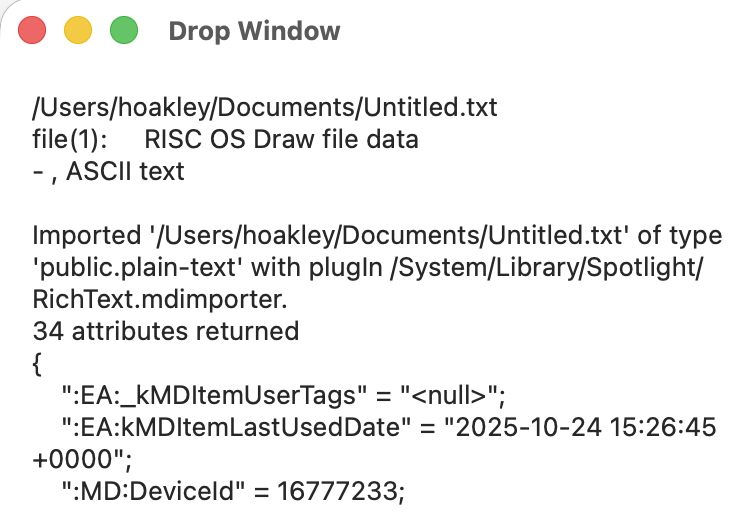
file(1) is an old tool, and turns out to be more sophisticated than I had expected. To get the best from it, SpotTest calls it with its -k option, so it gives its complete opinion about the file’s type.
To determine a file’s type, file(1) undertakes a sequence of tests in a fixed order. When the first test successfully identifies the file, it stops and returns that result. But the -k option ensures it continues, and returns later results from the sequence as well.
The sequence runs:
- filesystem tests using the
stat(2)call to identify types such as sockets and symlinks, that aren’t likely to be contributory here; - ‘magic’ tests to ‘sniff’ the contents of the file and compare its early bytes with a huge library of ‘magic’ bytes. These are tests that can misidentify a plain text file as something weird and wonderful from donkey’s years ago, instead of what to you and me is blindingly obvious;
- language tests to first classify a text file that doesn’t have any ‘magic’ bytes in terms of its text format, then to look for words that might indicate which language the text is in. These can also identify special text formats such as tar archives and JSON files.
Anything that passes through all three tests without being identified is then dismissed as mere data.
You’ll note that nowhere does file(1) ever consider the file’s declared UTI or the filename extension, which everyone else seems to think are decisive in macOS.
Ordinarily when you use file(1) it responds with a single-line answer. In SpotTest it shows all its working, giving the ‘strongest’ solution first, and others after that with a hyphen at their start.
SpotTest version 1.3 for macOS 14.6 and later, including Golden Gate, is now available from here: spottest13
from Downloads above, and from its Product Page.
Have fun!

