

Having discovered one reliable cause for some documents not being opened as expected when they’re double-clicked, I’ve been looking at how to work around that problem and restore expected behaviour. This article offers a solution.
I know from testing that removing or disabling the com.apple.quarantine extended attribute will immediately enable a document to be opened with a double click, in circumstances where it otherwise fails consistently. This provides two potential solutions: strip that xattr altogether, or change it to alter the behaviour of macOS.
When apps and executable code bearing quarantine xattrs clear quarantine successfully, one bit in that xattr is changed to indicate that. A status of 0082 becomes 00c2, for example, with the third block of four bits going from 1000 to 1100.
Although I have seen that occur in non-executable files, it appears unusual there. Another single-bit change that can achieve the same effect on document files is to change the first block of bits from 0000 to 0010, reflected in the leading digit changing from 0 to 2. I’ve not seen that used in the quarantine of executable code, so it may be confined to non-executable files.
While doing that on test PDF and other documents allows them to be opened from a double-click, it has the opposite effect on Zip archives, which then can’t be opened by Archive Utility either by a double-click or drag-and-drop. That’s encouraging, as setting the bit in the third block would be dangerous as it would then bypass Gatekeeper checks on downloaded apps and executables.
So my preferred strategy is to change the quarantine status digits from 0xxx to 2xxx.
If an app were to perform that, it needs safety checks. To ensure it doesn’t bypass Gatekeeper checks on executable code or scripts, it should refuse to change files whose UTI type contains script, package, archive, executable, java or application. It should also not meddle with bundles or their contents, which could contain malicious files, nor of course with apps. It should also be confined to changing only leading zeroes, in case other bits in that digit are used for other purposes.
This is exactly what my new app Quarant2 does.
To ensure you can only perform this change on files you explicitly select, it doesn’t work through the contents of folders, only separate files you drag and drop onto its window.
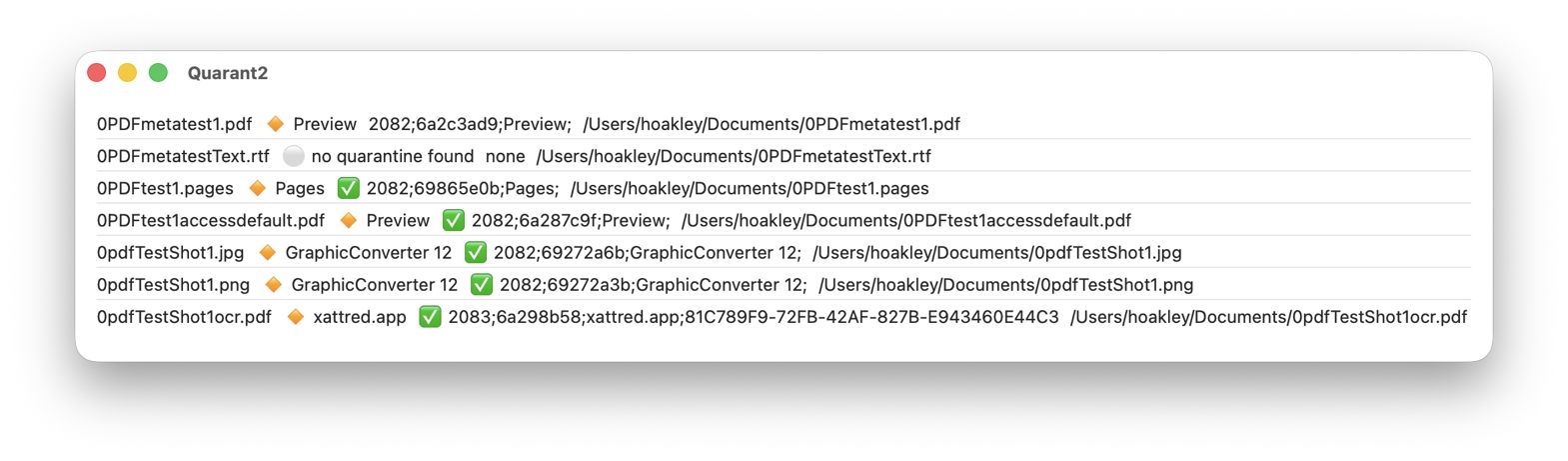
For each file that you drop onto the app’s window, Quarant2 provides the following information:
- the full name of the file;
- the name of the app that put it into quarantine, read from the quarantine xattr, prefaced by 🔸;
- the full text of the quarantine xattr after any change made to it, prefaced by ✅ if Quarant2 has changed it;
- the full path to the file.
When Quarant2 encounters a problem, can’t or won’t change the xattr, it shows ⚪️ instead of 🔸 and gives the reason. If you want to record any of those from its window, select and copy them, ready for pasting as text.
The first version of Quarant2 is now available for macOS 14.6 and later, including Golden Gate, from here: quarant21
Please let me know whether you think this is useful and a safe solution to the problem.

