

Ten days ago, I drew attention to anomalies in privacy protection of locations that could mislead, in that Privacy & Security settings could claim an app didn’t have access to a protected folder when it did. This article proposes an explanation, and provides further details of protected locations and their behaviour. This is based on my test app Insent version 1.2, which you can use to explore these behaviours in the comfort of your own Mac.
Procedures
For the avoidance of any doubt, Insent is a simple macOS app that doesn’t run in an App Sandbox, doesn’t have any entitlements, but is notarized. Its two features of greatest interest here are Open by consent, and Open from folder buttons:
- Open by consent constructs a folder path as a string without involving user action in an Open and Save Panel, then calls
FileManager.default.contentsOfDirectory()to list files within that folder. If that’s successful, it randomly selects a text file from those, opens it, and displays the opening part of the text contents. This is opening that file by consent, as the app is given access to that folder by user consent through TCC’s privacy controls, by consenting to the standard dialog. - Open from folder displays an Open and Save Panel (NSOpenPanel) asking the user to select a folder. The URL returned from that is then used to call
FileManager.default.contentsOfDirectory()to list files within that folder. If that’s successful, it randomly selects a text file from those, opens it, and displays the opening part of the text contents. This is opening that file by user intent, as the user has chosen that folder to be used. As a result, this doesn’t invoke TCC’s privacy controls.
Consent
The mechanism used to list the contents of a protected folder and open a file from among those is the more obvious, and better documented. Even though the app itself isn’t running in an App Sandbox, the call is intercepted by sandboxd and passed to TCC for it to check whether current privacy policy for that app should allow the request. TCC first checks whether kTCCServiceSystemPolicyAllFiles applies, with the app being given Full Disk Access. If it does, then sandboxd is advised and the call to list the directory proceeds.
If kTCCServiceSystemPolicyAllFiles doesn’t apply, TCC checks for the location-specific service, including
- kTCCServiceSystemPolicyDesktopFolder
- kTCCServiceSystemPolicyDocumentsFolder
- kTCCServiceSystemPolicyDownloadsFolder
- kTCCServiceSystemPolicyRemovableVolumes
- kTCCServiceSystemPolicyNetworkVolumes
- kTCCServiceFileProviderDomain.
If that has been given, sandboxd is advised and the call proceeds.
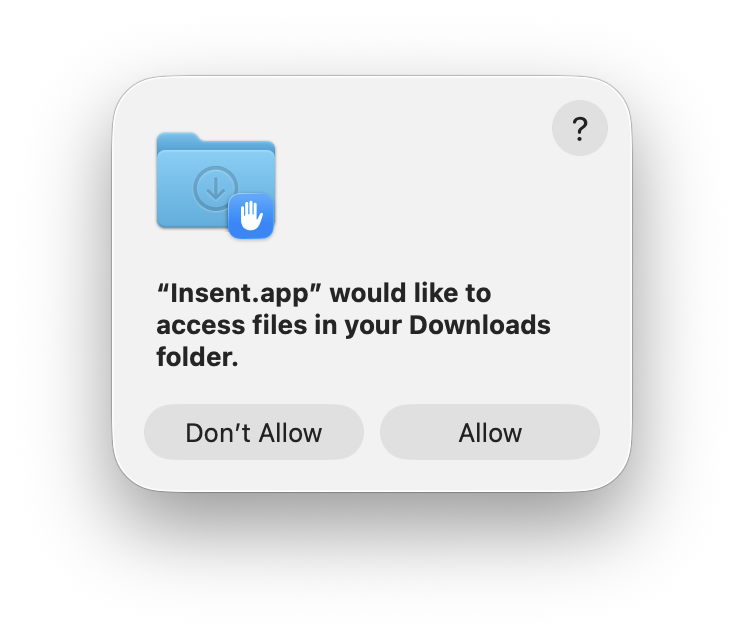
If neither of those applies, then a standard consent dialog will be displayed. If the user allows that, then the location-specific service is granted, and sandboxd advised to proceed. As these steps are all documented in detail in the log, there’s no difficulty in following them there, and diagnosing their problems.
Intent
Although the log contains details of the use of the Open and Save Panel to select a folder, when a protected folder is listed by intent, there are no informative log entries at all. For example,
0.812549 Insent sendAction:

0.812607 Insent: trying to list files in /Users/hoakley/Desktop

0.813297 Insent: trying to look in /Users/hoakley/Desktop for text files

0.813373 Insent: trying to read from: /Users/hoakley/Desktop/00vlutest1pm.text

1.173727 Insent: read from: /Users/hoakley/Desktop/00vlutest1pm.text
where the first four are written consecutively in the log.
To understand what’s going on here we have to consider how sandbox behaviour might apply. This has been explained clearly for the App Sandbox by Mark Rowe, and the most relevant section there is about Mandatory Access Control in the kernel, towards the end: “The macOS kernel (XNU) provides a Mandatory Access Control Framework (MACF) that exposes around 300 policy hooks that can be used to approve or deny specific operations at a fine-grained level. Most of the policy hooks correspond to specific system calls or operations on the kernel’s file system abstraction (VFS). As the name implies, these policy hooks are mandatory and are applied to all clients that use the system calls or perform file system operations.”
So when Insent calls FileManager.default.contentsOfDirectory() to list files within a folder, its corresponding policy hook is called with a context including the directory and the caller.
This is where the next component comes into play: any com.apple.macl extended attribute saved to that directory. We still know remarkably little about those xattrs, despite them being so common. Here I turn to Adam Chester’s early account of how they’re used for protection by user intent. These Mandatory Access Control Lists (MACL) enable the sandbox to determine whether the request to list the contents of the directory should be approved. Because this all takes place within the kernel and its sandbox extension, no entries appear in the log.
The only evidence of this happening is the MACL xattr saved to the protected directory, and making sense of that isn’t easy. Each MACL is 72 bytes, and multiple MACLs can be concatenated into a single xattr as necessary. They’re protected by SIP, so can’t be stripped in place while that’s enabled.
Because this mechanism remains within the kernel and sandbox, it’s invisible to TCC, and to its controls in Privacy & Security. If an app has gained access to a protected location by intent, then that takes precedent over TCC’s controls, and results in the contradiction seen in Files & Folders, whereby access is disabled but still takes place. This isn’t a bug, but a feature of access by intent.
Mechanisms
The following diagram summarises how I think these two mechanisms operate.
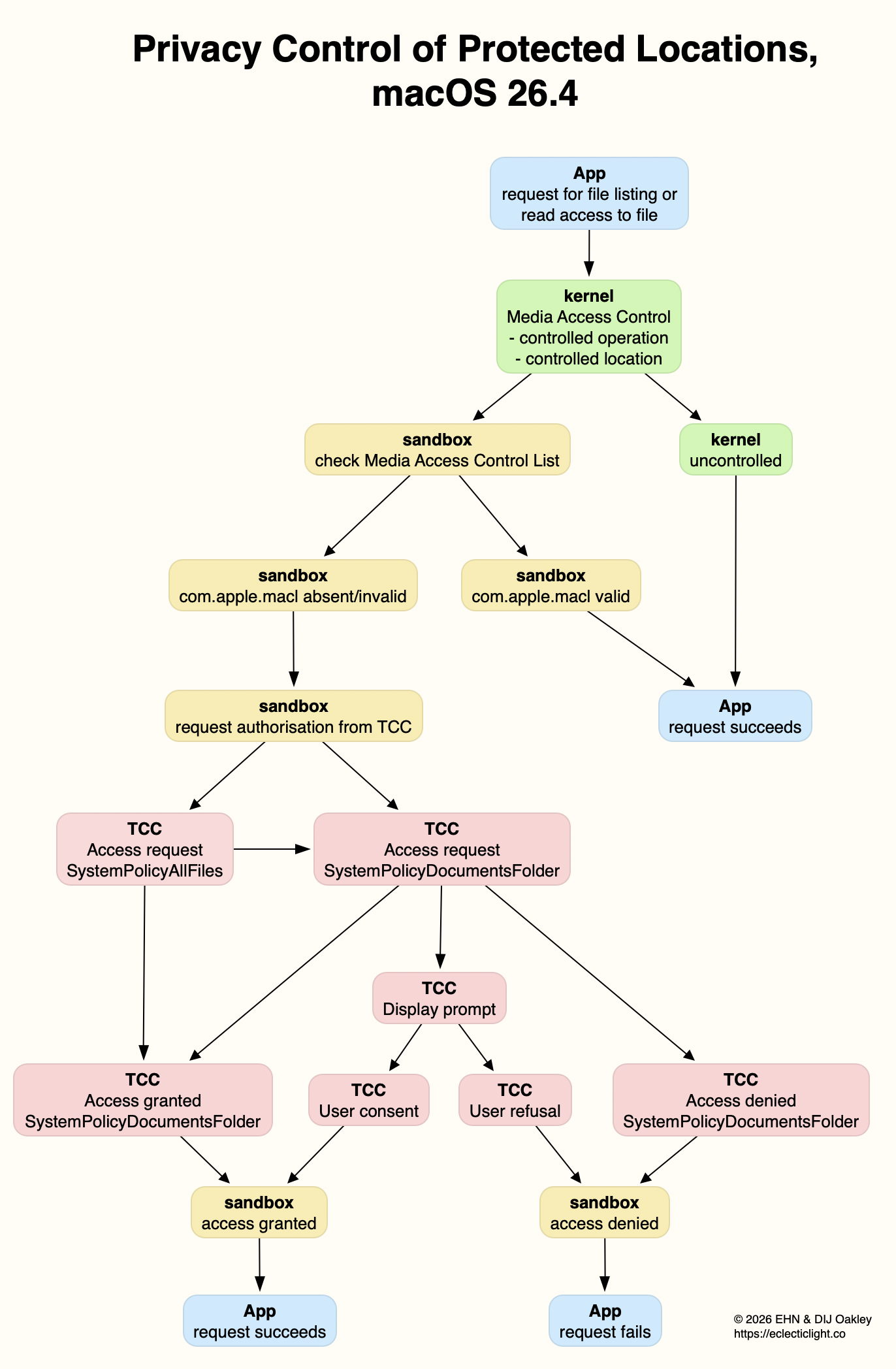
For the sake of simplicity, I have omitted the final step between access being granted/denied by the sandbox, and the app, where of course it’s the kernel that either permits the app’s request for the operation, or blocks it and returns an error. (I’m grateful to Csaba Fitzl for drawing my attention to that.)
This explains why Apple has been so reluctant to document any of this, and why MACLs are so opaque. If an app were capable of creating its own functional MACLs, they would enable it to bypass TCC’s controls and gain access to any protected location. Unfortunately, the side effect is that TCC isn’t allowed insight into what the sandbox is up to, and there’s no transparency for the user.
Overview
Even using a known and simple app like Insent, behaviours aren’t always consistent, and are susceptible to order effects and maybe even cosmic rays! There are also subtle differences between protected locations that can make generalisation unreliable. However, after extensive checks with Insent the following table gives an overview of protected locations in macOS 26.4.
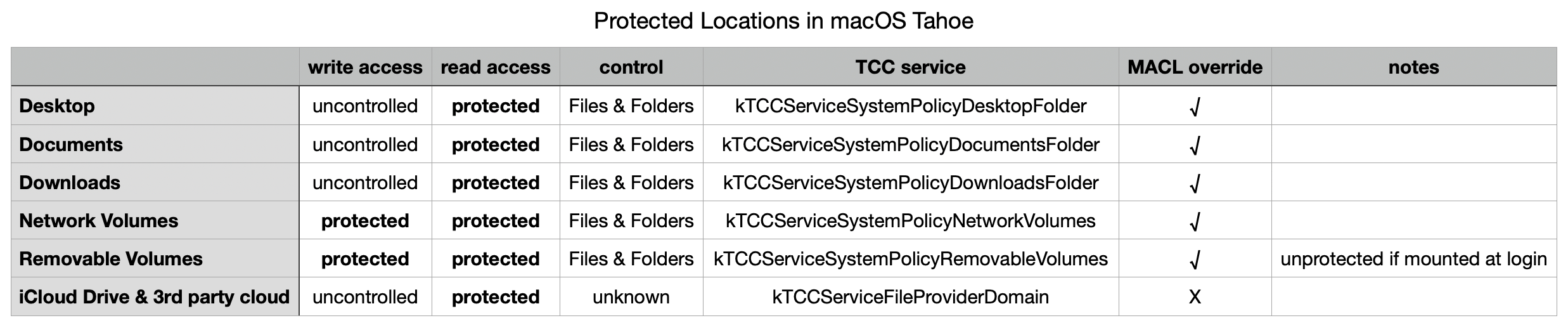
The three common local folders ~/Desktop, ~/Documents and ~/Downloads are most consistent, with controlled read access, GUI controls in Files & Folders, and can be overridden by intent using MACL xattrs. Network volumes also appear to protect write access.
External volumes that are mounted automatically during startup don’t appear to count as being removable, but any that are mounted later have similar protection for both read and write, and can be overridden by intent using MACLs.
iCloud Drive and third-party cloud storage using the FileProvider API are more difficult to investigate, as I’ve still been unable to find any GUI control. It also doesn’t appear to be overridden by intent using MACLs, although its directories can still have com.apple.macl xattrs attached to them.
In addition to using any controls in Files & Folders, all TCC controls can be reset using tccutil, for example in
tccutil reset All co.eclecticlight.Insent
and that takes immediate effect, without a restart.
Restarting may be the best and perhaps only way (without disabling SIP) to reset MACLs. Although they can appear to persist at times, and the xattrs themselves don’t change, Adam Chester points out that tokens used by the sandbox are invalidated on rebooting, so maybe existing MACLs may not remain effective following a restart.

