
For the first decade of Mac OS X there was no Recovery system. The closest equivalent had been booting in Single User Mode, which took the user straight into the command line to check and repair disks, for example. In the summer of 2011, in Mac OS X Lion, Apple introduced the first Recovery partition, complete with Disk Utility and tools to install or reinstall Mac OS X, and restore from a Time Machine backup. This was augmented by Internet Recovery, which connected to an Apple server to download a disk image containing the Recovery system, in case the local Recovery partition was damaged or unavailable.
In March 2017 macOS Sierra 10.12.4 expanded that into three different Recovery modes:
- local Recovery mode, engaged with Command-R, behaved as before, in providing the version of macOS already running on that Mac, even if a more recent version was available;
- remote latest Recovery mode, engaged with Command-Option-R, behaved differently according to the version of macOS installed. In 10.12.3 and earlier, reinstalling restored the version that came with that Mac. In 10.12.4 and later, reinstalling upgraded that Mac to the latest version of macOS compatible with it.
- remote original Recovery mode, engaged with Command-Option-Shift-R, only worked when running macOS 10.12.4 or later, where it reinstalled the version of macOS that shipped with the Mac.
With the arrival of APFS, what had been an HFS+ partition became just another volume inside the same container as the boot volume, and when the latter was divided into conjoined System and Data volumes in macOS Catalina, the Recovery volume was paired with that boot volume group in that container.

When the first Apple silicon Macs came in 2020, they had a brand new Recovery system, dubbed 1 True Recovery (1TR), run from a hidden container on their internal SSD, and engaged by pressing and holding the Power button. For security, this requires both physical contact with the Mac and a mechanical action.
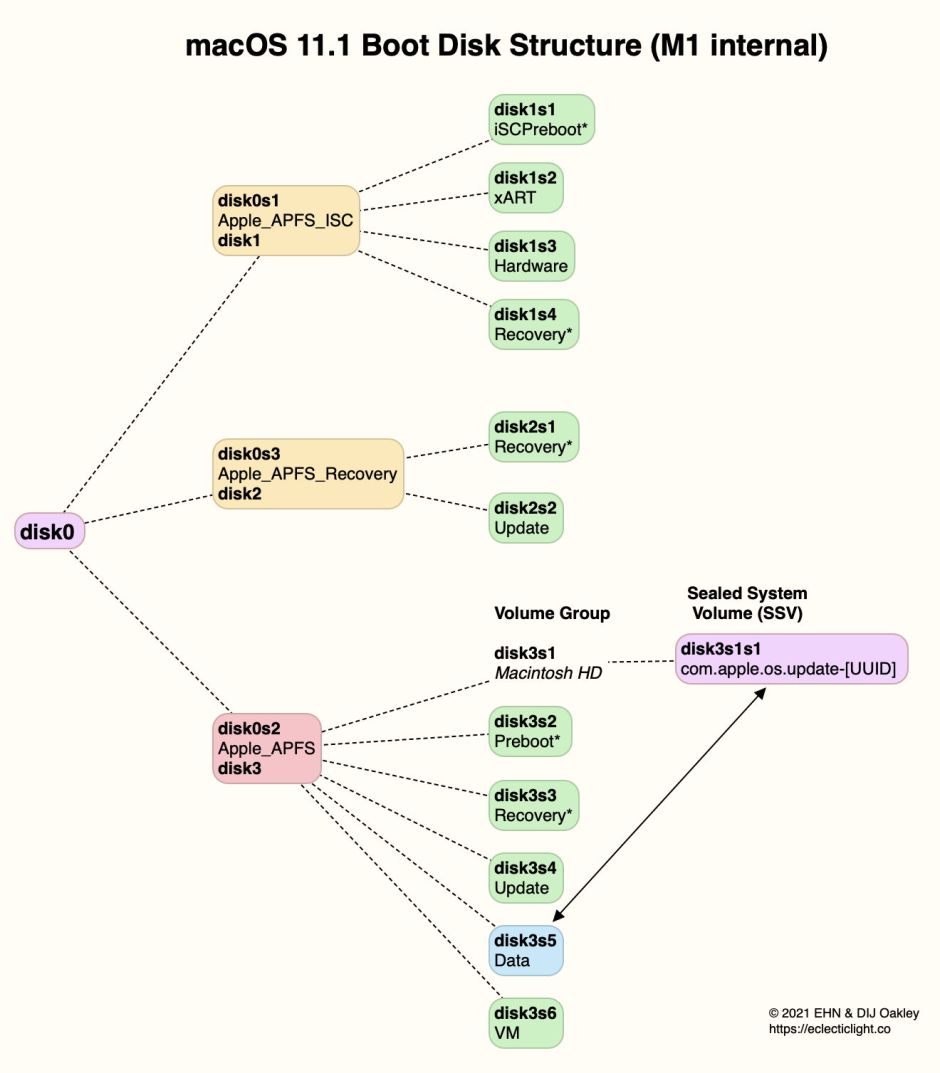
In Big Sur on an Apple silicon Mac, the Apple_APFS_Recovery container was dedicated to providing 1TR, stored in its Recovery volume. This includes a second part of iBoot and all that’s necessary for the M1’s full Recovery mode. In this scheme, there was just one True Recovery system on each M1 Mac, regardless of how many different versions of macOS it might have installed.
If you needed your M1 Mac to enter 1 True Recovery but that failed, there was a second copy of the software required for 1TR “for resiliency”, stored in the Recovery volume paired in the current boot volume group. To boot into that, instead of just holding the Power button until 1TR starts loading, you pressed the Power button twice in rapid succession, and on the second press, instead of releasing the button, hold it pressed until recovery options are reported as loading. What you then got was every bit as good as regular 1TR, with one significant exception: you couldn’t set the system security state using Startup Security Utility.
That new Recovery architecture was fine while Apple silicon Macs could only boot into the one major version of macOS, Big Sur. When Apple released the next, Monterey, it changed Recovery to cope better with those that might have two different boot volume groups installed on their internal storage. That swapped the locations of primary and fallback Recovery.
From Monterey onwards, starting up in primary Recovery using the Power button boots that Mac into the Recovery volume paired with the current boot volume group. Starting up in fallback Recovery using the doubly-pressed Power Button boots that Mac into the fallback Recovery (frOS) installed in the hidden Apple_APFS_Recovery container on the internal SSD. Now any paired Recovery volume can use Startup Security Utility, but it’s not available in fallback Recovery.

Since then there has been further economy that allows one paired Recovery volume to act as the primary Recovery system for additional boot volume groups installed within the same container.
Because the Recovery system is a sealed disk image, users can’t add their own tools to augment it. However, it has become progressively more capable, with the recent addition of Device Recovery Assistant and Repair Assistant. The diagram below gives an overview of its anatomy as of macOS 26.4.
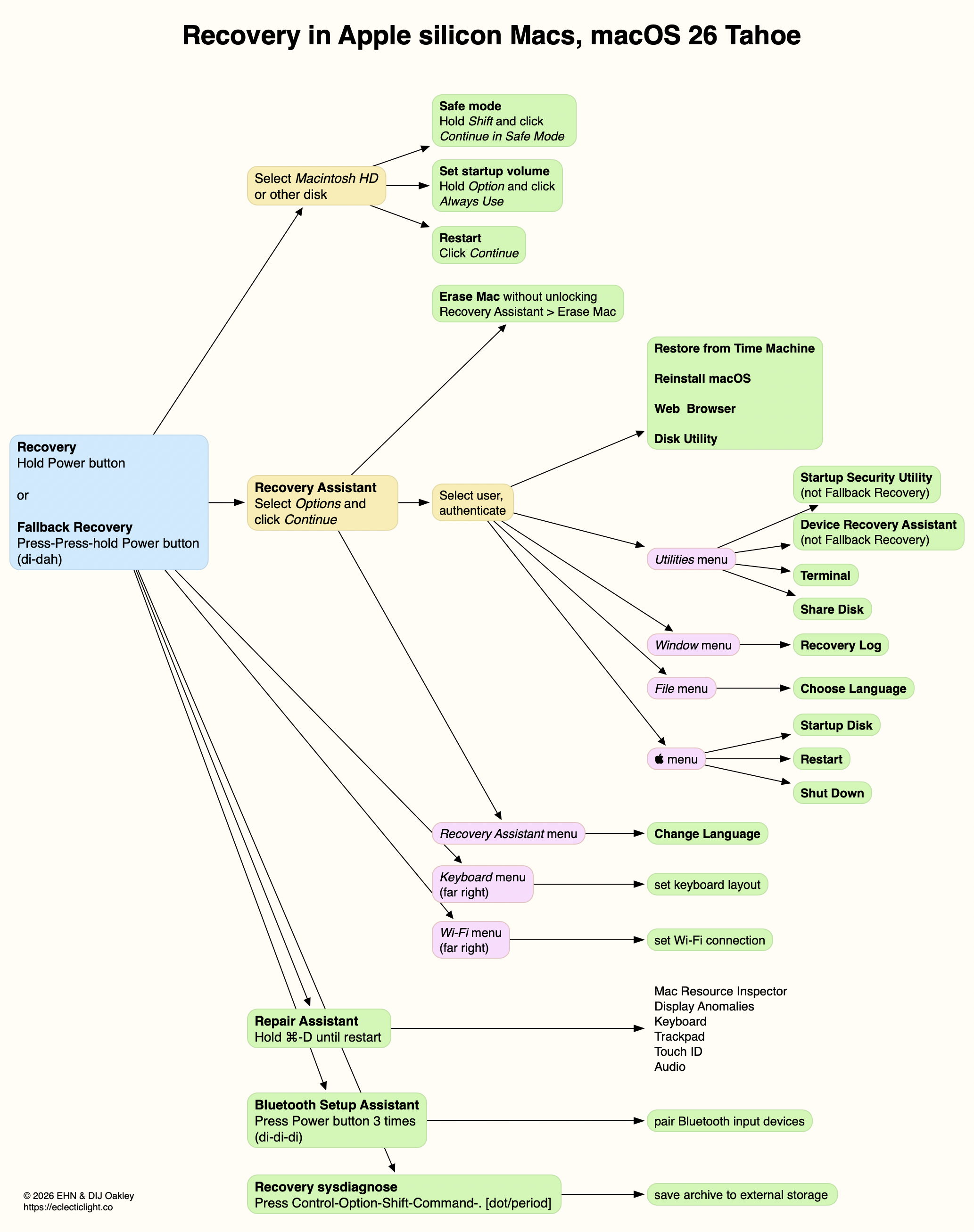
Further details are illustrated in my guide to Recovery on Apple silicon Macs.
How to enter Recovery in recent macOS
Intel Macs
- local Recovery, Command-R;
- remote latest Recovery, Command-Option-R, for latest version of macOS compatible with that Mac, over the internet;
- remote original Recovery, Command-Option-Shift-R, to reinstall the version of macOS that shipped with the Mac, over the internet.
Apple silicon Macs
- primary (paired) Recovery, press and hold Power button until entering Options;
- fallback Recovery, short press, press and hold (di-dah) Power button until entering Options.

