
Little more than seven years ago, most of us were running the final traditional version of macOS, Mojave, the last to support 32-bit code and to integrate both the system and user files in a single volume. Catalina changed that, first by requiring all code to be 64-bit, and by separating almost all system files into a System volume, with user files in the Data volume. At that stage, System was a real volume mounted read-only, but that was but an intermediate step to the modern boot volume group, with the system being an immutable snapshot of the System volume, the Signed System Volume, SSV. The latter first appeared in macOS 11 Big Sur, and with the addition of a paired Recovery volume, continues today in Tahoe.
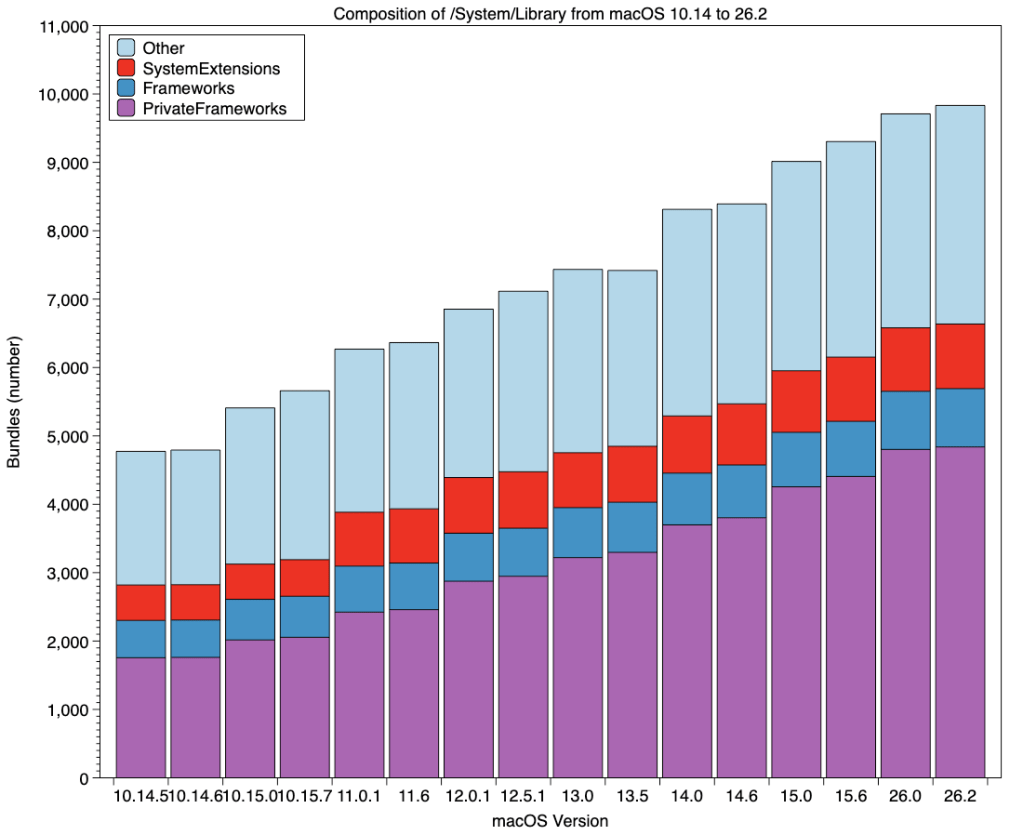
Over that period, the contents of /System/Library have grown considerably in size, as this article details. In Mojave there were just under 4,800 bundles in that folder. Catalina’s reorganisation increased that to around 5,500, and each new major version of macOS since has added another few hundred, culminating in 26.2 with just over 9,800 in all.
Much of that growth has been in Private Frameworks to support macOS and its bundled apps and tools, shown in purple in the bar chart above. Public Frameworks have grown from 546 to 853, similar to kernel extensions, and all the remaining folders from 2,000 to almost 3,200.
Because bundled apps were only separated in Catalina, their numbers only start in late 2019, as shown in the next chart.
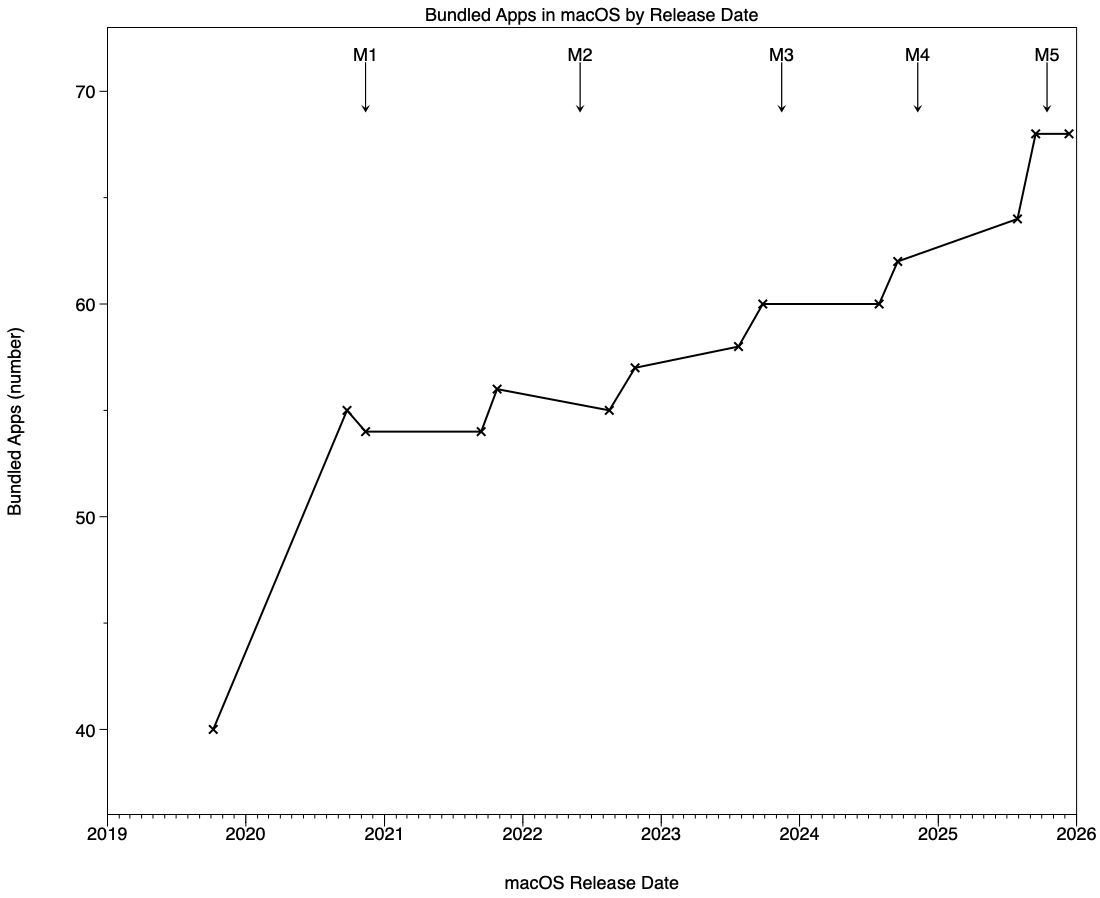
There was a marked rise for Big Sur, since when the total has risen more slowly, from about 55 to 68 today. A few have been removed over that time, such as Network Utility, and others have been relegated to /System/Library/CoreServices/Applications, as has Keychain Access since Sequoia.

The timeline of growth in the total number of bundles in the System Library folder matches milestones in Mac history. The first steep rise occurred with Catalina’s novel version of the boot volume group, and since then there have been further sharp increases immediately before the arrival of each family of M-series chips. The largest of those was for the M3 (900), with the M1 (600) and M4 (600) also being substantial.
Of all the system components that should reflect changing Mac hardware, effects should be greatest on kernel extensions.
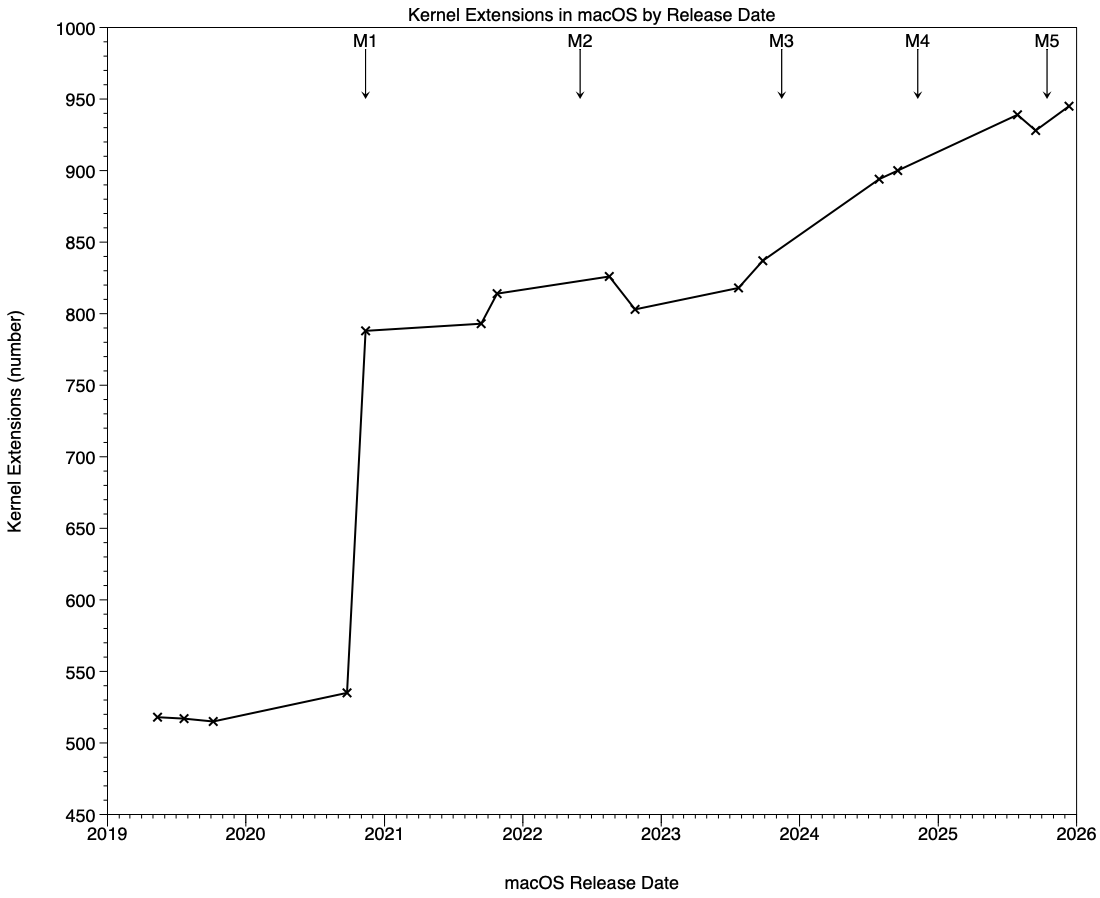
During this period of over six years the number of kernel extensions in /System/Library/Extensions has risen from a low of 515 in 10.15 to 945 in 26.2, just over six years later. Almost all of that occurred with the release of Big Sur, the first version of macOS to support Apple silicon Macs, when kernel extensions rose from 535 (10.15.7) to 788 (11.0.1). Most of those were required to support the many new hardware devices in the M1 chip. Subsequent families of new M-series chips have required fewer additional kernel extensions, although their number has been rising more rapidly since macOS 13.0 in October 2022.
Because of their structure, the directory app crawler I use to analyse each release of macOS counts most frameworks twice. More representative figures can thus be obtained by halving its raw numbers. Those still demonstrate the disproportionate growth of Private Frameworks:
- In macOS 10.14.5 there were at least 273 Frameworks and 878 Private Frameworks.
- In macOS 26.2 there are at least 428 Frameworks and 2,419 Private Frameworks.
Thus public Frameworks have risen to 157% of their number in mid-2019, and Private Frameworks have risen to 276%.
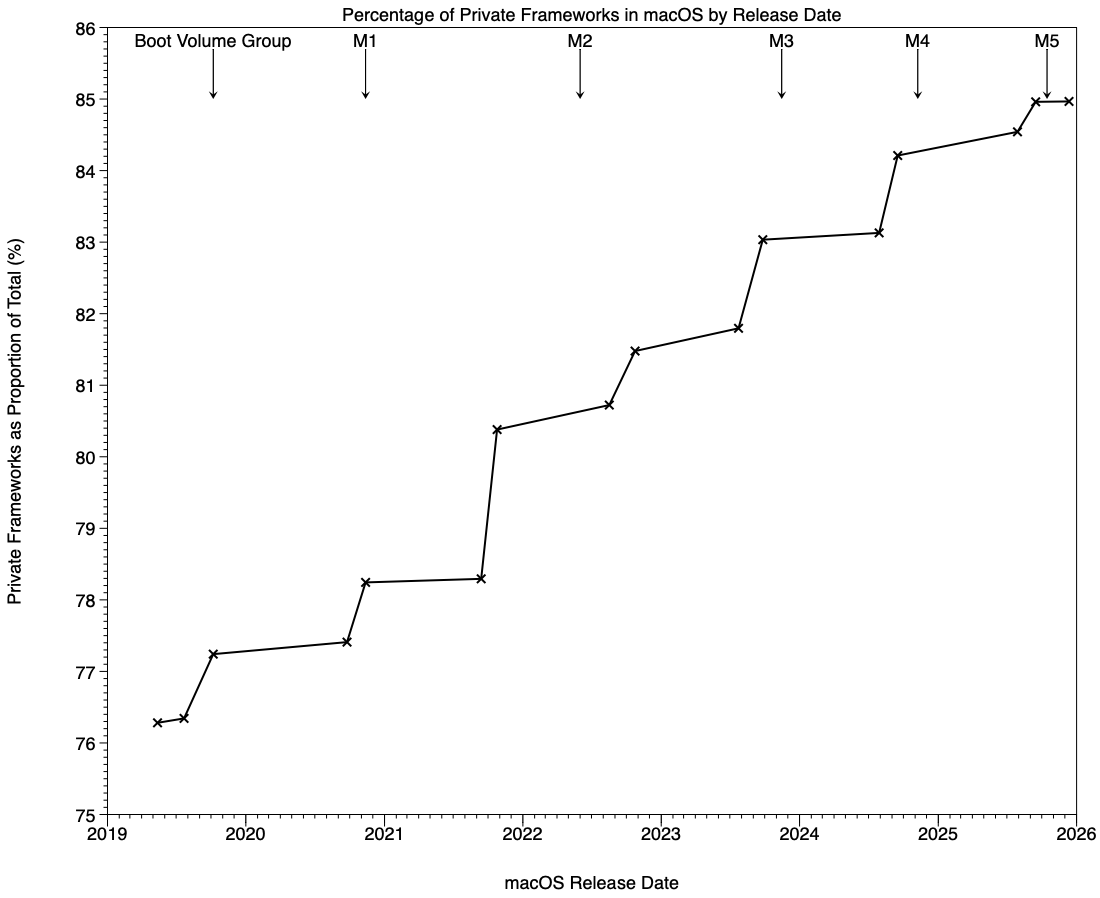
This chart provides better detail of these changes, as it gives the percentage of frameworks that were private over time. That percentage is:
PrivateFrameworks x 100 / TotalFrameworks
where PrivateFrameworks is the corrected (halved) number of Private Framework bundles, and TotalFrameworks is the sum of PrivateFrameworks and PublicFrameworks, the corrected number of public Framework bundles.
Every new major version of macOS over this period has brought a substantial increase in the percentage of Private Frameworks, rising from 76% in May 2019 to 85% in December 2025. Over that period, macOS has become increasingly private. Although the greatest increases have again largely coincided with the release of new families of M-series chips, the largest rise of all was of 2.1% with the release of macOS 12.0.1, nine months before the release of M2 Macs.
Frameworks are bundles providing resources that can be shared across multiple apps at the same time, and typically include at least one dynamic shared library, together with other resources such as images, strings and header files. Those that Apple makes public, in /System/Library/Frameworks, make up much of the macOS app programming interface (API).
An invaluable guide to all public Frameworks across macOS and device operating systems is maintained by Marco Eidinger. Look through that list and you’ll see a single public Framework for Siri, SiriKit. Compare that with those listed in the Private Frameworks for macOS 26.2 Tahoe, where you’ll see a total of 126 for Siri.
In the past, developers have been able to browse the contents of Private Frameworks directly, and where they expose header files and other information those have been readily accessible, even if they can’t be used by third-party code. Although independently distributed apps can’t be prevented from using Private Frameworks, it’s a guaranteed way of getting an app rejected from the App Store. More recently, dynamic shared libraries (dyld) have been supplied in huge caches within the OS cryptex installed by macOS. Accessing their contents is more complex, and has been explained by Juan Cruz Viotti.
Undoubtedly, much of what’s contained in Apple’s Private Frameworks is of neither use nor interest to third parties, and it’s up to Apple to determine what it exposes in public Frameworks. But this sustained high growth rate in Private Frameworks over the last six years questions how much of macOS is now private and proprietary, rather than being accessible and even open source where appropriate.
 The Eclectic Light Company