
Skip to content

The Eclectic Light Company

Macs & painting – 🦉 No AI content
Main navigation
  • Downloads
  • Freeware
  • M-series Macs
  • Mac Problems
  • Mac articles
  • Macs
  • Art
hoakley November 19, 2025 Macs, Technology

Viewing metadata in the Finder

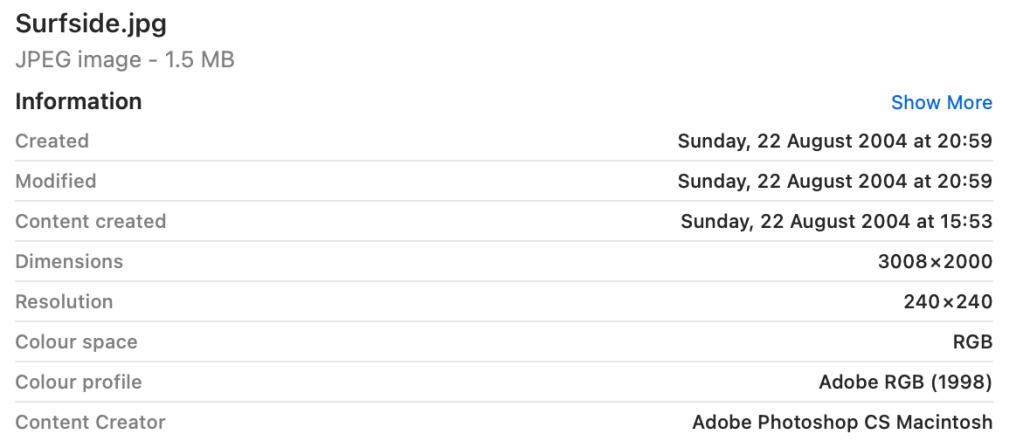
The Finder can display more information about files than their size and datestamps, and for some types of file can extend to a lot of useful metadata. These are shown in the Preview pane containing the file’s QuickLook thumbnail, in the Get Info dialog, and some can be added to the columns shown in List View. This article explains where those come from, and how you can customise what the Finder displays.

Metadata collection

Within a second or two of a new file being created, or an existing file being saved, Spotlight’s indexing services analyse that file and extract both metadata and, where possible, content to be added to that volume’s indexes. Metadata that is common to most or all files, including datestamps, and the contents of any extended attributes, that might include titles and keywords, is indexed separately from that extracted from a file’s contents.

In between those are metadata embedded in file data. They’re specific to certain types of file, for example EXIF metadata that is commonly included in images, so are extracted by the specialist mdimporter for that file type, then incorporated into the indexes on that volume.

Finder display

When you select an item in a Finder window showing the Preview pane (typically in Column View), two chains of processes are started. One calls on QuickLook to return the thumbnail to be displayed in the upper section of the Preview pane, the other starts a metadata query at a high Quality of Service (25, userInitiated), which is passed to SpotlightServer, and access to that data is checked by TCC. Once approved, the metadata is returned from Spotlight to the Finder to populate the Information section below the thumbnail.

Information displayed in the Preview pane depends on that available in the indexes, the type of file, whether the list is set to show more or less, and the Finder’s settings in its Show Preview Options command in the View menu. That displayed in a Get Info dialog undergoes similar processing, to populate its More Info section in particular, although those don’t appear to come with any options.

Preview Options

To a degree, the user determines which fields are displayed in the Information shown in the Preview pane, although Apple doesn’t mention the key setting involved. Select the file, ensure the blue text to the right of Information is set to Show Less, then open its Preview Options using the Finder’s View menu.

Here are my current Preview Options for all Image files, which only include a single item from EXIF metadata, the Content Creator (which is duplicated in the list of options). While that window is open, those are the only items shown in the Preview pane.

When that Preview Options window is closed, the Finder immediately reverts to its comprehensive list, including many of those in the EXIF metadata, until you click on Show Less.

It’s only when the Preview pane is showing less information that your Preview Options are applied, and they’re now used the same for all types of Image.

These are the extensive Preview Options for this CorelDRAW document with a cdr extension, although here they’re claimed to be for a file archive because of a clash in extensions. This list is derived from the mdimporter provided, and correct for CorelDRAW files. Unfortunately, this window is too tall to be accommodated on the display, and doesn’t scroll.

When set to show more information, all non-empty fields appear in the list.

With less information showing, the list conforms to that set in its Preview Options.

To confirm the list of metadata, we can usually inspect what Spotlight should have indexed from that file.

Discovering metadata

In Terminal there are two ways to list the metadata for a file. The first is to interrogate Spotlight with the command
mdls filename
which should list all attributes with their values, except indexed content such as text tokens.

The other method using mdimport does something subtly different. Enter the command
mdimport -t -d2 filename
for a file with the path and name filename, and you’ll either see a long list of all its Spotlight metadata, or the command will crash. Although it’s easy to mistake this for the metadata stored in Spotlight’s indexes, it’s actually what should be stored there when that file is processed by the mdimporter named in the output. Its occasional crashes are a mystery, though, as it used to be reliable up to and including macOS Sonoma.

If there are metadata missing from mdls and mdimport‘s output and not shown in the Preview Pane when listing more information, you can only presume that they’re missing from Spotlight’s indexes, so won’t be discoverable in a Spotlight search.

Conclusions

  • The Finder populates the information in its Preview pane from the file’s metadata in that volume’s Spotlight indexes.
  • When showing more information, the list should include all non-empty metadata appropriate to that type of file.
  • The Finder’s View Options customise what’s shown for all files of that type when there’s less information being shown.
  • Use mdls to check those against metadata stored in Spotlight’s indexes, and mdimport is also helpful, if it doesn’t crash.
  • If metadata are missing from the Preview pane, mdls and mdimport, they’re likely to be missing from Spotlight’s indexes as well, and are unlikely to be discovered by Spotlight search.

Share this:

  • Click to share on X (Opens in new window) X
  • Click to share on Facebook (Opens in new window) Facebook
  • Click to share on Reddit (Opens in new window) Reddit
  • Click to share on Pinterest (Opens in new window) Pinterest
  • Click to share on Threads (Opens in new window) Threads
  • Click to share on Mastodon (Opens in new window) Mastodon
  • Click to share on Bluesky (Opens in new window) Bluesky
  • Click to email a link to a friend (Opens in new window) Email
  • Click to print (Opens in new window) Print
Like Loading...

Related

Posted in Macs, Technology and tagged Finder, mdimport, mdimporter, metadata, QuickLook, Spotlight. Bookmark the permalink.

7Comments

Add yours
  1. 1
    EcleX's avatar
    EcleX on November 19, 2025 at 8:10 am
    Reply

    Thanks for yet another useful reference article.

    LikeLiked by 1 person

    • 2
      hoakley's avatar
      hoakley on November 19, 2025 at 8:41 am
      Reply

      You’re most welcome.
      Howard.

      LikeLike

  2. 3
    joethewalrus's avatar
    joethewalrus on November 19, 2025 at 8:57 am
    Reply

    This really is very cool. I underuse the preview pane.

    LikeLiked by 2 people

    • 4
      hoakley's avatar
      hoakley on November 19, 2025 at 12:06 pm
      Reply

      Thank you. For me, the big mystery that has taken several years to solve is how Preview Options works on the short list when ‘showing less’, rather than the full list.
      Howard.

      LikeLiked by 1 person

      • 5
        Duncan's avatar
        Duncan on November 19, 2025 at 12:54 pm
        Reply

        That sounds like using the ‘Start’ menu in Windows to shut down the machine! A UI oxymoron.

        It’s interesting how all the additional information and operations available with today’s OS’s are so much at odds with their discoverability. On the one hand we want access to as much information as the computer stores, but on the other hand we want simplified interfaces that don’t overwhelm us.

        It’s a bit like walking into a new large library looking for a single, specific book, bewildered with all the different sections and levels and not appreciating that all those other organizing systems have to be there just so they can carry the ‘single book’ that so many different people might be focused on.

        LikeLiked by 1 person

  3. 6
    Luis's avatar
    Luis on November 19, 2025 at 10:59 am
    Reply

    Hi! In my case, I’ve noticed two major improvements in macOS Tahoe, which I installed yesterday after upgrading from Sequoia.

    First, when downloading files from Safari or any other browser directly to an external drive, the system now saves the correct file. In previous macOS versions (at least Sequoia and maybe some versions of Sonoma), the download would result in a .download package, and I had to open “Show Package Contents” to access the actual file I wanted to download.

    Second, a longstanding issue (as I remember it has been happening with all the OSs since I have my M1 iMac) is now almost resolved: whenever I downloaded a photo to an external SSD — whether using Image Capture or any other method, and regardless of whether the source was another drive, an SD card, or an iPhone — all metadata would disappear. Only the creation and modification dates remained, and even those were replaced by the timestamp of the download.

    I ran a test today, and when downloading a photo from an iPhone to an external SSD using Image Capture, all the original metadata now appears correctly, except the creation date and time, which still take on the timestamp of the download. If I download the same photo to the Mac’s internal drive, the original creation date is preserved.

    Thank you

    LikeLiked by 1 person

    • 7
      hoakley's avatar
      hoakley on November 19, 2025 at 12:10 pm
      Reply

      Thank you. I wonder if those had been caused by security protection – macOS can sometimes get funny when writing potentially sensitive information to external storage. It refuses to save logarchives to external disks, for example.
      Howard.

      LikeLike

Leave a comment Cancel reply

Quick Links

  • Free Software Menu
  • System Updates
  • M-series Macs
  • Mac Troubleshooting Summary
  • Mac problem-solving
  • Painting topics
  • Painting
  • Long Reads

Search

Monthly archives

  • December 2025 (73)
  • November 2025 (74)
  • October 2025 (75)
  • September 2025 (78)
  • August 2025 (76)
  • July 2025 (77)
  • June 2025 (74)
  • May 2025 (76)
  • April 2025 (73)
  • March 2025 (78)
  • February 2025 (67)
  • January 2025 (75)
  • December 2024 (74)
  • November 2024 (73)
  • October 2024 (78)
  • September 2024 (77)
  • August 2024 (75)
  • July 2024 (77)
  • June 2024 (71)
  • May 2024 (79)
  • April 2024 (75)
  • March 2024 (81)
  • February 2024 (72)
  • January 2024 (78)
  • December 2023 (79)
  • November 2023 (74)
  • October 2023 (77)
  • September 2023 (77)
  • August 2023 (72)
  • July 2023 (79)
  • June 2023 (73)
  • May 2023 (79)
  • April 2023 (73)
  • March 2023 (76)
  • February 2023 (68)
  • January 2023 (74)
  • December 2022 (74)
  • November 2022 (72)
  • October 2022 (76)
  • September 2022 (72)
  • August 2022 (75)
  • July 2022 (76)
  • June 2022 (73)
  • May 2022 (76)
  • April 2022 (71)
  • March 2022 (77)
  • February 2022 (68)
  • January 2022 (77)
  • December 2021 (75)
  • November 2021 (72)
  • October 2021 (75)
  • September 2021 (76)
  • August 2021 (75)
  • July 2021 (75)
  • June 2021 (71)
  • May 2021 (80)
  • April 2021 (79)
  • March 2021 (77)
  • February 2021 (75)
  • January 2021 (75)
  • December 2020 (77)
  • November 2020 (84)
  • October 2020 (81)
  • September 2020 (79)
  • August 2020 (103)
  • July 2020 (81)
  • June 2020 (78)
  • May 2020 (78)
  • April 2020 (81)
  • March 2020 (86)
  • February 2020 (77)
  • January 2020 (86)
  • December 2019 (82)
  • November 2019 (74)
  • October 2019 (89)
  • September 2019 (80)
  • August 2019 (91)
  • July 2019 (95)
  • June 2019 (88)
  • May 2019 (91)
  • April 2019 (79)
  • March 2019 (78)
  • February 2019 (71)
  • January 2019 (69)
  • December 2018 (79)
  • November 2018 (71)
  • October 2018 (78)
  • September 2018 (76)
  • August 2018 (78)
  • July 2018 (76)
  • June 2018 (77)
  • May 2018 (71)
  • April 2018 (67)
  • March 2018 (73)
  • February 2018 (67)
  • January 2018 (83)
  • December 2017 (94)
  • November 2017 (73)
  • October 2017 (86)
  • September 2017 (92)
  • August 2017 (69)
  • July 2017 (81)
  • June 2017 (76)
  • May 2017 (90)
  • April 2017 (76)
  • March 2017 (79)
  • February 2017 (65)
  • January 2017 (76)
  • December 2016 (75)
  • November 2016 (68)
  • October 2016 (76)
  • September 2016 (78)
  • August 2016 (70)
  • July 2016 (74)
  • June 2016 (66)
  • May 2016 (71)
  • April 2016 (67)
  • March 2016 (71)
  • February 2016 (68)
  • January 2016 (90)
  • December 2015 (96)
  • November 2015 (103)
  • October 2015 (119)
  • September 2015 (115)
  • August 2015 (117)
  • July 2015 (117)
  • June 2015 (105)
  • May 2015 (111)
  • April 2015 (119)
  • March 2015 (69)
  • February 2015 (54)
  • January 2015 (39)

Tags

APFS Apple Apple silicon backup Big Sur Blake Bonnard bug Catalina Consolation Console Corinth Delacroix Disk Utility Doré El Capitan extended attributes Finder firmware Gatekeeper Gérôme High Sierra history of painting iCloud Impressionism landscape LockRattler log M1 Mac Mac history macOS macOS 10.12 macOS 10.13 macOS 10.14 macOS 10.15 macOS 11 macOS 12 macOS 13 macOS 14 macOS 15 malware Metamorphoses Mojave Monet Monterey Moreau myth narrative OS X Ovid painting performance Pissarro Poussin privacy Renoir riddle Rubens Sargent security Sierra SilentKnight Sonoma SSD Swift Time Machine Tintoretto Turner update upgrade Ventura xattr Xcode XProtect

Statistics

  • 21,093,727 hits
Blog at WordPress.com.
Footer navigation
  • Free Software Menu
  • About & Contact
  • Macs
  • Painting
  • Downloads
  • Mac problem-solving
  • Extended attributes (xattrs)
  • Painting topics
  • SilentKnight, Skint, SystHist, silnite, LockRattler & Scrub
  • DelightEd & Podofyllin
  • xattred, SpotTest, Spotcord, Metamer & xattr tools
  • 32-bitCheck & ArchiChect
  • XProCheck, T2M2, LogUI, Ulbow, blowhole and log utilities
  • Cirrus & Bailiff
  • Precize, Alifix, UTIutility, Sparsity, alisma, Taccy, Signet
  • Versatility & Revisionist
  • Text Utilities: Textovert, Nalaprop, Dystextia and others
  • PDF
  • Keychains & Permissions
  • Updates
  • Spundle, Cormorant, Stibium, DropSum, Dintch, Fintch and cintch
  • Long Reads
  • Mac Troubleshooting Summary
  • M-series Macs
  • Mints: a multifunction utility
  • VisualLookUpTest
  • Virtualisation on Apple silicon
  • System Updates
  • Saturday Mac Riddles
  • Last Week on My Mac
  • sysctl information
Secondary navigation
  • Search

Post navigation

Medium and Message: Glazes and optical effects
The Dutch Golden Age: Winter

Begin typing your search above and press return to search. Press Esc to cancel.

  • Comment
  • Reblog
  • Subscribe Subscribed
    • The Eclectic Light Company
    • Join 8,892 other subscribers
    • Already have a WordPress.com account? Log in now.
    • The Eclectic Light Company
    • Subscribe Subscribed
    • Sign up
    • Log in
    • Copy shortlink
    • Report this content
    • View post in Reader
    • Manage subscriptions
    • Collapse this bar
 

Loading Comments...
 

    %d