
Skip to content

The Eclectic Light Company

Macs & painting – 🦉 No AI content
Main navigation
  • Downloads
  • Freeware
  • M-series Macs
  • Mac Problems
  • Mac articles
  • Macs
  • Art
hoakley May 13, 2024 Macs, Technology

APFS: Extended attributes revisited

Of all the features in APFS, its support for extended attributes (xattrs) is among the least understood. Their origins go back to the Mac’s original file system and its use of forked files.

Resource forks

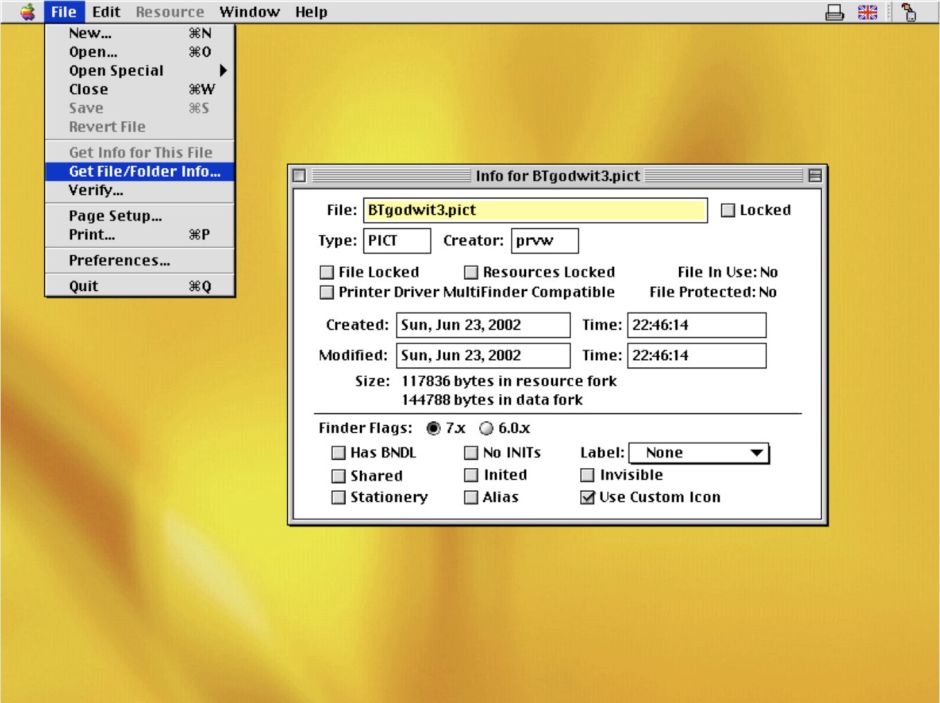
At that time, in the early 1980s, as now, the great majority of file systems used a single fork: one file with one block of data for the file’s contents. The Mac was going to be different. Each file would thus consist of two forks, one a regular data fork as in normal file systems, the other a structured database of resources, the resource fork, a concept proposed and implemented by Bruce Horn. This enabled an app to keep different localisations of its menus and other text contents in resources. Resource forks were allowed for any file, so an app could store a document’s window settings in each document’s resource fork, as many did.
filesize04

Resources were used to store a lot of standard structured data, such as the specifications for and contents of alerts and dialogs, menus, collections of text strings, keyboard definitions and layouts, icons, windows, fonts, and executable code run by apps. You could extend the types of resource supported by means of a template, itself stored as a resource, so developers could define new resource types appropriate to their own apps.

Extended attributes

Mac OS X changed all that, almost for the worse. Traditional Unix at that time didn’t have or support resource forks, and it was proposed that they should be done away with on Macs as well. This is reflected today in application bundles: instead of a Classic app consisting of a single file with its rich collection of resources, in Mac OS X this became a hierarchy of folders containing flat files without resources. In other parts of Mac OS X, former resources like keyboard layouts were also flattened into normal data-only files.

Some of Apple’s engineers wanted to be rid of these awkward resource forks and use file bundles instead, but in the end macOS has transformed Bruce Horn’s brilliant concept into extended attributes, introduced in Mac OS X 10.4. These offer as many different ‘forks’ as you want, among which is com.apple.ResourceFork, the reincarnation of this old feature. Even now, in macOS 14 and APFS, you can still access the resource fork of a file using a specialised path extension of /..namedfork/rsrc for any file with a xattr of type com.apple.ResourceFork. Access the file’s data fork in the conventional way:
ls -l 0test1.zip
-rw-------@ 1 hoakley staff 183136 19 Jul 2023 0test1.zip

and its resource fork thus:
ls -l 0test1.zip/..namedfork/rsrc
-rw------- 1 hoakley staff 80059 19 Jul 2023 0test1.zip/..namedfork/rsrc

Metadata

One of the first of these new xattrs, introduced in Mac OS X 10.5, was what’s commonly referred to as the quarantine flag, or the xattr named com.apple.quarantine. It’s so old that the ‘flag’ itself, a hexadecimal number, is encoded as UTF-8 text rather than in hex. Like resource forks before them, xattrs aren’t stored in the file’s data, ensuring that a quarantine flag can be attached to any file without changing that file’s data.

Against all odds, xattrs began to flourish. In the Mac Extended File System HFS+ they’re stored separately from file data, as they are in APFS today. This makes them ideal for storing metadata: rather than having to edit and store metadata embedded within the file’s data, it could be kept apart in xattrs. The snag here, though, is that other file systems aren’t as accommodating as HFS+ or APFS.

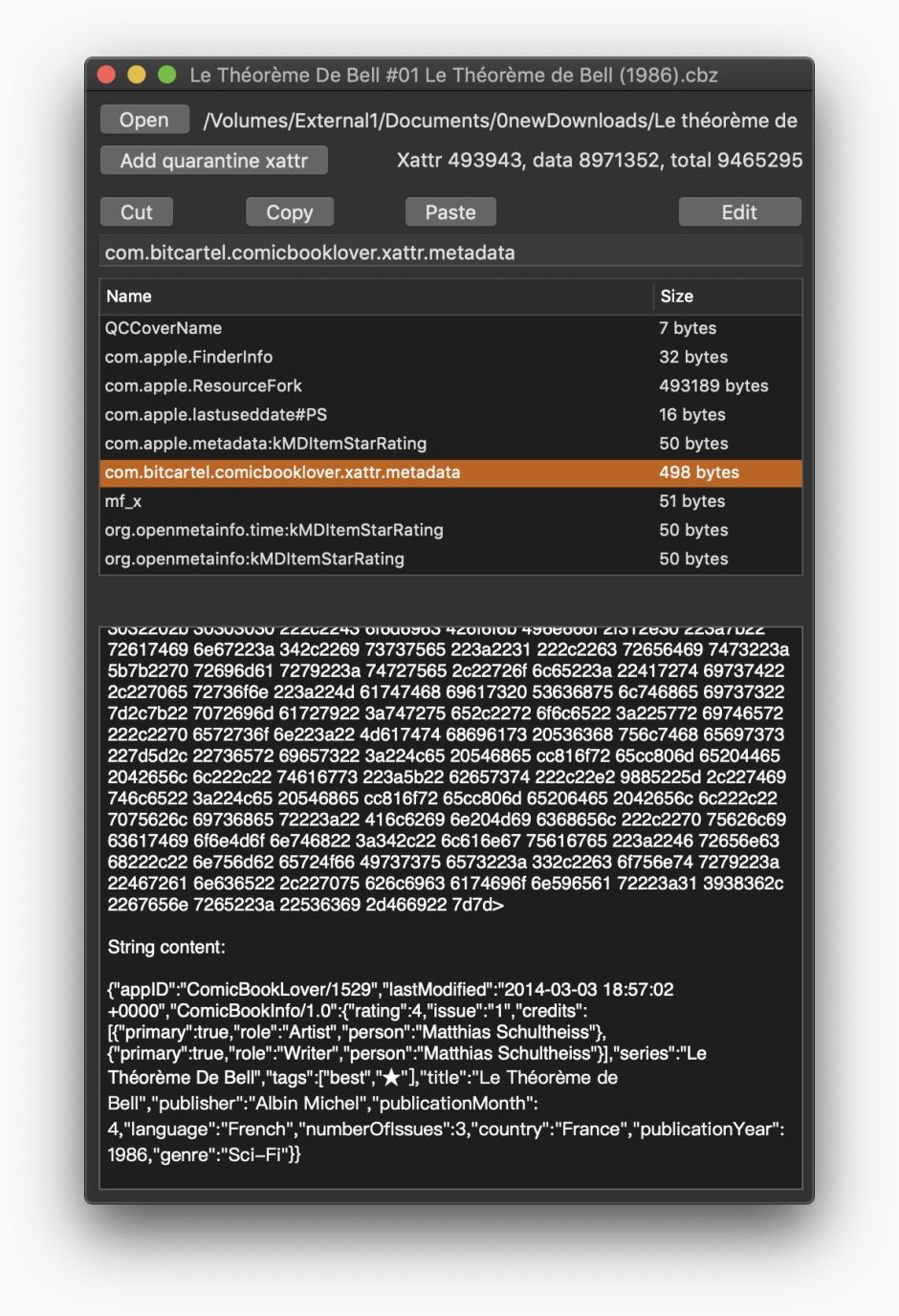
Most image formats embed structured metadata in the image data. That isn’t true of some other file formats, particularly if they’re less widely used or app-specific. In the past, a popular format used for ‘comic’ books, Comic Book Archive, has often included extensive metadata about its image archive, which was stored on Macs as a xattr attached to the CBZ file.

These metadata are stored in JSON format, and when in a xattr it’s a custom type named com.bitcartel.comicbooklover.xattr.metadata. The ComicBookLover app has made more extensive use of xattrs too, adding a thumbnail preview in com.apple.ResourceFork, a star rating in com.apple.metadata:kMDItemStarRating (intended for use by Apple apps), another in org.openmetadata.time:kMDItemStarRating, and a third in org.openmetadata:kMDItemStarRating.
xattred01

Note the size of the com.apple.ResourceFork xattr here, of over 490 KB, although this is taken from HFS+ rather than APFS.

Extended attribute management

In APFS, a file’s xattrs aren’t stored in the file’s inode with its file system attributes, nor with that file’s data, but are kept separately.

fileobjects

For smaller extended attributes up to 3,804 bytes, their data is stored with the xattr in the file system metadata. Larger extended attributes are stored as data streams, with separate records, but still separately from the file data. Apple doesn’t give a limit on the maximum size of xattrs, but they can certainly exceed 200 KB, and each file and folder can have an effectively unlimited number of xattrs.

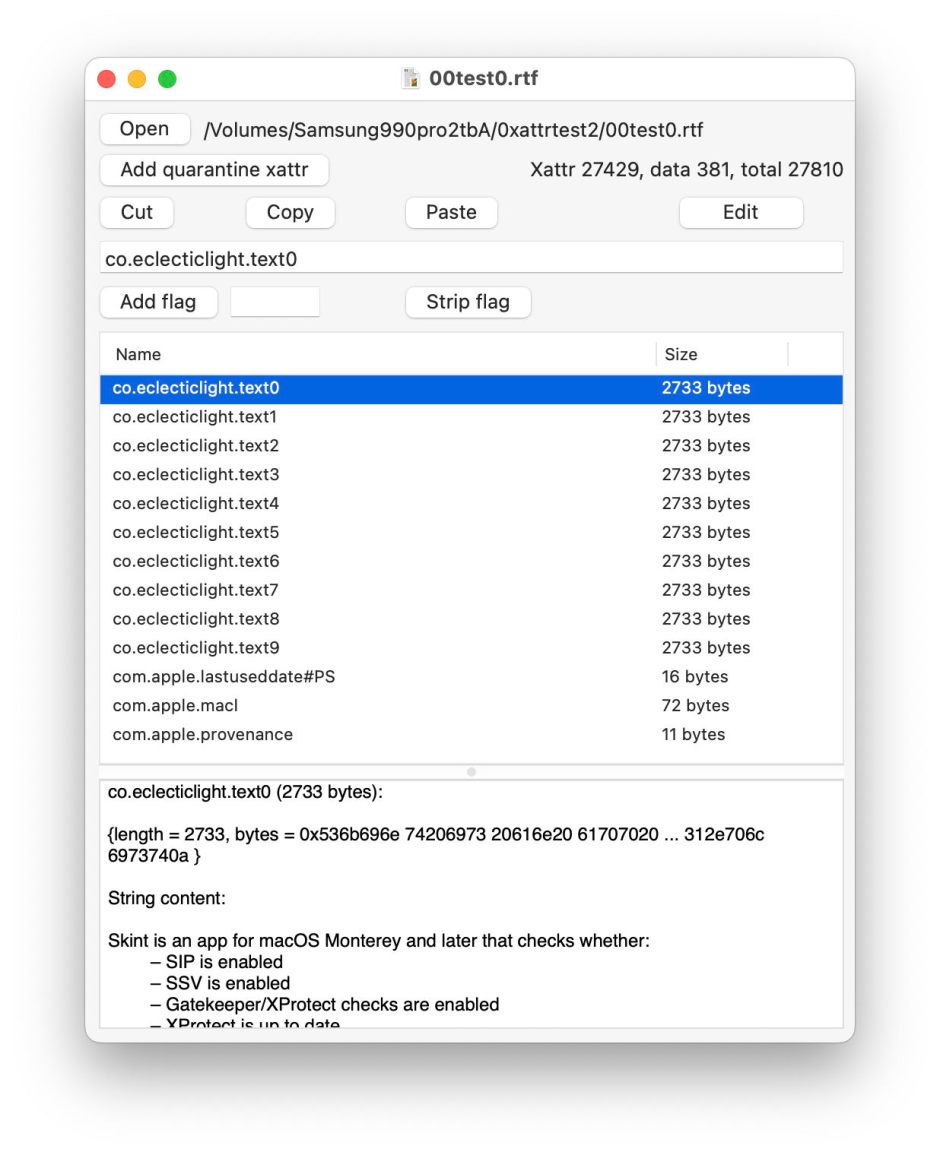
Behaviour of xattrs with the cloning of files is revealing, if tricky to investigate. It’s comparatively easy to demonstrate that larger xattrs are cloned and not duplicated when the new inode record is created for the clone file, by simply measuring changes in total file size in a volume. To accomplish the same for xattrs of less than 3,804 bytes requires amplification using multiple xattrs.
xattr1

In this test ten separate xattrs each of 2,733 bytes were attached to a single file containing only 381 bytes of data.
xattr2

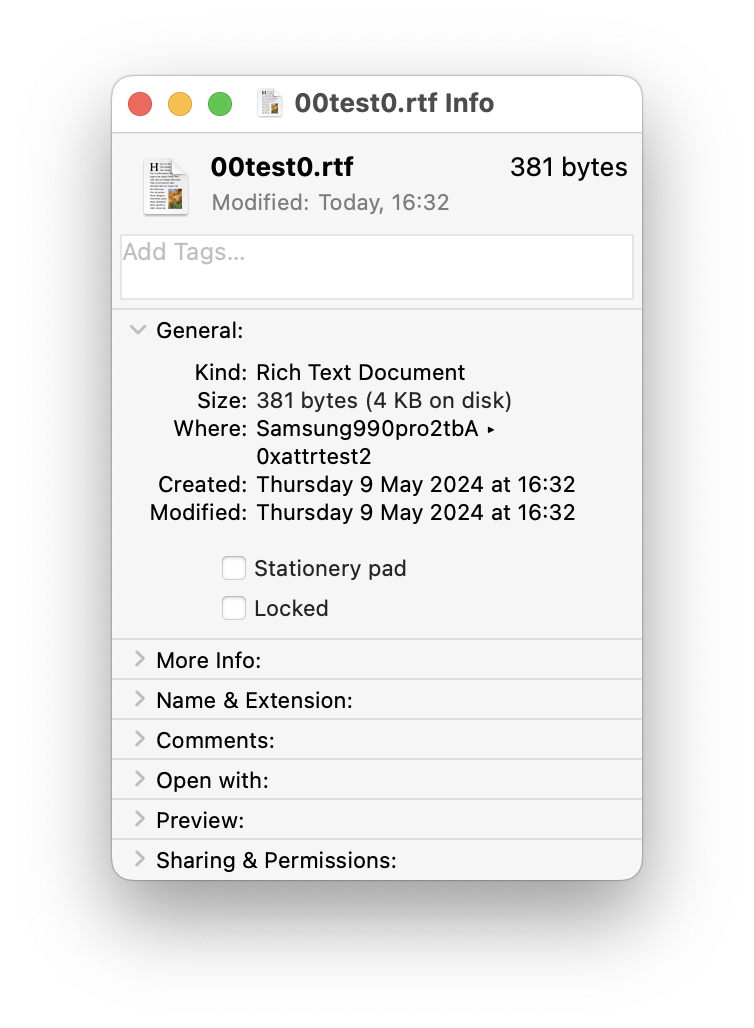
As the Finder information for that file doesn’t take into account size of xattrs, its size is reported as only 381 bytes.
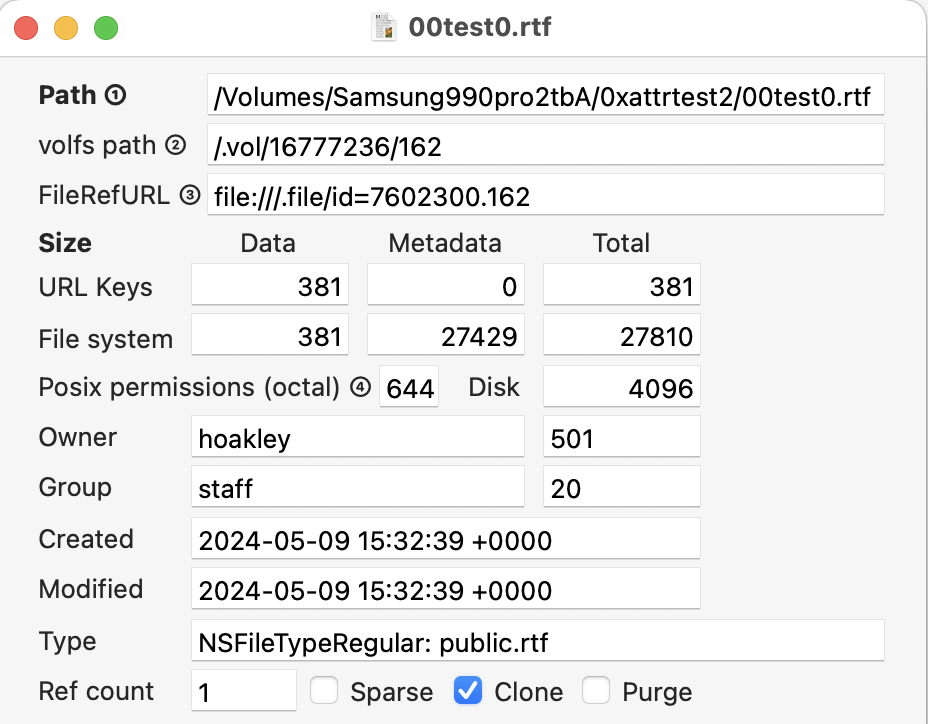
xattr3

Its true total size, though, is 27,810 bytes, sufficient to be reflected in volume total used space, as given by Disk Utility. Comparison of files with large, small and no xattrs demonstrates that clones don’t duplicate xattrs of any size, but clone them as well.

fileobject3

Thus cloning only duplicates the inode and its attributes (blue and pink), together with their file extent information. You can verify this by inspecting the numbers of those inodes, as they’re different, and information in file system attributes such as the file’s name will also be different. Thus, as far as APFS is concerned, xattrs are part of the file, not attributes owned and maintained by the file system. As most xattrs are created, maintained and used by processes outside the file system, this is a good functional distinction.

File system xattrs

APFS itself relies on xattrs for managing the file system.

Symbolic links (symlinks) are special files in APFS, and the volume superblock maintains a total number of symlinks on that volume. Rather than consisting simply of text data, they consist of at least one xattr named com.apple.fs.symlink containing the path in the link. That xattr is marked as being owned by the file system, although that doesn’t affect the symlink’s permissions.

Firmlinks introduced in macOS 10.15 Catalina to form bidirectional links between locations in the System and Data volumes in a boot volume group, are also distinguished with their own xattr, this time named com.apple.fs.firmlink. Another file system xattr named com.apple.fs.cow-exempt-file-count is used to mark inodes that are exempt from copy-on-write behaviour if they’re part of a snapshot.

Summary

  • Extended attributes, xattrs, supersede the resource fork of Classic Mac OS as a means of storing additional file information outside a file’s data.
  • In APFS, xattrs are stored outside the inode and its attributes, and separate from a file’s data.
  • Data for smaller xattrs of up to 3,804 bytes is stored with the xattr in the file system metadata.
  • Data for larger xattrs is stored as data streams, with separate records.
  • Like file data, both smaller and larger xattrs are cloned when APFS creates clone files, and not duplicated.
  • APFS uses xattrs to distinguish symlinks, firmlinks, and files exempted from copy-on-write.
  • Xattrs are now widely used, but their size is ignored in most measurements of file size by macOS.

Articles in this series

1. Files and clones
2. Directories and names
3. Containers and volumes
4. Snapshots
5. Encryption and sealing
6. Special file types
7. Command tools
8. Beyond, to vfs and volfs
9. Log entries

Reference

Apple’s APFS Reference (PDF), last revised 22 June 2020.

Share this:

  • Click to share on X (Opens in new window) X
  • Click to share on Facebook (Opens in new window) Facebook
  • Click to share on Reddit (Opens in new window) Reddit
  • Click to share on Pinterest (Opens in new window) Pinterest
  • Click to share on Threads (Opens in new window) Threads
  • Click to share on Mastodon (Opens in new window) Mastodon
  • Click to share on Bluesky (Opens in new window) Bluesky
  • Click to email a link to a friend (Opens in new window) Email
  • Click to print (Opens in new window) Print
Like Loading...

Related

Posted in Macs, Technology and tagged APFS, com.apple.ResourceFork, extended attributes, forks, HFS+, metadata, resource, xattr. Bookmark the permalink.

6Comments

Add yours
  1. 1
    Jean Létourneau's avatar
    Jean Létourneau on May 13, 2024 at 11:25 am

    Very interesting reseach ideed! Thanks for sharing.

    LikeLiked by 1 person

    • 2
      hoakley's avatar
      hoakley on May 13, 2024 at 2:35 pm

      Thank you.
      Howard

      LikeLike

  2. 3
    rickrsignup's avatar
    rickrsignup on May 13, 2024 at 2:32 pm

    Howard,

    I feel like you have opened a portal to another dimension that I never knew even existed! Amazing!

    May I ask what app you used for the second image in the article – the window for Theorem de Bell file that shows the file’s data in a hex dump with the strings shown below the dump? Looks like a very useful app.

    Thanks!

    LikeLiked by 1 person

  3. 4
    hoakley's avatar
    hoakley on May 13, 2024 at 2:34 pm

    Thank you. That’s my xattr editor, xattred.
    Howard

    LikeLike

  4. 5
    rubbergun's avatar
    rubbergun on September 29, 2024 at 10:57 am

    Greetings, Howard. Big fan of your site for technical knowledge and casual reading on macOS intricacies.

    I have been reading a lot on this topic to understand it. Can I say the following?

    Classic Mac OS support “dual-forked” files, where the “actual data” is in the data fork and the “resource fork” contains other resources, in a manner analogous to DLL files storing image resources. Uniquely, font files had only a resource fork and no data fork.

    This behaviour can be seen as a form of “Extended Attributes”, common on many filesystems (ADS on NTFS), to store data that is attached to the file but not belonging strictly to it. (such info may include: Quarantine tag, Dropbox info, etc). But resource forks are unique that they can be quite large rather than purely text strings.

    macOS retains support of dual-forked files, but the use of resource forks to store critical data is largely a bygone method. .app bundles use flat files, etc. Except for the custom Finder icon (more below).

    Everything below I am unsure of and would appreciate your clarification:

    macOS now favors the use of E.A. (xattr), more analogous to their use in other filesystems. From a filesystem perspective, you have the file (1), filesystem attributes like date, time, etc (2), and the xattr (3). I’d imagine NTFS/etc. all do things similarly.

    xattr extend the “dual-fork” analogy somewhat. We can now have a large number of attributes. Any sort of tag, or metadata, or comment, can be stuffed inside. We can think of this as a “field” and a “value”.

    “com.apple.ResourceFork” is one such field, and it stores what traditionally was contained inside the resource fork, as an extended attribute.

    Smaller xattr, such as in your screenshots, are stored with file system metadata (date, time, etc). Larger ones are stored as “data streams”. Small xattr would be textual ones, and larger ones would probably be thumbnails or large amounts of text, and especially classic Resource Forks.

    In addition to the confusion above, some specific questions:

    (1) Without knowing I’d assume that Resource Fork -> com.apple.ResourceFork conversion is handled transparently by the OS. So if I pull a font file from Mac OS into macOS, I will probably see a file with 0b data, and a com.apple.ResourceFork containing the actual data?

    (2) It is commonly said that a custom Finder icon stores the icon contents in a resource fork. Running the following:

    xattr -l Icon$’\r’
    com.apple.FinderInfo: iconMACS@
    com.apple.ResourceFork:

    seems to imply that the first xattr is a tag indicating it is a folder icon and the latter would be the actual icon data? And, technically speaking, from a file system perspective, it is not strictly located inside a “Resource Fork”, but rather an xattr that serves as a “pseudo fork”?

    (3) And while xattr are used extensively as you say, going forwards, we can treat macOS xattr as analogous to that of other filesystems, the use of actual Resource Forks (and the com.apple.ResourceFork) to store critical data is no longer done, moving on to .app bundles, hidden dot files (.VolumeIcon.icns), etc?

    tl;dr xattr now store non-file data, including forks

    LikeLiked by 1 person

    • 6
      hoakley's avatar
      hoakley on September 29, 2024 at 6:49 pm

      Thank you.
      APFS no longer supports the forked files of yesteryear, and I don’t think that HFS+ is allowed to either now. Resource forks are now resource xattrs. Any xattr can contain non-text data (a great many do), and can exceed the size limit for those stored with the file system metadata – there’s no distinction except that larger xattrs require a data stream.
      1. Yes, that’s correct. But pretty well all the Carbon API for handling resources has either been removed or is deprecated. I think the command tools remain, though.
      2. Yes, in APFS at least, what used to be in the resource fork, storing the icon contents, is now in the xattr. In that case, the FinderInfo xattr is just storing the old Type and Creator codes.
      3. Yes, although strangely I’m not aware of any conversion routines to inter-operate between APFS xattrs and those of other file systems, apart from the AppDouble trick for FAT and ExFAT.
      I hope that helps.
      Howard.

      LikeLike

·Comments are closed.

Quick Links

  • Free Software Menu
  • System Updates
  • M-series Macs
  • Mac Troubleshooting Summary
  • Mac problem-solving
  • Painting topics
  • Painting
  • Long Reads

Search

Monthly archives

  • December 2025 (67)
  • November 2025 (74)
  • October 2025 (75)
  • September 2025 (78)
  • August 2025 (76)
  • July 2025 (77)
  • June 2025 (74)
  • May 2025 (76)
  • April 2025 (73)
  • March 2025 (78)
  • February 2025 (67)
  • January 2025 (75)
  • December 2024 (74)
  • November 2024 (73)
  • October 2024 (78)
  • September 2024 (77)
  • August 2024 (75)
  • July 2024 (77)
  • June 2024 (71)
  • May 2024 (79)
  • April 2024 (75)
  • March 2024 (81)
  • February 2024 (72)
  • January 2024 (78)
  • December 2023 (79)
  • November 2023 (74)
  • October 2023 (77)
  • September 2023 (77)
  • August 2023 (72)
  • July 2023 (79)
  • June 2023 (73)
  • May 2023 (79)
  • April 2023 (73)
  • March 2023 (76)
  • February 2023 (68)
  • January 2023 (74)
  • December 2022 (74)
  • November 2022 (72)
  • October 2022 (76)
  • September 2022 (72)
  • August 2022 (75)
  • July 2022 (76)
  • June 2022 (73)
  • May 2022 (76)
  • April 2022 (71)
  • March 2022 (77)
  • February 2022 (68)
  • January 2022 (77)
  • December 2021 (75)
  • November 2021 (72)
  • October 2021 (75)
  • September 2021 (76)
  • August 2021 (75)
  • July 2021 (75)
  • June 2021 (71)
  • May 2021 (80)
  • April 2021 (79)
  • March 2021 (77)
  • February 2021 (75)
  • January 2021 (75)
  • December 2020 (77)
  • November 2020 (84)
  • October 2020 (81)
  • September 2020 (79)
  • August 2020 (103)
  • July 2020 (81)
  • June 2020 (78)
  • May 2020 (78)
  • April 2020 (81)
  • March 2020 (86)
  • February 2020 (77)
  • January 2020 (86)
  • December 2019 (82)
  • November 2019 (74)
  • October 2019 (89)
  • September 2019 (80)
  • August 2019 (91)
  • July 2019 (95)
  • June 2019 (88)
  • May 2019 (91)
  • April 2019 (79)
  • March 2019 (78)
  • February 2019 (71)
  • January 2019 (69)
  • December 2018 (79)
  • November 2018 (71)
  • October 2018 (78)
  • September 2018 (76)
  • August 2018 (78)
  • July 2018 (76)
  • June 2018 (77)
  • May 2018 (71)
  • April 2018 (67)
  • March 2018 (73)
  • February 2018 (67)
  • January 2018 (83)
  • December 2017 (94)
  • November 2017 (73)
  • October 2017 (86)
  • September 2017 (92)
  • August 2017 (69)
  • July 2017 (81)
  • June 2017 (76)
  • May 2017 (90)
  • April 2017 (76)
  • March 2017 (79)
  • February 2017 (65)
  • January 2017 (76)
  • December 2016 (75)
  • November 2016 (68)
  • October 2016 (76)
  • September 2016 (78)
  • August 2016 (70)
  • July 2016 (74)
  • June 2016 (66)
  • May 2016 (71)
  • April 2016 (67)
  • March 2016 (71)
  • February 2016 (68)
  • January 2016 (90)
  • December 2015 (96)
  • November 2015 (103)
  • October 2015 (119)
  • September 2015 (115)
  • August 2015 (117)
  • July 2015 (117)
  • June 2015 (105)
  • May 2015 (111)
  • April 2015 (119)
  • March 2015 (69)
  • February 2015 (54)
  • January 2015 (39)

Tags

APFS Apple Apple silicon backup Big Sur Blake Bonnard bug Catalina Consolation Console Corinth Delacroix Disk Utility Doré El Capitan extended attributes Finder firmware Gatekeeper Gérôme High Sierra history of painting iCloud Impressionism landscape LockRattler log M1 Mac Mac history macOS macOS 10.12 macOS 10.13 macOS 10.14 macOS 10.15 macOS 11 macOS 12 macOS 13 macOS 14 macOS 15 malware Metamorphoses Mojave Monet Monterey Moreau myth narrative OS X Ovid painting performance Pissarro Poussin privacy Renoir riddle Rubens Sargent security Sierra SilentKnight Sonoma SSD Swift Time Machine Tintoretto Turner update upgrade Ventura xattr Xcode XProtect

Statistics

  • 21,054,010 hits
Blog at WordPress.com.
Footer navigation
  • Free Software Menu
  • About & Contact
  • Macs
  • Painting
  • Downloads
  • Mac problem-solving
  • Extended attributes (xattrs)
  • Painting topics
  • SilentKnight, Skint, SystHist, silnite, LockRattler & Scrub
  • DelightEd & Podofyllin
  • xattred, SpotTest, Spotcord, Metamer & xattr tools
  • 32-bitCheck & ArchiChect
  • XProCheck, T2M2, LogUI, Ulbow, blowhole and log utilities
  • Cirrus & Bailiff
  • Precize, Alifix, UTIutility, Sparsity, alisma, Taccy, Signet
  • Versatility & Revisionist
  • Text Utilities: Textovert, Nalaprop, Dystextia and others
  • PDF
  • Keychains & Permissions
  • Updates
  • Spundle, Cormorant, Stibium, DropSum, Dintch, Fintch and cintch
  • Long Reads
  • Mac Troubleshooting Summary
  • M-series Macs
  • Mints: a multifunction utility
  • VisualLookUpTest
  • Virtualisation on Apple silicon
  • System Updates
  • Saturday Mac Riddles
  • Last Week on My Mac
  • sysctl information
Secondary navigation
  • Search

Post navigation

Woman in Trouble: Paulus Bor’s mythical portraits
Solutions to Saturday Mac riddles 255

Begin typing your search above and press return to search. Press Esc to cancel.

  • Reblog
  • Subscribe Subscribed
    • The Eclectic Light Company
    • Join 8,887 other subscribers
    • Already have a WordPress.com account? Log in now.
    • The Eclectic Light Company
    • Subscribe Subscribed
    • Sign up
    • Log in
    • Copy shortlink
    • Report this content
    • View post in Reader
    • Manage subscriptions
    • Collapse this bar
 

Loading Comments...
 

    %d