
One of the only ways to discover what’s going on with APFS is to browse the log. Compared to most other processes and subsystems, its entries are brief, to the point, and worth reading closely. This article provides a guide to help you identify and understand log entries made by APFS in recent versions of macOS, particularly Ventura and Sonoma.
You’ll find log entries from APFS with the following key fields:
- processImagePath kernel
- senderImagePath apfs
- eventMessage, such as
apfs_vfsop_unmount:3580: all done. going home. (numMountedAPFSVolumes 55)
There is no APFS sub-system used in log entries.
Predicates and reading
To obtain APFS entries, use a predicate of
senderImagePath CONTAINS[c] "apfs"
Relevant information is also contained in related entries obtained with the following predicate terms:
subsystem CONTAINS[c] "com.apple.diskmanagement"

subsystem CONTAINS[c] "com.apple.mobileaccessoryupdater"

subsystem CONTAINS[c] "com.apple.DiskArbitration.diskarbitrationd"

senderImagePath CONTAINS[c] "IOAccessoryManager"
These are readily available in custom log excerpts in Mints.
The message field of each log entry made by APFS has a standard structure:
- The descriptive name of the APFS task, which might refer to a code procedure, e.g.
nx_get_volume_group. Note that names prefixed withnxnormally refer to the container layer, in accordance with the structures listed in the APFS Reference, although thejprefix isn’t used for the volume layer in the log. - The task-specific identity number, e.g. 8051 for
nx_get_volume_group. Some tasks can have more than one ID, and numbers may change with different versions of APFS. - A description of the activity and any results.
Log entries by ID numbers
The following identity numbers appear well-used in recent versions of macOS. Listed in approximate numeric order they include:
- Space Manager metazone initialisation, spaceman_metazone_init: 110, 171, 600
- rename snapshot for removal, fs_insert_snapshot_metadata: 249
- crypto, block info, dev_init: 296
- device_handle block details, dev_init: 299
- container probe and check, nx_checkpoint_find_valid_checkpoint: 556, 560, 565
- crypto buffer allocation, cryptoAlloc: 650
- adds fresh mounted snapshot, nx_volume_group_update: 704
- mount volume info, handle_mount: 725
- mount volume set block size, handle_mount: 738
- handle snapshot mount, handle_mount: 817
- snapshot mount, handle_snapshot_mount: 996, 1144
- volume unmounting, stop background work, apfs_stop_bg_work: 831
- deleting snapshot, apfs_snap_vnop_remove: 1052, 1107
- initialise cache for mount, nx_mount: 1219, 1224
- transfer statistics, tx_flush: 1241
- adjust copy-on-write exempt count, apfs_update_cow_exempt_file_count: 1310
- object map cleanup, omap_cleanup: 1544
- container checkpoint search, nx_mount: 1548, 1550, 1553, 1575, 1580
- snapshot deletion, cleanup_snapshot_purgatory: 1805, 1808, 1826
- vnode_close() for container unload, container_unload: 1884
- unmount volume, apfs_log_mount_unmount: 1980
- initialise volume keybag, apfs_keybag_init: 2651
- snapshot merges, delete_clone_fs: 2778, 2915
- wait for purgatory cleaner to finish, apfs_vfsop_unmount: 2915
- volume name, apfs_log_op_with_proc: 3091
- unmount completion, apfs_vfsop_unmount: 3244, 3257
- Space Manager trim operations, spaceman_scan_free_blocks: 3293, 3295, 3303, 3306, 3311
- unwrap volume key, apfs_keybag_unlock_record_tag: 3322
- unwrap volume key, apfs_keybag_unlock_record: 3403
- snapshot deletion, apfs_vfsop_unmount: 3501, 3567, 3580
- bitmap update, gbitmap_update_thread_terminate: 6110
- anything to recover, er_state_obj_get_for_recovery: 7556, 7575
- volume name and group role, nx_volume_group_update: 7895
- buffer I/O only not raw disk access, bufatr_get_apfs: 8040
- volume group tree, nx_get_volume_group: 8051
- no-effaceable-storage, effaceable_is_disabled: 10727
- purge files, handle_purge_files: 10874
- print_unknown_ioctl: 18120
- unwrap metadata crypto state, apfs_mount: 28950
- file system won’t be encrypted, apfs_newfs: 30416
Log entry types listed by theme
Containers:
- container probe and check, nx_checkpoint_find_valid_checkpoint: 556, 560, 565
- initialise cache for mount, nx_mount: 1219, 1224
- container checkpoint search, nx_mount: 1548, 1550, 1553, 1575, 1580
- vnode_close() for container unload, container_unload: 1884
- volume name and group role, nx_volume_group_update: 7895
- volume group tree, nx_get_volume_group: 8051
Volumes:
- mount volume info, handle_mount: 725
- mount volume set block size, handle_mount: 738
- volume unmounting, stop background work, apfs_stop_bg_work: 831
- unmount volume, apfs_log_mount_unmount: 1980
- wait for purgatory cleaner to finish, apfs_vfsop_unmount: 2915
- volume name, apfs_log_op_with_proc: 3091
- unmount completion, apfs_vfsop_unmount: 3244, 3257
- buffer I/O only not raw disk access, bufatr_get_apfs: 8040
Snapshots:
- rename snapshot for removal, fs_insert_snapshot_metadata: 249
- adds fresh mounted snapshot, nx_volume_group_update: 704
- handle snapshot mount, handle_mount: 817
- snapshot mount, handle_snapshot_mount: 996, 1144
- deleting snapshot, apfs_snap_vnop_remove: 1052, 1107
- snapshot deletion, cleanup_snapshot_purgatory: 1805, 1808, 1826
- snapshot merges, delete_clone_fs: 2778, 2915
- snapshot deletion, apfs_vfsop_unmount: 3501, 3567, 3580
Space Manager:
- Space Manager metazone initialisation, spaceman_metazone_init: 110, 171, 600
- Space Manager trim operations, spaceman_scan_free_blocks: 3293, 3295, 3303, 3306, 3311
Encryption:
- crypto, block info, dev_init: 296
- crypto buffer allocation, cryptoAlloc: 650
- initialise volume keybag, apfs_keybag_init: 2651
- unwrap volume key, apfs_keybag_unlock_record_tag: 3322
- unwrap volume key, apfs_keybag_unlock_record: 3403
- no-effaceable-storage, effaceable_is_disabled: 10727
- unwrap metadata crypto state, apfs_mount: 28950
- file system won’t be encrypted, apfs_newfs: 30416
Example log sequences
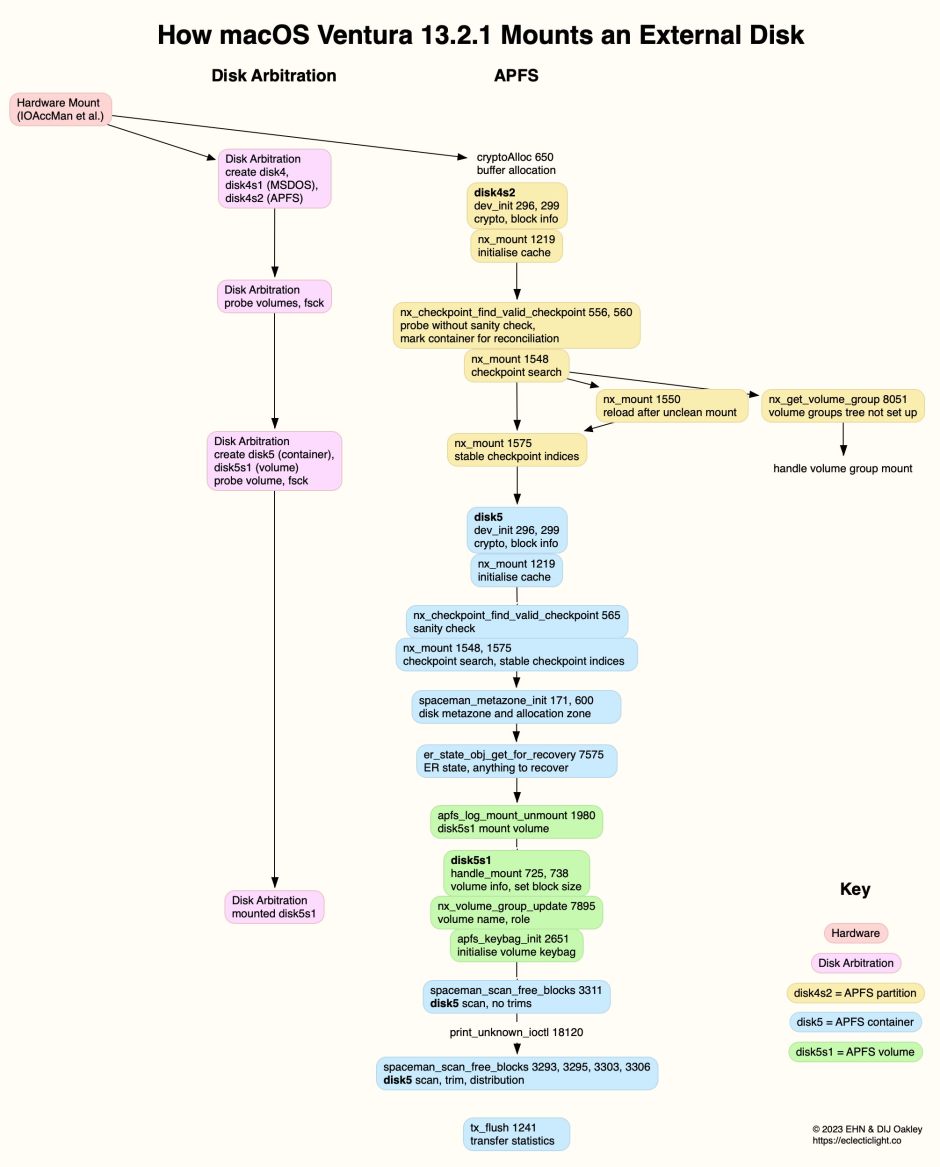
Mounting a plain SSD formatted with a single APFS container and unencrypted volume.
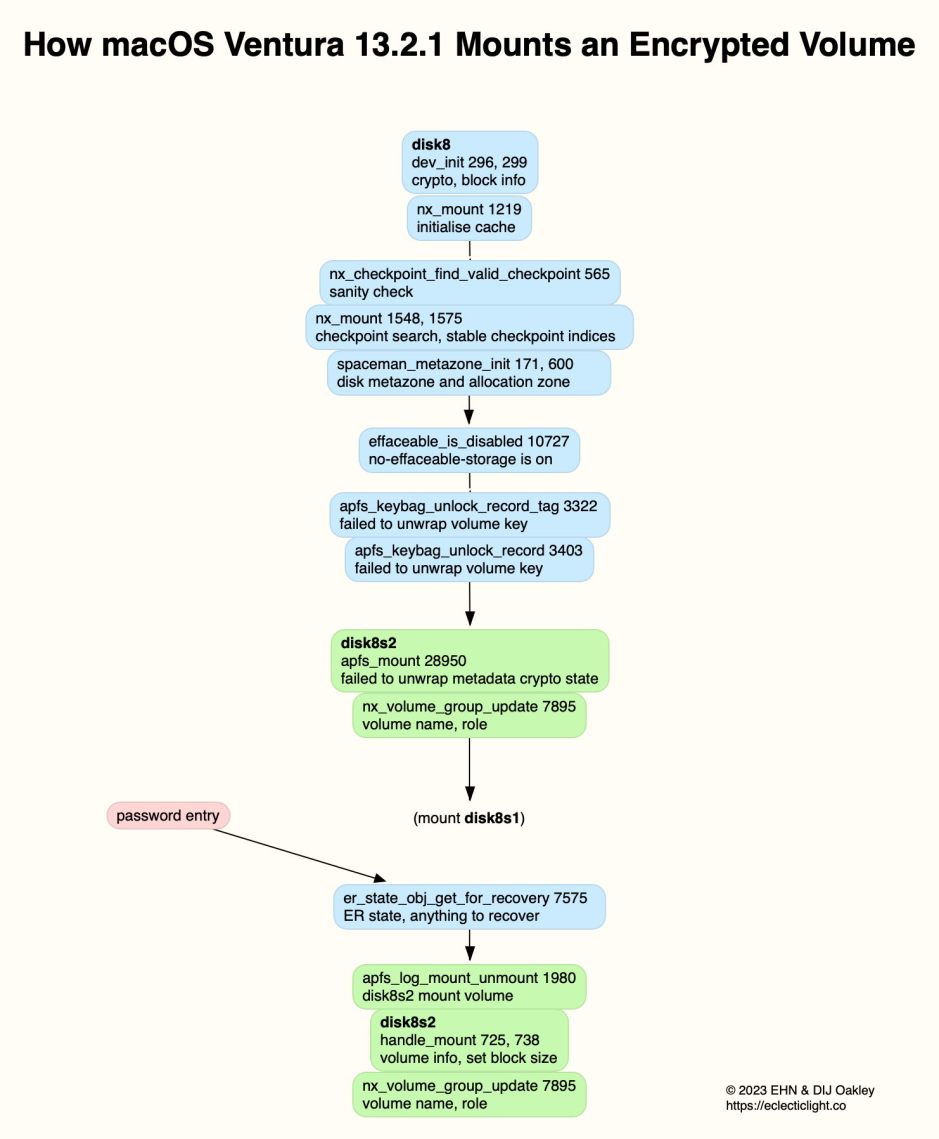
Mounting a single APFS (Encrypted) volume on an external Thunderbolt 3 SSD.
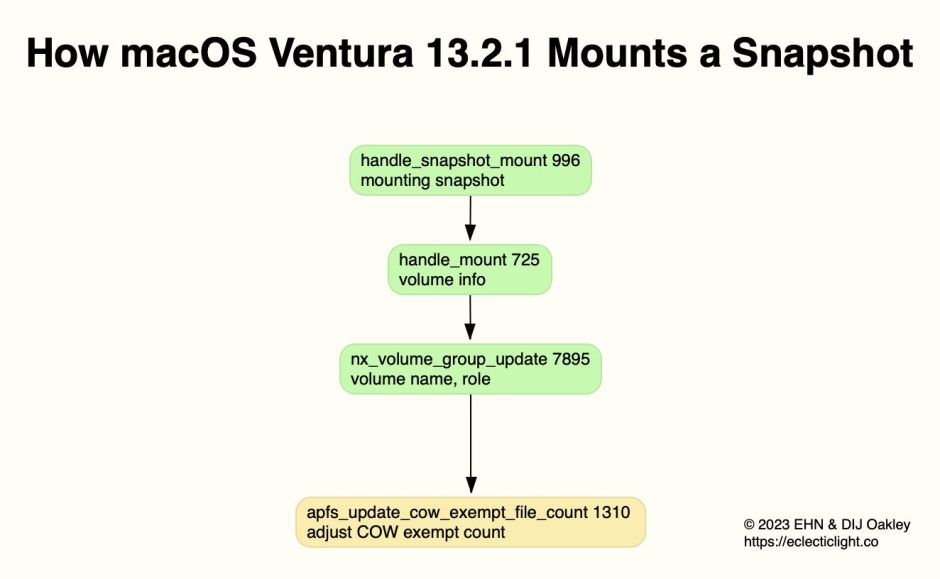
Mounting a snapshot on a Time Machine backup store on an external disk.
Performing a clean unmount of an APFS volume.

Articles in this series
1. Files and clones
2. Directories and names
3. Containers and volumes
4. Snapshots
5. Encryption and sealing
6. Special file types
7. Command tools
8. Beyond, to vfs and volfs
References
Apple’s APFS Reference (PDF), last revised 22 June 2020.
 The Eclectic Light Company