
If you’ve supported Macs, or many other computers, you’ll be aware that there are times when restarting doesn’t seem good enough, and performing a cold boot works best. By that I mean shutting the Mac down, counting to the number you first thought of, then starting it up. It’s what Apple refers to as a “manual restart”, as opposed to the automatic restart you’ll get from the Restart command. This article looks at what the difference might be.
Restarting clears everything not saved to disk or non-volatile memory (NVRAM). It runs the Mac’s Boot ROM from hardware, and that in turn starts the process of verifying the first stage firmware, and so on until the kernel is loaded and running. Whether the Mac has had a kernel panic, or WindowServer has run amok, a restart should fix it.
Just a few days ago, I was reminded of how different a cold boot and a restart can be: a dual-boot Apple silicon Mac wouldn’t restart into its primary system, but would do so with a cold boot. How could that be?
One way to see is to compare timings, here using a Mac Studio M1 Max booting from a single system on its internal SSD. Times from the startup chime to the first log entry recording the kernel running were around 3 seconds, with a further 5 seconds or so before the kernel started its logging in earnest with its distinctive kprintf entry. It’s then less than 4 seconds before the login window appears. Those don’t differ significantly between a cold boot and restart, confirming that the processes are essentially the same. Wading through the logs written by the kernel in the first few seconds shows almost identical entries there too.
Received wisdom is that the difference between cold boot and restart is the result of data being retained in memory through a restart, but being wiped clean after a cold boot. This was first documented by Alex Halderman and others, who used it to perform ‘cold boot’ attacks to recover encryption keys. They demonstrated that RAM contents were still recoverable many seconds after shutting down, and could be used to recover encryption keys and other critically secure data.
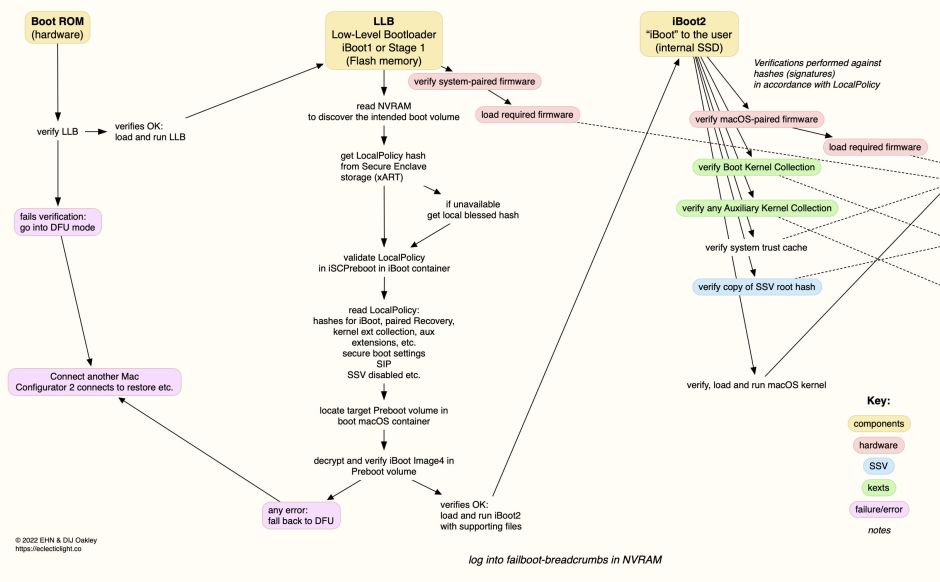
Sadly, although an attractive explanation, it doesn’t hold good unless pre-boot code accesses old data in memory. If that were the case, then the whole boot process would be fatally flawed. Just a cursory glance at a diagram of the boot process of any Apple silicon Mac (above), or a T2 Intel Mac (below), demonstrates that any data retained in memory for a restart can’t be re-used.

If we don’t understand what the differences are between cold boot and a restart, it’s difficult to know when to recommend each. One rule of thumb could be that when problems are related to factors in the early stages of the boot process, like LocalPolicy, then you might be more successful performing a cold boot. Although that has some logic to it, it relies on pre-boot software behaving differently depending on whether the Mac was merely being restarted. As there are no logs from that phase, that can only ever be guesswork.
Summary
- A cold boot is sometimes more effective at fixing problems than a restart.
- If you have tried restarting your Mac to address a problem and that didn’t help, try cold booting instead.
- Cold booting may be more effective at addressing problems relating to the early stages of the boot process, such as those involving LocalPolicy and recognition of boot systems on Apple silicon Macs.
- We don’t understand why cold boot should differ from a restart, but it can.
 The Eclectic Light Company