
Skip to content

The Eclectic Light Company

Macs & painting – 🦉 No AI content
Main navigation
  • Downloads
  • Freeware
  • M-series Macs
  • Mac Problems
  • Mac articles
  • Macs
  • Art
hoakley May 27, 2023 Macs, Technology

Would you like to Comment or Finder Comment?

Adding metadata to files is important. A few words in a comment, perhaps some keywords, and Spotlight searches become so much easier. Instead of wading through hundreds of files containing common contents, your list of hits could be short and well focussed. That’s one of the great strengths of extended attributes: pick the right type and use it wisely, and that comment is ready for your next search.

The easiest type of metadata to use is the Finder Comment, which you can edit in the Finder’s Get Info dialog. The snag is that it’s also the least reliable.

Finder Comments have a long history, and at one time don’t appear to have been saved as an extended attribute attached to the file, but in a hidden and opaque .DS_Store file in the same folder as the document. Those files are so well-hidden that, even when you set the Finder to show hidden files, they still aren’t revealed. The only place you can see them is in Terminal.

More recently, Finder Comments have also been saved as extended attributes of type com.apple.metadata:kMDItemFinderComment, which you can visualise using my free apps xattred or Metamer. Because Finder Comments are now saved in two places, keeping them in sync has been a long battle, and one that Apple shows no sign of winning yet. Let me demonstrate one of their problems in macOS Ventura 13.4.

Find an old text file you can sacrifice for this purpose. Select it in the Finder, and Get Info for it. In the Comments section, type in a comment.
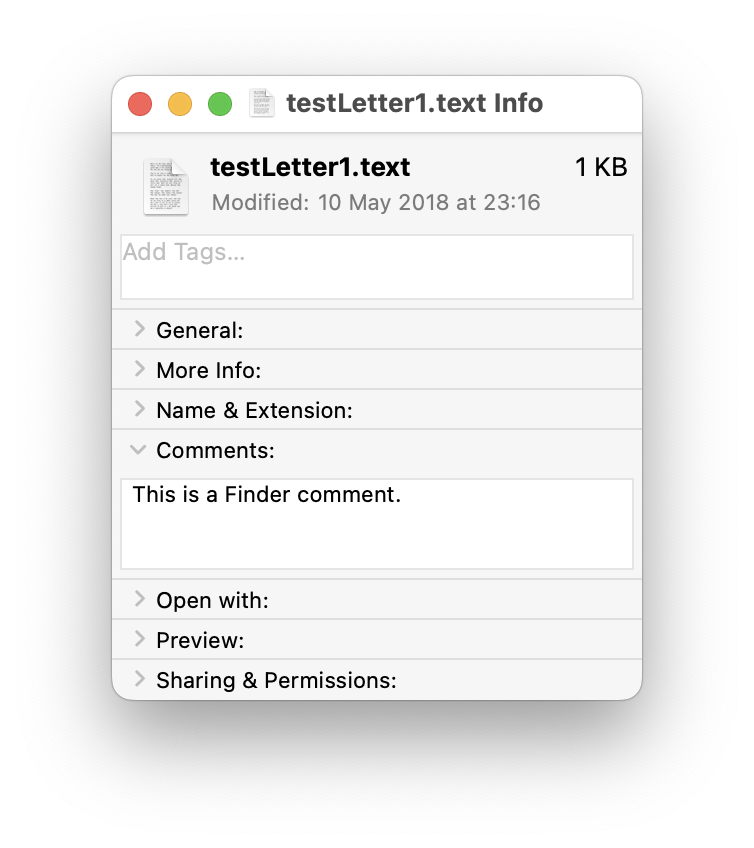
comment1

Open that file in Metamer, and select the FinderComment item in its combo box menu.

comment2

Your freshly added Finder Comment has already been added as an extended attribute.

Open it in xattred, and you’ll see that text as a String in a property list for that extended attribute.
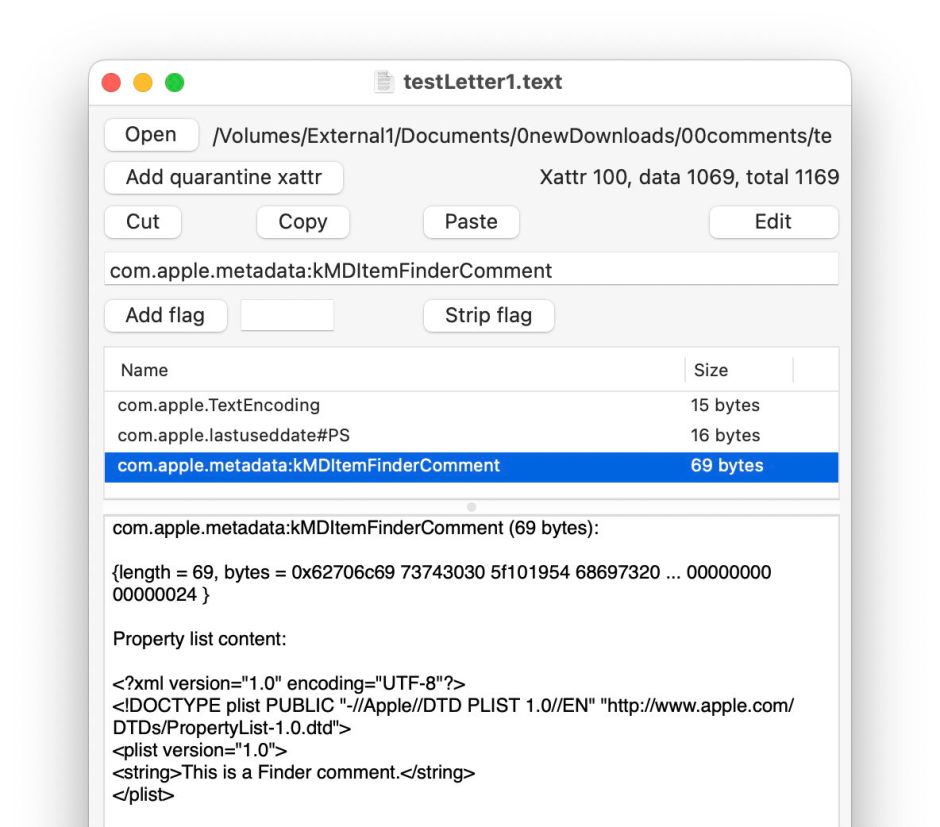
comment3

Now change the name of that file, perhaps by adding a short suffix. Get Info and the Finder Comment is still there.

comment4

Look at the extended attribute using Metamer or xattred, and you’ll see that the String in the property list has been deleted, and the extended attribute no longer contains the text displayed in the Get Info dialog.
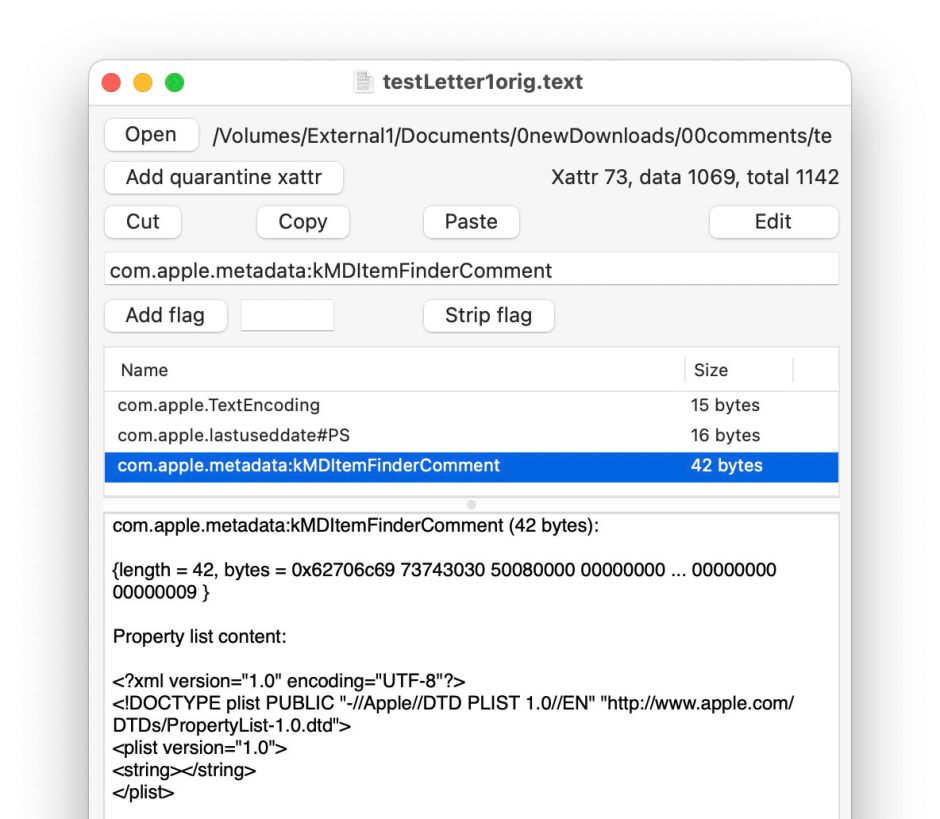
comment5

This is because

  • the primary copy of the Finder Comment goes into the hidden .DS_Store file in the same folder as the document;
  • a secondary copy is saved in a xattr of type com.apple.metadata:kMDItemFinderComment for the file.

I refer to them as primary and secondary because the Finder only seems to know about the first.

If the hidden .DS_Store file were to go missing or become separated, your file’s metadata will go with it.

A far better option is to stick with extended attributes, whose behaviour is more predictable and not messed with by invisible overrides. Metamer offers access to 15 others, including a regular non-Finder Comment. This is easily added using its combo box menu.
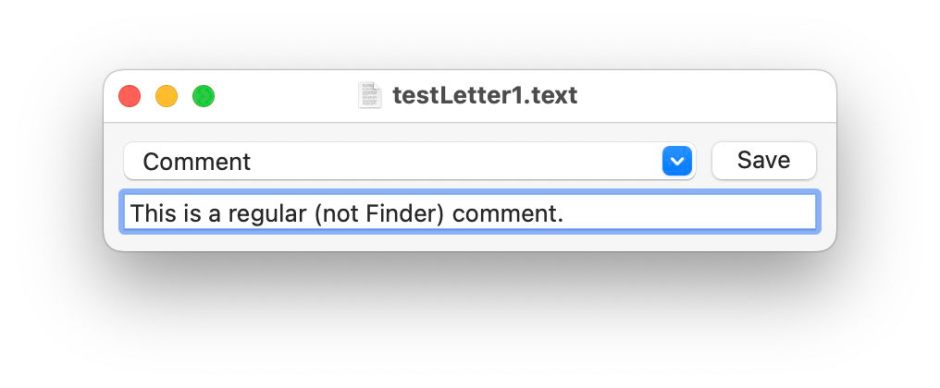
comment6

Although that text doesn’t appear in the Comments box in Get Info, it is displayed in the More info section, and remains editable using Metamer or xattred.
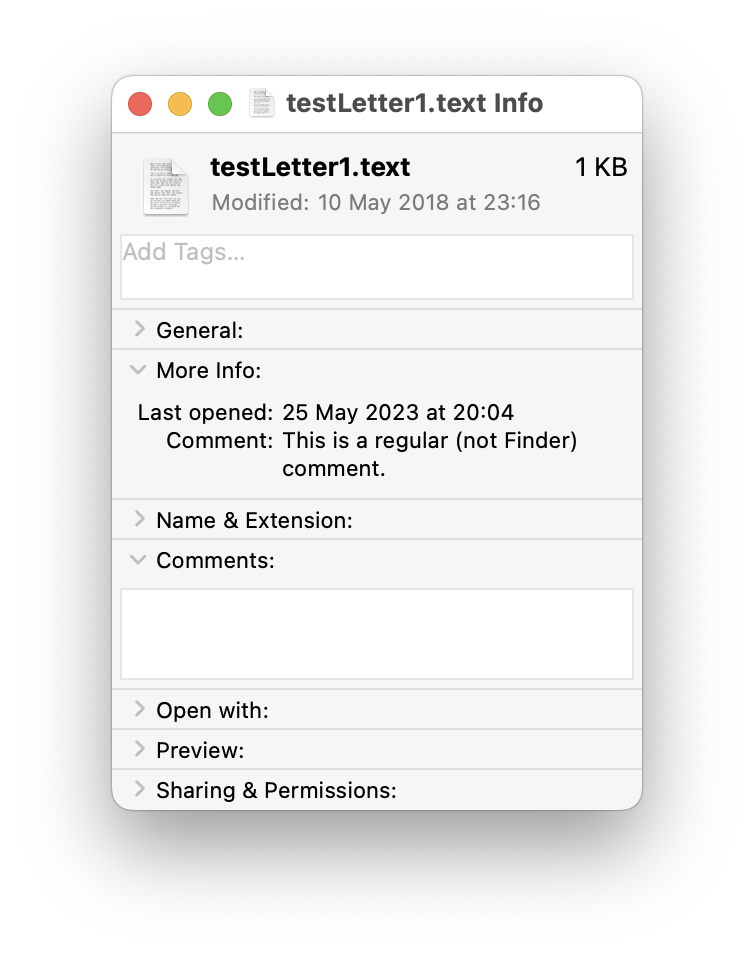
comment7

It’s also fully accessible as a search attribute for Spotlight. If you still want to use Finder Comments in search, you’ll not find them listed among the attributes, but should use Spotlight comments instead, where you’ll discover that Spotlight only indexes those in hidden .DS_Store files, not extended attributes. Regular comments as set in extended attributes by Metamer are known to Spotlight simply as Comments.

Share this:

  • Click to share on X (Opens in new window) X
  • Click to share on Facebook (Opens in new window) Facebook
  • Click to share on Reddit (Opens in new window) Reddit
  • Click to share on Pinterest (Opens in new window) Pinterest
  • Click to share on Threads (Opens in new window) Threads
  • Click to share on Mastodon (Opens in new window) Mastodon
  • Click to share on Bluesky (Opens in new window) Bluesky
  • Click to email a link to a friend (Opens in new window) Email
  • Click to print (Opens in new window) Print
Like Loading...

Related

Posted in Macs, Technology and tagged .DS_Store, comment, extended attributes, Finder, metadata, Metamer, Spotlight, xattr, xattred. Bookmark the permalink.

18Comments

Add yours
  1. 1
    kapitainsky's avatar
    kapitainsky on May 27, 2023 at 9:23 am

    “Although that text doesn’t appear in the Comments box in Get Info, it is displayed in the More info section”

    At least for me this behaviour only applies to txt files. I have tried some other formats and it is not visible in Get Info – but used by Spotlight and accessible by Metamer

    LikeLiked by 1 person

    • 2
      hoakley's avatar
      hoakley on May 27, 2023 at 9:38 am

      Thank you.
      Yes, you’re right. There is a way to customise what’s shown from the metadata in both Get Info and in QuickLook previews, although just at the moment I don’t recall it. It varies by the UTI of the file concerned – for example, images tend to get metadata from within the image data displayed, like image dimensions. Similarly for metadata contained in PDFs.
      Howard.

      LikeLiked by 1 person

  2. 3
    Tristan Hubsch's avatar
    Tristan Hubsch on May 27, 2023 at 10:55 am

    “[…] even when you set the Finder to show hidden files, […] The only place you can see [.DS_Store files] is in Terminal.” The latter conclusion seems true, but only within the apps bundled with standard macOS installations; some Finder alternatives (such as PathFinder) have preference options to show them routinely. AFIK, the .DS_Store files are UNIX-hidden (by the period starting the file-name) and also have the “invisible” flag set.
    …or, is there some other (third?) hiding mechanism?

    LikeLiked by 1 person

    • 4
      hoakley's avatar
      hoakley on May 27, 2023 at 8:32 pm

      Thank you.
      As I understand it, the leading stop/period in the file name makes them hidden, but able to be unhidden in the Finder. However, the invisible flag then hides them from the Finder altogether. That also applies to standard Open File dialogs.
      Howard.

      LikeLike

      • 5
        Tristan Hubsch's avatar
        Tristan Hubsch on May 28, 2023 at 9:56 pm

        “Like” — since the like-link doesn’t want to work (Safari, Chrome, Brave, Firefox); yes, that’s what I thought too.

        LikeLiked by 1 person

  3. 6
    Duncan's avatar
    Duncan on May 27, 2023 at 4:51 pm

    Howard, thanks for clearing this up. Years (decades!) ago I used to add all sorts of note into the Finder’s Get Info box, only to discover later that they had disappeared. Everything I read at the time ended with someone shrugging their shoulders and saying, “The Get Info comment box is broken and unreliable.” I eventually gave up and stopped using them.

    Why does Apple even provide this poorly-implemented feature? As Marvin lamented in HHGTTG, “This will only end in tears.”

    I appreciate that you have created yet another utility to address this, but it’s also one more piece of software we have to maintain separately, and not as fluid as opening the Info panel in the Finder.

    How difficult would it be to have a utility that periodically checks the Finder’s Comments box and syncs it with the extended attributes entry? As a safeguard, if the Finder comment is blank, preserve what’s in the extended attributes entry and write it back.

    LikeLiked by 1 person

    • 7
      hoakley's avatar
      hoakley on May 27, 2023 at 8:42 pm

      Thank you. I agree.
      This problem will only fester if it’s left as it is, which is what has happened so far. The best solution now is surely to make the extended attribute the primary mechanism, and aim to drop the .DS_Store copy as soon as possible.
      I don’t know any way of changing the FinderComment as stored in the .DS_Store file using compiled code like Swift, so I’m not sure how a third-party app could do the sync.
      Howard.

      LikeLike

  4. 8
    artiste212's avatar
    artiste212 on May 27, 2023 at 6:12 pm

    Howard, thanks so much for this article! I downloaded the update yesterda and last night I stayed up too late wondering why Metamer didn’t show finder comments for one particular app. I reindexed the Applications folder in Spotlight but, as I now understand, it was a hopeless endeavor. I’m really glad you described a way to reliably find files by comment in a Spotlight search. I came here looking to ask you how, but you presciently answered before I even asked.

    To quote the late Steve Jobs, “Wow.”

    LikeLiked by 1 person

    • 9
      hoakley's avatar
      hoakley on May 27, 2023 at 8:42 pm

      Thank you.
      Howard.

      LikeLike

  5. 10
    John Gilbert's avatar
    John Gilbert on May 28, 2023 at 7:15 am

    Glad you have (yet again) approached this issue!

    As I understand it, the main upshot of the article is to use Comments (kMDItemComment) for consistent file commenting. Sadly…

    Metamer does always add the comment to the xattr (no surprises there!).

    For a file which does not have a anything (except last opened date) visible in Finder Get Info More Info (FGIMI) this works well – the comment is duly visible in FGIMI, mdls and is searchable in Finder.

    But for a file which already has an FGIMI info (e.g. a photo image), the comment NOT visible in FGIMI, NOT in mdls and is NOT searchable.

    My assumption is that FGIMI, mdls and the Spotlight indexer ignore the kMDItemComment xattr when the file has internal data which populates FGIMI and the Spotlight index.

    So, I don’t think that kMDItemComment is the solution to a consistent way of using file comments across all files. In answer to the title’s question: I don’t want to Comment or to Finder Comment!

    LikeLiked by 1 person

    • 11
      hoakley's avatar
      hoakley on May 28, 2023 at 7:50 am

      Thank you.
      “But for a file which already has an FGIMI info (e.g. a photo image), the comment NOT visible in FGIMI, NOT in mdls and is NOT searchable.”
      That’s not correct. The Spotlight search available from the menu bar is notoriously defective. Try using that in the Finder’s Find command, or even better a third-party Spotlight search utility like HoudahSpot. You should find that *all* xattr Comments are found, no matter whether they’re attached to an image, compressed file, PDF, or whatever. This is because the xattr content is indexed, is in mdls, and is fully searchable/discoverable.
      So kMDItemComment is consistent and works as expected, even when you can’t inspect it in the Get Info dialog.
      Howard.

      LikeLike

      • 12
        John Gilbert's avatar
        John Gilbert on May 28, 2023 at 10:36 am

        I stand corrected (mostly!). I was in too much of hurry earlier, the Spotlight index has now caught up (that is my excuse).

        mdls and Finder searches do use kMDItemComment as you say. The only thing missing is that the comments do not appear in Finder Get Info More Info for photos. I can live with that.

        I do use HoudahSpot for most searching and it does allow columns for any metadata fields – e.g. both “Comment” and “Spotlight Comment” are available as columns.

        LikeLiked by 1 person

    • 13
      Ted Chambers's avatar
      Ted Chambers on May 30, 2023 at 4:30 pm

      My impression is that, whether by design or neglect, kMDItemComment has become a place for developers to store pieces of information useful only to them, since it is never exposed to the user in an accessible fashion. It is searchable in Spotlight but not really maintainable. So we are left with the less-robust Finder Comments, since they are at least accessible and maintainable, even if fragile.

      Some file types (PDFs, Office files, images, audio files) have their own mechanisms for storing comments, and markdown files can store YAML metadata, including comments, directly in the contents of the file. Perhaps folder comments are useful only if the comment isn’t that critical?

      LikeLiked by 1 person

      • 14
        hoakley's avatar
        hoakley on May 30, 2023 at 5:10 pm

        “kMDItemComment has become a place for developers to store pieces of information useful only to them”
        There are many extended attributes like that which have never been exposed in the Finder. Apple leaves it to third-parties to provide such access as users might need. I have three free apps here that give full access to that and other extended attributes. So use of those extended attributes is completely maintainable, and fully supported by Spotlight.
        Howard.

        LikeLike

  6. 15
    David C.'s avatar
    David C. on May 30, 2023 at 5:51 pm

    Amusingly, Finder comments have never been all that reliable.

    Back in the days of classic Mac OS, Finder comments would be stored in the volume’s Desktop file. I don’t know if this goes back to the very first release, but it is definitely the case for System 6. And rebuilding a volume’s desktop (an important periodic maintenance step to keep it from getting bloated over time) on these early Mac OS systems would trash all the Finder comments on the volume.

    Later releases of Mac OS would preserve Finder comments during the desktop-rebuild process, but they still seemed to be very flaky and would often lose their value for no apparent reason.

    Because of this, I never use them and I tell other people to not use them.

    It’s very sad that today, nearly 40 years later, they are still flaky.

    LikeLiked by 2 people

    • 16
      hoakley's avatar
      hoakley on May 30, 2023 at 8:20 pm

      Thank you. Yes, I well remember rebuilding the Desktop wiping all my Finder Comments.
      I don’t understand why metadata is so often treated as disposable in this way.
      Howard.

      LikeLiked by 1 person

  7. 17
    gvmelbrty's avatar
    gvmelbrty on August 31, 2023 at 8:48 pm

    I have been happily adding important text snippets to hundreds of pdf’s using Preview – it refers to these as “annotations.” Unfortunately, I just found out the hard way that my added text is not searchable by Finder or Preview! To make it searchable, you have to take the extra step to “Print to PDF.” But then, your text will no longer be editable. Not good for my situation.

    Then I remembered Finder Comments, which I’ve never used due to a vague memory of corruption issues – which I can’t believe is still a problem after all these years.

    I think I’ll try one of your metadata utilities to add my extra information so that it stays with the file and is searchable. Thanks for your work in this area!

    LikeLiked by 1 person

    • 18
      hoakley's avatar
      hoakley on August 31, 2023 at 9:31 pm

      Thank you. Yes, PDF metadata like those are horribly unreliable. What upsets me most about them is that they alter the data in the file, and to incorporate them properly, they have to be written out again, as you have discovered. I much preferred PDFs of old, which we were able to keep unchanged, as a permanent record.
      Howard.

      LikeLike

·Comments are closed.

Quick Links

  • Free Software Menu
  • System Updates
  • M-series Macs
  • Mac Troubleshooting Summary
  • Mac problem-solving
  • Painting topics
  • Painting
  • Long Reads

Search

Monthly archives

  • December 2025 (56)
  • November 2025 (74)
  • October 2025 (75)
  • September 2025 (78)
  • August 2025 (76)
  • July 2025 (77)
  • June 2025 (74)
  • May 2025 (76)
  • April 2025 (73)
  • March 2025 (78)
  • February 2025 (67)
  • January 2025 (75)
  • December 2024 (74)
  • November 2024 (73)
  • October 2024 (78)
  • September 2024 (77)
  • August 2024 (75)
  • July 2024 (77)
  • June 2024 (71)
  • May 2024 (79)
  • April 2024 (75)
  • March 2024 (81)
  • February 2024 (72)
  • January 2024 (78)
  • December 2023 (79)
  • November 2023 (74)
  • October 2023 (77)
  • September 2023 (77)
  • August 2023 (72)
  • July 2023 (79)
  • June 2023 (73)
  • May 2023 (79)
  • April 2023 (73)
  • March 2023 (76)
  • February 2023 (68)
  • January 2023 (74)
  • December 2022 (74)
  • November 2022 (72)
  • October 2022 (76)
  • September 2022 (72)
  • August 2022 (75)
  • July 2022 (76)
  • June 2022 (73)
  • May 2022 (76)
  • April 2022 (71)
  • March 2022 (77)
  • February 2022 (68)
  • January 2022 (77)
  • December 2021 (75)
  • November 2021 (72)
  • October 2021 (75)
  • September 2021 (76)
  • August 2021 (75)
  • July 2021 (75)
  • June 2021 (71)
  • May 2021 (80)
  • April 2021 (79)
  • March 2021 (77)
  • February 2021 (75)
  • January 2021 (75)
  • December 2020 (77)
  • November 2020 (84)
  • October 2020 (81)
  • September 2020 (79)
  • August 2020 (103)
  • July 2020 (81)
  • June 2020 (78)
  • May 2020 (78)
  • April 2020 (81)
  • March 2020 (86)
  • February 2020 (77)
  • January 2020 (86)
  • December 2019 (82)
  • November 2019 (74)
  • October 2019 (89)
  • September 2019 (80)
  • August 2019 (91)
  • July 2019 (95)
  • June 2019 (88)
  • May 2019 (91)
  • April 2019 (79)
  • March 2019 (78)
  • February 2019 (71)
  • January 2019 (69)
  • December 2018 (79)
  • November 2018 (71)
  • October 2018 (78)
  • September 2018 (76)
  • August 2018 (78)
  • July 2018 (76)
  • June 2018 (77)
  • May 2018 (71)
  • April 2018 (67)
  • March 2018 (73)
  • February 2018 (67)
  • January 2018 (83)
  • December 2017 (94)
  • November 2017 (73)
  • October 2017 (86)
  • September 2017 (92)
  • August 2017 (69)
  • July 2017 (81)
  • June 2017 (76)
  • May 2017 (90)
  • April 2017 (76)
  • March 2017 (79)
  • February 2017 (65)
  • January 2017 (76)
  • December 2016 (75)
  • November 2016 (68)
  • October 2016 (76)
  • September 2016 (78)
  • August 2016 (70)
  • July 2016 (74)
  • June 2016 (66)
  • May 2016 (71)
  • April 2016 (67)
  • March 2016 (71)
  • February 2016 (68)
  • January 2016 (90)
  • December 2015 (96)
  • November 2015 (103)
  • October 2015 (119)
  • September 2015 (115)
  • August 2015 (117)
  • July 2015 (117)
  • June 2015 (105)
  • May 2015 (111)
  • April 2015 (119)
  • March 2015 (69)
  • February 2015 (54)
  • January 2015 (39)

Tags

APFS Apple Apple silicon backup Big Sur Blake Bonnard bug Catalina Consolation Console Corinth Delacroix Disk Utility Doré El Capitan extended attributes Finder firmware Gatekeeper Gérôme High Sierra history of painting iCloud Impressionism landscape LockRattler log M1 Mac Mac history macOS macOS 10.12 macOS 10.13 macOS 10.14 macOS 10.15 macOS 11 macOS 12 macOS 13 macOS 14 macOS 15 malware Metamorphoses Mojave Monet Monterey Moreau myth narrative OS X Ovid painting performance Pissarro Poussin privacy Renoir riddle Rubens Sargent security Sierra SilentKnight Sonoma SSD Swift Time Machine Tintoretto Turner update upgrade Ventura xattr Xcode XProtect

Statistics

  • 20,936,862 hits
Blog at WordPress.com.
Footer navigation
  • Free Software Menu
  • About & Contact
  • Macs
  • Painting
  • Downloads
  • Mac problem-solving
  • Extended attributes (xattrs)
  • Painting topics
  • SilentKnight, Skint, SystHist, silnite, LockRattler & Scrub
  • DelightEd & Podofyllin
  • xattred, SpotTest, Spotcord, Metamer & xattr tools
  • 32-bitCheck & ArchiChect
  • XProCheck, T2M2, LogUI, Ulbow, blowhole and log utilities
  • Cirrus & Bailiff
  • Precize, Alifix, UTIutility, Sparsity, alisma, Taccy, Signet
  • Versatility & Revisionist
  • Text Utilities: Textovert, Nalaprop, Dystextia and others
  • PDF
  • Keychains & Permissions
  • Updates
  • Spundle, Cormorant, Stibium, DropSum, Dintch, Fintch and cintch
  • Long Reads
  • Mac Troubleshooting Summary
  • M-series Macs
  • Mints: a multifunction utility
  • VisualLookUpTest
  • Virtualisation on Apple silicon
  • System Updates
  • Saturday Mac Riddles
  • Last Week on My Mac
  • sysctl information
Secondary navigation
  • Search

Post navigation

Paintings of Eugène Delacroix: 2 First success
Saturday Mac riddles 205

Begin typing your search above and press return to search. Press Esc to cancel.

  • Reblog
  • Subscribe Subscribed
    • The Eclectic Light Company
    • Join 8,879 other subscribers
    • Already have a WordPress.com account? Log in now.
    • The Eclectic Light Company
    • Subscribe Subscribed
    • Sign up
    • Log in
    • Copy shortlink
    • Report this content
    • View post in Reader
    • Manage subscriptions
    • Collapse this bar
 

Loading Comments...
 

    %d