
Skip to content

The Eclectic Light Company

Macs & painting – 🦉 No AI content
Main navigation
  • Downloads
  • Freeware
  • M-series Macs
  • Mac Problems
  • Mac articles
  • Macs
  • Art
hoakley October 15, 2022 Macs, Technology

Explainer: Keychain basics

From the moment you log into your Mac until you log out again (and, for some services, even when there’s no user logged in at all), it depends on its keychains, secure databases mainly stored in Keychains folders in each of its Library folders. Keychains are used to store, access and manage secrets, including passwords for all purposes, security certificates, private keys, passkeys, and secure notes. This article outlines their function.

login keychain

For each user, their default personal keychain is the login keychain, located in ~/Library/Keychains/login.keychain-db. This is unlocked automatically when you log in, and has the same password as your username. Even when you share your keychain in iCloud, this remains the default personal keychain. It’s here that you should store certificates, passwords, etc. for general use.

Although kept unlocked, readable and writeable while you’re logged in, that doesn’t guarantee access to its contents. If an app you’re using makes a call to the macOS security system to retrieve a stored password for its use, the macOS security system decides whether that app is trusted to access that information, and whether that keychain is locked. Assuming the password is stored there, the app is trusted (as Safari might be, for example), and the keychain is unlocked, then the password is retrieved and passed back to the app.

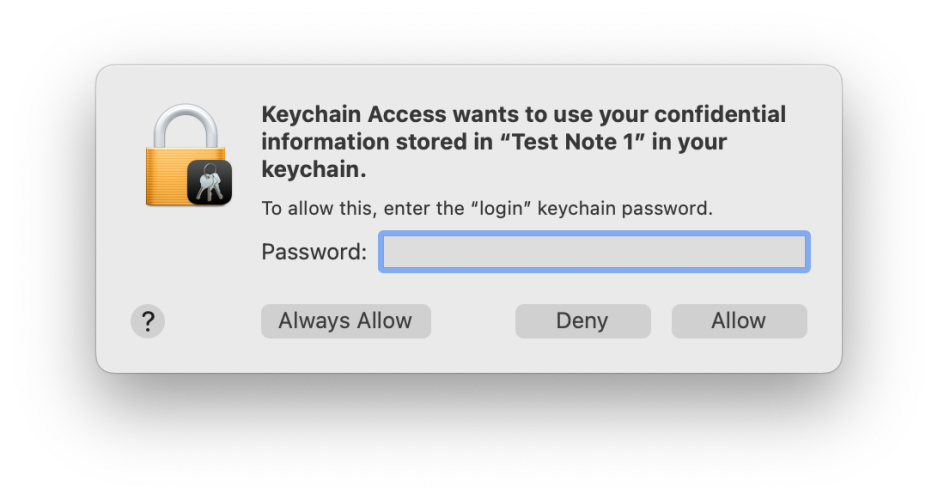
If the app isn’t trusted or the keychain is locked, then the security system, not the app, displays a dialog asking you for the password to that keychain to authenticate before it will provide the password to the app. That authentication dialog is very important: although malware might try to forge it, it contains distinctive features you should always look for:

  • The icon consists of a locked padlock, on which is superimposed a miniature icon representing the app or component which has asked to access the keychain.
  • The bold message text names the app or component which has called for keychain access, and states which item it’s asking to access: here, a named secure note.
  • The smaller lettering specifies that it’s asking for the keychain password, that is the password used to unlock the named keychain, not your Apple ID or any other password.
  • If you’re in any doubt about its authenticity, click on the Deny button and the request will be denied.
  • If you’re in any doubt about its authenticity, you can open Keychain Access, lock the keychain there, and repeat the action while watching the keychain to ensure that it’s unlocked and handled correctly.
keychain

Older versions of macOS may display this slightly differently, but still contain the same key items of information to reassure you that the request is genuine.

As a user, you cannot determine which of your apps are trusted, as far as the security system is concerned. Those are determined by the security system, the specific access it grants to an app, and to individual items in your keychain. At its most restrictive, the system can limit all other apps from access to a particular secret in the keychain, but specific secrets can be shared between several different apps.

System keychains

For the system, there are two vital groups of keychains:

  • in /System/Library/Keychains is SystemRootCertificates and others providing the set of root security certificates for that version of macOS;
  • in /Library/Keychains is the System keychain and others providing certificates and passwords required for all users, including those to gain access to your Mac’s Wi-Fi connections.

Custom keychains

Apps and users are also able to create their own keychains. Among those I have on my Macs are shared keychains with Parallels virtual machines, several for Microsoft apps, and those for Adobe’s products. I also tend to make a copy of the login keychain from my last Mac and copy it across under another name to ~/Library/Keychains, so that if I happen to have left any important certificates or passwords behind when migrating to a new Mac, I should be able to find them there.

Although these additional keychains may be included in the keychain search path, when macOS is looking for a secret kept in a keychain, unlike the login keychain they’re not normally kept unlocked. If I or an app want access to them, I’ll be prompted for that keychain’s password. For old login passwords, that’s just my old password from that Mac, of course.

Keychain in iCloud

If you have more than one Mac or Apple device, sharing your keychain in iCloud is recommended as an excellent way of ensuring that all have access to passwords. However, it can’t be used to share security certificates such as those used by developers for code-signing, which must be installed manually in each login keychain required. Keychain in iCloud does, though, share passkeys very well.

Conceptually, it’s better to think of Keychain in iCloud as synchronising certain types of data, including passwords and passkeys, between local login keychains, rather than storing them all in iCloud. Data in iCloud keychains are protected by end-to-end encryption, and are stored locally, transferred, and held in iCloud in encrypted form, which is the highest level of security provided by iCloud. Encryption keys use device-specific information to ensure that no one else can access keychain data. As that includes Apple, keychains in iCloud can’t be recovered by the iCloud Data Recovery Service: only you can access them on your Mac and devices when you’re signed into iCloud.

Tools

The bundled tool for working with keychains is the Keychain Access app, in /Applications/Utilities. A few third-party utilities, including my own free Mints, give additional information which can be helpful in resolving keychain problems.

Share this:

  • Click to share on X (Opens in new window) X
  • Click to share on Facebook (Opens in new window) Facebook
  • Click to share on Reddit (Opens in new window) Reddit
  • Click to share on Pinterest (Opens in new window) Pinterest
  • Click to share on Threads (Opens in new window) Threads
  • Click to share on Mastodon (Opens in new window) Mastodon
  • Click to share on Bluesky (Opens in new window) Bluesky
  • Click to email a link to a friend (Opens in new window) Email
  • Click to print (Opens in new window) Print
Like Loading...

Related

Posted in Macs, Technology and tagged certificates, iCloud, keychain, Keychain Access, login, Mints, Passkeys, security. Bookmark the permalink.

4Comments

Add yours
  1. 1
    Rado's avatar
    Rado on October 15, 2022 at 8:25 am

    Can you research where specific pair of app+keychain-item permission is stored AFTER you use always allow option on keychain prompt?

    I’d like to review all this (given in past permissions) and probably remove some.

    TIA

    LikeLiked by 1 person

    • 2
      hoakley's avatar
      hoakley on October 15, 2022 at 8:36 am

      I’m not aware of any way of doing that.
      Keychain Access tells you when passwords etc. were last modified, but not when they were last accessed. The Unified log used to record details of when keychains were opened, but if I recall correctly that was discontinued in High Sierra. I don’t know whether these are accessible through the security databases, or as events in Endpoint Security, but neither of those are easy to access.
      Howard.

      LikeLike

  2. 3
    Michele Galvagno's avatar
    Michele Galvagno on October 20, 2022 at 11:54 am

    Thank you very much Howard for writing this article.
    Could you, briefly, elaborate on why you create new keychains for Microsoft apps and virtual machines, what is their use, and how do you make them shared?
    Thanks

    LikeLiked by 1 person

    • 4
      hoakley's avatar
      hoakley on October 20, 2022 at 12:17 pm

      Thank you – I don’t, but you’ll find that those vendors/apps create their own. As the user isn’t provided with their password, their contents are kept secret.
      Howard.

      LikeLiked by 1 person

·Comments are closed.

Quick Links

  • Free Software Menu
  • System Updates
  • M-series Macs
  • Mac Troubleshooting Summary
  • Mac problem-solving
  • Painting topics
  • Painting
  • Long Reads

Search

Monthly archives

  • January 2026 (7)
  • December 2025 (75)
  • November 2025 (74)
  • October 2025 (75)
  • September 2025 (78)
  • August 2025 (76)
  • July 2025 (77)
  • June 2025 (74)
  • May 2025 (76)
  • April 2025 (73)
  • March 2025 (78)
  • February 2025 (67)
  • January 2025 (75)
  • December 2024 (74)
  • November 2024 (73)
  • October 2024 (78)
  • September 2024 (77)
  • August 2024 (75)
  • July 2024 (77)
  • June 2024 (71)
  • May 2024 (79)
  • April 2024 (75)
  • March 2024 (81)
  • February 2024 (72)
  • January 2024 (78)
  • December 2023 (79)
  • November 2023 (74)
  • October 2023 (77)
  • September 2023 (77)
  • August 2023 (72)
  • July 2023 (79)
  • June 2023 (73)
  • May 2023 (79)
  • April 2023 (73)
  • March 2023 (76)
  • February 2023 (68)
  • January 2023 (74)
  • December 2022 (74)
  • November 2022 (72)
  • October 2022 (76)
  • September 2022 (72)
  • August 2022 (75)
  • July 2022 (76)
  • June 2022 (73)
  • May 2022 (76)
  • April 2022 (71)
  • March 2022 (77)
  • February 2022 (68)
  • January 2022 (77)
  • December 2021 (75)
  • November 2021 (72)
  • October 2021 (75)
  • September 2021 (76)
  • August 2021 (75)
  • July 2021 (75)
  • June 2021 (71)
  • May 2021 (80)
  • April 2021 (79)
  • March 2021 (77)
  • February 2021 (75)
  • January 2021 (75)
  • December 2020 (77)
  • November 2020 (84)
  • October 2020 (81)
  • September 2020 (79)
  • August 2020 (103)
  • July 2020 (81)
  • June 2020 (78)
  • May 2020 (78)
  • April 2020 (81)
  • March 2020 (86)
  • February 2020 (77)
  • January 2020 (86)
  • December 2019 (82)
  • November 2019 (74)
  • October 2019 (89)
  • September 2019 (80)
  • August 2019 (91)
  • July 2019 (95)
  • June 2019 (88)
  • May 2019 (91)
  • April 2019 (79)
  • March 2019 (78)
  • February 2019 (71)
  • January 2019 (69)
  • December 2018 (79)
  • November 2018 (71)
  • October 2018 (78)
  • September 2018 (76)
  • August 2018 (78)
  • July 2018 (76)
  • June 2018 (77)
  • May 2018 (71)
  • April 2018 (67)
  • March 2018 (73)
  • February 2018 (67)
  • January 2018 (83)
  • December 2017 (94)
  • November 2017 (73)
  • October 2017 (86)
  • September 2017 (92)
  • August 2017 (69)
  • July 2017 (81)
  • June 2017 (76)
  • May 2017 (90)
  • April 2017 (76)
  • March 2017 (79)
  • February 2017 (65)
  • January 2017 (76)
  • December 2016 (75)
  • November 2016 (68)
  • October 2016 (76)
  • September 2016 (78)
  • August 2016 (70)
  • July 2016 (74)
  • June 2016 (66)
  • May 2016 (71)
  • April 2016 (67)
  • March 2016 (71)
  • February 2016 (68)
  • January 2016 (90)
  • December 2015 (96)
  • November 2015 (103)
  • October 2015 (119)
  • September 2015 (115)
  • August 2015 (117)
  • July 2015 (117)
  • June 2015 (105)
  • May 2015 (111)
  • April 2015 (119)
  • March 2015 (69)
  • February 2015 (54)
  • January 2015 (39)

Tags

APFS Apple Apple silicon backup Big Sur Blake Bonnard bug Catalina Consolation Console Corinth Delacroix Disk Utility Doré El Capitan extended attributes Finder firmware Gatekeeper Gérôme High Sierra history of painting iCloud Impressionism landscape LockRattler log M1 Mac Mac history macOS macOS 10.12 macOS 10.13 macOS 10.14 macOS 10.15 macOS 11 macOS 12 macOS 13 macOS 14 macOS 15 malware Metamorphoses Mojave Monet Monterey Moreau myth narrative OS X Ovid painting performance Pissarro Poussin privacy Renoir riddle Rubens Sargent security Sierra SilentKnight Sonoma SSD Swift Time Machine Tintoretto Turner update upgrade Ventura xattr Xcode XProtect

Statistics

  • 21,118,573 hits
Blog at WordPress.com.
Footer navigation
  • Free Software Menu
  • About & Contact
  • Macs
  • Painting
  • Downloads
  • Mac problem-solving
  • Extended attributes (xattrs)
  • Painting topics
  • SilentKnight, Skint, SystHist, silnite, LockRattler & Scrub
  • DelightEd & Podofyllin
  • xattred, SpotTest, Spotcord, Metamer & xattr tools
  • 32-bitCheck & ArchiChect
  • XProCheck, T2M2, LogUI, Ulbow, blowhole and log utilities
  • Cirrus & Bailiff
  • Precize, Alifix, UTIutility, Sparsity, alisma, Taccy, Signet
  • Versatility & Revisionist
  • Text Utilities: Textovert, Nalaprop, Dystextia and others
  • PDF
  • Keychains & Permissions
  • Updates
  • Spundle, Cormorant, Stibium, DropSum, Dintch, Fintch and cintch
  • Long Reads
  • Mac Troubleshooting Summary
  • M-series Macs
  • Mints: a multifunction utility
  • VisualLookUpTest
  • Virtualisation on Apple silicon
  • System Updates
  • Saturday Mac Riddles
  • Last Week on My Mac
  • sysctl information
Secondary navigation
  • Search

Post navigation

Reading visual art: 4 Danse Macabre
Saturday Mac riddles 173

Begin typing your search above and press return to search. Press Esc to cancel.

  • Reblog
  • Subscribe Subscribed
    • The Eclectic Light Company
    • Join 8,899 other subscribers
    • Already have a WordPress.com account? Log in now.
    • The Eclectic Light Company
    • Subscribe Subscribed
    • Sign up
    • Log in
    • Copy shortlink
    • Report this content
    • View post in Reader
    • Manage subscriptions
    • Collapse this bar
 

Loading Comments...
 

    %d