
Skip to content

The Eclectic Light Company

Macs & painting – 🦉 No AI content
Main navigation
  • Downloads
  • Freeware
  • M-series Macs
  • Mac Problems
  • Mac articles
  • Macs
  • Art
hoakley September 13, 2021 Macs, Technology

Running software automatically using launchd

macOS has several systems for running software automatically, of which three are accessible outside other apps and therefore suitable for running scripts of different kinds. Although long since deprecated, the standard Unix scheduler cron is still available if you really must. LaunchServices also offers Login Items, but those are only launched once, when your Mac starts up. For general purposes, including running tasks which must occur at regular intervals, the primary mechanism is launchd, with its control tool launchctl.

launchd

Mac OS X 10.4 brought together the functions of a disparate group of Unix tools, including (x)inetd, init, and watchdogd, into a single service manager launchd, which is controlled by launchctl. During startup, once the kernel is running and required kernel extensions have been loaded, launchd is run with the process ID of 1, and it remains running until your Mac shuts down again.

Before you log in, launchd runs services and other components which are specified in Property List files in the LaunchAgents and LaunchDaemons folders in /System/Library, then in /Library. Those in /System/Library are all part of macOS, owned by Apple, and now (macOS 11 and later) can’t be modified without unsealing the system, but those in /Library include many installed by third party products. As they’re run before the user logs in, they work for all users, so provide global services.

Once you have logged in, launchd runs any services and other components specified in any LaunchAgent folder in ~/Library. Those are user-specific.

Launchd is best suited to background services, which use it the most. You don’t need any tools beyond a Property List or text editor to craft its configuration files, although Peter Borg’s Lingon and Soma-zone’s LaunchControl make them much more accessible. It’s also widely abused by malware, which often installs its own LaunchAgents and LaunchDaemons to ensure its persistence across reboots, and to perform services which it requires.

Uninstalling a LaunchAgent or LaunchDaemon is simply a matter of trashing its Property List from the appropriate folder – a task sometimes necessary when you’ve uninstalled an app which doesn’t clean up properly after itself. If software does need to install one or more Property Lists in any of these folders, then it should also provide an effective uninstaller to remove them when required.

LaunchAgent or LaunchDaemon?

Apple defines a LaunchDaemon as a general background service, without any form of GUI. Specifically, LaunchDaemons are not allowed to connect to the macOS window server. LaunchAgents do have access to the GUI, and to other system features such as locating the current user’s Home folder, but generally have more limited interfaces than do regular apps.

Property lists

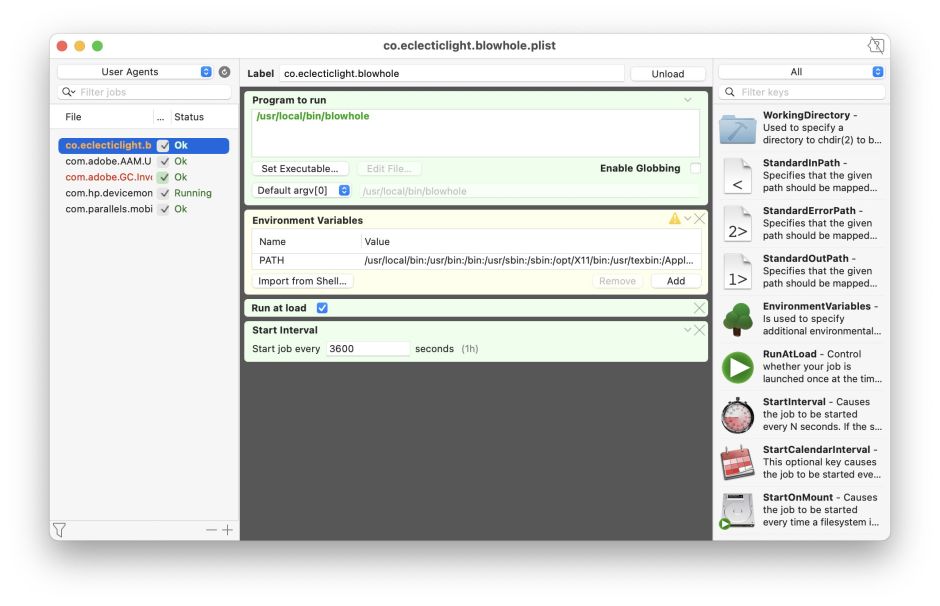
These Property List files contain keyed settings which determine what launchd does with what. In Lingon and LaunchControl, these are presented in more understandable ways which should help you set them correctly. For example, the following property list, viewed in LaunchControl, runs my command tool blowhole at startup and again every 3600 seconds, or one hour.
launchd1

This equates to a property list containing just the following dictionary

<dict>
<key>EnvironmentVariables</key>
<dict>
<key>PATH</key>
<string>/usr/local/bin:/usr/bin:/bin:/usr/sbin:/sbin:/opt/X11/bin:/usr/local/sbin</string>
</dict>
<key>Label</key>
<string>co.eclecticlight.blowhole</string>
<key>ProgramArguments</key>
<array>
<string>/usr/local/bin/blowhole</string>
</array>
<key>RunAtLoad</key>
<true/>
<key>StartInterval</key>
<integer>3600</integer>
</dict>

For tasks running at regular intervals, the most important keys are:

  • ProgramArguments, which tells launchd what to run;
  • RunAtLoad, which determines whether it is run whenever your Mac starts up;
  • StartInterval, which sets the time interval between launches.

To run a GUI app as a LaunchAgent, set the ProgramArguments to the executable binary of the app, in its Contents/MacOS folder.

If you prefer, you can use the launchctl command tool to dynamically configure LaunchDaemons and LaunchAgents, but Apple has been progressively limiting its capabilities, and now you’re generally better off using a property list, which is also less prone to error.

So long as you’re working with a small number of daemons/agents, launchd isn’t that complex, and certainly not difficult to use. It can get messier when you need to know about other tasks. One example of this is when your Mac starts crashing or freezing at 0200 every morning, but the logs provide insufficient information to identify what has caused the problem.

Further information

Apple’s documentation on launchd is very old now, but is still a valuable reference, as is TN2083.

launchd, launchctl, cron, and crontabs are fully documented in their man files. The best overall guide to launchd is Soma-zone’s launchd.info, which explains how to make your own property list files and much more.

Lingon and LaunchControl are inexpensive, and worth every penny even if you only use them infrequently.

Share this:

  • Share on X (Opens in new window) X
  • Share on Facebook (Opens in new window) Facebook
  • Share on Reddit (Opens in new window) Reddit
  • Share on Pinterest (Opens in new window) Pinterest
  • Share on Threads (Opens in new window) Threads
  • Share on Mastodon (Opens in new window) Mastodon
  • Share on Bluesky (Opens in new window) Bluesky
  • Email a link to a friend (Opens in new window) Email
  • Print (Opens in new window) Print
Like Loading...

Related

Posted in Macs, Technology and tagged cron, LaunchAgents, LaunchControl, launchctl, launchd, LaunchDaemons, Lingon, Login Item, macOS, property list. Bookmark the permalink.

11Comments

Add yours
  1. 1
    Bryan Christianson's avatar
    Bryan Christianson on September 13, 2021 at 7:00 am

    I have found that a LaunchAgent is a very simple way to implement “Launch at Login” in an application.

    I know Apples ‘preferred’ method is for me to write (and maintain) a separate application for this purpose, but a launch agent executing ‘open -b ‘ seems to be very robust. Using the bundleid rather than a hard coded path to the application means the launch will happen even if the user has moved the application to a different location.

    The agent plist easily installed in the users ~/Library/LaunchAgents directory and is also easily removed if the user no longer requires ‘Launch at Login’.

    Of course this would not be needed if Apple provided a better (i.e. not deprecated) api for adding an entry to the login items in the Users & Groups preferences.

    LikeLiked by 1 person

  2. 2
    bwillius's avatar
    bwillius on September 13, 2021 at 9:15 am

    Using Lingon as UI for launchd has another benefit: it tells me when a launch agent has been added or removed. A notification for a new launch agent is a good security measure.

    LikeLiked by 1 person

    • 3
      hoakley's avatar
      hoakley on September 13, 2021 at 9:17 am

      Thank you: that’s one of the tasks that I use Hazel for.
      Howard

      LikeLike

  3. 4
    Gideon's avatar
    Gideon on September 13, 2021 at 10:42 am

    I use this to manage (schedule) Time Machine backups more flexibly.
    Do you know of a way to do something similar, but when shutting down?
    e. g. Mute Mac audio on shutdown or reboot?

    LikeLiked by 1 person

    • 5
      nudge's avatar
      nudge on September 13, 2021 at 9:29 pm

      Hi Gideon, there is one way to run these kind of scripts that I know of. Checkout the contents of /etc/bashrc_Apple_Terminal. If like me you always have terminals sessions running, you can use the bash shell (unsure about others) to define a function called shell_session_save_user_state and it will br run before logout/reboot/shutdown. I think there used to be some other hooks that don’t work any more, but this still does.

      LikeLiked by 1 person

    • 6
      hoakley's avatar
      hoakley on September 13, 2021 at 10:48 pm

      Thank you. launchd doesn’t provide a way, as shutdown scripts can be a cause of all sorts of problems.
      I also advise against scheduling Time Machine backups using launchd, which runs them at the set time and doesn’t take into account any of the many factors which the DAS despatching system does. TM is also designed to run every hour, so that each backup is manageably small. Less frequent backups tend to be larger, thus take longer and have more impact on your Mac.
      Howard.

      LikeLike

  4. 7
    Hans Siemensma's avatar
    Hans Siemensma on September 14, 2021 at 5:52 am

    Thanks Howard for (again) this fine article. It was a confirmation for me for what I was supposing how things work. Meanwhile I added Lingon to my server’s toolbox and happy since.
    Best regards, Hans.

    LikeLiked by 1 person

    • 8
      hoakley's avatar
      hoakley on September 14, 2021 at 7:25 pm

      Thank you.
      Howard.

      LikeLike

  5. 9
    Rebecca Latimer's avatar
    Rebecca Latimer on September 17, 2021 at 3:25 pm

    Very good writeup! I just recorded a jamf session called Intro to LaunchDaemons. I hope it will be useful to people.

    LikeLiked by 1 person

    • 10
      hoakley's avatar
      hoakley on September 17, 2021 at 3:27 pm

      Thank you. Please feel free to add a link here when it’s published.
      Howard.

      LikeLike

  6. 11
    jibiaz's avatar
    jibiaz on October 10, 2021 at 7:08 am

    great article and informative thank you

    LikeLiked by 1 person

·Comments are closed.

Quick Links

  • Free Software Menu
  • System Updates
  • M-series Macs
  • Mac Troubleshooting Summary
  • Mac problem-solving
  • Painting topics
  • Painting
  • Long Reads

Search

Monthly archives

  • January 2026 (39)
  • December 2025 (75)
  • November 2025 (74)
  • October 2025 (75)
  • September 2025 (78)
  • August 2025 (76)
  • July 2025 (77)
  • June 2025 (74)
  • May 2025 (76)
  • April 2025 (73)
  • March 2025 (78)
  • February 2025 (67)
  • January 2025 (75)
  • December 2024 (74)
  • November 2024 (73)
  • October 2024 (78)
  • September 2024 (77)
  • August 2024 (75)
  • July 2024 (77)
  • June 2024 (71)
  • May 2024 (79)
  • April 2024 (75)
  • March 2024 (81)
  • February 2024 (72)
  • January 2024 (78)
  • December 2023 (79)
  • November 2023 (74)
  • October 2023 (77)
  • September 2023 (77)
  • August 2023 (72)
  • July 2023 (79)
  • June 2023 (73)
  • May 2023 (79)
  • April 2023 (73)
  • March 2023 (76)
  • February 2023 (68)
  • January 2023 (74)
  • December 2022 (74)
  • November 2022 (72)
  • October 2022 (76)
  • September 2022 (72)
  • August 2022 (75)
  • July 2022 (76)
  • June 2022 (73)
  • May 2022 (76)
  • April 2022 (71)
  • March 2022 (77)
  • February 2022 (68)
  • January 2022 (77)
  • December 2021 (75)
  • November 2021 (72)
  • October 2021 (75)
  • September 2021 (76)
  • August 2021 (75)
  • July 2021 (75)
  • June 2021 (71)
  • May 2021 (80)
  • April 2021 (79)
  • March 2021 (77)
  • February 2021 (75)
  • January 2021 (75)
  • December 2020 (77)
  • November 2020 (84)
  • October 2020 (81)
  • September 2020 (79)
  • August 2020 (103)
  • July 2020 (81)
  • June 2020 (78)
  • May 2020 (78)
  • April 2020 (81)
  • March 2020 (86)
  • February 2020 (77)
  • January 2020 (86)
  • December 2019 (82)
  • November 2019 (74)
  • October 2019 (89)
  • September 2019 (80)
  • August 2019 (91)
  • July 2019 (95)
  • June 2019 (88)
  • May 2019 (91)
  • April 2019 (79)
  • March 2019 (78)
  • February 2019 (71)
  • January 2019 (69)
  • December 2018 (79)
  • November 2018 (71)
  • October 2018 (78)
  • September 2018 (76)
  • August 2018 (78)
  • July 2018 (76)
  • June 2018 (77)
  • May 2018 (71)
  • April 2018 (67)
  • March 2018 (73)
  • February 2018 (67)
  • January 2018 (83)
  • December 2017 (94)
  • November 2017 (73)
  • October 2017 (86)
  • September 2017 (92)
  • August 2017 (69)
  • July 2017 (81)
  • June 2017 (76)
  • May 2017 (90)
  • April 2017 (76)
  • March 2017 (79)
  • February 2017 (65)
  • January 2017 (76)
  • December 2016 (75)
  • November 2016 (68)
  • October 2016 (76)
  • September 2016 (78)
  • August 2016 (70)
  • July 2016 (74)
  • June 2016 (66)
  • May 2016 (71)
  • April 2016 (67)
  • March 2016 (71)
  • February 2016 (68)
  • January 2016 (90)
  • December 2015 (96)
  • November 2015 (103)
  • October 2015 (119)
  • September 2015 (115)
  • August 2015 (117)
  • July 2015 (117)
  • June 2015 (105)
  • May 2015 (111)
  • April 2015 (119)
  • March 2015 (69)
  • February 2015 (54)
  • January 2015 (39)

Tags

APFS Apple Apple silicon backup Big Sur Blake Bonnard bug Catalina Consolation Console Corinth Delacroix Disk Utility Doré El Capitan extended attributes Finder firmware Gatekeeper Gérôme High Sierra history of painting iCloud Impressionism landscape LockRattler log M1 Mac Mac history macOS macOS 10.12 macOS 10.13 macOS 10.14 macOS 10.15 macOS 11 macOS 12 macOS 13 macOS 14 macOS 15 malware Metamorphoses Mojave Monet Monterey Moreau myth narrative OS X Ovid painting performance Pissarro Poussin privacy Renoir riddle Rubens Sargent security Sierra SilentKnight Sonoma SSD Swift Time Machine Tintoretto Turner update upgrade Ventura xattr Xcode XProtect

Statistics

  • 21,216,594 hits
Blog at WordPress.com.
Footer navigation
  • Free Software Menu
  • About & Contact
  • Macs
  • Painting
  • Downloads
  • Mac problem-solving
  • Extended attributes (xattrs)
  • Painting topics
  • SilentKnight, Skint, SystHist, silnite, LockRattler & Scrub
  • DelightEd & Podofyllin
  • xattred, SpotTest, Providable, Spotcord, Metamer & xattr tools
  • 32-bitCheck & ArchiChect
  • XProCheck, T2M2, LogUI, Ulbow, blowhole and log utilities
  • Cirrus & Bailiff
  • Precize, Alifix, UTIutility, Sparsity, alisma, Taccy, Signet
  • Versatility & Revisionist
  • Text Utilities: Textovert, Disclipper, Nalaprop, Dystextia and others
  • PDF
  • Keychains & Permissions
  • Updates
  • Spundle, Cormorant, Stibium, DropSum, Dintch, Fintch and cintch
  • Long Reads
  • Mac Troubleshooting Summary
  • M-series Macs
  • Mints: a multifunction utility
  • VisualLookUpTest
  • Virtualisation on Apple silicon
  • System Updates
  • Saturday Mac Riddles
  • Last Week on My Mac
  • sysctl information
Secondary navigation
  • Search

Post navigation

The 700th anniversary of Dante’s death: 2 His writing
Solutions to Saturday Mac riddles 116

Begin typing your search above and press return to search. Press Esc to cancel.

  • Reblog
  • Subscribe Subscribed
    • The Eclectic Light Company
    • Join 8,939 other subscribers
    • Already have a WordPress.com account? Log in now.
    • The Eclectic Light Company
    • Subscribe Subscribed
    • Sign up
    • Log in
    • Copy shortlink
    • Report this content
    • View post in Reader
    • Manage subscriptions
    • Collapse this bar
 

Loading Comments...
 

    %d