
Skip to content

The Eclectic Light Company

Macs & painting – 🦉 No AI content
Main navigation
  • Downloads
  • Freeware
  • M-series Macs
  • Mac Problems
  • Mac articles
  • Macs
  • Art
hoakley September 7, 2020 Macs, Technology, Updates

Tackling keychain problems with KeychainCheck 2, now a Universal App

Keychain problems come and go. When Apple introduced Keychain in iCloud, a lot of users experienced problems, but in more recent versions of macOS these seem to have settled down. Few users now seem troubled by those infernal repeated requests for passwords to access items which should be accessible from your login keychain. That said, when they do come, such problems can be infuriating, and very difficult to investigate.

Over three years ago, I produced a simple tool to report the status of keychains and give direct access to some useful tools to aid in diagnosing problems, KeychainCheck. Keychains are one of the oldest parts of macOS, dating right back to Classic System 8.6 in 1999, and some parts seem to creak and groan a little because of their age. I had hoped that I’d be able to take my utility progressively deeper into keychains and their problems, but so far haven’t found a good way to do so.

One valuable feature of the new unified log when it appeared in Sierra was the fact that each time a keychain was opened, there would be a log entry to record that. I incorporated that into KeychainCheck, so that you could see exactly what was going on when you were being bombarded with those dialogs. Then in more recent versions of macOS the log entries stopped, never to return.

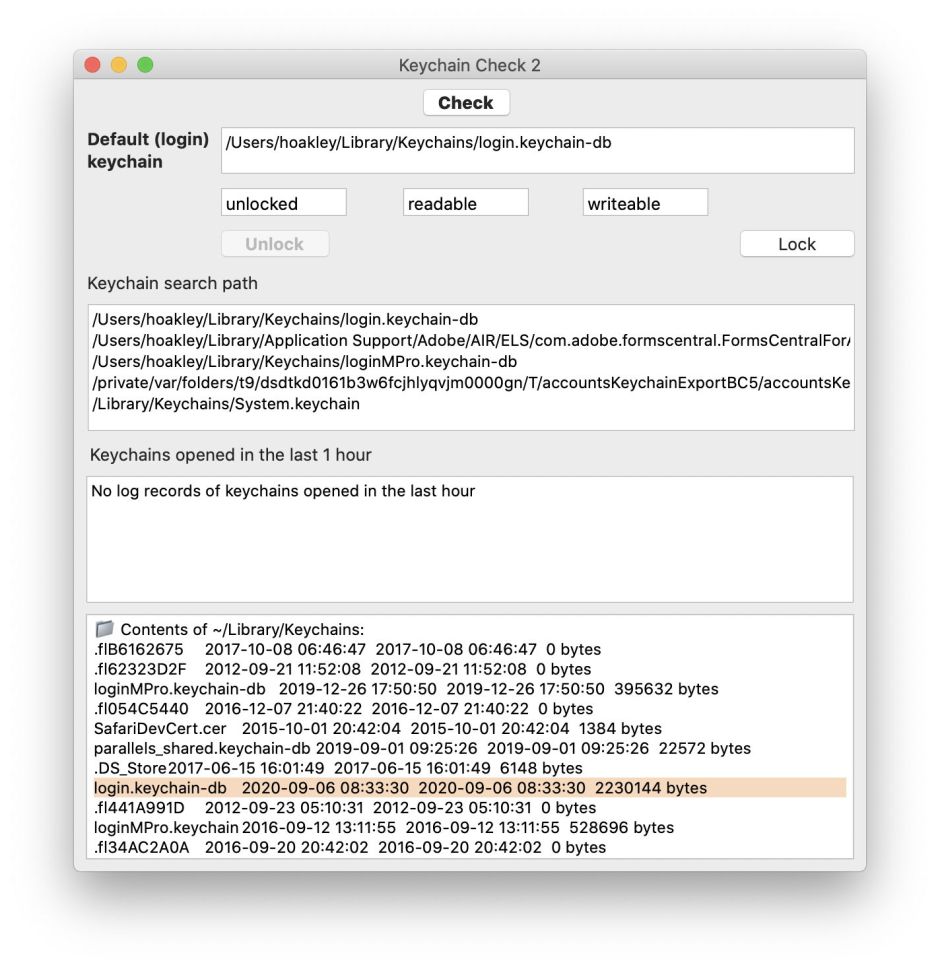
KeychainCheck 2 is still a useful utility when you’re trying to understand keychain problems, though. Its window shows:

  • the path to and status of the default login keychain, which enables you to lock and unlock it;
  • the keychain search path, listing the location of each keychain in that;
  • in older versions of macOS, any log records referring to keychains in the past hour;
  • a compendium of other useful information, including details of the contents of each of the keychain folders, with their datestamps.

For example, this is its document window:
keychain01

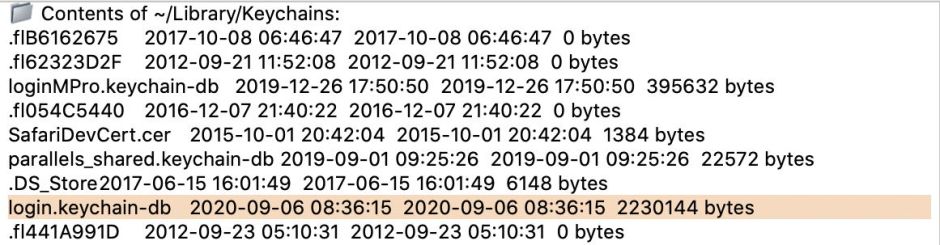
and here it has recorded a changed file date on the main login keychain file after toggling keychain sharing over iCloud.
keychain02

KeychainCheck 2.0 is now available from here: keychaincheck2
from Downloads above, and from its Product Page.

I will leave the last Intel-only beta-release available from its Product Page, in case you encounter any problems with this Universal App version.

This will be the last version of KeychainCheck, as I will be rolling its features into my diagnostic toolbox Mints in the coming few weeks.

Share this:

  • Click to share on X (Opens in new window) X
  • Click to share on Facebook (Opens in new window) Facebook
  • Click to share on Reddit (Opens in new window) Reddit
  • Click to share on Pinterest (Opens in new window) Pinterest
  • Click to share on Threads (Opens in new window) Threads
  • Click to share on Mastodon (Opens in new window) Mastodon
  • Click to share on Bluesky (Opens in new window) Bluesky
  • Click to email a link to a friend (Opens in new window) Email
  • Click to print (Opens in new window) Print
Like Loading...

Related

Posted in Macs, Technology, Updates and tagged Apple silicon, Big Sur, Catalina, iCloud, keychain, KeychainCheck, login, macOS 10.15, macOS 11, update. Bookmark the permalink.

2Comments

Add yours
  1. 1
    EcleX's avatar
    EcleX on September 7, 2020 at 6:47 am

    Thanks. Is there a way to prevent Keychain asking twice (or more) for passwords sometimes? For instance, it happens sometimes when login web sites requiring Class 2 CA certificates or when login using VPN applications to access the University or government servers Searching the Internet with Google for for

    “keychain” requests password “twice”

    shows the following, but that does not work with Keychain Keychain Access 9.0 (55208.60.1) on macOS 10.12.6 (16G2136) Sierra:

    If your Mac keeps asking for the login keychain password
    https://support.apple.com/en-us/HT201609

    asked to login twice in keychain
    https://discussions.apple.com/thread/4481908

    Thanks again!

    LikeLiked by 1 person

    • 2
      hoakley's avatar
      hoakley on September 7, 2020 at 7:07 am

      Thank you.
      The advice in that support note, and given in response to that question, isn’t good. Using KeychainCheck, you can discover which keychain is being accessed, particularly on Sierra where it should still be logged. You can also use the app to manually unlock your login keychain when you need.
      Changing the password on your login keychain can cause all sorts of problems. Sometimes you’re reduced to creating a new login keychain, but it’s then extremely tedious to copy across all the essential items from the old one to the new. So it’s not something to enter into lightly.
      As I wrote above, these keychain problems seem to have become much less common in recent versions of macOS, and with improvements in Keychain in iCloud, which now seems much more robust.
      Howard.

      LikeLike

·Comments are closed.

Quick Links

  • Free Software Menu
  • System Updates
  • M-series Macs
  • Mac Troubleshooting Summary
  • Mac problem-solving
  • Painting topics
  • Painting
  • Long Reads

Search

Monthly archives

  • December 2025 (47)
  • November 2025 (74)
  • October 2025 (75)
  • September 2025 (78)
  • August 2025 (76)
  • July 2025 (77)
  • June 2025 (74)
  • May 2025 (76)
  • April 2025 (73)
  • March 2025 (78)
  • February 2025 (67)
  • January 2025 (75)
  • December 2024 (74)
  • November 2024 (73)
  • October 2024 (78)
  • September 2024 (77)
  • August 2024 (75)
  • July 2024 (77)
  • June 2024 (71)
  • May 2024 (79)
  • April 2024 (75)
  • March 2024 (81)
  • February 2024 (72)
  • January 2024 (78)
  • December 2023 (79)
  • November 2023 (74)
  • October 2023 (77)
  • September 2023 (77)
  • August 2023 (72)
  • July 2023 (79)
  • June 2023 (73)
  • May 2023 (79)
  • April 2023 (73)
  • March 2023 (76)
  • February 2023 (68)
  • January 2023 (74)
  • December 2022 (74)
  • November 2022 (72)
  • October 2022 (76)
  • September 2022 (72)
  • August 2022 (75)
  • July 2022 (76)
  • June 2022 (73)
  • May 2022 (76)
  • April 2022 (71)
  • March 2022 (77)
  • February 2022 (68)
  • January 2022 (77)
  • December 2021 (75)
  • November 2021 (72)
  • October 2021 (75)
  • September 2021 (76)
  • August 2021 (75)
  • July 2021 (75)
  • June 2021 (71)
  • May 2021 (80)
  • April 2021 (79)
  • March 2021 (77)
  • February 2021 (75)
  • January 2021 (75)
  • December 2020 (77)
  • November 2020 (84)
  • October 2020 (81)
  • September 2020 (79)
  • August 2020 (103)
  • July 2020 (81)
  • June 2020 (78)
  • May 2020 (78)
  • April 2020 (81)
  • March 2020 (86)
  • February 2020 (77)
  • January 2020 (86)
  • December 2019 (82)
  • November 2019 (74)
  • October 2019 (89)
  • September 2019 (80)
  • August 2019 (91)
  • July 2019 (95)
  • June 2019 (88)
  • May 2019 (91)
  • April 2019 (79)
  • March 2019 (78)
  • February 2019 (71)
  • January 2019 (69)
  • December 2018 (79)
  • November 2018 (71)
  • October 2018 (78)
  • September 2018 (76)
  • August 2018 (78)
  • July 2018 (76)
  • June 2018 (77)
  • May 2018 (71)
  • April 2018 (67)
  • March 2018 (73)
  • February 2018 (67)
  • January 2018 (83)
  • December 2017 (94)
  • November 2017 (73)
  • October 2017 (86)
  • September 2017 (92)
  • August 2017 (69)
  • July 2017 (81)
  • June 2017 (76)
  • May 2017 (90)
  • April 2017 (76)
  • March 2017 (79)
  • February 2017 (65)
  • January 2017 (76)
  • December 2016 (75)
  • November 2016 (68)
  • October 2016 (76)
  • September 2016 (78)
  • August 2016 (70)
  • July 2016 (74)
  • June 2016 (66)
  • May 2016 (71)
  • April 2016 (67)
  • March 2016 (71)
  • February 2016 (68)
  • January 2016 (90)
  • December 2015 (96)
  • November 2015 (103)
  • October 2015 (119)
  • September 2015 (115)
  • August 2015 (117)
  • July 2015 (117)
  • June 2015 (105)
  • May 2015 (111)
  • April 2015 (119)
  • March 2015 (69)
  • February 2015 (54)
  • January 2015 (39)

Tags

APFS Apple Apple silicon backup Big Sur Blake Bonnard bug Catalina Consolation Console Corinth Delacroix Disk Utility Doré El Capitan extended attributes Finder firmware Gatekeeper Gérôme High Sierra history of painting iCloud Impressionism landscape LockRattler log M1 Mac Mac history macOS macOS 10.12 macOS 10.13 macOS 10.14 macOS 10.15 macOS 11 macOS 12 macOS 13 macOS 14 macOS 15 malware Metamorphoses Mojave Monet Monterey Moreau myth narrative OS X Ovid painting performance Pissarro Poussin privacy Renoir riddle Rubens Sargent security Sierra SilentKnight Sonoma SSD Swift Time Machine Tintoretto Turner update upgrade Ventura xattr Xcode XProtect

Statistics

  • 20,882,240 hits
Blog at WordPress.com.
Footer navigation
  • Free Software Menu
  • About & Contact
  • Macs
  • Painting
  • Downloads
  • Mac problem-solving
  • Extended attributes (xattrs)
  • Painting topics
  • SilentKnight, Skint, SystHist, silnite, LockRattler & Scrub
  • DelightEd & Podofyllin
  • xattred, SpotTest, Spotcord, Metamer & xattr tools
  • 32-bitCheck & ArchiChect
  • XProCheck, T2M2, LogUI, Ulbow, blowhole and log utilities
  • Cirrus & Bailiff
  • Precize, Alifix, UTIutility, Sparsity, alisma, Taccy, Signet
  • Versatility & Revisionist
  • Text Utilities: Textovert, Nalaprop, Dystextia and others
  • PDF
  • Keychains & Permissions
  • Updates
  • Spundle, Cormorant, Stibium, DropSum, Dintch, Fintch and cintch
  • Long Reads
  • Mac Troubleshooting Summary
  • M-series Macs
  • Mints: a multifunction utility
  • VisualLookUpTest
  • Virtualisation on Apple silicon
  • System Updates
  • Saturday Mac Riddles
  • Last Week on My Mac
  • sysctl information
Secondary navigation
  • Search

Post navigation

Harvest Home in paintings – gleaners
Solutions to Saturday Mac riddles 63

Begin typing your search above and press return to search. Press Esc to cancel.

  • Reblog
  • Subscribe Subscribed
    • The Eclectic Light Company
    • Join 8,876 other subscribers
    • Already have a WordPress.com account? Log in now.
    • The Eclectic Light Company
    • Subscribe Subscribed
    • Sign up
    • Log in
    • Copy shortlink
    • Report this content
    • View post in Reader
    • Manage subscriptions
    • Collapse this bar
 

Loading Comments...
 

    %d