
Since macOS Catalina in 2019, macOS has started up from two volumes in its boot volume group. Much of macOS is stored on the System volume, since Big Sur the Signed System Volume (SSV), a snapshot, referenced as the root at / in Terminal. The Data volume is joined into it using a set of firmlinks that make the two volumes appear as one. The layout of those hasn’t changed in over six years up to and including macOS Tahoe 26.3.1, but has altered in 26.4 and Golden Gate, with the addition of a new firmlinked directory pkg.
New pkg directory
The pkg directory was first added to the Data volume in macOS 26.4 released on 24 March 2026, drew attention in its visibility in the first developer beta-release of macOS 27.0, and persists into the public release on 14 September. Those who have been testing betas and assumed it was a transient addition should still see it at /pkg, at the top level of the root.
Currently its contents are minimal: there are four directories named env, etc, inv and var, with no substantial contents at present. Its name isn’t included in the now historical summary of disk structure in man hier, nor is it listed among those forming the Filesystem Hierarchy Standard FHS.
Boot volume group
The new structure of volumes, cryptexes and major directories in the boot volume group of 26.4 and later is summarised in the diagram below.
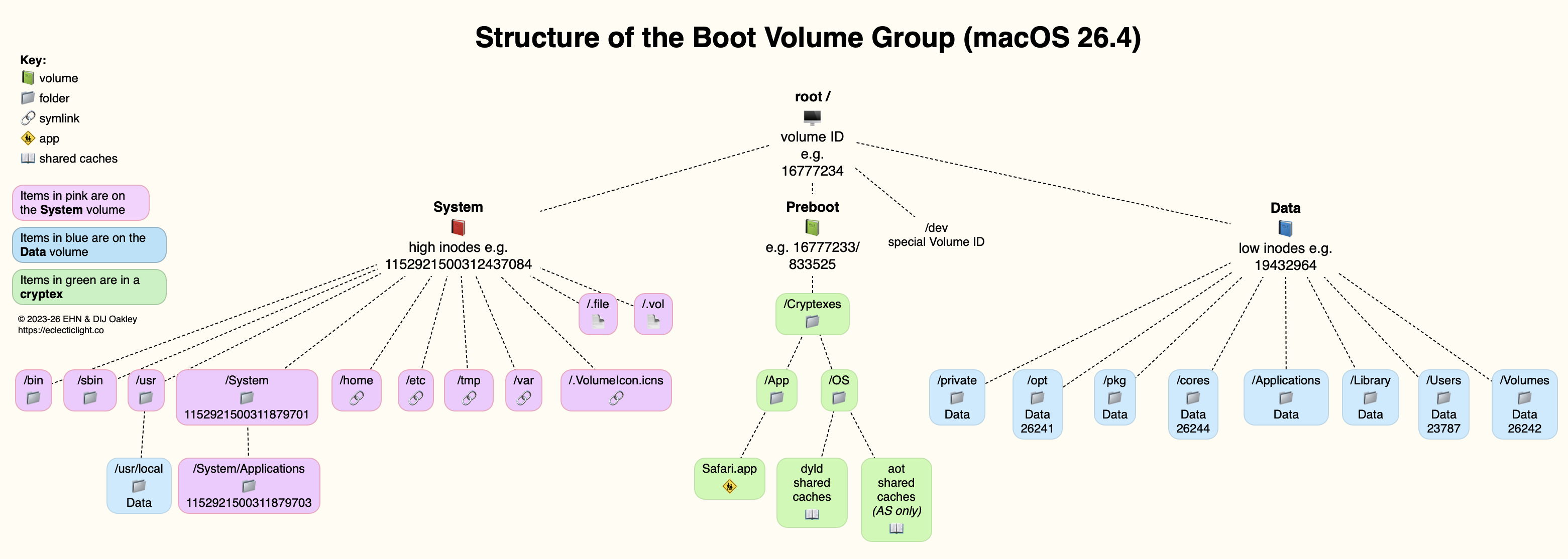
Volume IDs and inode numbers given here are only examples, and you’re likely to see different ones.
This shows the location of major directories across the three components, with those located in the SSV shown in pink, those of the Data volume in blue, and contributions from cryptexes in green. The effect of firmlinks and ‘grafting’ of cryptexes into the file system is now complex. One important example is how the single top-level Applications directory is assembled from:
- bundled apps in the SSV, located in /System/Applications,
- user-installed apps in /Applications in the Data volume,
- Safari.app mounted from the Preboot volume in the App cryptex.
Although the SSV is identical in both Intel and Apple silicon Macs, the two architectures remain differentiated by their cryptexes. Those for Intel Macs contain only dyld shared caches with x86 support; those for Apple silicon Macs provide both ARM and x86 support, as well as AOT shared caches, for Rosetta 2.
Firmlinks
The addition of the /pkg firmlink is the only change to the list of firmlinks in /usr/share/firmlinks, which now contains the following mappings:
/Applications <-> Applications
/Library <-> Library
/System/Library/Caches <-> System/Library/Caches
/System/Library/Assets <-> System/Library/Assets
/System/Library/PreinstalledAssets <-> System/Library/PreinstalledAssets
/System/Library/AssetsV2 <-> System/Library/AssetsV2
/System/Library/PreinstalledAssetsV2 <-> System/Library/PreinstalledAssetsV2
/System/Library/CoreServices/CoreTypes.bundle/Contents/Library <-> System/Library/CoreServices/CoreTypes.bundle/Contents/Library
/System/Library/Speech <-> System/Library/Speech
/Users <-> Users
/Volumes <-> Volumes
/cores <-> cores
/opt <-> opt
/pkg <-> pkg
/private <-> private
/usr/local <-> usr/local
/usr/libexec/cups <-> usr/libexec/cups
/usr/share/snmp <-> usr/share/snmp
/AppleInternal <-> AppleInternal (on Apple engineering systems only)
in each case shown as the system volume path and the Data volume path which are firmlinked together.
Directory layout
Given the volume ID and inode numbers of directories and files, together with that list of firmlinks, it’s possible to construct a full directory tree for the conjoined SSV, Data volume and cryptexes. A simplified version of that is in the diagram below.
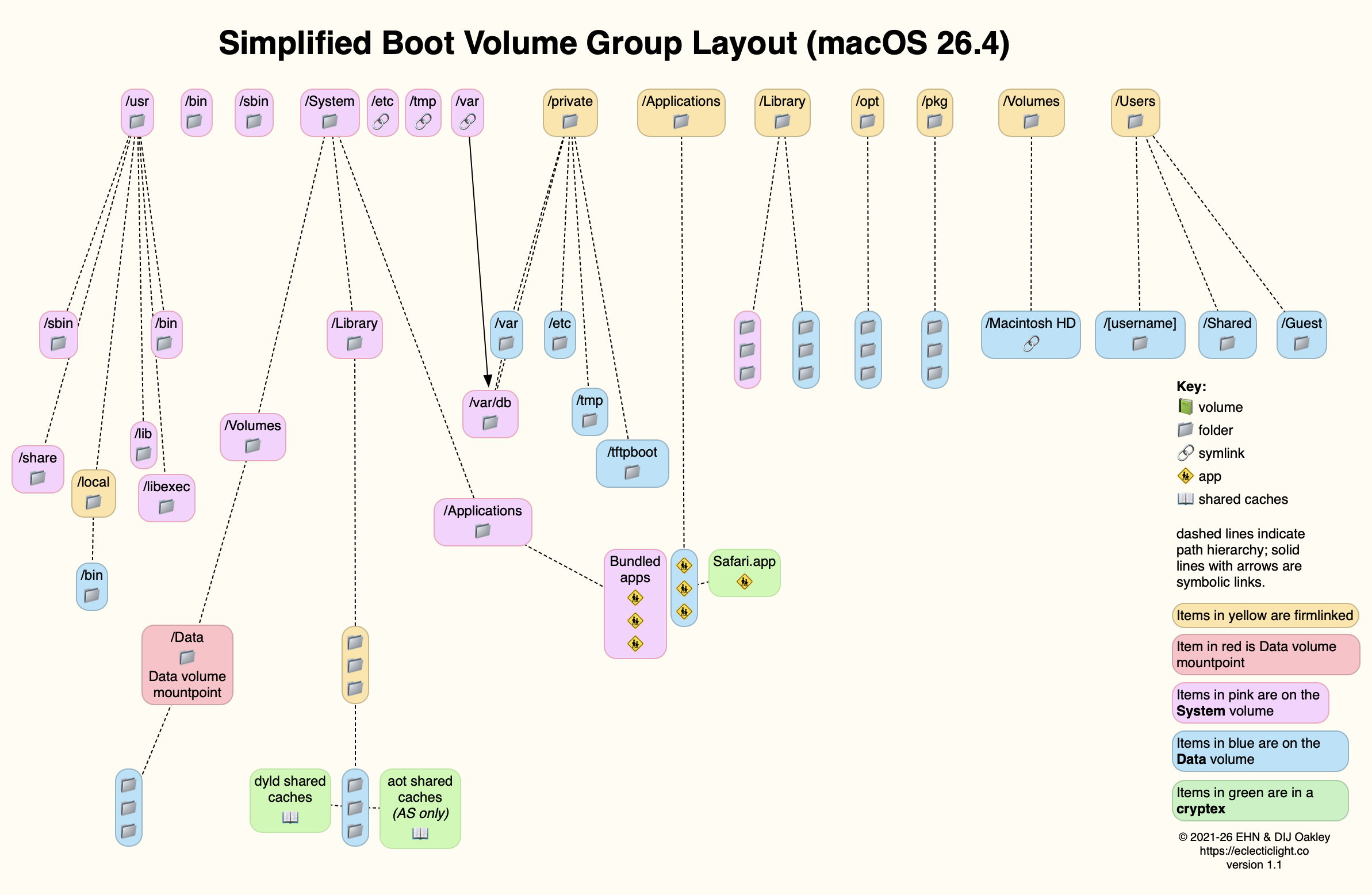
This uses the same colour convention, with pink for the SSV, blue for the Data volume, green for cryptexes, adding red for the mountpoint of the Data volume, and yellow for firmlinked items. This demonstrates graphically how the contents of the main Applications folder are gathered from three sources.
Previous boot volume architectures from High Sierra to Monterey are explained here. In macOS Mojave and previous versions, there was no standard top-level directory named pkg, and it’s not present in macOS Sequoia.

