
There’s still no end in sight for security updates to macOS, with Tahoe 26.6.2 now in testing as a release candidate and likely to be released to the public next week. I don’t know whether that’s intended to be accompanied by matching updates to Sequoia and Sonoma, though. If it is, there’ll no doubt be further disparities in their size: as several have remarked, download size of the update to 26.6.1 was half that for 15.7.9, although all three updates addressed just the same single vulnerability in Screen Sharing. How can that be?
What gets updated
Although it’s four years since Apple released its last ‘normal’ macOS update to Catalina, many still think of updates as simple installers. From Big Sur onwards they’ve been far more complicated, and now can consist of at least 7 components:
- updated components to be installed in the Signed System Volume (SSV) snapshot;
- the Update Brain required to install those, create and sign the new SSV;
- updated cryptexes containing Safari and WebKit (the app cryptex), and dyld caches (the system cryptex). Although Intel Macs only require the single architecture system cryptex, Apple silicon Macs require system cryptexes for both architectures to provide Rosetta 2 support);
- firmware updates;
- Recovery system update;
- Recovery system Update Brain;
- Rosetta 2 update.
These vary considerably between major versions of macOS. For example, cryptexes were only introduced in Ventura, and previous versions install and update those components in the Data volume instead.
Sizing
Throughout updating, macOS and the Update Brain are most concerned with estimating disk space required to prepare and apply the update, as that determines whether that update can be installed successfully. Those are calculated repeatedly during the update. The first estimate might consist of:
- Cryptex size requirement, consisting of 60 MB being 1.2 times the size of the app cryptex, and 7,748 MB being 1.2 times the size of the system cryptex, for a total of 7,809 MB.
- Snapshot preparation size, consisting of snapshot installation size of 3,785 MB plus the cryptex size, for a total of 11,595 MB.
- Snapshot apply size, consisting of twice the update partition size plus the update APFS reserve for 700 MB, plus 231 MiB for sealing, for a total of 931 MB.
- Snapshot preparation size, consisting of snapshot installation size of 5,154 MB (a significant increase from previously) plus the cryptex size, for a total of 12,963 MB.
Later prepare size is then estimated as the sum of the snapshot installation size of 3,785 MB, the cryptex size of 7,809 MB, three ‘slack sizes’ for VM, Recovery and Preboot of 2,048 + 1,024 + 1,024 = 4,096 MB, the new template size of 991 MB, twice the update partition size totalling 600 MB, less the old template size of 363 MB. The grand total then comes to 16,918 MB.
Download size is based on the sizes given for each component by the software update service (Pallas), listed in the documentation for that update, and is only one part of these calculations. It’s also less important than the decompressed size of the components, as their decompression now takes place during downloading rather than in the preparation phase that follows.
Expected download size
When macOS finds an update that it’s eligible to apply, Software Update gives a promise of its download size prior to the user initiating the update. A second, and sometimes slightly different size is then shown above the progress bar during download, derived from a more accurate estimate. Sometimes even that proves an overestimate, and the download apparently completes earlier than was expected.
Earlier this year, I recorded those two figures and the size downloaded from a local Content Caching server, for several virtual machines, with the results for the update to macOS 26.3 shown in the table below.
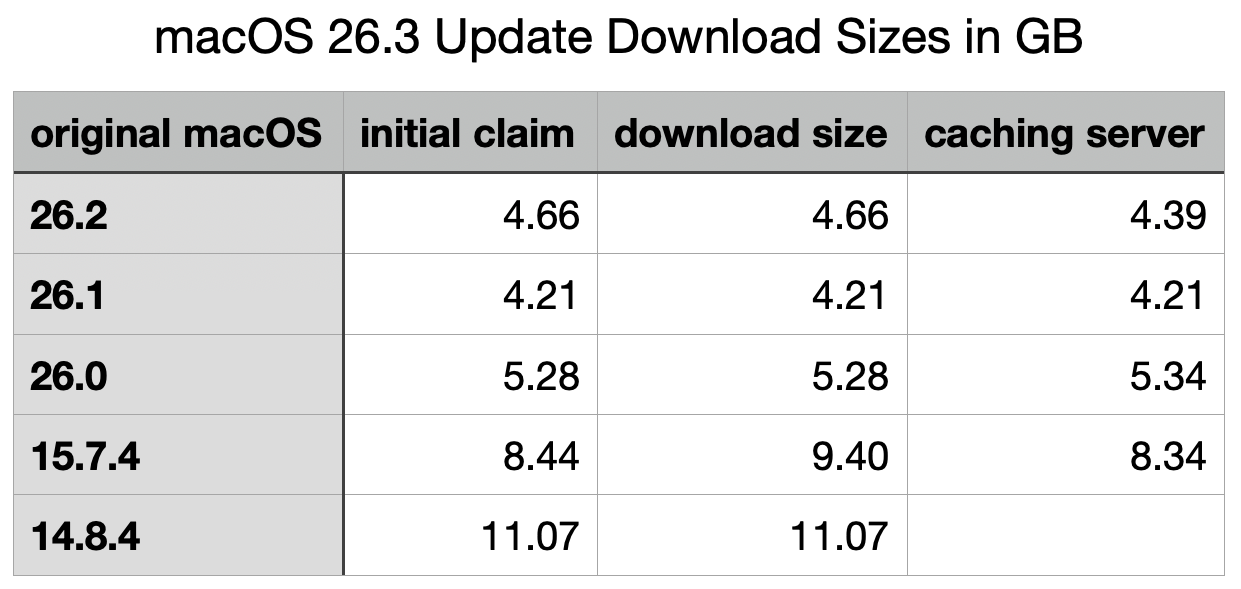
When originally performed on the host Mac, the initial claimed and reported download sizes were both smaller at 3.68 GB.
Although sizes for the update from 26.1 to 26.3 are surprisingly slightly less than those from 26.2, these demonstrate that the greater the difference between the original and destination versions, the larger will be the size of the download, as expected. However, there is no evidence that any of these shared the same download size: each is different, as if tailored to the requirements for the original macOS. This is completely different from the installers provided for Catalina and earlier.
Reports for the changes coming in the security update to Tahoe 26.6.2 are that it involves extensive changes to at least 6 of the update components,
- SSV,
- the Update Brain,
- both app and system cryptexes,
- firmware, at least for Apple silicon Macs,
- Recovery system,
- Recovery system Update Brain.
Any accompanying security updates for Sequoia to 15.7.10 and Sonoma to 14.8.10 are likely to differ again. So be prepared to see a wide range of download sizes that don’t appear to make any sense.
 The Eclectic Light Company