
Alongside RunningBoard, TCC and privacy protection are among the greatest contributors to the Unified log, although they’ve been a little less loquacious more recently. This article sheds light on what they do when an app tries to access the contents of a protected folder. Log extracts were obtained from Insent 1.1 running in macOS 26.4 on a Mac mini M4 Pro, and concentrate on what happens when Insent tries to ‘open by consent’, first listing the contents of ~/Documents, then picking a text file at random and displaying some of its contents.
Relevant entries from the log are given in the Appendix at the end of this article.
Accessing ~/Documents by consent
When the Open by consent button is clicked, Insent first tries to obtain a listing of the Documents folder. That request is considered to be sandboxed, so the sandbox service requests authorisation to proceed from TCC.
When it receives that request from sandboxd, TCC first checks whether the requesting app has been granted Full Disk Access, formally the kTCCServiceSystemPolicyAllFiles service. An early step in that sequence is to establish the attribution chain, so TCC can check the correct process, in this case Insent’s executable code.
A second check is then started, to determine whether the requesting app has been granted the more restricted service of kTCCServiceSystemPolicyDocumentsFolder. Those requests are followed by many validation checks on the Insent executable.
The simplest outcome is that Insent has kTCCServiceSystemPolicyAllFiles, in which case access is granted to the sandbox, and the Documents folder is listed as requested.
If Insent doesn’t have that, TCC considers kTCCServiceSystemPolicyDocumentsFolder:
- if that has already been granted, TCC tells the sandbox to grant access;
- if that has neither been granted nor denied, TCC displays the dialog requesting user consent, and acts accordingly;
- if that had been granted but has been disabled (denied) in Privacy & Security, TCC denies access without seeking any consent.
This demonstrates an important difference in the behaviour of Full Disk Access (kTCCServiceSystemPolicyAllFiles) and locations protected by Files & Folders (here kTCCServiceSystemPolicyDocumentsFolder). Disabling Full Disk Access doesn’t deny access, it just doesn’t enable it. Disabling a specific protected location in Files & Folders will deny that app access to that location.
If you want to return an app’s Files & Folders settings to the default, so you will be prompted to consent for access, you therefore need to remove that app’s entry from Files & Folders, and might also need to log out and back in, or restart, to ensure that’s put into effect.
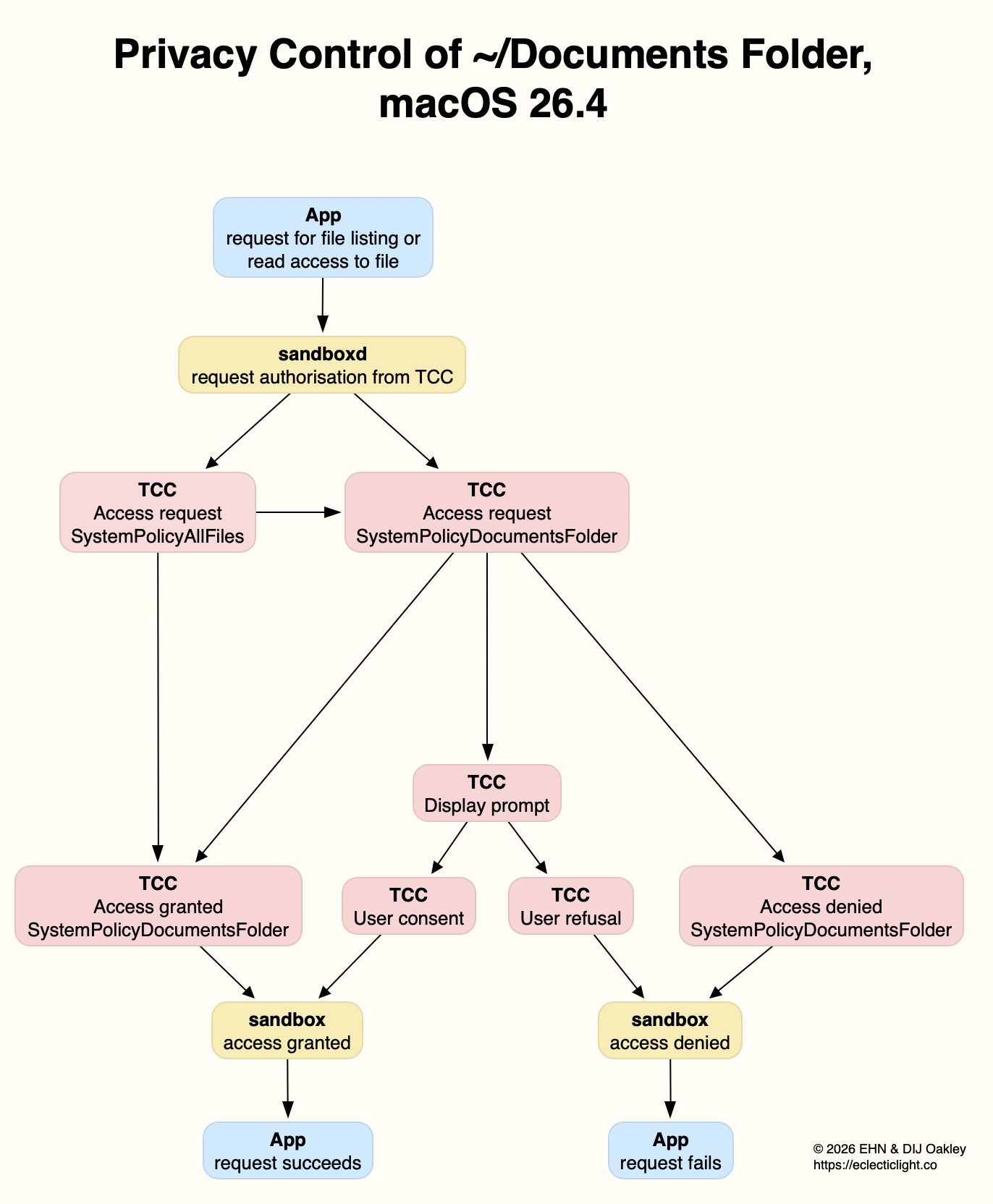
These are summarised in the diagram above. For the sake of simplicity, access granted under SystemPolicyAllFiles isn’t shown separately, but merged with that under SystemPolicyDocumentsFolder.
Interactions between Full Disk Access and individual access in Files & Folders can appear complicated, even random at times, but are actually the result of logical decisions. They are also reflected faithfully in Privacy & Security settings. For example:
- Remove all settings for Insent from both Files & Folders and Full Disk Access.
- Open Insent, click on Open by consent, and agree to add the app to Files & Folders with Documents access.
- Quit Insent, and disable its Documents access in Files & Folders but don’t remove it. Then add Insent to the Full Disk Access list.
- Confirm that Open by consent still functions correctly, because its Full Disk Access setting overrides Files & Folders, as shown in the latter settings. Quit Insent.
- Remove Insent from the Full Disk Access list, and it will be listed in Files & Folders with access to Documents disabled once again.
Summary
- If the app at the head of the attribution chain has been given Full Disk Access, access to list and read files will be given.
- If not, then location-specific access in Files & Folders will be applied.
- If there’s no setting for that app and location, the user is asked for consent.
- If that app has already been given consent for that location, access to list and read files will be given.
- If that app has consent denied or disabled, access to list and read files will be denied.
- None of these controls apply to access by user intent in a File Open dialog, or to writing files.
Open and Save Panel access
As I have made clear, when a user expresses their intent to open a file by selecting it using the Open and Save Panel, that doesn’t trigger the same system of access rules. However, the request is still considered by TCC, this time using the Attribution Chain to examine the app rather than that panel service.
When looking briefly at log entries for that sequence, I noticed something odd: instead of the TCC access request being made for a location-related policy such as SystemPolicyDocumentsFolder, it’s recorded as kTCCServiceScreenCapture. Whether that’s a bug or intended behaviour, the request was authorised, and access proceeded.
The first time I saw that, I was so surprised that I repeated the test using Insent to confirm that I wasn’t misunderstanding the log entries. Exactly the same happened a second time, despite Insent having nothing whatsoever to do with making screenshots.
Previously
Consent, intent and privacy
Privacy: protected folders
Appendix: Log Extracts
Each entry is prefaced with the clock time in seconds.
Request, dialog and approval:
In this case, Insent hadn’t made any prior request to access the Documents folder in that session, so had no entry in Privacy & Security settings. When its access dialog was displayed, consent was granted, allowing access to proceed. As with other extracts, this starts with the event marking the button click in Insent.
1.204592 Insent sendAction:

1.205160 Insent: trying to list files in ~/Documents

1.205828 sandboxd request approval

1.205919 sandboxd tcc_send_request_authorization() IPC

1.206291 com.apple.TCC SEND: 0/7 synchronous to com.apple.tccd.system: request: msgID=440.94, function=TCCAccessRequest, service=kTCCServiceSystemPolicyAllFiles,

1.207414 com.apple.TCC AttributionChain: accessing={TCCDProcess: identifier=co.eclecticlight.Insent, pid=2232, auid=501, euid=501, binary_path=/Applications/Insent.app/Contents/MacOS/Insent}, requesting={TCCDProcess: identifier=com.apple.sandboxd, pid=440, auid=0, euid=0, binary_path=/usr/libexec/sandboxd},

1.235893 com.apple.TCC SEND: 0/7 synchronous to com.apple.tccd: request: msgID=440.95, function=TCCAccessRequest, service=kTCCServiceSystemPolicyDocumentsFolder,
[TCC then makes various checks on Insent]
1.261591 com.apple.TCC AUTHREQ_PROMPTING: msgID=440.95, service=kTCCServiceSystemPolicyDocumentsFolder, subject=Sub:{co.eclecticlight.Insent}Resp:{TCCDProcess: identifier=co.eclecticlight.Insent, pid=2232, auid=501, euid=501, binary_path=/Applications/Insent.app/Contents/MacOS/Insent},

1.265001 com.apple.TCC No usage string found (key:NSDocumentsFolderUsageDescription) for client[2232] in bundle:[private]

1.265006 com.apple.TCC display_prompt: called for [private] for service kTCCServiceSystemPolicyDocumentsFolder
[The access dialog is displayed, and consent given]
3.798770 com.apple.sandbox kTCCServiceSystemPolicyDocumentsFolder granted by TCC for Insent

3.802225 com.apple.chrono appAuth:co.eclecticlight.Insent] tcc authorization(s) changed

3.809558 Insent: trying to look in ~/Documents for text files

3.809691 Insent: trying to read from: /Users/hoakley/Documents/asHelp.text

3.842101 Insent: read from: /Users/hoakley/Documents/asHelp.text
Request after approval:
In this case, Insent had already been granted consent to access the Documents folder, as recorded in Privacy & Security settings.
0.911529 Insent sendAction:

0.912220 Insent: trying to list files in ~/Documents

0.913379 sandboxd request approval

0.913482 sandboxd tcc_send_request_authorization() IPC

0.913953 com.apple.TCC SEND: 0/7 synchronous to com.apple.tccd.system: request: msgID=440.100, function=TCCAccessRequest, service=kTCCServiceSystemPolicyAllFiles,

0.915394 com.apple.TCC AttributionChain: accessing={TCCDProcess: identifier=co.eclecticlight.Insent, pid=2255, auid=501, euid=501, binary_path=/Applications/Insent.app/Contents/MacOS/Insent}, requesting={TCCDProcess: identifier=com.apple.sandboxd, pid=440, auid=0, euid=0, binary_path=/usr/libexec/sandboxd},

0.949736 com.apple.TCC SEND: 0/7 synchronous to com.apple.tccd: request: msgID=440.101, function=TCCAccessRequest, service=kTCCServiceSystemPolicyDocumentsFolder,
[TCC then makes various checks on Insent]
0.970955 com.apple.TCC AUTHREQ_RESULT: msgID=440.101, authValue=2, authReason=2, authVersion=1, desired_auth=0, error=(null),

0.971072 com.apple.sandbox kTCCServiceSystemPolicyDocumentsFolder granted by TCC for Insent

0.973350 Insent: trying to look in ~/Documents for text files

0.973532 Insent: trying to read from: /Users/hoakley/Documents/piklisting.text

1.035508 Insent: read from: /Users/hoakley/Documents/piklisting.text
Request denied:
In this case, Insent had previously been given access to the Documents folder, but that was then disabled.
1.033344 Insent sendAction:

1.034069 Insent: trying to list files in ~/Documents

1.035189 sandboxd request approval

1.035299 sandboxd tcc_send_request_authorization() IPC

1.035820 com.apple.TCC SEND: 0/7 synchronous to com.apple.tccd.system: request: msgID=440.108, function=TCCAccessRequest, service=kTCCServiceSystemPolicyAllFiles,

1.037404 com.apple.TCC AttributionChain: accessing={TCCDProcess: identifier=co.eclecticlight.Insent, pid=2303, auid=501, euid=501, binary_path=/Applications/Insent.app/Contents/MacOS/Insent}, requesting={TCCDProcess: identifier=com.apple.sandboxd, pid=440, auid=0, euid=0, binary_path=/usr/libexec/sandboxd},

1.071652 com.apple.TCC SEND: 0/7 synchronous to com.apple.tccd: request: msgID=440.109, function=TCCAccessRequest, service=kTCCServiceSystemPolicyDocumentsFolder,
[TCC then makes various checks on Insent]
1.093533 com.apple.TCC AUTHREQ_RESULT: msgID=440.109, authValue=0, authReason=4, authVersion=1, desired_auth=0, error=(null),

1.093669 com.apple.sandbox kTCCServiceSystemPolicyDocumentsFolder denied by TCC for Insent

1.094007 Insent: couldn't get contents of ~/Documents
Open and Save Panel Oddity:
In this case, the Open from folder button in Insent was used to select the Documents folder, ready to allow the app access by intent. This extract shows what happened after the button in the Open and Save Panel was clicked.
8.800555 com.apple.appkit.xpc.openAndSavePanelService trackMouse send action on mouseUp

8.802062 com.apple.appkit.xpc.openAndSavePanelService tcc_send_request_authorization() IPC

8.802140 com.apple.TCC SEND: 0/7 synchronous to com.apple.tccd.system: request: msgID=2259.2, function=TCCAccessRequest, service=kTCCServiceScreenCapture,

8.802469 com.apple.TCC AttributionChain: responsible={TCCDProcess: identifier=co.eclecticlight.Insent, pid=2255, auid=501, euid=501, responsible_path=/Applications/Insent.app/Contents/MacOS/Insent, binary_path=/Applications/Insent.app/Contents/MacOS/Insent}, requesting={TCCDProcess: identifier=com.apple.appkit.xpc.openAndSavePanelService, pid=2259, auid=501, euid=501, binary_path=/System/Library/Frameworks/AppKit.framework/Versions/C/XPCServices/com.apple.appkit.xpc.openAndSavePanelService.xpc/Contents/MacOS/com.apple.appkit.xpc.openAndSavePanelService},

8.809596 com.apple.TCC Handling access request to kTCCServiceScreenCapture, from Sub:{co.eclecticlight.Insent}Resp:{TCCDProcess: identifier=co.eclecticlight.Insent, pid=2255, auid=501, euid=501, responsible_path=/Applications/Insent.app/Contents/MacOS/Insent, binary_path=/Applications/Insent.app/Contents/MacOS/Insent}, ReqResult(Auth Right: Unknown (None), promptType: 1,DB Action:None, UpdateVerifierData)

8.809609 com.apple.TCC AUTHREQ_RESULT: msgID=2259.2, authValue=1, authReason=5, authVersion=1, desired_auth=0, error=(null),

