
In my review of apps and the validity of certificates used to sign them, I dodged the thorny issue of those apps delivered from the App Store, writing that “their signatures will remain valid as long as the developer remains a member of its Developer Program.” If you care to take a look at some of those apps using Apparency, you’ll discover that many of them have certificates that expired on 7 February 2023 at 00:00:00 GMT. This article explains why, how they should still run, but may not in the future.
As I explained, the general rule for certificates is that, once they have expired by date, they’re no longer valid. However, to ensure that third-party apps and installers can still be used after their expiry, Apple usually includes a trusted timestamp in their signature. Provided the certificate was valid at the time the app or installer was signed, then macOS should accept it as still being valid, as long as it hasn’t been revoked. But App Store apps are different again.
For reasons unknown, Apple doesn’t sign App Store apps with trusted timestamps. As a result, when its certificate expires, that app’s signature should no longer be valid, and macOS should refuse to run it on that basis. What happens in practice is that it turns a blind eye to the certificate expiry, and runs the app regardless.
What you see in the log demonstrates that. At the start of its security checks by Apple Mobile File Integrity (AMFI), securityd discovers that its certificates no longer have “temporal validity”, and fail trust evaluation:
00.701706 com.apple.securityd cert[0]: TemporalValidity =(leaf)[]> 0

00.701753 com.apple.securityd cert[1]: TemporalValidity =(leaf)[]> 0

00.703344 com.apple.securityd Trust evaluate failure: [leaf TemporalValidity] [ca1 TemporalValidity]
Those entries are repeated multiply every time that app’s trust is evaluated, including by TCC. Despite that, the app passes its Gatekeeper evaluation “due to migration”:
00.718197 com.apple.syspolicy.exec GK evaluateScanResult: 2, PST: (path: c97bd5e74b98ed79), (team: 4GXF3JAMM4), (id: (null)), (bundle_id: (null)), 0, 0, 1, 0, 9, 0, 0

00.718213 com.apple.syspolicy.exec Allowing evaluation due to migration: PST: (path: c97bd5e74b98ed79), (team: 4GXF3JAMM4), (id: (null)), (bundle_id: (null))

00.718218 com.apple.syspolicy.exec Updating flags: [private], 513
As with all other apps, a ‘ticket check’ is performed on its CDHashes, first against the local ticket cache, then against records in the CKTicketStore via CloudKit. As App Store apps aren’t normally notarised as well, looking up their ticket in the CKTicketStore should be unsuccessful. In macOS Tahoe at least, there should be no XProtect scan or further checks, and the app should proceed to launch normally.
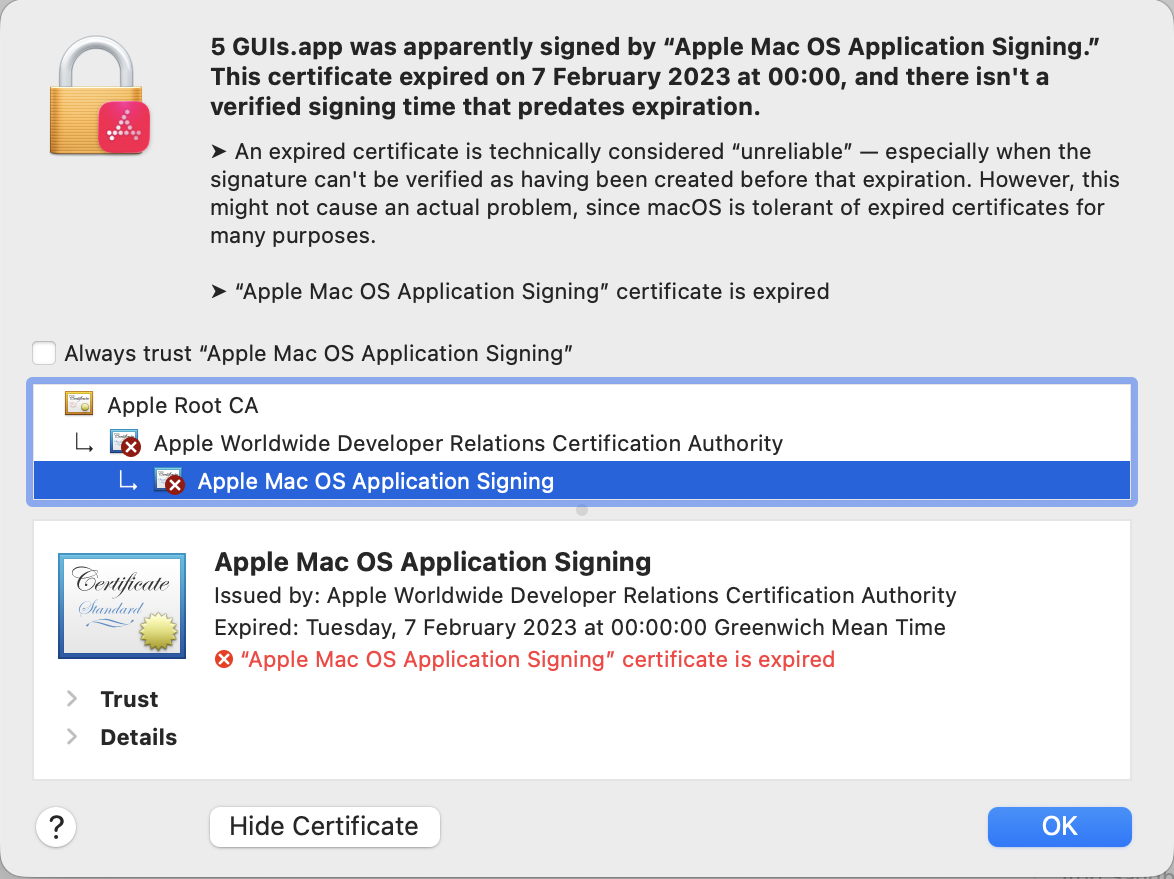
App Store apps are signed using an Apple Mac OS Application Signing certificate, relying on the intermediate Apple Worldwide Developer Relations Certification Authority, and back to the Apple Root CA. While the latter should expire on 9 February 2035, both the signing certificate and its intermediate have shorter lifetimes:
- Older App Store apps should have an intermediate expiry of 7 February 2023, as explained here by Apple, and more recent apps that is likely to be 10 December 2030.
- Older App Store apps are likely to have been signed with a certificate that expired on 7 February 2023, while more recent apps are likely to expire on 12 August 2026.
None of this should affect Intel Macs, although we’re likely to see increasing numbers of App Store apps that are Arm-only and won’t run on Intel systems. However, this will become more complicated with the retirement of Rosetta 2 next year.
Apple has stated its intention that full Rosetta translation support will end with macOS 27, although it intends to retain “a subset of Rosetta functionality aimed at supporting older unmaintained gaming titles” beyond that. In practice, that means most x86 apps and command tools will stop working in macOS 28, in the autumn/fall of 2027. Apple silicon Macs will therefore continue to run Intel-only App Store apps until they are upgraded to macOS 28.
Their fallback then is to run Intel-only code in a VM running macOS 27 or earlier, as that will still be able to provide full Rosetta 2 support. Given the performance of code translated by Rosetta, and that of VMs, that’s far better than might appear. There’s one remaining problem with that, though: some App Store apps can’t run in virtualisation, as it doesn’t support connections to the App Store. Some can, and as a matter of interest the five that I used in these tests all do, although not always reliably, but others can’t. I don’t know of any reliable way of testing this other than trying it out.
Summary
- macOS security checks ignore the expiry of certificates (including intermediates) used to sign App Store apps, and allow the app to run regardless.
- Many App Store apps have expired certificates.
- This shouldn’t affect Intel Macs in the future.
- Running Intel-only App Store apps is unlikely to be supported from macOS 28 onwards, except for a limited range of unmaintained gaming titles.
- Some Intel-only App Store apps might not run in a VM with Rosetta 2 support either.
 The Eclectic Light Company