
Sometimes apparently simple things are truly simple, but more often than not they need us to turn detective to delve deeper. This has proved the case with local network privacy protection, introduced well over a year ago in macOS Sequoia, and largely glossed over since. As I was compiling my brief summary of what I had been able to discover about it, I had a feeling there was more to come, and there is.
Cast your mind back just over a year to the first couple of release versions of macOS Sequoia. Do you recall all the problems reported with its software firewall and networking? At the time I wrote of 15.0 “There have been widespread reports of problems with networking, many attributable to the software firewall. Products across a wide range of vendors are affected, and many simply can’t function properly in Sequoia.”
Most of those were addressed in 15.1, but their cause was never made clear unless you read Apple’s TN3179 carefully, where it’s mentioned in passing that “macOS 15.1 fixed a number of local network privacy bugs”. It’s no coincidence that macOS 15.0 was the first public release to feature that local network privacy protection.
Another clue came in the statement in that note that “on macOS there’s no way to reset your program’s Local Network privilege to the undetermined state”. This contrasts with pretty well every other category of privacy protection, which are handled by the dreaded TCC, Transparency Consent and Control. The major exception to those comes in Location Services, which are handled and implemented separately.
At this point I could hear the log calling me to take a look at what happens when a new app first requests access to the local network. Thanks to those of you who suggested candidates for this, I chose VideoLAN’s VLC running in a macOS 26.2 VM with bridged networking and a LAN available. I first drew a blank for TCC, as I had expected, which clearly knows nothing about local network privacy. Instead, it was the Network Extension framework that did all the work.
Once VLC had cleared Gatekeeper’s checks, it tried to query the local network, resulting in the standard request for consent.
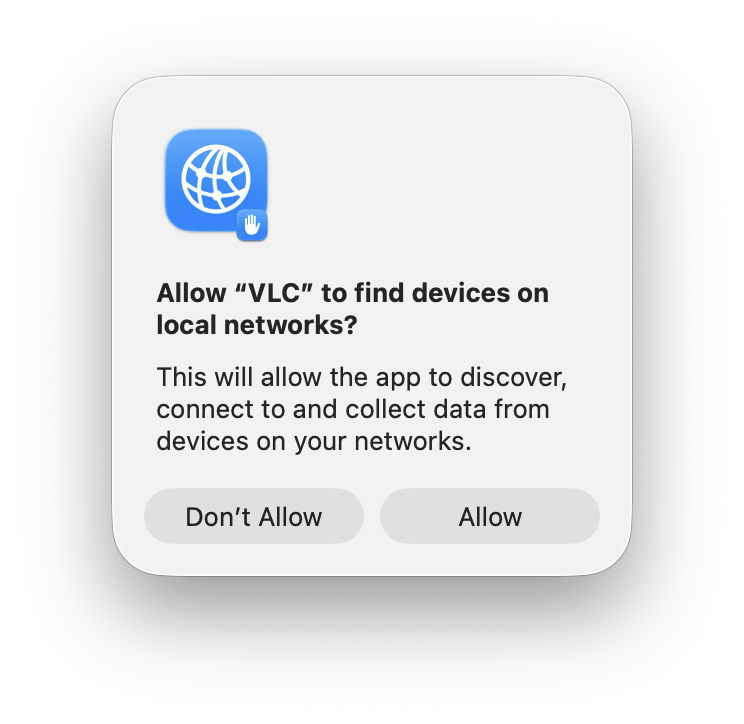
This in itself is revealing, as it doesn’t appear to be constructed using a prompt string supplied in VLC, neither does it include VLC’s icon. It turns out that was all handled by the Network Extension framework:
06.249975 com.apple.networkextension Showing local network alert for org.videolan.vlc even though not in the foreground

06.249982 com.apple.networkextension Local network preference not yet set, prompting for VLC (org.videolan.vlc)

06.252939 com.apple.networkextension LocalNetwork icon configuration: notification dictionary option {

AlertHeader = "Allow \U201cVLC\U201d to find devices on local networks?";

AlertMessage = "This will allow the app to discover, connect to and collect data from devices on your networks.";

AlternateButtonTitle = "Don\U2019t Allow";

DefaultButtonTitle = Allow;

IconURL = "file:///System/Library/Frameworks/NetworkExtension.framework/Resources/LocalNetworkPrivacy.png";

SBUserNotificationDefaultButtonTag = 32; }
Less than four seconds later, I had clicked on the Allow button, and VLC got the green light:
10.015043 com.apple.mdns Local network alert policy status 'granted' for (org.videolan.vlc).
This added a new entry to the network privacy configuration:
10.023955 com.apple.networkextension NESMPathControllerSession[com.apple.preferences.networkprivacy-04DDB2F9-2C12-49BC-A4DE-B4CE6341E2B0:0C6F88E8-8AB2-4307-88AE-17E072232031]: handling configuration changed: {

name = <73-char-str>

identifier = 0C6F88E8-8AB2-4307-88AE-17E072232031

grade = 2

pathController = {

enabled = YES

pathRules = ( {

matchSigningIdentifier = PathRuleDefaultNonSystemIdentifier

matchDesignatedRequirement =

allowEmptyDesignatedRequirement = YES

noDivertDNS = NO

cellularBehavior = 0

denyCellularFallback = NO

denyMulticast = YES

multicastPreferenceSet = NO

isIdentifierExternal = NO

wifiBehavior = 0

denyAll = NO },

[other apps omitted]

{

matchSigningIdentifier = org.videolan.vlc

allowEmptyDesignatedRequirement = YES

noDivertDNS = NO

cellularBehavior = 0

denyCellularFallback = NO

denyMulticast = NO

multicastPreferenceSet = YES

isIdentifierExternal = NO

wifiBehavior = 0

denyAll = NO }, )

cellularFallbackFlags = 0

ignoreRouteRules = YES

ignoreFallback = YES } }

10.027741 com.apple.networkextension UUID: Found for org.videolan.vlc: ("07F0D29A-6013-3F29-81DC-15EAAB1C50D4")
The apps listed there extend well beyond those in the Local Network section of Privacy & Security settings, and it appears to include apps that don’t even attempt to make any network connection. It’s a useful list, though, that could be valuable if you’re trying to investigate a problem with local network connections. To elicit it, change its configuration and look for log entries from the com.apple.networkextension subsystem containing the word NESMPathControllerSession in the message field.
Knowing what the Network Extension framework can do, this makes it clear that local network privacy is implemented as a packet filter following those pathRules, which matches the statement in TN3179, that “the system implements these TCP and UDP checks deep in the networking stack, and thus they apply to all networking APIs.”
Summary
- Local network privacy isn’t implemented through TCC, but as a packet filter in the Network Extension framework.
- Prompts to allow access to local network features can be made without the app providing an information string.
- A user’s Network Extension configuration contains path rules for apps that aren’t listed in the Local Network section of Privacy & Security settings.
- The subsystem
com.apple.networkextensionmay write its configuration to the log when it’s changed. - An app’s path rules are applied across all networking APIs.
Further reading
How local network privacy could affect you
Apple TN3179
Network Extension framework
 The Eclectic Light Company