
This is the first in a series diving deeper into Apple’s new M4 family of chips. This starts with details of its Performance (P) cores. Comparisons of their performance against cores in earlier M-series chips will follow separately when I have completed them.
M4 family
There are currently three M4 designs:
- Base M4, with 4 P and 6 E cores, also available in a cheaper variant with only 4 active E cores, and a ‘binned’ variant for iPads with only 3 active P cores.
- M4 Pro, with 10 P and 4 E cores, also available in a ‘binned’ variant with only 8 active P cores.
- M4 Max, with 12 P and 4 E cores, also available in a ‘binned’ variant with only 10 active P cores.
Apple is expected to release an Ultra variant in 2025, consisting of two M4 Max chips connected and working in tandem, providing a total of 24 P and 8 E cores.
Apart from the number of cores in each design, their caches and memory, all P cores are the same, and different from E cores.
P core architecture
All CPU cores are arranged in clusters of up to 6. All cores within any given cluster share L2 cache, and are run at the same frequency (clock speed). The Base M4 has a single cluster of 4 P cores, while the Pro and Max have two clusters of 5 and 6 cores respectively.
Frequency
A prominent feature of both P and E cores is their variable frequency (clock speed). In the case of P cores, this can be set to any of 17 values between the minimum of 1,260 MHz and maximum of 4,512 MHz (1.3-4.5 GHz). When running macOS, cluster frequencies are set by macOS at a kernel level; other operating systems may offer more direct control.
P cores idle at 1,260 MHz, but can also be shut down altogether. Previous M-series chips have been reported by the powermetrics command tool as sometimes being idle at a frequency of 0 MHz, but the M4 is the first to have idle and down states reported separately, for example:
CPU 4 active residency: 0.00%

CPU 4 idle residency: 0.00%

CPU 4 down residency: 100.00%
when that core and its whole cluster are shut down rather than just idling. It’s not clear whether this is merely an administrative change, or M4 cores implement this state differently from previous cores.
Instruction set
There’s confusion over the Instruction Set Architecture (ISA) supported by M4 cores. This is explained in the LLVM source, where it’s claimed that they’re “technically” ARMv9.2-A, but without its Scalable Vector Extension (SVE). Some might consider that’s closer to ARMv8.7-A, one version more recent than the M3’s ARMv8.6-A.
Although this is now fully supported in LLVM clang, it’s not clear how fully it’s supported by Xcode, for example.
Power
When shut down, a P core consumes no power, of course, and at idle with no active residency, it uses only 1-2 mW, according to measurements reported by powermetrics.
Maximum power consumption rises to approximately 1,400 mW when running intensive floating point calculations at 100% active residency, and to approximately 3,230 mW when running NEON vector instructions at 100% active residency.
macOS core allocation
Threads are normally allocated by macOS to an available P core when their designated Quality of Service (QoS) is higher than 9 (Background), for example when using Dispatch, formerly branded Grand Central Dispatch (GCD). Running threads may also be moved periodically between P cores in the same cluster, and between clusters. Previous M-series chips appear to move threads less frequently, and may leave them to run to completion after several seconds on the same core, but threads appear to be considerably more mobile when running on M4 P cores.

This bar chart shows 4 threads from 4 virtual CPUs in a VM running for 3 seconds at 100% active residency. For almost all that period, the threads remain running on the 4 physical cores of the first P cluster in this M1 Max, with the second P cluster remaining idle for much of that time.
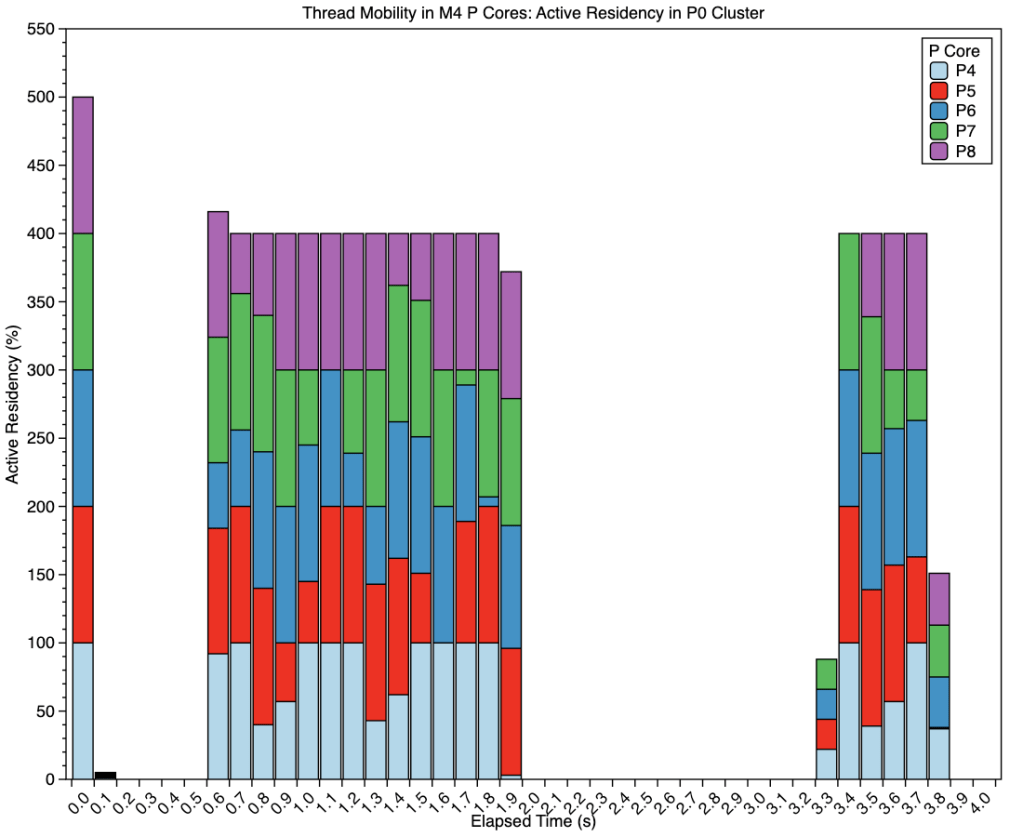
The following charts show 4 threads of intensive in-core floating point arithmetic running on the P cores of an M4 Pro.

When viewed by cluster, those threads are loaded first onto the second P cluster (red bars), where they run for 0.4 seconds before being moved to the first cluster (pale blue bars). After running there for 1.3 seconds, they’re moved back to the second cluster for a further 1.3 seconds, before completing on the first cluster.
The next two bar charts show each cluster separately, illustrating thread mobility within them.

When running on the first cluster (above), threads appear to be moved to a different core approximately every 0.3 second, as they do when on the second cluster (below).


Cluster frequency matches this movement, with each cluster being run up to maximum frequency (shown here averaged across the whole cluster) to process the threads running on its cores. The black line below those for the P clusters shows the small changes in average frequency for the E cluster over this period.

This last chart shows the total CPU power use in mW over the same period. Of particular interest here is the consistent difference in power use reported by powermetrics between the two P clusters: the first (P0) used a steady 6,000 mW when running these four threads, whereas the second (P1) used slightly less, at 5,700-5,800 mW. That could be the result of measurement error in powermetrics, peculiar to this particular chip, or could reflect an underlying difference between the two clusters.
Thread mobility makes interpreting CPU History in Activity Monitor difficult, as the fastest frequency of sampling available there is every second, while powermetrics was sampling every 0.1 second when gathering the data above. As groups of threads may be moved between clusters every 1.3 seconds or so, this can give the impression that threads are being run on both clusters simultaneously. Once again, great care is needed when interpreting the data shown by Activity Monitor.
Key information
- Current M4 chips offer 4-12 CPU P cores.
- M4 P cores are arranged in clusters of up to 6, sharing L2 cache and running at a common frequency.
- P core clusters can be shut down, idling at their minimum frequency of 1,260 MHz, or at one of 18 set frequencies up to a maximum of 4,512 MHz, as controlled by macOS.
- Their instruction set is “technically” ARMv9.2-A, but without its Scalable Vector Extension (SVE).
- They use 1-2 mW when idle, rising to peaks of 1,400 mW (floating point) or 3,230 mW (NEON vector code).
- macOS preferentially allocates them threads at all QoS higher than 9 (Background).
- Threads running on M4 P cores are mobile, and may be moved to another core in the same cluster frequently, and after just over a second may be transferred to a core in the other P cluster, when available.
- Thread mobility makes interpretation of the CPU History window in Activity Monitor very difficult.
Explainer
Residency is the percentage of time a core is in a specific state. Idle residency is thus the percentage of time that core is idle and not processing instructions. Active residency is the percentage of time it isn’t idle, but is actively processing instructions. Down residency is the percentage of time the core is shut down. All these are independent of the core’s frequency or clock speed.

