
In the middle of January, several whose Macs were capable of running macOS Sonoma, but were still running Monterey or Ventura, reported that their Macs had automatically started to download and install the upgrade to Sonoma, despite not having opted to do that. Although a detailed analysis by Adam Engst on TidBITS laid the blame on what could only have been a serious bug in the upgrade notification, I’ve had reports from users who insist that they never saw or dismissed that. Reports of this problem have since petered out, and in the absence of further information such as log records, it has been assumed that blocking the upgrade notification is sufficient to prevent future forced macOS upgrades. Most recently, Jeff Johnson has detailed how to stop Upgrade to macOS Sonoma notifications.
Current situation
Since 23 January, repeated attempts to reproduce the reported behaviour using VMs running Monterey and Ventura have failed to result in any unintended download of a Sonoma upgrade. Whatever the original cause of those forced upgrades thus appears to have been rectified, and dismissing an Upgrade to macOS Sonoma notification should, for now, be a safe action for those intending to continue using older macOS.
Blocking the notification
Jeff Johnson’s remedy of using a command like
defaults write com.apple.SoftwareUpdate MajorOSUserNotificationDate -date "2025-02-07 23:22:47 +0000"
to set the MajorOSUserNotificationDate key to the distant future is completely effective in preventing that notification, but has two important limitations. First, macOS stores that key-value pair not in the system-level /Library/Preferences/com.apple.SoftwareUpdate.plist, but in that file in each user’s Home folder Library. For Macs with more than one user, that key-value pair must be set in each user’s ~/Library/Preferences/com.apple.SoftwareUpdate.plist to ensure the notification doesn’t occur.
Of greater concern, though, is that command only blocks macOS from showing the notification, and doesn’t alter the behaviour of any other part of Software Update, softwareupdate, or their supporting processes. If those forced upgrades had been initiated independently of that notification, as some accounts imply, then blocking its appearance wouldn’t have prevented the upgrade from occurring.
Blocking the upgrade
There are two ways to prevent software update processes in recent versions of macOS from initiating and performing an upgrade to Sonoma. The ‘hard’ way is to block outgoing access for those processes that access Apple’s software update service, either by severing that Mac’s network connections altogether, or by selective blocking in software. As both of those also block access to all software updates, including security updates to that version of macOS and security data updates to XProtect and others, few could contemplate doing that for long.
Automatic checks for updates are controlled by Software Update settings in System Preferences or System Settings, but those ‘soft’ controls only determine whether macOS makes those checks automatically. Merely opening those settings initiates a full check for updates, and will inform software update processes that the Sonoma upgrade is available. Similarly, there appears to be no available option to the softwareupdate command which can avoid that.
At times macOS can appear to be devious about Sonoma upgrades. In this example, a VM running Monterey 12.7.3 without a network connection was set with Check for updates disabled, shut down, then run again with a bridged Ethernet connection. When the command
softwareupdate -l --include-config-data
was run in Terminal, it didn’t report the availability of the macOS Sonoma upgrade, but still triggered the upgrade notification and offered that upgrade in Software Update. When repeated in Ventura 13.6.4, the Sonoma upgrade was at least listed among those available.
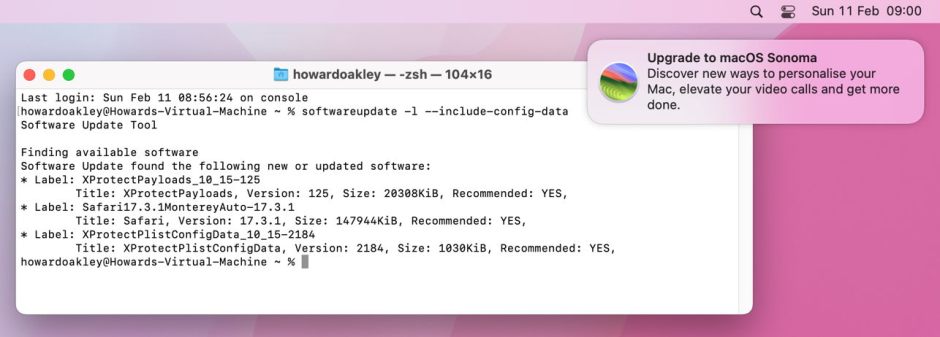
When Check for updates is disabled, any access to Software Update or use of the softwareupdate command tool seems certain to result in software update processes preparing to perform the upgrade.
I here declare a personal interest, as SilentKnight uses the softwareupdate -l --include-config-data command when it checks for available updates. I’m aware of at least one Mac that underwent forced upgrade to Sonoma immediately after its user had opened SilentKnight, and suspicious that command could have triggered the bug, apparently without any user notification.
Update check and notification
Examining the log following triggering of processes intending to initiate upgrade to Sonoma is concerning. For a period of 6 seconds, there are copious entries from com.apple.SoftwareUpdate and related subsystems and processes such as SoftwareUpdateNotificationManager (in the SoftwareUpdate private framework). The latter does check the MajorOSUserNotificationDate key-value pair (as identified by Jeff Johnson) when deciding whether to post a notification to the user.
The com.apple.SoftwareUpdateMacController subsystem in conjunction with the softwareupdated service are largely responsible for scanning for available updates. Once detailed information about all the available updates and their components has been assembled, SoftwareUpdateNotificationManager considers whether to post a notification, in log entries such as
SoftwareUpdateNotificationManager SUOSUNotificationUpdateService: Posting major OS notification for <SUOSUMajorProduct: MSU_UPDATE_23D60_patch_14.3.1>(Title:macOS Sonoma 14.3.1 Version:14.3.1, Identifier:(null), IconSize:6941084, Deferred:0, Deferred Until:(null))

SoftwareUpdateNotificationManager Check if exceeded last user notification major OS update post date (Sat Feb 10 16:03:49 2024) with interval (604800.000000): 0

SoftwareUpdateNotificationManager SUOSUNotificationManager: Major OS time interval not elapsed, don't post notification

SoftwareUpdateMacController SUMacControllerDescriptor:initWithCoder - using initialization method: SUMacControllerDescriptorInitWithSUCoreDescriptor

SoftwareUpdateCore [DOCUMENTATION] Using icon path: /System/Library/AssetsV2/com_apple_MobileAsset_SoftwareUpdateDocumentation/9edef03105afe359100bb20e674974d267bcfcfd.asset/AssetData/OSBadge.icns
Examination of com.apple.SoftwareUpdate.plist preferences has failed to reveal the source of the interval of 604800 seconds allowed between upgrade notifications; that amounts to a period of one week.
This confirms that posting the Upgrade to macOS Sonoma notification is but the final step in extensive preparations to start the upgrade. If forced upgrades that took place in the middle of January did occur without the user interacting with that notification, then it suggests that blocking the appearance of the notification may not be effective in the event of a repetition of this or a similar bug.
Conclusions
In recent versions of macOS, software update processes are weighted heavily in favour of upgrading macOS, and the slightest user error or bug can result in an unintended upgrade. This is even more of a problem with Ventura and Sonoma upgrades, as they no longer require a full installer to be downloaded and run, but can be installed using a similar process to a minor version update. For those reliant on software or hardware that can’t be used in macOS Sonoma, that can burden them with the task of downgrading their macOS before their Mac can be used again.
macOS should better accommodate the needs of its users. While it’s fair game to encourage and persuade users to upgrade, tricking them into doing so is in no one’s best interest.
 The Eclectic Light Company