
It was Big Sur that focussed attention on the size of macOS updates. In Mojave and earlier, updates had essentially been Installer packages that brought a minimum of overhead. By the time that many had installed Big Sur’s new Signed System Volume (SSV), we were starting to discover just how large its updates were. Those were early days with its completely new updating process that builds a new System volume, takes a snapshot of it, and constructs a tree of hashes that verify the integrity of every last bit within it.
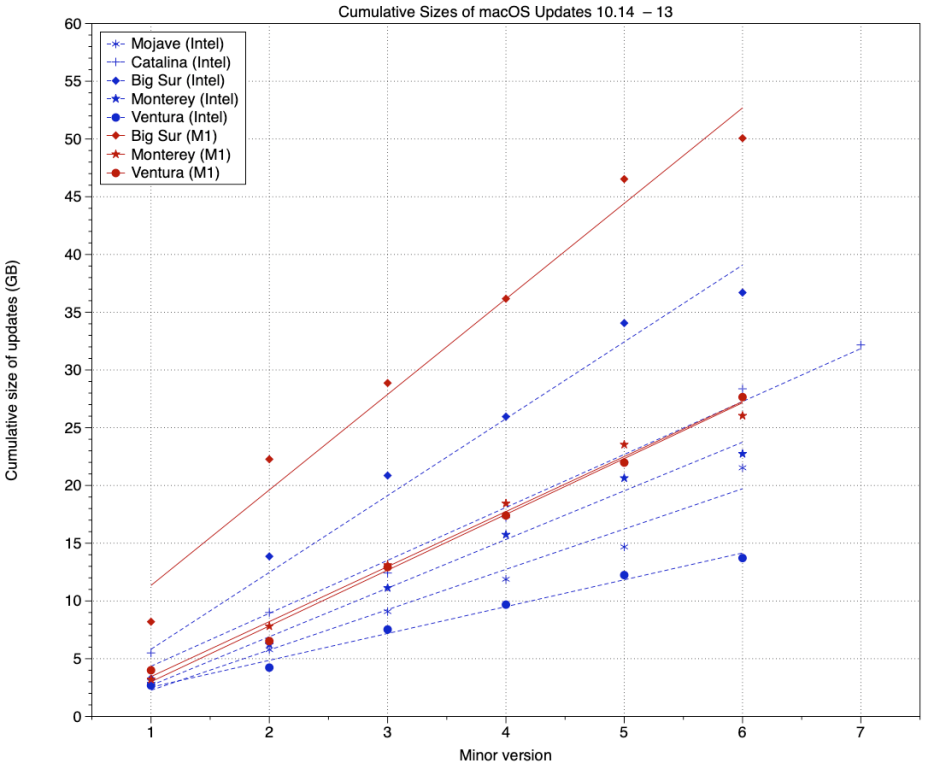
This chart shows cumulative sizes of updates to macOS from 10.14 Mojave, with its traditional single boot volume, through to macOS 13 Ventura when it passed to security-only maintenance with 13.6 last summer. Symbols and broken lines in blue are those for Intel Macs, and those in red with solid lines are corresponding values for Apple silicon Macs. Lines are best fits by linear regression.
These demonstrate that Apple silicon Macs have consistently received larger updates than Intel models. The other obvious conclusion is that Big Sur, shown using diamond ♢ points, had update sizes much greater than any other version of macOS, culminating in a total of 37 GB on Intel Macs and 50 GB on Apple silicon models, far in excess of any other version. Since Big Sur, updates have reduced in total size, and in Ventura were close to or below earlier versions.
Cumulative update sizes are a function of the size and frequency of updates. One persistent disappointment even in Ventura was the smallest size of its updates, even when they patched just one or two security vulnerabilities. This is particularly true for Apple silicon Macs, which seemed to carry a minimum overhead of slightly less than 2 GB for each update, while Intel Macs were able to get away with slightly less than 500 MB, even in Ventura.
Various theories have been proposed to account for high update overheads, particularly in Apple silicon Macs. These include the size of its ‘firmware’ components including iBoot, and the apparent need to replace extensive dyld caches in every update.
Engineering work to improve system architecture has brought tangible benefits. Most obvious among those is the use of cryptexes to contain system components such as Safari and WebKit, that may need to be updated more frequently to address security vulnerabilities, hence the Rapid Security Response (RSR), introduced in Ventura.
Apple remains secretive about the new process of updating macOS and, with the notable exception of RSRs that were featured in the list of changes in Ventura, it neither announces nor explains any changes it makes. They just happen, leaving us to notice and wonder why and how.
One important change that was unannounced and caught many users out was Ventura’s use of an update process to perform most upgrades from earlier versions of macOS, which was repeated with the release of Sonoma. When a user accepts Software Update’s invitation to upgrade to macOS 13 or 14, rather than downloading a full installer app of about 12 GB, Ventura or Sonoma will instead attempt an update, in which only changed files are copied to the System volume, substantially reducing the amount to be downloaded, and increasing the speed of the update process. This also has the unfortunate side-effect that users who inadvertently start that update process have no easy way to abort it, and Ventura and Sonoma resulted in many upgrading sooner than they had intended.
As far as I’m aware, Apple has made no announcements of changes in macOS updates for Sonoma, and there’s no evidence that any more of the contents of the SSV have been transferred to cryptexes, allowing them to be updated without rebuilding the SSV. However, the two unscheduled patch updates to Sonoma so far, in 14.1.1 and 14.1.2, have required the smallest updates since the days of Mojave. In the case of 14.1.2, the update was only 400 MB for Intel Macs, and 820 MB for Apple silicon, far below the smallest update sizes in Ventura. Although there’s some uncertainty as to exactly what was changed in 14.1.1, 14.1.2 contains two fixes to WebKit, thus in a cryptex, and some smaller updates in the contents of the SSV. In previous versions of macOS since Big Sur, those would have required larger downloads, particularly for Apple silicon Macs, which would have been at least 1 GB larger.
Although harder to quantify, macOS update installation times have also become steadily shorter, at least on Apple silicon models, whose 30 minutes ‘preparation’ seldom takes even half that time. Some of this improvement in speed may be attributable to the smaller size of updates, of course, but on Apple silicon Macs they are now sufficiently quick as to be little interruption.
It has taken three years and many GB of updates for them to shed overhead and lighten their weight, although whether we’ll ever see the return of standalone updates remains in serious doubt.

