

Apple has tried to have just one current version of macOS, although that couldn’t be achieved during the transition to Mac OS X, when there was an overlap of nine months during which Mac OS 9 and OS X were updated alongside one another. Introducing new models is another event when, for a short while, new Macs might run a slightly different release from previous models. We’re currently in another phase when that’s the case: while those Macs released before September should now be running macOS 14.1.2 build 23B92, M3 models from November have their own build number of 23B2091.
This means that if you have an M3 and an older model, they’re running incompatible releases of macOS. Take a look at Mr. Macintosh’s comprehensive lists of Sonoma installers and IPSW image files, and you’ll notice there’s a general release and one specifically for M3 models.
What’s different between builds?
Some of the difference in the M3 build 23B2091 are obvious, in the long list of kernel extensions to support their new hardware, which I list in the Appendix at the end of this article. Those cover their new GPUs, displays, and other systems such as PCIe interfaces and neural engines. Simply adding those to what’s already in the general build of Sonoma shouldn’t make it as incompatible as it is.
There are other differences that are harder to explain, like an apparently much newer build of the News app, which has reached 3529.0.3 on all other Macs, but the M3’s build number is given as 5323, as do all the private frameworks that support it, despite having the same version number of 9.1. Inevitably, /System/Library/Displays has a higher build number (1170.11.4) for M3s, compared with that for other Macs (1170.11.2). But why should the M3 need a more advanced build of the SwiftUI framework (M3 5.1.16.1.400, others 5.1.16)?
If you want to browse model information for new M3 Macs, understandably the CoreTypes-0011 and CoreTypes-0013 bundles in /System/Library/CoreServices/CoreTypes.bundle/Contents/Library are only available in the M3 build of 23B2091. The kernel is also different: for instance, on an M1 Mac running 14.1.2, it’s version 23.1.0, RELEASE_ARM64_T6000, while an M3 reports it as 23.1.0, RELEASE_ARM64_T6030.
Incompatibility
For the time being the end result is that Sonoma 14.1.2 build 23B92 won’t boot an M3 Mac, and Sonoma 14.1.2 build 23B2091 works no better with any Mac released before November 2023, including M1 and M2 models.
The details are worse, though. Only an M3 Mac can run an M3 Installer, and only a pre-M3 Mac can run a pre-M3 Installer. Try to install the M3 version of 14.1.2 on any earlier model, even to an external disk, and you’ll be told that model isn’t compatible with macOS Sonoma at all!
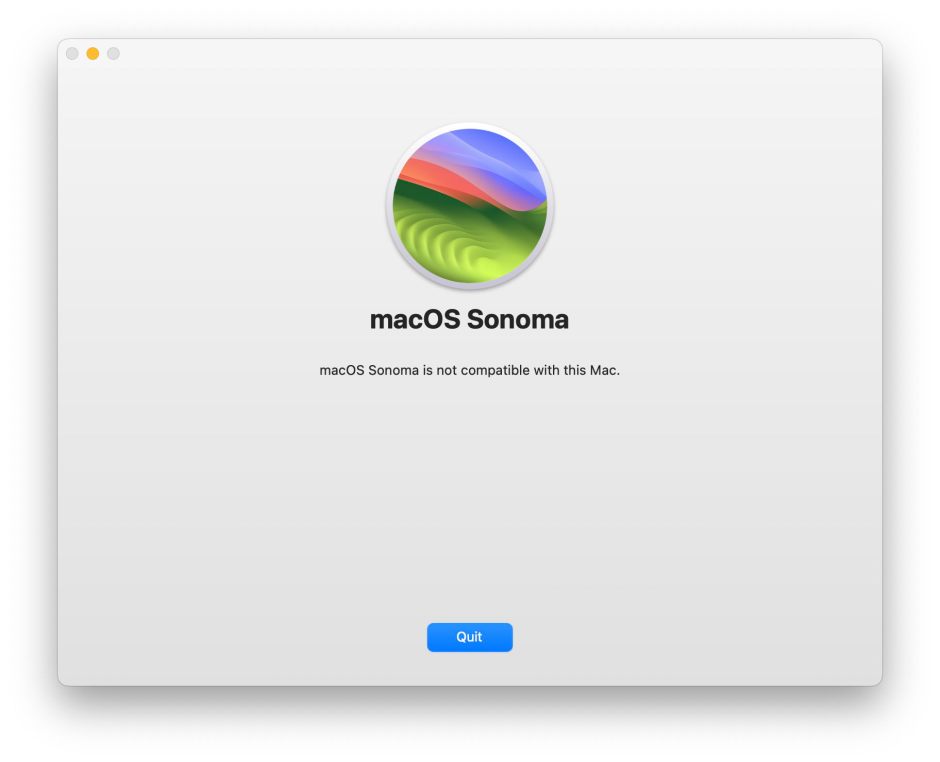
Not to admit defeat, I then repartitioned my external SSD, and using my M3 Mac installed the M3 build of Sonoma 14.1.2 in the new container. That worked fine as a boot disk with my MacBook Pro M3 Pro, but my Mac Studio M1 Max wouldn’t allow that boot volume group to be used as an external boot disk.
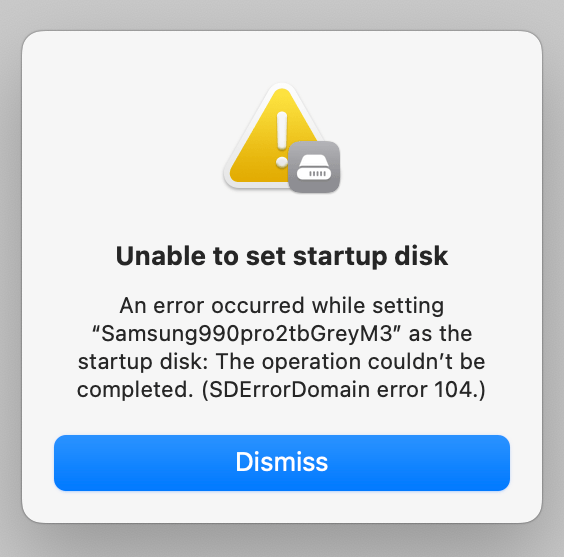
These two versions of Sonoma may only differ in their build numbers, but as far as Macs are concerned they could be completely different operating systems.
Wouldn’t it also be more helpful to users if these problems were to be reported accurately: of course my Mac Studio is compatible with Sonoma 14.1.2, it’s just incompatible with that particular build; what on earth is “SDErrorDomain error 104”, and why can’t macOS explain its errors in a way that’s meaningful to users?
If you’re unfortunate enough to want to boot an M3 Mac and any other Mac from the same external disk, then you’re out of luck until Apple reunifies macOS 14. The closest you can come to a workaround is to do what I did, and install the two builds in separate volume groups or containers, and somehow wrangle them to share common folders for documents and other files.
Sonoma 14.2 resolution?
Unfortunately, Sonoma’s first update to 14.1 was released on 25 October, too early to include the kernel extensions and other system software for the M3s that were announced just five days later. Apple could have delayed 14.1 just a little to roll M3 support into that minor update, but in its scary haste wouldn’t wait. Since then, 14.1.1 and 14.1.2 have been urgent patches to address bugs and vulnerabilities, and weren’t the right time to try unifying the two forks of macOS.
It looks like we’ll have to wait for macOS 14.2 to see reunification, and one build of Sonoma to rule them all, Intel, M1, M2 and M3 Macs. With any luck, that should be around 11 December, just in time for Christmas.
Appendix: New Kernel Extensions in M3 macOS
Kernel extensions included in macOS 14.1.2 build 23B2091 (M3 only), but not present in build 23B92 (other Macs):
- AGXFirmwareKextG15CRTBuddy
- AGXFirmwareKextG15GRTBuddy
- AGXFirmwareKextG15SRTBuddy
- AGXG15C
- AGXG15G
- AGXG15S
- AGXMetalG15G_B0.bundle
- AGXMetalG15G_C0.bundle
- AGXMetalG15X_A0.bundle
- AGXMetalG15X_B0.bundle
- AppleH15MCD
- AppleMCA2_T6030
- AppleMCA2_T603x
- AppleMCA2_T8122
- AppleMobileDispH15G-DCP
- AppleMobileDispH15G
- AppleMobileDispT603C-DCP
- AppleMobileDispT603C
- AppleMobileDispT603S-DCP
- AppleMobileDispT603S
- AppleT6030
- AppleT6030ANEHAL
- AppleT6030CLPC
- AppleT6030PCIe
- AppleT6030PMGR
- AppleT6030SOCTuner
- AppleT6031ANEHAL
- AppleT6031CLPC
- AppleT6031PCIe
- AppleT6031PMGR
- AppleT6031SOCTuner
- AppleT8122
- AppleT8122CLPC
- AppleT8122PCIe
- AppleT8122PCIeC
- AppleT8122PMGR
- AppleTypeCPhy.kext/Contents/PlugIns/AppleT8122TypeCPhy.kext
- AudioDMAController_T6030
- AudioDMAController_T603x
- AudioDMAController_T8122
I’m very grateful to Michael for pointing out my early misreading of the News app’s build number, which I have now corrected above.
 The Eclectic Light Company