

Skip to content

The Eclectic Light Company

Macs & painting – 🦉 No AI content
Main navigation
  • Downloads
  • Freeware
  • M-series Macs
  • Mac Problems
  • Mac articles
  • Macs
  • Art
hoakley October 31, 2023 Macs, Technology, Updates

Making metadata more accessible: Metamer 1.3

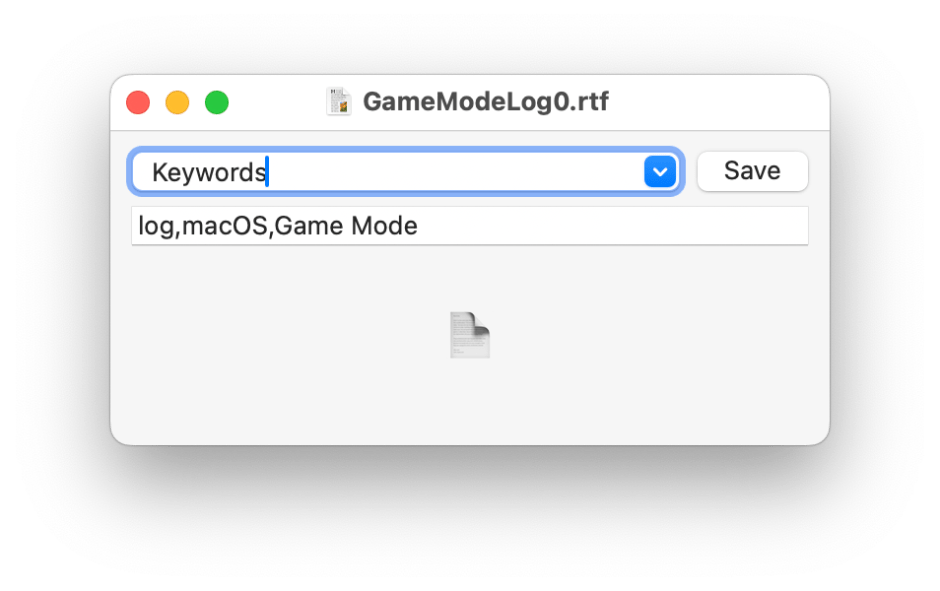
Following my lament on how metadata are woefully underused, I’m delighted to do a bit more to open their access, with a new version of my lightweight metadata editor Metamer.

Metamer gives you quick and convenient access to 16 of the most commonly used extended attributes for attaching metadata to files. Most popular are Keywords, but the app also supports Authors, Comment, Copyright, Creator, Description, FinderComment, Headline, Information, Kind, Languages, Projects, Subject, Title, Version, and ApplicationCategories. Additionally you can edit any other extended attribute containing text as a CFString or CFArray of CFStrings, although for those you’ll need to provide the full name of that extended attribute.
metamer131

You have a choice of ways in which this new version can open a document. Its document window now contains space onto which you can drag and drop files, you can use its standard Open File dialog, or drag and drop onto the app icon in the Dock.

Some of you who have used earlier versions of Metamer asked for somewhere to keep lists of keywords to make it easier to add them to a succession of documents. This comes in a new Scratchpad window, where you can assemble any text that you might want, then copy and paste it into the Keywords or whichever metadata you’re editing. For your convenience, the contents of the Scratchpad are automatically saved to Metamer’s preferences, so they’ll still be there the next time you open the app.

metamer132

Although the Scratchpad works in plain text (as do these extended attributes), you can change the size of the font that it uses.

Note that Metamer works with extended attributes attached to files, and not metadata embedded into specific file formats, such as EXIF data in images. Those stored in extended attributes can be added to any file, and are readily used in Spotlight search.

Metamer version 1.3 requires macOS 10.14.6 or later, and is now available from here: metamer13
from Downloads above, from its Product Page, and through its auto-update mechanism. It should now prove the perfect partner for Spotcord, to build vocabularies of Keywords and other metadata.

Share this:

  • Click to share on X (Opens in new window) X
  • Click to share on Facebook (Opens in new window) Facebook
  • Click to share on Reddit (Opens in new window) Reddit
  • Click to share on Pinterest (Opens in new window) Pinterest
  • Click to share on Threads (Opens in new window) Threads
  • Click to share on Mastodon (Opens in new window) Mastodon
  • Click to share on Bluesky (Opens in new window) Bluesky
  • Click to email a link to a friend (Opens in new window) Email
  • Click to print (Opens in new window) Print
Like Loading...

Related

Posted in Macs, Technology, Updates and tagged extended attributes, keyword, metadata, Metamer, search, Spotcord, Spotlight. Bookmark the permalink.

10Comments

Add yours
  1. 1
    Ralf's avatar
    Ralf on October 31, 2023 at 4:14 pm

    Thank you for the Metamer version. I like the drop area. The input of keywords is much faster now. I will test it in real life.

    LikeLiked by 1 person

    • 2
      hoakley's avatar
      hoakley on October 31, 2023 at 4:25 pm

      Thank you.
      Howard.

      LikeLike

  2. 3
    kapitainsky's avatar
    kapitainsky on October 31, 2023 at 5:51 pm

    “setXattr error: Permission denied” is what I see when I try to add keyword to some files… Not all. Quick observation is that this are files downloaded from Internet. If I see more obvious pattern I will report.

    LikeLiked by 1 person

    • 4
      hoakley's avatar
      hoakley on October 31, 2023 at 5:52 pm

      Thank you.
      Howard

      LikeLike

      • 5
        kapitainsky's avatar
        kapitainsky on October 31, 2023 at 5:55 pm

        I think it was maybe too hasty comment from my side… But also learnt something about one of my communicators I use. It saves all files as `-r–r–r–` – nothing wrong with Metamer.

        LikeLiked by 1 person

        • 6
          hoakley's avatar
          hoakley on October 31, 2023 at 8:38 pm

          No problems.
          Howard.

          LikeLike

  3. 7
    Aaron's avatar
    Aaron on November 1, 2023 at 6:17 pm

    I’ve got one bug and two feature requests for you. The scratchpad contents don’t seem to save automatically for me. When I open up Metamer, the scratchpad is always blank. If I look at `defaults read co.eclecticlight.Metamer`, the `scratchpad` is an empty string.

    First feature request: When I right click on a file in the Finder, I would like Metamer to appear in the context menu under Open With (like xattred does).

    Second feature request: I would also like to be able to configure the extended attribute that is shown by default. Alternatively Metamer could remember which attribute I have viewed most recently and show that attribute by default. I use Metamer for comments >90% of the time (due to https://eclecticlight.co/2023/05/27/would-you-like-to-comment-or-finder-comment/) so I would like it to show the comment field by default.

    LikeLiked by 1 person

    • 8
      hoakley's avatar
      hoakley on November 1, 2023 at 6:20 pm

      I think you may have a preference file problem. Have you tried trashing that preference file and trying again?
      Howard

      LikeLike

      • 9
        Aaron's avatar
        Aaron on November 1, 2023 at 6:32 pm

        Oh I see what’s happening. The scratchpad only saves when you close it. It doesn’t save if you just quit the app.

        LikeLiked by 1 person

        • 10
          hoakley's avatar
          hoakley on November 1, 2023 at 6:34 pm

          I hadn’t realised that: I’ll fix that in the next version. My apologies.
          Howard

          LikeLiked by 1 person

·Comments are closed.

Quick Links

  • Free Software Menu
  • System Updates
  • M-series Macs
  • Mac Troubleshooting Summary
  • Mac problem-solving
  • Painting topics
  • Painting
  • Long Reads

Search

Monthly archives

  • December 2025 (73)
  • November 2025 (74)
  • October 2025 (75)
  • September 2025 (78)
  • August 2025 (76)
  • July 2025 (77)
  • June 2025 (74)
  • May 2025 (76)
  • April 2025 (73)
  • March 2025 (78)
  • February 2025 (67)
  • January 2025 (75)
  • December 2024 (74)
  • November 2024 (73)
  • October 2024 (78)
  • September 2024 (77)
  • August 2024 (75)
  • July 2024 (77)
  • June 2024 (71)
  • May 2024 (79)
  • April 2024 (75)
  • March 2024 (81)
  • February 2024 (72)
  • January 2024 (78)
  • December 2023 (79)
  • November 2023 (74)
  • October 2023 (77)
  • September 2023 (77)
  • August 2023 (72)
  • July 2023 (79)
  • June 2023 (73)
  • May 2023 (79)
  • April 2023 (73)
  • March 2023 (76)
  • February 2023 (68)
  • January 2023 (74)
  • December 2022 (74)
  • November 2022 (72)
  • October 2022 (76)
  • September 2022 (72)
  • August 2022 (75)
  • July 2022 (76)
  • June 2022 (73)
  • May 2022 (76)
  • April 2022 (71)
  • March 2022 (77)
  • February 2022 (68)
  • January 2022 (77)
  • December 2021 (75)
  • November 2021 (72)
  • October 2021 (75)
  • September 2021 (76)
  • August 2021 (75)
  • July 2021 (75)
  • June 2021 (71)
  • May 2021 (80)
  • April 2021 (79)
  • March 2021 (77)
  • February 2021 (75)
  • January 2021 (75)
  • December 2020 (77)
  • November 2020 (84)
  • October 2020 (81)
  • September 2020 (79)
  • August 2020 (103)
  • July 2020 (81)
  • June 2020 (78)
  • May 2020 (78)
  • April 2020 (81)
  • March 2020 (86)
  • February 2020 (77)
  • January 2020 (86)
  • December 2019 (82)
  • November 2019 (74)
  • October 2019 (89)
  • September 2019 (80)
  • August 2019 (91)
  • July 2019 (95)
  • June 2019 (88)
  • May 2019 (91)
  • April 2019 (79)
  • March 2019 (78)
  • February 2019 (71)
  • January 2019 (69)
  • December 2018 (79)
  • November 2018 (71)
  • October 2018 (78)
  • September 2018 (76)
  • August 2018 (78)
  • July 2018 (76)
  • June 2018 (77)
  • May 2018 (71)
  • April 2018 (67)
  • March 2018 (73)
  • February 2018 (67)
  • January 2018 (83)
  • December 2017 (94)
  • November 2017 (73)
  • October 2017 (86)
  • September 2017 (92)
  • August 2017 (69)
  • July 2017 (81)
  • June 2017 (76)
  • May 2017 (90)
  • April 2017 (76)
  • March 2017 (79)
  • February 2017 (65)
  • January 2017 (76)
  • December 2016 (75)
  • November 2016 (68)
  • October 2016 (76)
  • September 2016 (78)
  • August 2016 (70)
  • July 2016 (74)
  • June 2016 (66)
  • May 2016 (71)
  • April 2016 (67)
  • March 2016 (71)
  • February 2016 (68)
  • January 2016 (90)
  • December 2015 (96)
  • November 2015 (103)
  • October 2015 (119)
  • September 2015 (115)
  • August 2015 (117)
  • July 2015 (117)
  • June 2015 (105)
  • May 2015 (111)
  • April 2015 (119)
  • March 2015 (69)
  • February 2015 (54)
  • January 2015 (39)

Tags

APFS Apple Apple silicon backup Big Sur Blake Bonnard bug Catalina Consolation Console Corinth Delacroix Disk Utility Doré El Capitan extended attributes Finder firmware Gatekeeper Gérôme High Sierra history of painting iCloud Impressionism landscape LockRattler log M1 Mac Mac history macOS macOS 10.12 macOS 10.13 macOS 10.14 macOS 10.15 macOS 11 macOS 12 macOS 13 macOS 14 macOS 15 malware Metamorphoses Mojave Monet Monterey Moreau myth narrative OS X Ovid painting performance Pissarro Poussin privacy Renoir riddle Rubens Sargent security Sierra SilentKnight Sonoma SSD Swift Time Machine Tintoretto Turner update upgrade Ventura xattr Xcode XProtect

Statistics

  • 21,097,751 hits
Blog at WordPress.com.
Footer navigation
  • Free Software Menu
  • About & Contact
  • Macs
  • Painting
  • Downloads
  • Mac problem-solving
  • Extended attributes (xattrs)
  • Painting topics
  • SilentKnight, Skint, SystHist, silnite, LockRattler & Scrub
  • DelightEd & Podofyllin
  • xattred, SpotTest, Spotcord, Metamer & xattr tools
  • 32-bitCheck & ArchiChect
  • XProCheck, T2M2, LogUI, Ulbow, blowhole and log utilities
  • Cirrus & Bailiff
  • Precize, Alifix, UTIutility, Sparsity, alisma, Taccy, Signet
  • Versatility & Revisionist
  • Text Utilities: Textovert, Nalaprop, Dystextia and others
  • PDF
  • Keychains & Permissions
  • Updates
  • Spundle, Cormorant, Stibium, DropSum, Dintch, Fintch and cintch
  • Long Reads
  • Mac Troubleshooting Summary
  • M-series Macs
  • Mints: a multifunction utility
  • VisualLookUpTest
  • Virtualisation on Apple silicon
  • System Updates
  • Saturday Mac Riddles
  • Last Week on My Mac
  • sysctl information
Secondary navigation
  • Search

Post navigation

Arthur: 8 Galahad’s sword and shield
Reading visual art: 83 Hammers in myth and religion

Begin typing your search above and press return to search. Press Esc to cancel.

  • Reblog
  • Subscribe Subscribed
    • The Eclectic Light Company
    • Join 8,893 other subscribers
    • Already have a WordPress.com account? Log in now.
    • The Eclectic Light Company
    • Subscribe Subscribed
    • Sign up
    • Log in
    • Copy shortlink
    • Report this content
    • View post in Reader
    • Manage subscriptions
    • Collapse this bar
 

Loading Comments...
 

    %d