
The boot volume group was introduced to macOS in Catalina and Big Sur, and has since stabilised as an architectural feature that still catches us out. This article looks in detail at how the firmlinked System and Data volumes appear in the file system in Ventura and Sonoma, to help you navigate them.
Identifiers
To understand how these two volumes are intertwined, there are three systems used to identify files and directories within them.
File path URLs are most commonly used, and most familiar. These trace the series of directories to be traversed between the root / and the file or directory of interest, such as
/Applications/Utilities/Disk Utility.app/Contents/MacOS/Disk Utility
which appears to identifiy the executable code within that app. That path isn’t correct, though, as that’s actually located at
/System/Applications/Utilities/Disk Utility.app/Contents/MacOS/Disk Utility
on the System volume, and not really among the user-installed apps in /Applications on the Data volume. That demonstrates how confusing it can be to navigate these volumes.
For this article, I’ll also use the volfs path, in that case
/.vol/16777242/1152921500311911197
which is based on inode numbers. Within any volume, including the conjoined System and Data volumes, each file and directory has a unique number, its inode. This is an unsigned 64-bit integer, here 1152921500311911197. Each volume also has its own numeric ID, here 16777242 which is used for both linked volumes. In this case, as the inode number is very large, it indicates the file is on the System not Data volume within that boot volume group.
There’s also a third method, the File Reference URL, in this case
file:///.file/id=6571367.1152921500311911197
This also uses inode numbers, but the volume ID is different. File Reference URLs are described here, and are used internally in Finder Aliases and Bookmarks, but seldom when navigating the file system.
Inevitably, I have a free app Precize that supplies all three of these, Bookmarks and more.
In some errors generated by APFS and its tools, you may come across the extended field flag referred to as a doc-id. This is used by applications to keep track of documents, both files and compound documents using folders, like RTFD, during some file operations such as atomic save, where the doc-id remains associated with the document path rather than the inode at that path. Unfortunately, there doesn’t appear to be any way of relating a doc-id to a file path URL, making such error messages unhelpful.

Volume and root
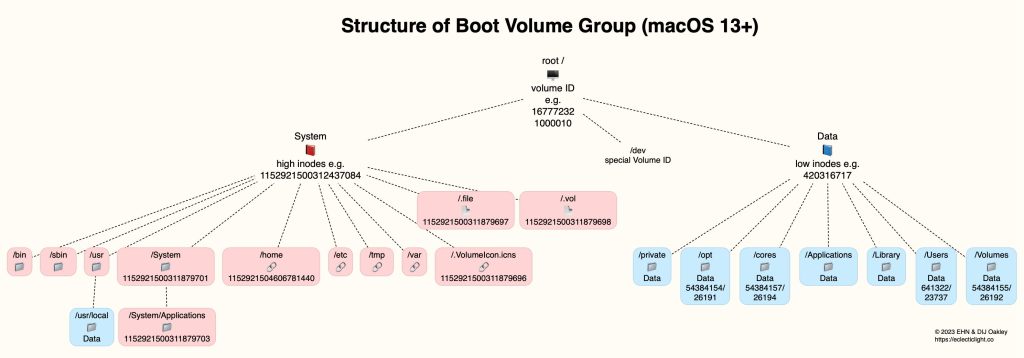
The volume ID used for all files and directories in the System and Data volumes isn’t fixed, but is typically slightly greater than 16777216, or hexadecimal 1000000, such as 16777232 (hex 1000010) or 16777242 (hex 100001A). That includes all items in both those volumes, with the exception of /dev. Those on the System volume have very large inode numbers, such as 1152921500312437084, and those on the Data volume have smaller inode numbers, like 420316717. This can be used to tell which of the two volumes any item is located.
There are two special items at the root level of immediate relevance to inode numbers: /.vol, a volume placemarker with the inode number of 1152921500311879698, and /.file with 1152921500311879697. If you ever write software that has any dealings with items at the root level of a boot volume, then you must beware of those, as they behave unexpectedly, and whatever your code is trying to do with them, it shouldn’t. In High Sierra, /.file was given the special inode number of 42 in honour of Douglas Adams, but that Easter Egg has sadly been replaced since.
Top-level files and folders

The diagram above summarises the top-level layout of the integrated System and Data volumes, with directories colour-coded in red for those on the System volume, and blue on the Data volume. A tear-out PDF is available from here: BootVolGpVentapfs
Some of these items appear to have fixed inode numbers, consistent across different Macs, architectures and versions of macOS, including Sonoma. Notable among those are /System and its /Applications sub-directory on the System volume. Below those top-level directories, other sub-directories are firmlinked with the Data volume, for example the important location /usr/local.
Some of the top-level folders on the Data volume, like /Users and /Volumes, also appear to have fixed inode numbers, but those may change between different versions of macOS, or perhaps different Macs. In those cases, the diagram gives both numbers found.
Summary
- The volfs path of a file or directory gives its volume ID and inode number.
- All items on the combined System and Data volumes (except /dev) have the same volume ID, typically around 16777232.
- Items on the System volume have very high inode numbers, and those on the Data volume relatively low inode numbers.
- Inode numbers can thus be used to locate files and directories to either volume.
- Some inode numbers appear consistent enough to identify the directory.
 The Eclectic Light Company