
I’m delighted to provide a new beta release of my free macOS virtualisation utility Viable, with substantial improvements.
Most significant among these is the use of a new document type for the VM bundle, which now saves the settings to be used when running that VM. This prepares the way for a new app, Vimy, that will make it far simpler to run existing VMs just by double-clicking them. My plan is that Viable will continue to provide full facilities for creating VMs, and exploiting advanced features like controlling machine ID and full options for the virtual display. But when you simply want to run a VM that you’ve already set up, you can just double-click it and Vimy will run it using the settings saved within that VM bundle.
VM settings
When you first run a VM in Viable beta 9, it creates a file inside the VM bundle containing the settings used to run that VM. Whenever you run that VM after that, you can either override those settings with those in Viable’s window, or use the saved settings for that VM. Those are the settings to be used automatically when you run that VM using Vimy, where they can’t be overridden or overwritten.
Current saved settings are stored in a property list file named Settings.plist inside the VM bundle. As that file isn’t managed by cfprefsd, and is only read when running a VM, you can edit it manually using a suitable editor if you wish.
You can also set Viable to overwrite the current saved settings in the VM with those you’re just about to use to run it. When you first overwrite saved settings in a VM, the previous settings are copied to a backup named PreviousSettings.plist. Only one backup settings file is kept, and you can make that the current settings file simply by renaming it Settings.plist if you want. Unlike machine IDs, settings files aren’t unique to a VM, and you can copy them between VM bundles if you wish.
Viable still works fine with existing .bundle VMs, and you don’t need to convert them into its new .vimi bundles, although if you want them to be double-clickable with Vimy then I recommend that you transition to the new bundles. As their internal structure is identical, you can do that simply by changing their extension from .bundle to .vimi. If you want to open a VM using an older version of Viable or ViableS, then you should keep to .bundle for the time being. There’s one minor shortcoming at present: although Viable gives these new .vimi bundles a custom icon, that isn’t being displayed correctly yet.
Controls
I have laid out Viable’s main window to make clearer distinction between the relevance and use of its controls.
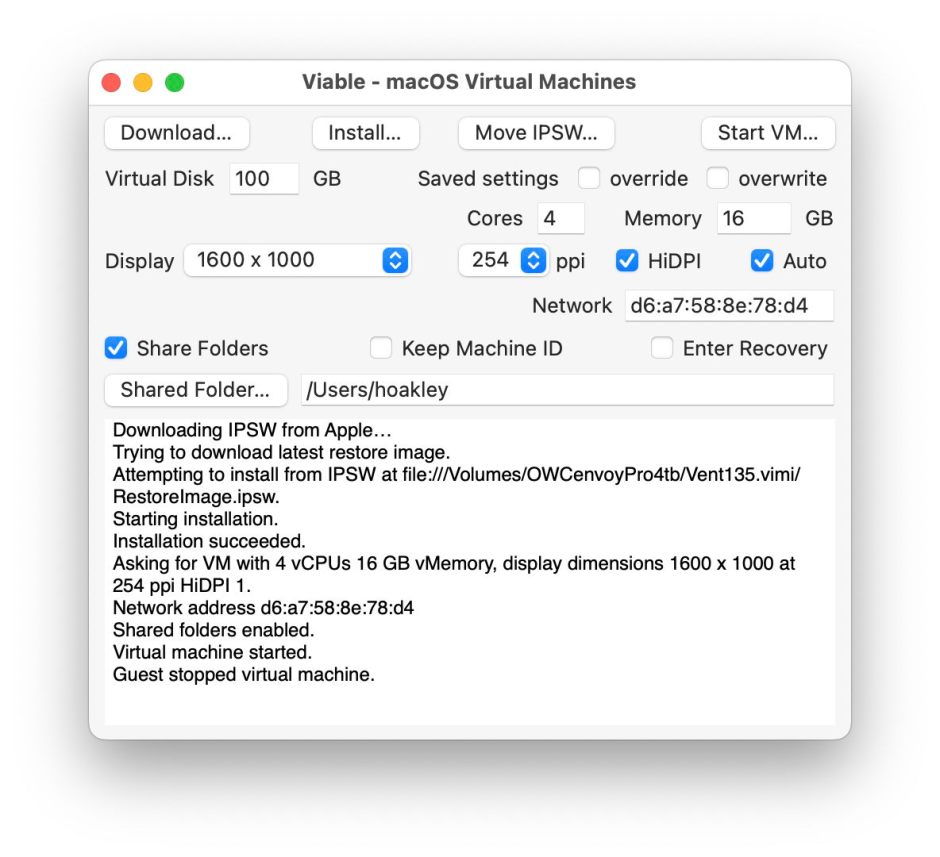
Each of its four action buttons now has a menu equivalent, two of them with key shortcuts too. Each control has an informative tooltip, and a 14-page PDF Help book replaces the old Rich Text introductory notes.
IPSW files
Viable follows Apple’s example of moving the IPSW image file used to build and install a VM inside the VM’s bundle. This isn’t perhaps appreciated when you first start using Viable: all you see is your previous 14 GB IPSW file vanish, and you may not be aware that it has just been moved.
Like many Viable users, I routinely move IPSW files out from the VM bundle to use them to build further VMs, and have looked carefully at whether Viable should continue to do this. While I think it’s good practice for several reasons, I also want to make it easier to extract the IPSW file from the VM. This new version of Viable therefore has a menu command and button that let you select an existing VM, extract any IPSW file from within it, and move it to a location and name of your choosing.
You can do this immediately after completing the installation of that VM, before the VM has even been run for the first time, or at any time later. It’s quick, simple, and preserves most of the advantages gained by moving the IPSW file inside the VM bundle in the first place.
Changes
This is the full list of changes in Viable 1.0.9 (beta 9):
- added vimi document type
- updated UTType support
- added saved settings features
- redesigned the main window, removing redundant keyboard items
- customised menus to cover the four button actions
- added support for moving IPSW files
- changed VM information shown on launch
- replaced RTF help with PDF
- added full tooltips.
Viable 1.0.9 (beta 9) is now available from here: viable1b9
from Downloads above, and from its Product Page.
I hope to release the first version of Vimy in the next week or two, and an update to ViableS soon afterwards. I am aware that, while Viable 1.0.9 is getting closer to release quality, it doesn’t trap all errors properly, something that I will address in a future update.
Enjoy!
 The Eclectic Light Company