
When Apple was designing the storage architecture to support Secure Boot in Apple silicon Macs, it needed to separate system from user files, so that macOS itself could be better protected. Although traditional Unix architectures bring some separation, there are many directories that contain mixtures of files, some that are part of the system, and others that the user installs. The solution Apple’s engineers came up with is the firmlink, an essential part of the structure and function of macOS since Catalina.
To illustrate this, I’ll consider a folder that isn’t part of traditional Unix architectures, but is central to macOS: Applications. Since the first version of Mac OS X, it has contained a mixture of apps that are bundled with the system, and most of those installed by the user. Dividing this into two folders on different volumes wouldn’t be an acceptable solution, so two Applications folders on separate volumes are merged thanks to their firmlink, joining the Applications folder on the System volume with that on the Data volume.
You can view those apps contributed by the System volume by following the path [Macintosh HD]/System/Applications in the Finder, where you’ll see only the apps that come on the System volume. Look at the normal Applications folder, though, and those are mixed among those apps you have installed on the Data volume.
Previous methods of linking directories together can’t do that: if you wanted to achieve a similar effect using symbolic links (symlinks), each of the apps on the System volume would require its own symlink in a directory containing all the other apps. This property of firmlinks becomes even more important in directories containing command tools like /usr/local. If Apple’s new volume architecture was to remain reasonably compatible with the past, it required several of these firmlinks to stitch System and Data volumes together.
Back in Big Sur, I mapped these out in three diagrams; they’ve not changed substantially since.
This is the System volume:

This is the Data volume:
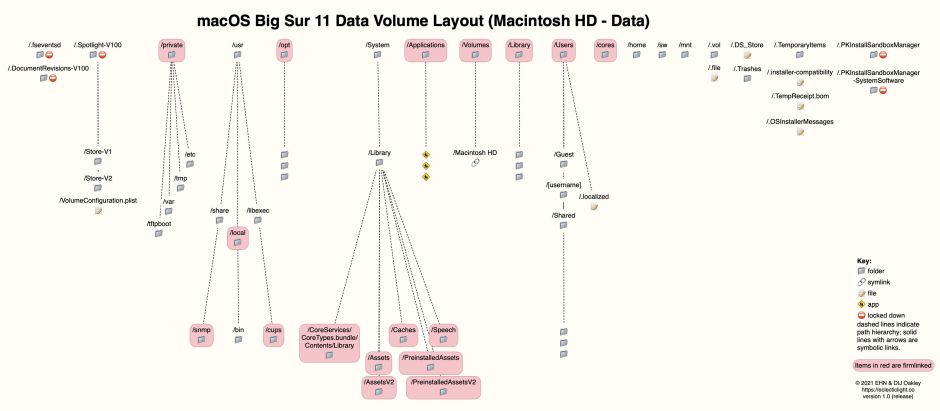
Together, and shown simplified, they look like this:

Since their introduction in Catalina, the list given in /usr/share/firmlinks has remained the same:
/Applications <-> Applications
/Library <-> Library
/System/Library/Caches <-> System/Library/Caches
/System/Library/Assets <-> System/Library/Assets
/System/Library/PreinstalledAssets <-> System/Library/PreinstalledAssets
/System/Library/AssetsV2 <-> System/Library/AssetsV2
/System/Library/PreinstalledAssetsV2 <-> System/Library/PreinstalledAssetsV2
/System/Library/CoreServices/CoreTypes.bundle/Contents/Library <-> System/Library/CoreServices/CoreTypes.bundle/Contents/Library
/System/Library/Speech <-> System/Library/Speech
/Users <-> Users
/Volumes <-> Volumes
/cores <-> cores
/opt <-> opt
/private <-> private
/usr/local <-> usr/local
/usr/libexec/cups <-> usr/libexec/cups
/usr/share/snmp <-> usr/share/snmp
/AppleInternal <-> AppleInternal (on Apple engineering systems only)
in each case shown as the system volume path and the Data volume path which are firmlinked.
Apple has never documented firmlinks in any detail, and doesn’t provide the user with any tools for working with them. They don’t appear to be easy to create, though, and rejoining existing volumes using firmlinks may not be possible. During the early days with Big Sur, it was all too easy to end up with orphaned Data volumes that had lost their firmlinks to the System volume. At that time, it appeared that firmlinks had to be created early in the life of a volume, probably before its file system had been populated with files. Currently, there doesn’t appear to be any method for the user to join together any given pair of System and Data files using their firmlinks.
You can though create your own synthetic firmlinks, which appear at root volume level and link to folders or symbolic links on the Data volume. These are stored in an /etc/synthetic.conf file, which is documented in man synthetic.conf. Rich Trouton has published an excellent tutorial on how to do this. Users who previously had their own custom folders at the root level of the boot volume can use this to create the same effect in Catalina and later.
Without firmlinks, the boot volume group used by Secure Boot couldn’t work, and without that Apple silicon Macs would have essentially the same volume architecture as in Mojave, with all the problems that brought.
 The Eclectic Light Company