
Skip to content

The Eclectic Light Company

Macs & painting – 🦉 No AI content
Main navigation
  • Downloads
  • Freeware
  • M-series Macs
  • Mac Problems
  • Mac articles
  • Macs
  • Art
hoakley June 8, 2023 Macs, Technology, Updates

More app updates: SearchKey and SearchKeyLite 1.5, and Scrub 1.3

I have the last three planned updates to my GUI apps, for two apps that complement Metamer in helping you edit metadata, and an app intended to protect your privacy. These improve their code handling extended attributes to help it work better with future versions of macOS. They also no longer check their own signatures on opening, a feature now performed by macOS.

SearchKey and SearchKeyLite versions 1.5 edit a standard suite of metadata stored as extended attributes. SearchKey will do this on both individual files and whole folders, while SearchKeyLite is simpler and works with just individual files.
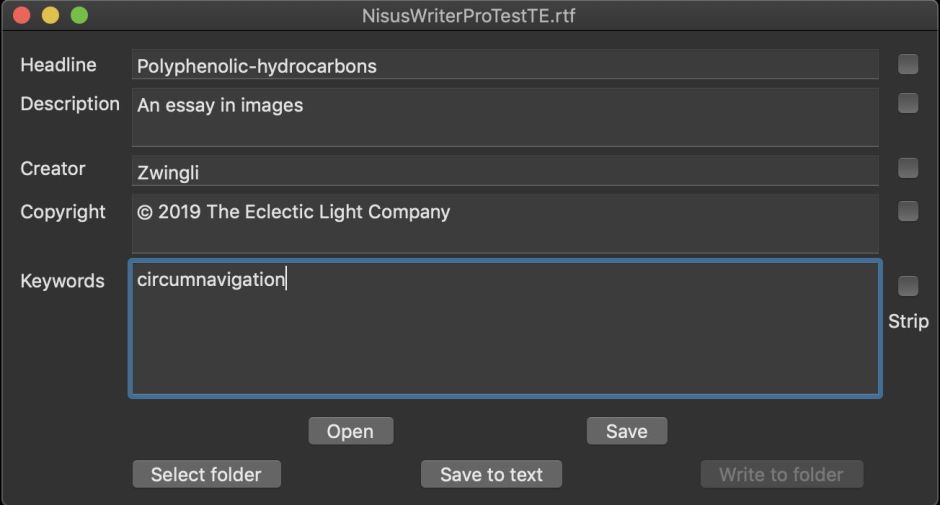
searchkey01

For example, with SearchKey it’s quick and simple to add author and copyright data to all the images stored in a folder, or to strip them when you want to work on a batch.
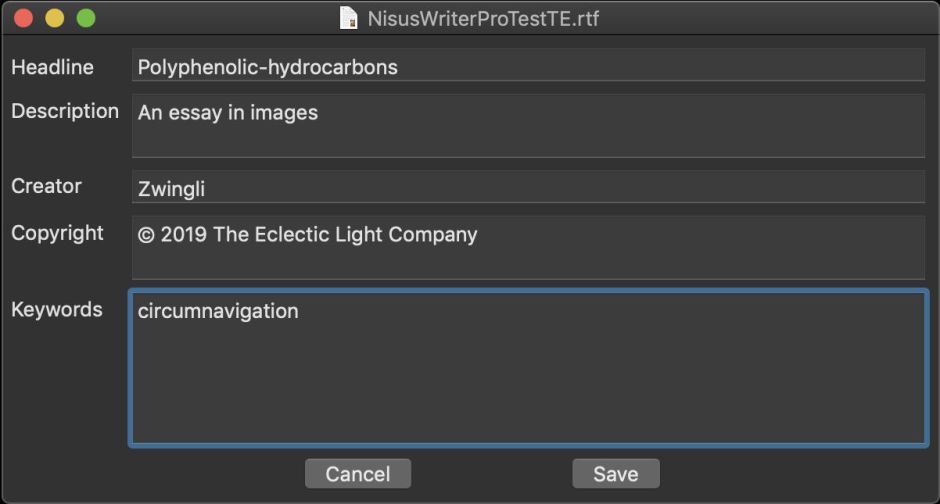
searchkey02

SearchKey 1.5 is now available from here: searchkey15
from Downloads above, and from its Product Page.

SearchKeyLite 1.5 is now available from here: searchkeylite15
from Downloads above, and from its Product Page.

As they’re seldom updated, they don’t use my auto-update mechanism. Both apps run on High Sierra and later.

Scrub is designed to strip out a lot of hidden data which could prove damaging if examined by third parties, thereby protecting your privacy. These include:

  • extended attributes (xattrs), which often contain download source and time and much more,
  • Spotlight metadata, which opens the contents of documents to search,
  • versions, which may contain material which was later removed or redacted from a document,
  • the QuickLook cache (High Sierra only), which could readily show previews of images and other files you have used,
  • system logs, which can contain entries revealing your Mac’s activities over previous days,
  • datestamps on files, which reveal when a document was created and last modified.
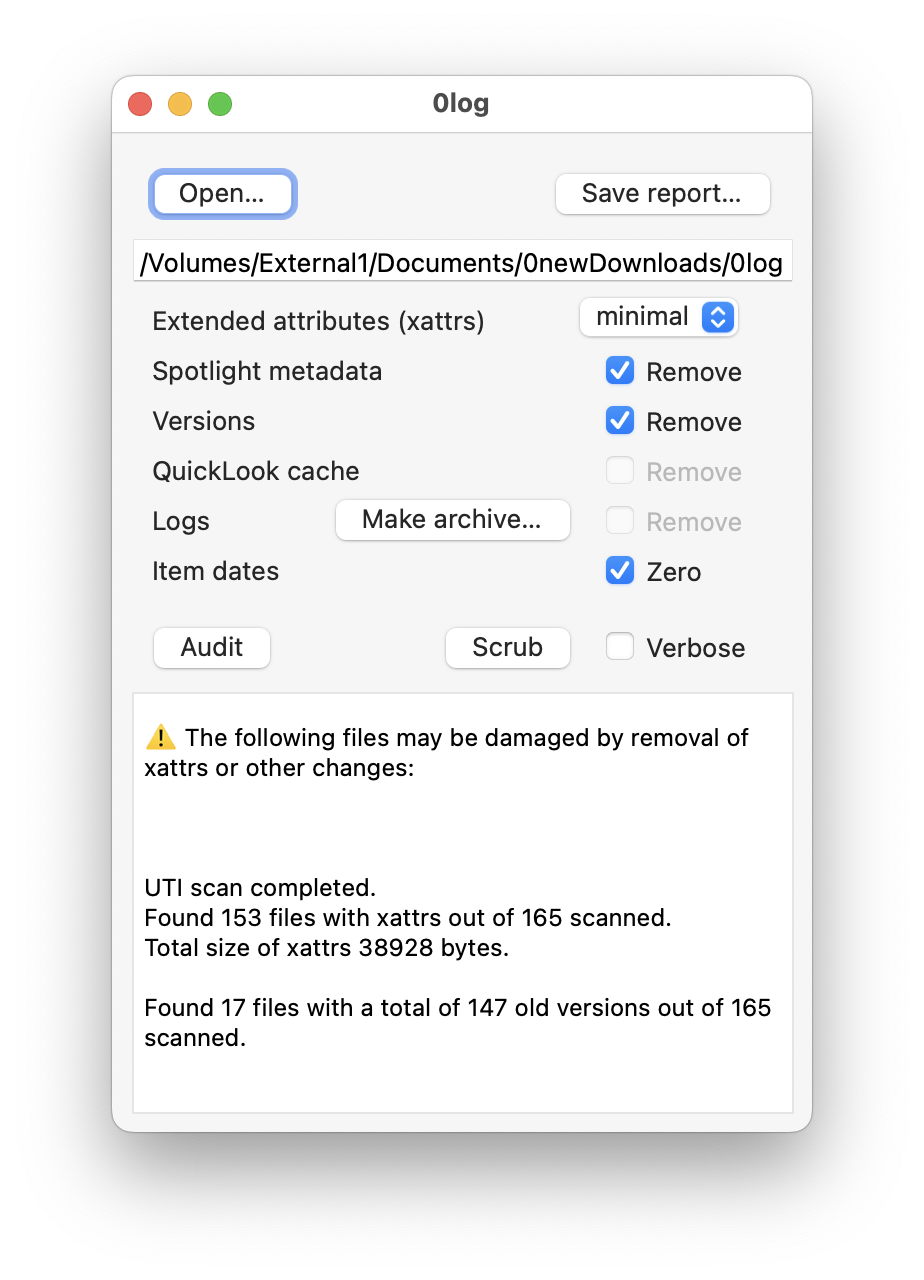
scrub131

Removing those is a serious and committing action. By definition, you can’t have an Undo, and used inappropriately, Scrub can cause damage and lose data. To help you avoid that, it works in two phases: you first perform an audit of the volume/folder/document you want to scrub clean, and that lets you know of any particular dangers in doing so. When you’re happy that what you’re intending to do won’t cause damage, you can then run the scrub to clean those files.

This is ideal, for example, when you need to clean a ‘thumb’ drive containing sensitive documents. Used without great care on your Home folder, it will cause severe damage which you may find very difficult to reverse.

Scrub version 1.3 is now available from here: scrub13
from Downloads above, and from its Product Page. This version runs on High Sierra and later.

I regret that I am discontinuing further versions or support for two related utilities: Sandstrip and Pratique. These have now fulfilled their purpose, and have no place in Big Sur or later. I will leave their current versions available from their Product Page if you do still wish to use them.

The remaining updates I have due are both command tools: cintch, part of the Dintch/Fintch integrity checking suite, and cmpxat, for comparing extended attributes.

Share this:

  • Click to share on X (Opens in new window) X
  • Click to share on Facebook (Opens in new window) Facebook
  • Click to share on Reddit (Opens in new window) Reddit
  • Click to share on Pinterest (Opens in new window) Pinterest
  • Click to share on Threads (Opens in new window) Threads
  • Click to share on Mastodon (Opens in new window) Mastodon
  • Click to share on Bluesky (Opens in new window) Bluesky
  • Click to email a link to a friend (Opens in new window) Email
  • Click to print (Opens in new window) Print
Like Loading...

Related

Posted in Macs, Technology, Updates and tagged extended attributes, metadata, privacy, Scrub, SearchKey, SearchKeyLite, update, xattr. Bookmark the permalink.

8Comments

Add yours
  1. 1
    Ryan's avatar
    Ryan on August 23, 2023 at 12:43 pm

    Scrub does a lot of the housekeeping which I currently do manually, but it doesn’t touch the FSEvents records. When you introduced the app, you wrote: “I don’t know of any reliable way of managing it, so the only action would be to remove the whole database, which I think would be a foolish move.”

    I used FSEventsParser to take a quick look at the records on my very old system (High Sierra). Privacy-wise it’s nightmarish. Among many other things, the records can be used to reconstruct long deleted Firefox browsing histories of all users with approximate timestamps and perfect chronology.

    It seems that the data is no longer stored permanently. I my test, the records covered the last three weeks. So there is some kind of housekeeping, but I don’t know what triggers it. (I can rule out that Time Machine triggers it on my system because I don’t use it.)

    There’s not much on the web. Apparently, it’s possible to just delete the FSEvents records. I too doubt that this is a good idea, but apparently macOS is able to start from scratch.

    Preventing file system event storage by creating an empty file named “no_log” in the .fseventsd folder seems to be an option. My concern is that this might break some things or lead to excessive logging.

    It’s also possible to purge the records via an API call (https://developer.apple.com/library/archive/documentation/Darwin/Conceptual/FSEvents_ProgGuide/UsingtheFSEventsFramework/UsingtheFSEventsFramework.html). Apple advises against it. (“As a general rule, you should never call this function because you cannot safely assume that your application is the only consumer of event data.”)

    One ugly workaround might be to routinely spam the file system and thereby trigger the deletion of old records.

    I’m wondering if you are still considering the FSEvents folder a no-go area and would be glad to get some feedback on this topic. I would like to purge the records on my main volume, but don’t want to do any damage to the system.

    LikeLiked by 1 person

    • 2
      hoakley's avatar
      hoakley on August 23, 2023 at 4:12 pm

      Thank you.
      A lot of other things now use FSEvents, and purging it would have serious effects, particularly on backups using Time Machine, and some security software, if not more. It also requires root privileges, and wouldn’t be an easy call to implement in a privileged helper app.
      Howard.

      LikeLike

      • 3
        Ryan's avatar
        Ryan on August 23, 2023 at 5:51 pm

        Thank you for the feedback.

        On my system, the files in .fseventsd hardly ever get accessed, but I think I will probably not touch them.

        LikeLiked by 1 person

        • 4
          hoakley's avatar
          hoakley on August 23, 2023 at 8:35 pm

          You can of course block their generation: the link you provided describes how. AFAIK that still works.
          Howard.

          LikeLike

  2. 5
    Grant Symon's avatar
    Grant Symon on September 25, 2023 at 11:50 am

    Howard,

    firstly, thank you for the excellent apps.

    I’m wondering if there is any way, to display all the keywords applied in this way to files on a Mac? A problem with keywords, is keeping track of them and having existing ones available when applying keywords to new files, so ensuring that they are consistent and not mixed up with multiple variations on a theme.

    LikeLiked by 1 person

    • 6
      hoakley's avatar
      hoakley on September 25, 2023 at 12:40 pm

      Thank you.
      The only way that I know isn’t good, and that’s to use xattred’s xattr crawler feature for the appropriate xattr. But that’s not intended to do this, and would need post-processing too.
      I happen to be looked at related issues with IPTC keywords for images, and will devote some thought to the best way to implement this. I can’t promise anything in days, but it’s a fascinating project that merits an app.
      Howard.

      LikeLike

  3. 7
    Grant Symon's avatar
    Grant Symon on September 25, 2023 at 1:02 pm

    Ahhh! Interesting Howard! 😊

    Imaging was my business for 40yrs, so I got quite familiar with IPTC etc. I used Aperture for many of those years, which handled the IPTC and other xattr so very well. I was gutted when Apple abandoned it. As someone who used to ‘tag’ drawers full of 5×4 and 10×8 transparencies, keywording has always been a part of my profession. I just kindof automatically think of using it. I’ve even made my own Notes app in Filemaker, just so I could base it on keywords (and then 4 or 5 years later, Apple added Tags to Notes.app. Hmmph..)

    Looking forward to seeing what you can come up with. Thanks for your efforts!

    LikeLiked by 1 person

    • 8
      hoakley's avatar
      hoakley on September 25, 2023 at 2:41 pm

      I have a lead now, but have commissioned writing to complete in the coming days, so further exploration will be paused until that’s submitted.
      Howard.

      LikeLike

·Comments are closed.

Quick Links

  • Free Software Menu
  • System Updates
  • M-series Macs
  • Mac Troubleshooting Summary
  • Mac problem-solving
  • Painting topics
  • Painting
  • Long Reads

Search

Monthly archives

  • January 2026 (7)
  • December 2025 (75)
  • November 2025 (74)
  • October 2025 (75)
  • September 2025 (78)
  • August 2025 (76)
  • July 2025 (77)
  • June 2025 (74)
  • May 2025 (76)
  • April 2025 (73)
  • March 2025 (78)
  • February 2025 (67)
  • January 2025 (75)
  • December 2024 (74)
  • November 2024 (73)
  • October 2024 (78)
  • September 2024 (77)
  • August 2024 (75)
  • July 2024 (77)
  • June 2024 (71)
  • May 2024 (79)
  • April 2024 (75)
  • March 2024 (81)
  • February 2024 (72)
  • January 2024 (78)
  • December 2023 (79)
  • November 2023 (74)
  • October 2023 (77)
  • September 2023 (77)
  • August 2023 (72)
  • July 2023 (79)
  • June 2023 (73)
  • May 2023 (79)
  • April 2023 (73)
  • March 2023 (76)
  • February 2023 (68)
  • January 2023 (74)
  • December 2022 (74)
  • November 2022 (72)
  • October 2022 (76)
  • September 2022 (72)
  • August 2022 (75)
  • July 2022 (76)
  • June 2022 (73)
  • May 2022 (76)
  • April 2022 (71)
  • March 2022 (77)
  • February 2022 (68)
  • January 2022 (77)
  • December 2021 (75)
  • November 2021 (72)
  • October 2021 (75)
  • September 2021 (76)
  • August 2021 (75)
  • July 2021 (75)
  • June 2021 (71)
  • May 2021 (80)
  • April 2021 (79)
  • March 2021 (77)
  • February 2021 (75)
  • January 2021 (75)
  • December 2020 (77)
  • November 2020 (84)
  • October 2020 (81)
  • September 2020 (79)
  • August 2020 (103)
  • July 2020 (81)
  • June 2020 (78)
  • May 2020 (78)
  • April 2020 (81)
  • March 2020 (86)
  • February 2020 (77)
  • January 2020 (86)
  • December 2019 (82)
  • November 2019 (74)
  • October 2019 (89)
  • September 2019 (80)
  • August 2019 (91)
  • July 2019 (95)
  • June 2019 (88)
  • May 2019 (91)
  • April 2019 (79)
  • March 2019 (78)
  • February 2019 (71)
  • January 2019 (69)
  • December 2018 (79)
  • November 2018 (71)
  • October 2018 (78)
  • September 2018 (76)
  • August 2018 (78)
  • July 2018 (76)
  • June 2018 (77)
  • May 2018 (71)
  • April 2018 (67)
  • March 2018 (73)
  • February 2018 (67)
  • January 2018 (83)
  • December 2017 (94)
  • November 2017 (73)
  • October 2017 (86)
  • September 2017 (92)
  • August 2017 (69)
  • July 2017 (81)
  • June 2017 (76)
  • May 2017 (90)
  • April 2017 (76)
  • March 2017 (79)
  • February 2017 (65)
  • January 2017 (76)
  • December 2016 (75)
  • November 2016 (68)
  • October 2016 (76)
  • September 2016 (78)
  • August 2016 (70)
  • July 2016 (74)
  • June 2016 (66)
  • May 2016 (71)
  • April 2016 (67)
  • March 2016 (71)
  • February 2016 (68)
  • January 2016 (90)
  • December 2015 (96)
  • November 2015 (103)
  • October 2015 (119)
  • September 2015 (115)
  • August 2015 (117)
  • July 2015 (117)
  • June 2015 (105)
  • May 2015 (111)
  • April 2015 (119)
  • March 2015 (69)
  • February 2015 (54)
  • January 2015 (39)

Tags

APFS Apple Apple silicon backup Big Sur Blake Bonnard bug Catalina Consolation Console Corinth Delacroix Disk Utility Doré El Capitan extended attributes Finder firmware Gatekeeper Gérôme High Sierra history of painting iCloud Impressionism landscape LockRattler log M1 Mac Mac history macOS macOS 10.12 macOS 10.13 macOS 10.14 macOS 10.15 macOS 11 macOS 12 macOS 13 macOS 14 macOS 15 malware Metamorphoses Mojave Monet Monterey Moreau myth narrative OS X Ovid painting performance Pissarro Poussin privacy Renoir riddle Rubens Sargent security Sierra SilentKnight Sonoma SSD Swift Time Machine Tintoretto Turner update upgrade Ventura xattr Xcode XProtect

Statistics

  • 21,118,573 hits
Blog at WordPress.com.
Footer navigation
  • Free Software Menu
  • About & Contact
  • Macs
  • Painting
  • Downloads
  • Mac problem-solving
  • Extended attributes (xattrs)
  • Painting topics
  • SilentKnight, Skint, SystHist, silnite, LockRattler & Scrub
  • DelightEd & Podofyllin
  • xattred, SpotTest, Spotcord, Metamer & xattr tools
  • 32-bitCheck & ArchiChect
  • XProCheck, T2M2, LogUI, Ulbow, blowhole and log utilities
  • Cirrus & Bailiff
  • Precize, Alifix, UTIutility, Sparsity, alisma, Taccy, Signet
  • Versatility & Revisionist
  • Text Utilities: Textovert, Nalaprop, Dystextia and others
  • PDF
  • Keychains & Permissions
  • Updates
  • Spundle, Cormorant, Stibium, DropSum, Dintch, Fintch and cintch
  • Long Reads
  • Mac Troubleshooting Summary
  • M-series Macs
  • Mints: a multifunction utility
  • VisualLookUpTest
  • Virtualisation on Apple silicon
  • System Updates
  • Saturday Mac Riddles
  • Last Week on My Mac
  • sysctl information
Secondary navigation
  • Search

Post navigation

What features has Apple announced for macOS 14 Sonoma, and can your Mac use them?
Hard reality: 8 The illusion of depth

Begin typing your search above and press return to search. Press Esc to cancel.

  • Reblog
  • Subscribe Subscribed
    • The Eclectic Light Company
    • Join 8,899 other subscribers
    • Already have a WordPress.com account? Log in now.
    • The Eclectic Light Company
    • Subscribe Subscribed
    • Sign up
    • Log in
    • Copy shortlink
    • Report this content
    • View post in Reader
    • Manage subscriptions
    • Collapse this bar
 

Loading Comments...
 

    %d