
Skip to content

The Eclectic Light Company

Macs & painting – 🦉 No AI content
Main navigation
  • Downloads
  • Freeware
  • M-series Macs
  • Mac Problems
  • Mac articles
  • Macs
  • Art
hoakley June 2, 2023 Macs, Technology

Customising metadata display in the Finder

Although the Finder is the most obvious place to look for metadata associated with files, it’s not always obvious where to look, and when you do you might conclude that little is exposed there. This article explains what’s displayed where, and how to customise it.

There are three places in the Finder where it displays metadata, including some extended attributes:

  • in the Get Info dialog, or better in its Inspector variant;
  • in columns in List View;
  • in QuickLook previews, best seen in Column View.

Get Info

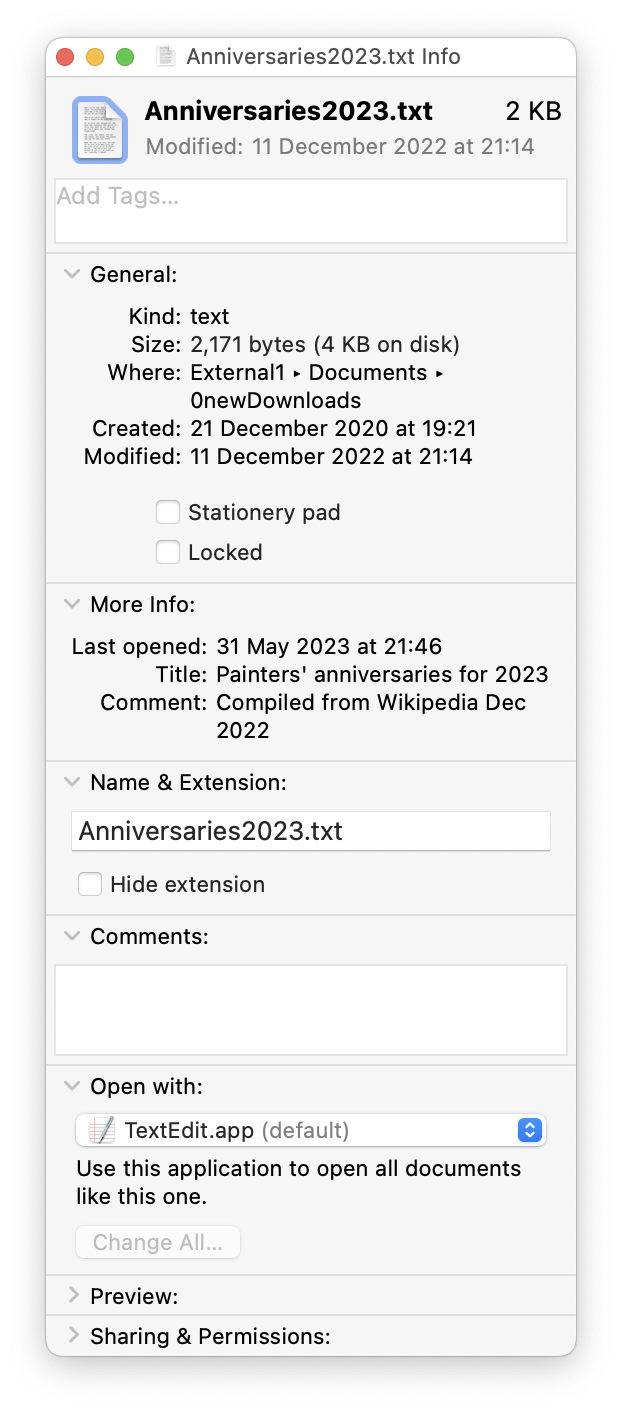
Select an item in the Finder and press Command-I for the Get Info dialog. There’s also a less used Inspector variant, opened using Command-Opt-I. If you want to keep the dialog open on the same file, use the standard Get Info; it you want its contents to change according to which file is selected, then opt for the Inspector instead.
findermeta1

Metadata shown in the dialog appear in the More Info and Comments sections, and vary according to the file type: here a text file reveals the contents of two extended attributes, giving Title and Comment. The latter isn’t the Finder/Spotlight comment, which is both displayed and edited in the Comments section. Apart from the latter, those wouldn’t be shown for images, movies, or audio files, though, which have their own fields specific to their content.

Choice of metadata to be displayed here isn’t customisable, though, and is set by the Finder.

List View

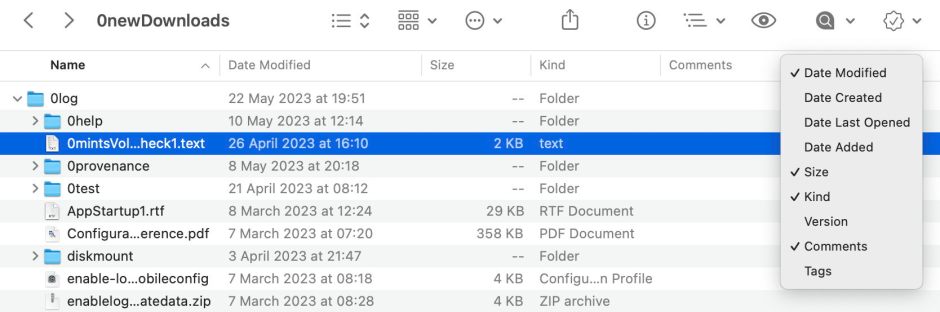
By default, List Views in the Finder don’t show any metadata, but can be customised to display Finder/Spotlight comments. Control-click (or two-finger tap) in one of the column headers and select the fields you want displayed from the popup menu.
findermeta2

In addition to these common fields, available in all List Views, the three dedicated media folders in the Home folder, Movies, Music and Pictures, have additional fields available, appropriate to their content. But those can’t apparently be accessed in other folders when in List (or any other) View.

QuickLook Preview

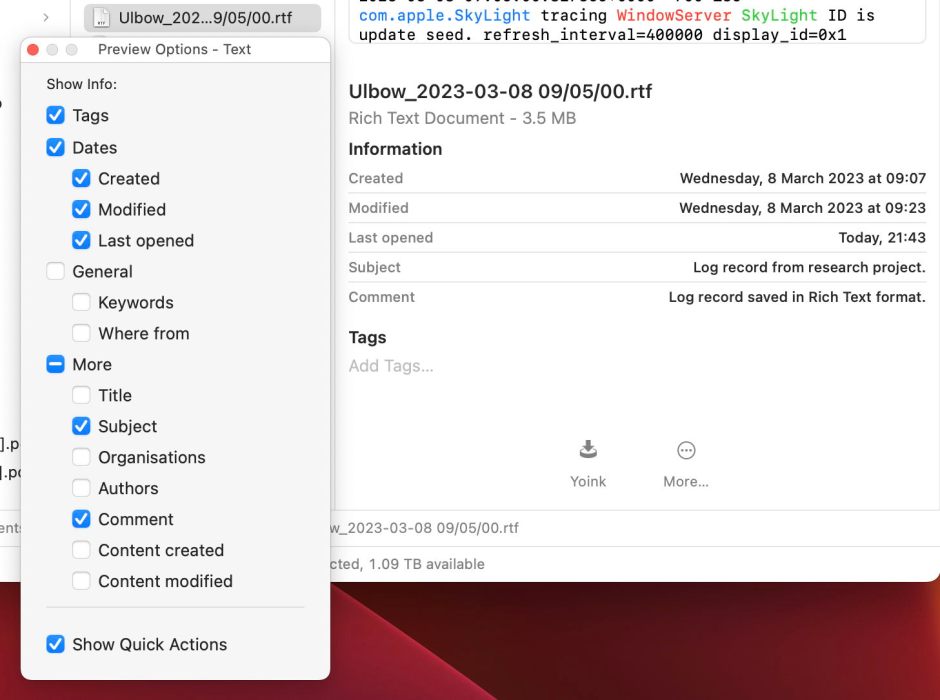
To see the metadata in a QuickLook Preview, select the file in Column View, and they’re listed in Information beneath its thumbnail. These are the most customisable: to see the list of fields available, use the View / Show Preview Options menu command, or the same command in the contextual menu.
findermeta3

Common to all file types are the Tags and Dates sections, and a More section is also usually available. Beyond those, metadata available varies greatly according to the type of file, and includes those metadata embedded in the file data as well as those saved in extended attributes. For still images and movies, the lists are long, and include a selection of standard fields taken from Exif and others.

Currently, in Ventura 13.4, Preview Options doesn’t always work quite right, and adds to the confusion.

findermeta4

In this case, although Subject is clearly unticked in Preview Options at the left, the Preview shown includes the Subject regardless.

Text files

Perhaps the easiest way to visualise what can be shown by way of metadata is to list the scope available for each of the three Finder interfaces for text files:

  • Get Info: Title, Subject, Authors, Comment, Finder/Spotlight Comments;
  • List View: Finder/Spotlight Comments only;
  • QuickLook Preview: Keywords, Title, Subject, Organisations, Authors, Editors, Comment, but not Finder/Spotlight Comments.

Storage

The Finder might seem to treat this metadata as a second-class citizen, but it’s certainly not as far as safe-keeping is concerned. Unlike file data, which doesn’t have the protection of checksums for integrity, extended attributes are stored in HFS+ and APFS file system objects, and are verified by Fletcher 64 checksums in APFS.

fileobjects

Although APFS doesn’t separate file system data from the extents used to store file data, HFS+ normally keeps extended attributes in its Attributes file.

This contrasts with Finder/Spotlight Comments, stored in .DS_Store files, and metadata that are stored within file data itself, such as Exif.

Conclusions

  • Extensive metadata is shown in the Finder, although the user is given only limited control over what is displayed where.
  • There are many anomalies in the metadata that become apparent. For example, much of the Exif data is accessible for images, but none of the more popular extended attributes, such as Copyright.
  • Better design could give the user greater flexibility, and enable better use of metadata.
  • Preview Options is currently buggy.

Share this:

  • Click to share on X (Opens in new window) X
  • Click to share on Facebook (Opens in new window) Facebook
  • Click to share on Reddit (Opens in new window) Reddit
  • Click to share on Pinterest (Opens in new window) Pinterest
  • Click to share on Threads (Opens in new window) Threads
  • Click to share on Mastodon (Opens in new window) Mastodon
  • Click to share on Bluesky (Opens in new window) Bluesky
  • Click to email a link to a friend (Opens in new window) Email
  • Click to print (Opens in new window) Print
Like Loading...

Related

Posted in Macs, Technology and tagged APFS, EXIF, extended attributes, Finder, HFS+, metadata, QuickLook, xattr. Bookmark the permalink.

15Comments

Add yours
  1. 1
    Tristan Hübsch's avatar
    Tristan Hübsch on June 2, 2023 at 1:05 pm

    Why do these articles feel like the “Missing Manual (with Annotations)”?
    (rhetorical question; no need to answer)

    LikeLiked by 1 person

  2. 2
    John Gilbert's avatar
    John Gilbert on June 3, 2023 at 11:51 pm

    Another way of looking at metadata. I make a lot of use of a simple Automator Quick Action to display metadata as indexed for Spotlight. The Quick Action contains a one line script: mdls “$1” | open -f

    Whilst this Quick Action is using a different source of metadata it is arguably the more useful as it shows all the metadata which could be used in a search. I don’t need to worry about where the metadata is sourced (xattr, .DS_Store, exif, etc.).

    LikeLiked by 1 person

    • 3
      hoakley's avatar
      hoakley on June 4, 2023 at 6:07 am

      Thank you. That works fine, of course, for search. However, should you want to edit the metadata you then need to know how to do that.
      Howard.

      LikeLike

      • 4
        John Gilbert's avatar
        John Gilbert on June 4, 2023 at 10:07 am

        In macOS, I see the Spotlight index as the nexus between disparate sources of metadata and being able to make of use of the metadata in a coherent way. And, yes, we need to know how to create and modify that metadata – some of that is in tools (like yours) addressing xattr as source of file system metadata, but also in photo and document processing apps which create metadata within their own file formats. There can be no single source of metadata, but I wish for a single repository for using that metadata.

        The sad thing is that Apple has chosen to keep both metadata and content from its own apps (particularly Notes, Mail and Photos) walled off from a central repository like the main Spotlight index. This is part of the tension between application and document centric paradigms which is a major way that “iOSification” is detroying much of what is/was valuable in OS X. (rant)

        LikeLiked by 1 person

        • 5
          hoakley's avatar
          hoakley on June 4, 2023 at 11:13 am

          Thank you.
          The problem with that second category is that there are two distinct issues: some apps like Notes use databases rather than documents, for which their metadata is necessarily internal. You can work around that by using a different app, of course.
          Then there are apps like Mail that do use Spotlight, but in app-specific form, so that their metadata is only accessible within that app. Apple does that largely for privacy reasons, and in the case of Mail it can be worked around using HoudahSpot, for instance.
          So the first sub-category doesn’t have any metadata indexed in Spotlight’s indexes; the second does, but it’s partitioned off to prevent access outside the app.
          Howard.

          LikeLike

  3. 6
    jimthing's avatar
    jimthing on June 4, 2023 at 7:46 am

    Are there any apps that can show full/better metadata, and even edit it?
    I’ve always thought the macOS options as extremely lacking.

    LikeLiked by 1 person

    • 7
      hoakley's avatar
      hoakley on June 4, 2023 at 11:05 am

      The problem here is that metadata have several sources.
      Much is embedded in the file data itself – that’s true for images, video, audio, PDFs, MS Office documents, and many more. In general that’s not good, as it requires a specialist editor capable working with that file format.
      Macs, but few other systems, also use extended attributes attached to the file, for which xattred is the most complete viewer/editor I know.
      Then there are some oddities like Finder Comments stored in files like .DS_Store, that can only be viewed and editing in the Finder.
      As John has pointed out, Spotlight is a focal point for viewing much of this metadata, but even that can’t openly access some in-app metadata, such as that in Apple’s Mail app, or in apps that aren’t document-based like Notes.
      Howard.

      LikeLike

  4. 8
    Michele's avatar
    Michele on August 18, 2023 at 9:41 pm

    How does one edit metadata? Beyond Finder > Get info > comments, what is there native to macOS? What other third party? Thanks!

    LikeLiked by 1 person

    • 9
      hoakley's avatar
      hoakley on August 18, 2023 at 9:53 pm

      Metadata are stored in two different places: much is stored in the document data, such as EXIF for images. You can edit those using better image editors, etc. The other main location is in extended attributes, although few tools provide easy access to the most suitable xattrs forTitle, Authors, copyright, etc.
      Howard.

      LikeLike

      • 10
        Michele's avatar
        Michele on August 19, 2023 at 5:12 am

        Ah, yes, for pictures I use Adobe bridge. Possibly your xattred can do something about them, I recall?

        LikeLiked by 1 person

        • 11
          hoakley's avatar
          hoakley on August 19, 2023 at 6:16 am

          No. EXIF and a lot of other metadata are actually written and stored in the main data of files. Many formats do that: PDFs, MS Office documents, and so on. While there are some apps that specialise in editing those metadata, in general it’s better to use the document editor to do so.
          You can always attach xattrs to files, and they can contain additional metadata accessible in Spotlight search, for example. While you can edit those using xattred, that’s a general purpose xattr editor. For working with only xattr metadata, you should find Metamer, SearchKey and SearchKeyLite better.
          Howard.

          LikeLike

    • 12
      John Gilbert's avatar
      John Gilbert on August 20, 2023 at 12:15 am

      Howard has already dealt with metadata stored inside a document/photo – use the tools which create or modify the document/photo. For example, MS Word, PDF creation apps, photo editors, or specialised exif editors.

      For file system metadata, ask why you need it. I suggest the reasons are just for more advanced searching. In practice, Finder Comments and Tags are about it. Both can be added and changed using Finder’s Get Info. This is probably sufficient for single files.

      When I need to deal with many files I automate this. Two ways I use:
      1) Applescript can manipulate comments and so can be used by itself or embedded in other automation tools (Automator or third party like Keyboard Maestro).
      2) Tag which is a command line app (https://github.com/jdberry/tag/ or installed via homebrew). I use that within with shell scripts or any of the many automation tools which can use shell scripts.

      There is also Leap https://ironicsoftware.com/leap/ which predates Apple adding tags to macOS. It is not free, but is a great tool for those that make extensive use of file tags for file management.

      In my experience you don’t need a general purpose xattr editor for file system metadata unless you want to add your own metadata. But that moves you outside the scope of using metadata with Finder.

      LikeLiked by 1 person

      • 13
        hoakley's avatar
        hoakley on August 20, 2023 at 1:13 pm

        Finder Comments are, as I have shown on several occasions, highly unreliable because they’re not actually stored in the file at all, but in the hidden .DS_Store file in the folder. I strongly discourage users from wasting their time putting anything in the Finder Comments, as sooner or later it will be lost. xattrs are actually considerably more sticky and robust now, and with careful choice survive iCloud Drive as well as copying between volumes.
        Tags are of extremely limited use, as in practice they can only assign an item to one of a small number of categories.
        Howard.

        LikeLike

        • 14
          John Gilbert's avatar
          John Gilbert on August 20, 2023 at 11:57 pm

          I think you have missed the value and flexibility of tags. There is no limit to the range of tags and their use in Finder/Spotlight/HS searches. I have learnt that it is important to keep to a dictionary and structure – mentally even if not documented. Tags are robust (stored as xattrs), but are easily set/changed in Finder or the command line without the need for general purpose xattr tools.

          LikeLiked by 1 person

        • 15
          hoakley's avatar
          hoakley on August 21, 2023 at 10:52 am

          Maybe.
          My free app gives you easy GUI access to no less than 16 different xattrs that are far more flexible, survive iCloud Drive and transfer to other volumes and Macs, and have their own Spotlight search categories. Some are also shown in Finder’s Get Info dialog. Why bother contriving a system build around tags?
          Howard.

          LikeLike

·Comments are closed.

Quick Links

  • Free Software Menu
  • System Updates
  • M-series Macs
  • Mac Troubleshooting Summary
  • Mac problem-solving
  • Painting topics
  • Painting
  • Long Reads

Search

Monthly archives

  • January 2026 (2)
  • December 2025 (75)
  • November 2025 (74)
  • October 2025 (75)
  • September 2025 (78)
  • August 2025 (76)
  • July 2025 (77)
  • June 2025 (74)
  • May 2025 (76)
  • April 2025 (73)
  • March 2025 (78)
  • February 2025 (67)
  • January 2025 (75)
  • December 2024 (74)
  • November 2024 (73)
  • October 2024 (78)
  • September 2024 (77)
  • August 2024 (75)
  • July 2024 (77)
  • June 2024 (71)
  • May 2024 (79)
  • April 2024 (75)
  • March 2024 (81)
  • February 2024 (72)
  • January 2024 (78)
  • December 2023 (79)
  • November 2023 (74)
  • October 2023 (77)
  • September 2023 (77)
  • August 2023 (72)
  • July 2023 (79)
  • June 2023 (73)
  • May 2023 (79)
  • April 2023 (73)
  • March 2023 (76)
  • February 2023 (68)
  • January 2023 (74)
  • December 2022 (74)
  • November 2022 (72)
  • October 2022 (76)
  • September 2022 (72)
  • August 2022 (75)
  • July 2022 (76)
  • June 2022 (73)
  • May 2022 (76)
  • April 2022 (71)
  • March 2022 (77)
  • February 2022 (68)
  • January 2022 (77)
  • December 2021 (75)
  • November 2021 (72)
  • October 2021 (75)
  • September 2021 (76)
  • August 2021 (75)
  • July 2021 (75)
  • June 2021 (71)
  • May 2021 (80)
  • April 2021 (79)
  • March 2021 (77)
  • February 2021 (75)
  • January 2021 (75)
  • December 2020 (77)
  • November 2020 (84)
  • October 2020 (81)
  • September 2020 (79)
  • August 2020 (103)
  • July 2020 (81)
  • June 2020 (78)
  • May 2020 (78)
  • April 2020 (81)
  • March 2020 (86)
  • February 2020 (77)
  • January 2020 (86)
  • December 2019 (82)
  • November 2019 (74)
  • October 2019 (89)
  • September 2019 (80)
  • August 2019 (91)
  • July 2019 (95)
  • June 2019 (88)
  • May 2019 (91)
  • April 2019 (79)
  • March 2019 (78)
  • February 2019 (71)
  • January 2019 (69)
  • December 2018 (79)
  • November 2018 (71)
  • October 2018 (78)
  • September 2018 (76)
  • August 2018 (78)
  • July 2018 (76)
  • June 2018 (77)
  • May 2018 (71)
  • April 2018 (67)
  • March 2018 (73)
  • February 2018 (67)
  • January 2018 (83)
  • December 2017 (94)
  • November 2017 (73)
  • October 2017 (86)
  • September 2017 (92)
  • August 2017 (69)
  • July 2017 (81)
  • June 2017 (76)
  • May 2017 (90)
  • April 2017 (76)
  • March 2017 (79)
  • February 2017 (65)
  • January 2017 (76)
  • December 2016 (75)
  • November 2016 (68)
  • October 2016 (76)
  • September 2016 (78)
  • August 2016 (70)
  • July 2016 (74)
  • June 2016 (66)
  • May 2016 (71)
  • April 2016 (67)
  • March 2016 (71)
  • February 2016 (68)
  • January 2016 (90)
  • December 2015 (96)
  • November 2015 (103)
  • October 2015 (119)
  • September 2015 (115)
  • August 2015 (117)
  • July 2015 (117)
  • June 2015 (105)
  • May 2015 (111)
  • April 2015 (119)
  • March 2015 (69)
  • February 2015 (54)
  • January 2015 (39)

Tags

APFS Apple Apple silicon backup Big Sur Blake Bonnard bug Catalina Consolation Console Corinth Delacroix Disk Utility Doré El Capitan extended attributes Finder firmware Gatekeeper Gérôme High Sierra history of painting iCloud Impressionism landscape LockRattler log M1 Mac Mac history macOS macOS 10.12 macOS 10.13 macOS 10.14 macOS 10.15 macOS 11 macOS 12 macOS 13 macOS 14 macOS 15 malware Metamorphoses Mojave Monet Monterey Moreau myth narrative OS X Ovid painting performance Pissarro Poussin privacy Renoir riddle Rubens Sargent security Sierra SilentKnight Sonoma SSD Swift Time Machine Tintoretto Turner update upgrade Ventura xattr Xcode XProtect

Statistics

  • 21,105,137 hits
Blog at WordPress.com.
Footer navigation
  • Free Software Menu
  • About & Contact
  • Macs
  • Painting
  • Downloads
  • Mac problem-solving
  • Extended attributes (xattrs)
  • Painting topics
  • SilentKnight, Skint, SystHist, silnite, LockRattler & Scrub
  • DelightEd & Podofyllin
  • xattred, SpotTest, Spotcord, Metamer & xattr tools
  • 32-bitCheck & ArchiChect
  • XProCheck, T2M2, LogUI, Ulbow, blowhole and log utilities
  • Cirrus & Bailiff
  • Precize, Alifix, UTIutility, Sparsity, alisma, Taccy, Signet
  • Versatility & Revisionist
  • Text Utilities: Textovert, Nalaprop, Dystextia and others
  • PDF
  • Keychains & Permissions
  • Updates
  • Spundle, Cormorant, Stibium, DropSum, Dintch, Fintch and cintch
  • Long Reads
  • Mac Troubleshooting Summary
  • M-series Macs
  • Mints: a multifunction utility
  • VisualLookUpTest
  • Virtualisation on Apple silicon
  • System Updates
  • Saturday Mac Riddles
  • Last Week on My Mac
  • sysctl information
Secondary navigation
  • Search

Post navigation

Hard reality: 7 Strange landscapes
Paintings of Eugène Delacroix: 3 Massacre at Chios

Begin typing your search above and press return to search. Press Esc to cancel.

  • Reblog
  • Subscribe Subscribed
    • The Eclectic Light Company
    • Join 8,894 other subscribers
    • Already have a WordPress.com account? Log in now.
    • The Eclectic Light Company
    • Subscribe Subscribed
    • Sign up
    • Log in
    • Copy shortlink
    • Report this content
    • View post in Reader
    • Manage subscriptions
    • Collapse this bar
 

Loading Comments...
 

    %d