
Skip to content

The Eclectic Light Company

Macs & painting – 🦉 No AI content
Main navigation
  • Downloads
  • Freeware
  • M-series Macs
  • Mac Problems
  • Mac articles
  • Macs
  • Art
hoakley October 1, 2019 Macs, Technology

How to preserve metadata stored in a custom extended attribute

Metadata are often as important as the data they relate to, and may be as difficult to recreate. You might recognise everyone in that photo shortly after you’ve taken it. In ten years time, though, identifying the faces might be well nigh impossible. Anything which fails to preserve the metadata you attach to that image is seriously bad news.

Most image formats allow the embedding of a lot of structured metadata in the image file itself. That isn’t true, though, of many other file formats, particularly if they’re less widely used, or even app specific. My example here comes from a popular format used for ‘comic’ books, Comic Book Archive, which has been used by the popular macOS app ComicBookLover. It comes in two main variants, CBZ and CBR. Both consist of compressed folders containing page images: the CBZ version is compressed using Zip, and CBR using RAR. Other less common variants use different compression formats such as 7z.

These often include extensive metadata about the image archive, which can be stored as a comment to the Zip archive, in an XML file included in the folder of sequential images or, on Macs at least, as an extended attribute (xattr) attached to the CBZ file itself – and that’s how ComicBookLover likes to store them.

These metadata are stored in JSON format, and when in a xattr it is a custom type named com.bitcartel.comicbooklover.xattr.metadata. ComicBookLover makes more extensive use of xattrs too, adding a thumbnail preview in com.apple.ResourceFork, a star rating in com.apple.metadata:kMDItemStarRating (intended for use by Apple apps), another in org.openmetadata.time:kMDItemStarRating, and a third in org.openmetadata:kMDItemStarRating.
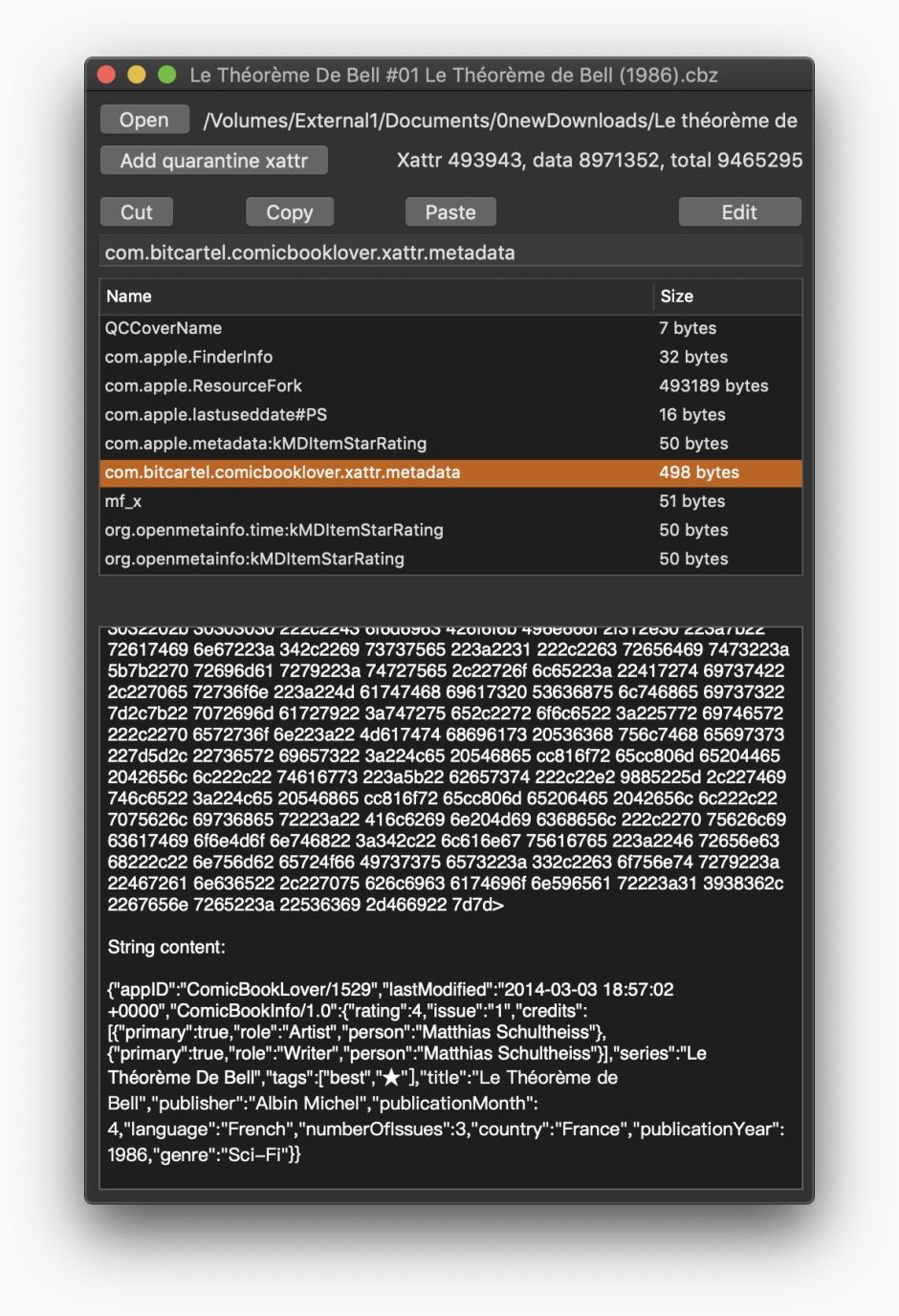
xattred01

Unfortunately, most if not all of those xattrs will be stripped when the CBZ file is moved, for example to iCloud Drive or DropBox. This is a common problem with apps which use xattrs to store metadata, and results from incomplete understanding of how xattrs are handled, which in turn reflects Apple’s failure to document them fully for developers. The same issue also severely limits the usability of other apps like Skim, which uses xattrs to store PDF annotations.

Xattrs – extended attributes – are parcels of data which are attached to a specific file or folder. They’re not stored with the rest of the file’s data, but in the file system metadata. They’re used for a wide range of purposes: some are clearly ephemeral and shouldn’t be preserved when making a copy of that file, whilst others are more permanent. macOS has a complex system for determining which xattrs are preserved and which are lost in various situations, but that is known to very few developers or users.

As far as custom xattrs like com.bitcartel.comicbooklover.xattr.metadata are concerned, they will be treated by macOS as being ephemeral unless a handling flag such as #S is added to their name, as in com.bitcartel.comicbooklover.xattr.metadata#S. As that isn’t done by ComicBookLover, its precious metadata stored in that xattr will be all too easily lost. And that is generally the case for all custom xattrs used by third party apps to store such metadata.

Salvage

The immediate task for anyone using metadata in custom xattrs is to salvage their contents before those xattrs become stripped. If you don’t do that, just passing the file through iCloud Drive or copying it off your Mac could lose those metadata.

One simple way to salvage what you have is to open each item bearing metadata in xattrs using my free xattred, select the xattr concerned in the upper list, then select all its contents in the view below, copy and paste that into a text document. In this case, com.bitcartel.comicbooklover.xattr.metadata content in JSON format will be preserved for the future.

Protection

Once you have salvaged and preserved the existing metadata, you should consider how best to protect it from removal.

The only way that I know of to accomplish this is to use the existing feature of macOS, and add a handling flag of #S to the name of the xattr. Although you can do this in xattred, it’s a little messy, as there’s no simple call to change the name of a xattr. Instead you select the xattr you wish to preserve, click on the Edit button, and in the xattr’s name field at the top append #S. When you then click on Save, you’ll have a new xattr with the new name, and the old one without the #S. Select the old xattr with its original name and click the Cut button to remove it.
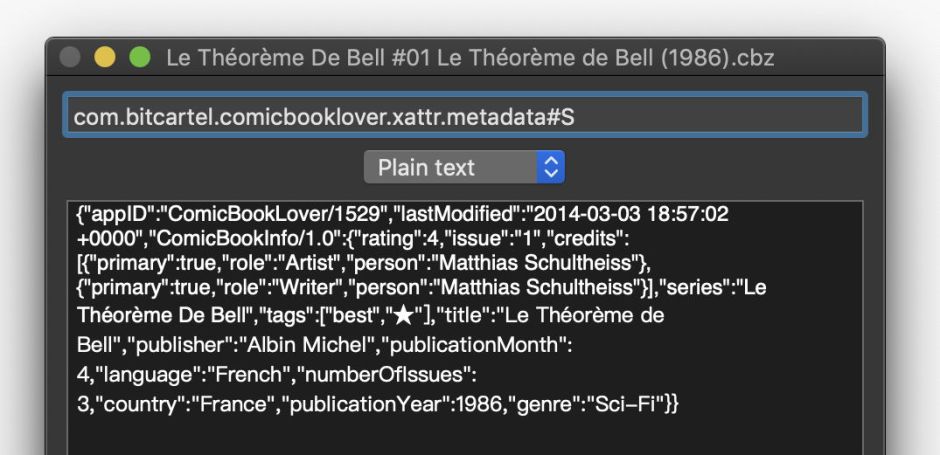
xattred02

The problem with doing this is that accessing xattrs with such handling flags isn’t transparent to apps: this even catches the Finder out, which fails to recognise the few xattrs which it would normally display in its Get Info dialog. So the chances are the app which uses that xattr now won’t be able to locate it.

I also have a test app, SaveTheMetadata, which appends #S handling flags to most xattrs. This is still in development, and shouldn’t be used on original files, but is available from here: STM10b2

Conversion

The only permanent solution is to discover a file format which doesn’t rely on storing metadata in xattrs. In the case of CBZ files, this should be possible by writing the metadata from the com.bitcartel.comicbooklover.xattr.metadata xattr to the Zip file comment, or to an XML file stored within the CBZ itself.

Although it may be possible to perform this using AppleScript, or even a shell script, in general working with xattrs requires access fairly deep into macOS, and is best performed using a compiled language such as Swift or Objective-C. I’m currently looking at the best solution for CBZ files, and welcome your comments.

Lesson

As a friend used to say, there ain’t no such thing as a free lunch. Xattrs are marvellous features of macOS, but unless a developer is aware of their lability and how to preserve them, they aren’t good places to store metadata of any importance.

Thanks to Clément, who raised this issue with CBZ files, and had already solved quite a lot of it before coming to me.

Share this:

  • Click to share on X (Opens in new window) X
  • Click to share on Facebook (Opens in new window) Facebook
  • Click to share on Reddit (Opens in new window) Reddit
  • Click to share on Pinterest (Opens in new window) Pinterest
  • Click to share on Threads (Opens in new window) Threads
  • Click to share on Mastodon (Opens in new window) Mastodon
  • Click to share on Bluesky (Opens in new window) Bluesky
  • Click to email a link to a friend (Opens in new window) Email
  • Click to print (Opens in new window) Print
Like Loading...

Related

Posted in Macs, Technology and tagged BD, ComicBookLover, comics, extended attributes, metadata, Skim, xattr, xattred. Bookmark the permalink.

2Comments

Add yours
  1. 1
    Joss's avatar
    Joss on October 10, 2019 at 11:23 am

    Skim can now create syncable XAs using the #S suffix: … but not by default, so as not to break notes compatibility with older Skim versions. But it’s a hidden preference you can add to the net.sourceforge.skim-app.skim domain: https://sourceforge.net/p/skim-app/wiki/Hidden_Preferences/#write-syncable-notes

    LikeLiked by 1 person

    • 2
      hoakley's avatar
      hoakley on October 10, 2019 at 11:55 am

      Thank you for letting me know – that is wonderful! I’ve always liked Skim, as I think it handles annotations correctly, without disturbing the original PDF document, but this was a serious problem.
      Howard.

      LikeLike

·Comments are closed.

Quick Links

  • Free Software Menu
  • System Updates
  • M-series Macs
  • Mac Troubleshooting Summary
  • Mac problem-solving
  • Painting topics
  • Painting
  • Long Reads

Search

Monthly archives

  • December 2025 (38)
  • November 2025 (74)
  • October 2025 (75)
  • September 2025 (78)
  • August 2025 (76)
  • July 2025 (77)
  • June 2025 (74)
  • May 2025 (76)
  • April 2025 (73)
  • March 2025 (78)
  • February 2025 (67)
  • January 2025 (75)
  • December 2024 (74)
  • November 2024 (73)
  • October 2024 (78)
  • September 2024 (77)
  • August 2024 (75)
  • July 2024 (77)
  • June 2024 (71)
  • May 2024 (79)
  • April 2024 (75)
  • March 2024 (81)
  • February 2024 (72)
  • January 2024 (78)
  • December 2023 (79)
  • November 2023 (74)
  • October 2023 (77)
  • September 2023 (77)
  • August 2023 (72)
  • July 2023 (79)
  • June 2023 (73)
  • May 2023 (79)
  • April 2023 (73)
  • March 2023 (76)
  • February 2023 (68)
  • January 2023 (74)
  • December 2022 (74)
  • November 2022 (72)
  • October 2022 (76)
  • September 2022 (72)
  • August 2022 (75)
  • July 2022 (76)
  • June 2022 (73)
  • May 2022 (76)
  • April 2022 (71)
  • March 2022 (77)
  • February 2022 (68)
  • January 2022 (77)
  • December 2021 (75)
  • November 2021 (72)
  • October 2021 (75)
  • September 2021 (76)
  • August 2021 (75)
  • July 2021 (75)
  • June 2021 (71)
  • May 2021 (80)
  • April 2021 (79)
  • March 2021 (77)
  • February 2021 (75)
  • January 2021 (75)
  • December 2020 (77)
  • November 2020 (84)
  • October 2020 (81)
  • September 2020 (79)
  • August 2020 (103)
  • July 2020 (81)
  • June 2020 (78)
  • May 2020 (78)
  • April 2020 (81)
  • March 2020 (86)
  • February 2020 (77)
  • January 2020 (86)
  • December 2019 (82)
  • November 2019 (74)
  • October 2019 (89)
  • September 2019 (80)
  • August 2019 (91)
  • July 2019 (95)
  • June 2019 (88)
  • May 2019 (91)
  • April 2019 (79)
  • March 2019 (78)
  • February 2019 (71)
  • January 2019 (69)
  • December 2018 (79)
  • November 2018 (71)
  • October 2018 (78)
  • September 2018 (76)
  • August 2018 (78)
  • July 2018 (76)
  • June 2018 (77)
  • May 2018 (71)
  • April 2018 (67)
  • March 2018 (73)
  • February 2018 (67)
  • January 2018 (83)
  • December 2017 (94)
  • November 2017 (73)
  • October 2017 (86)
  • September 2017 (92)
  • August 2017 (69)
  • July 2017 (81)
  • June 2017 (76)
  • May 2017 (90)
  • April 2017 (76)
  • March 2017 (79)
  • February 2017 (65)
  • January 2017 (76)
  • December 2016 (75)
  • November 2016 (68)
  • October 2016 (76)
  • September 2016 (78)
  • August 2016 (70)
  • July 2016 (74)
  • June 2016 (66)
  • May 2016 (71)
  • April 2016 (67)
  • March 2016 (71)
  • February 2016 (68)
  • January 2016 (90)
  • December 2015 (96)
  • November 2015 (103)
  • October 2015 (119)
  • September 2015 (115)
  • August 2015 (117)
  • July 2015 (117)
  • June 2015 (105)
  • May 2015 (111)
  • April 2015 (119)
  • March 2015 (69)
  • February 2015 (54)
  • January 2015 (39)

Tags

APFS Apple Apple silicon backup Big Sur Blake Bonnard bug Catalina Consolation Console Corinth Delacroix Disk Utility Doré El Capitan extended attributes Finder firmware Gatekeeper Gérôme High Sierra history of painting iCloud Impressionism landscape LockRattler log M1 Mac Mac history macOS macOS 10.12 macOS 10.13 macOS 10.14 macOS 10.15 macOS 11 macOS 12 macOS 13 macOS 14 macOS 15 malware Metamorphoses Mojave Monet Monterey Moreau myth narrative OS X Ovid painting performance Pissarro Poussin privacy Renoir riddle Rubens Sargent security Sierra SilentKnight Sonoma SSD Swift Time Machine Tintoretto Turner update upgrade Ventura xattr Xcode XProtect

Statistics

  • 20,812,888 hits
Blog at WordPress.com.
Footer navigation
  • Free Software Menu
  • About & Contact
  • Macs
  • Painting
  • Downloads
  • Mac problem-solving
  • Extended attributes (xattrs)
  • Painting topics
  • SilentKnight, Skint, SystHist, silnite, LockRattler & Scrub
  • DelightEd & Podofyllin
  • xattred, SpotTest, Spotcord, Metamer & xattr tools
  • 32-bitCheck & ArchiChect
  • XProCheck, T2M2, LogUI, Ulbow, blowhole and log utilities
  • Cirrus & Bailiff
  • Precize, Alifix, UTIutility, Sparsity, alisma, Taccy, Signet
  • Versatility & Revisionist
  • Text Utilities: Textovert, Nalaprop, Dystextia and others
  • PDF
  • Keychains & Permissions
  • Updates
  • Spundle, Cormorant, Stibium, DropSum, Dintch, Fintch and cintch
  • Long Reads
  • Mac Troubleshooting Summary
  • M-series Macs
  • Mints: a multifunction utility
  • VisualLookUpTest
  • Virtualisation on Apple silicon
  • System Updates
  • Saturday Mac Riddles
  • Last Week on My Mac
  • sysctl information
Secondary navigation
  • Search

Post navigation

Visual Riddles: Summary and contents
Orlando Furioso: Introduction

Begin typing your search above and press return to search. Press Esc to cancel.

  • Reblog
  • Subscribe Subscribed
    • The Eclectic Light Company
    • Join 8,862 other subscribers
    • Already have a WordPress.com account? Log in now.
    • The Eclectic Light Company
    • Subscribe Subscribed
    • Sign up
    • Log in
    • Copy shortlink
    • Report this content
    • View post in Reader
    • Manage subscriptions
    • Collapse this bar
 

Loading Comments...
 

    %d