
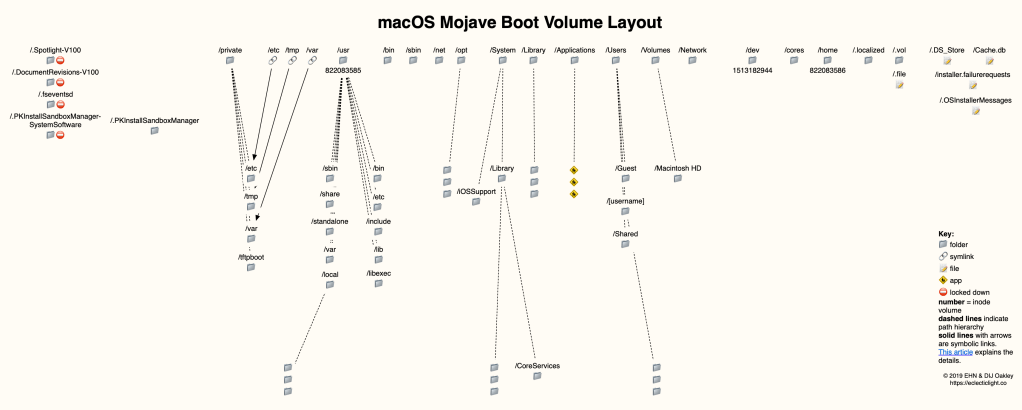
In a few weeks time, when Catalina is being installed on millions of Macs, the structure of their boot disks will change greatly. Catalina introduces a read-only system volume which increases the number of volumes in the APFS container/partition on the boot disk, and changes many paths within it. Here’s a breakdown and roadmap to what we currently have in Mojave, for comparison with the roadmap I’ll publish soon after the release of macOS 10.15.
Each disk contains at least two partitions:
- EFI, of 200-300 MB,
- the APFS Container(s).
HFS+ disks have at least one HFS+ volume instead of the APFS container, and you can also mix and match APFS containers and HFS+ volumes on the same disk.
A bootable APFS container normally contains at least four APFS volumes:
- the user volume, by default on the internal disk named Macintosh HD, although naming a volume on an SSD as a Hard Disk seems faintly ludicrous now,
- Preboot, a small volume of around 40-50 MB,
- Recovery, the Recovery Volume, of around 500 MB,
- VM, containing virtual memory caches, which is upwards of 20 KB depending on use.
Even non-bootable APFS disks can contain the same volumes, although the contents of the last three are then normally tiny.
Layout of standard folders and files is shown in this roadmap:
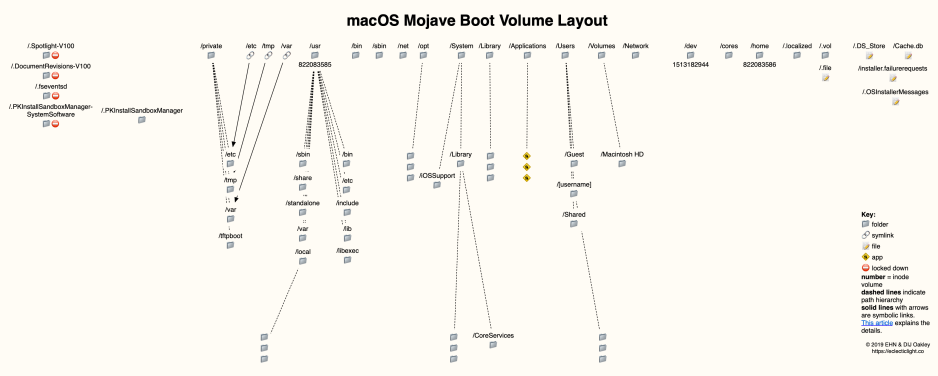
available here as a PDF: Mojave2
Folders normally found at the root level of a bootable volume include:
- .DocumentRevisions-V100/ ⛔️ – the macOS versioning database, detailed here. Stored on each mounted volume containing documents with versions.
- .fseventsd/ ⛔️ – macOS FSEvents records, which record changes to the file system. Stored individually on each mounted volume.
- .PKInstallSandboxManager/ – used for software updates and the Sandbox
- .PKInstallSandboxManager-SystemSoftware/ ⛔️ – used for system software updates
- .Spotlight-V100/ ⛔️ – Spotlight metadata, stored individually on each mounted volume. These are compiled by
mdworkerprocesses, and are used by Spotlight search, other macOS-based search features, and Time Machine. - .vol/ – a pseudo-directory used to access files by their ID or inode number.
- .localized/ – listings of localized versions of item names
- bin/ 🔑 – core command tools
- cores/ – core files
- dev/ – Unix-style devices
- etc/ 🔑 ➡️ – configuration files and settings
- home/
- net/
- opt/ – optional installations such as X11
- private/ – where /etc, /tftpboot, /tmp and /var actually are
- sbin/ 🔑 – system command tools
- tmp/ 🔑 ➡️ – temporary files and caches, which can be written by any user
- usr/ 🔑 – user command tools and a lot more too; /usr/local/bin and other directories are commonly used to install 3rd party tools as they’re not included in SIP.
- var/ 🔑 ➡️ – miscellaneous data and configuration files
- System/ 🔑 – contains two main folders, Library/ with the main system files, and iOSSupport/ which supports cross-platform software
- Library/
- Applications/
- Users/ – contains Guest/, Shared/, and user Home folders
- Volumes/ – all mounted volumes, including the boot volume
- Network/
- AppleInternal/ – used only in Apple’s in-house builds, which you should never see.
Other folders you may see on non-bootable volumes include:
- .TemporaryItems/ ➡️
- .Trashes/ ➡️
in addition to .DocumentRevisions-V100/, .fseventsd/, and .Spotlight-V100/.
Files normally found at the root level of a bootable volume include:
- .DS_Store – custom attributes of the containing folder, such as icon positions, and can be found in any folder
- .file – facilitates access to files by their ID or inode number.
- .OSInstallerMessages – messages written by macOS installers.
- Cache.db
- installer.failurerequests – written by macOS installers, even after a successful installation.
The top level of your Home folder (~/) normally includes, among many other files and folders:
- .bash_history – command history of the bash shell in Terminal.
- .bash_profile – profile settings of the bash shell in Terminal.
- .bash_sessions/ – folder containing individual bash shell sessions.
- .cups/ – CUPS printing files
- .ssh/ – contains known_hosts, listing known SSH hosts.
- Library/ – the Home folder library, ~/Library, containing settings, etc.
- Trash/ – per-user Trash folder
Symbols used:
🔑 = protected by SIP
⛔️ = permissions locked down, root access only
➡️ = symbolic link to folder in /private.
6 October 2019: This article has now been updated with improved charts.
 The Eclectic Light Company