
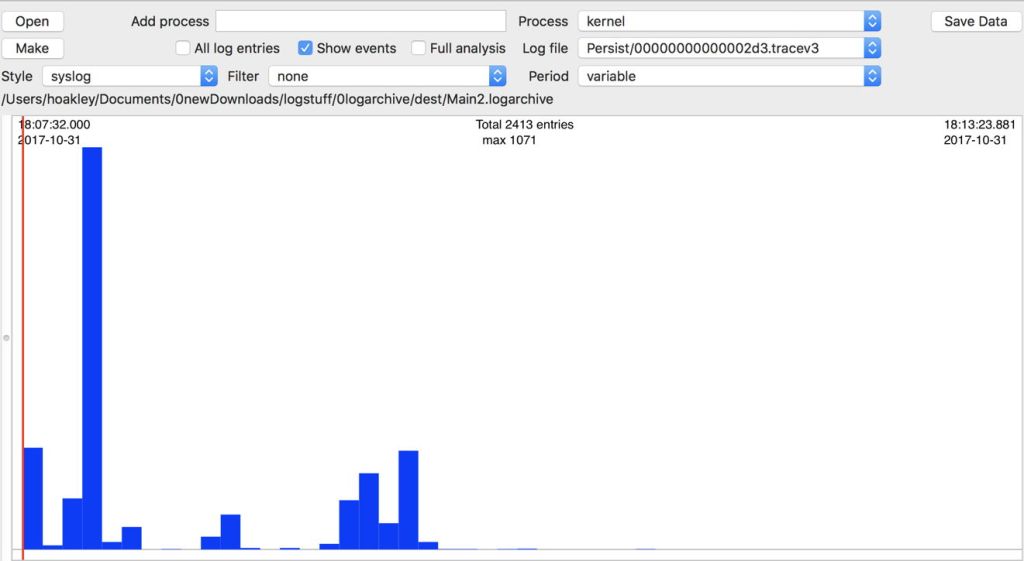
Starting your Mac up is an exciting time, when a great deal happens in a short period. It’s a time when a lot of things can go wrong: incompatible kernel extensions can cause panics and infinitely looping reboots, your keychain can go missing and force you to keep entering your password, and malware can set up residence to cause you more grief.
It is also a phase in which you are given few clues which might solve a problem, except those in the log, and one for which Apple’s bundled Console log browser is next to useless.
I have previously written a detailed account of what happens during startup in Sierra, when browsed through Consolation. Since then, Sierra has been updated to 10.12.6, and I have produced a new log browser, Woodpile, which provides a completely different approach. This updated account contains useful information which was not previously apparent.
The startup I show here was the result of a routine restart (to restore normal Time Machine backup function). The unified log writes the last entries from the moments prior to shutdown to the current log file, closes that, and opens a new log file at the next startup.
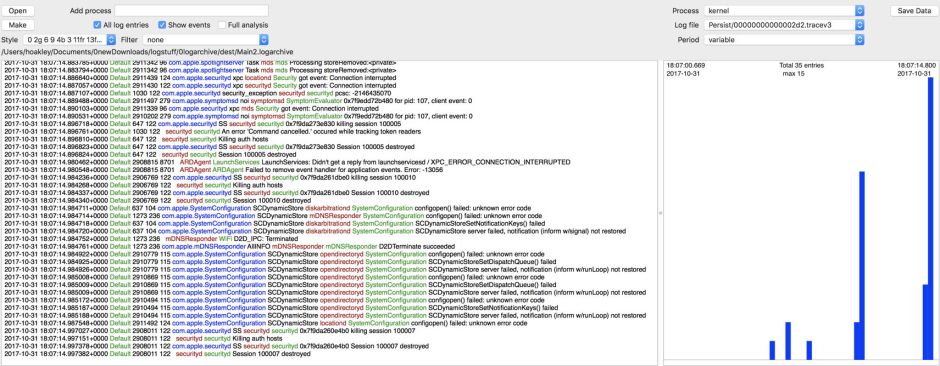
In this case, shutdown happened at almost exactly 18:07:15, with the last securityd session being destroyed.
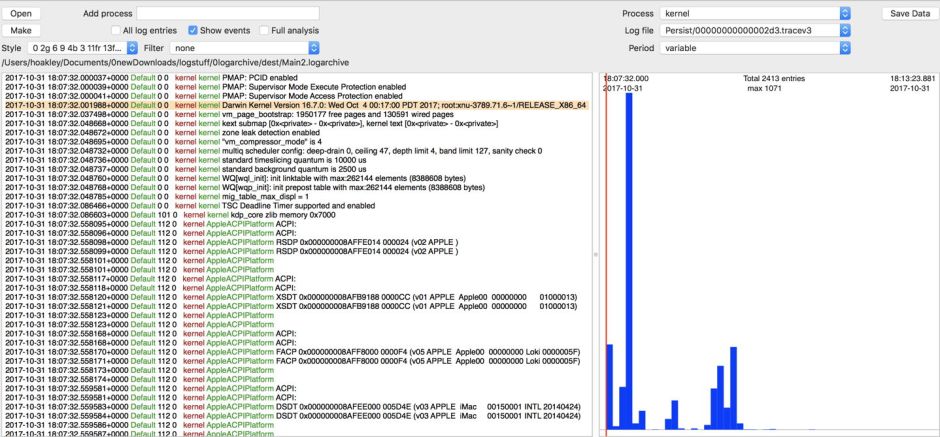
This iMac17,1 (booting from an internal Fusion Drive) then started up again at almost exactly 18:07:32, a silent period of 7 seconds.
In Woodpile, the initial boot message is usually omitted from the log displayed, as it isn’t marked as a kernel message, but is the basis for the red event line in the chart view here. Just a few entries into the log and the kernel version is displayed (highlighted here), and the kernel gets on with preparing hardware for use. From here on, I will use elapsed times in minutes and seconds since startup, rather than raw clock time.
Two important waypoints which you should look for in the kernel’s log entries during this early phase are:
At an elapsed time after startup of just over 22 seconds, the shutdown cause code should be given. These are detailed here.
00:20.147879 Previous shutdown cause: 5
A wired Ethernet connection should be brought up fully rather later, here after an elapsed time of just over 25 seconds:
00:25.116110 Ethernet [AppleBCM5701Ethernet]: Link up on en0, 100-Megabit, Full-duplex, Symmetric flow-control, Debug [796d,0301,0de1,0300,45e1,0000]

This hardware and driver phase usually completes by around 21 seconds after starting up, and the kernel then becomes heavily occupied in setting up IOAudioFamily (audio input and output support) until just over 34 seconds after startup. It then concerns itself with Bluetooth and other drivers for the next couple of seconds, after which it becomes relatively quiet in the log again.
powerd, an undocumented daemon apparently concerned with power management, registers any UPS devices at around 19.7 seconds after startup:
00:19.739819 localhost powerd[86]: Registering for UPS devices
amfid, the daemon responsible for the Apple Mobile File Integrity service, which enforces sandboxing among other things, is another early riser. It opens the metadata server’s databases at about 20 seconds after startup:
00:20.035814  localhost amfid[149]: (Security) [com.apple.securityd.atomicfile] 0x7faaca506630 opened /private/var/db/mds/system/mdsObject.db: 4636 bytes

00:20.036094  localhost amfid[149]: (Security) [com.apple.securityd.atomicfile] 0x7faaca50b1d0 opened /private/var/db/mds/system/mdsDirectory.db: 50744 bytes
Many other services which use these databases open them up in the following seconds, including apsd, the Apple Push Service daemon, which I will mention again below in respect of keychains.
Login
The next major event which you are likely to recognise is the login window. This first appears quite early, just over 20 seconds after startup, with loginwindow posting the message
00:20.244142 localhost loginwindow[142]: Login Window Application Started
However, the mechanism follows rather later, and is the responsibility of SecurityAgent, which reports:
01:07.055396  localhost SecurityAgent[349]: {main} uid 92/92   service com.apple.security.agent.login

01:07.109040  localhost SecurityAgent[349]: (loginsupport) This is the first run

01:07.109103  localhost SecurityAgent[349]: (loginsupport) MacBuddy was run = 0

01:07.267178  localhost SecurityAgent[349]: AgentMechanism [mechanism(loginwindow:login)] setResult called: 0

01:07.267379  localhost SecurityAgent[349]: (loginsupport) User info context values set for hoakley

01:07.268413  localhost SecurityAgent[349]: AgentMechanism invoked [mechanism(builtin:login-begin)]

01:07.268553  localhost SecurityAgent[349]: AgentMechanism [mechanism(builtin:login-begin)] setResult called: 0

01:07.291564  localhost SecurityAgent[349]: AgentMechanism invoked [mechanism(builtin:login-success)]

01:07.415962  localhost SecurityAgent[349]: (loginsupport) Login Window login proceeding
(some of those messages are repeated – that is a short summary.)
Keychains
Once login is successful, keychains are unlocked. These are best followed in accountsd‘s messages, which run something like:
01:12.887260  localhost accountsd[390]: (Security) [com.apple.securityd.atomicfile] 0x7fc6c9736d10 opened /Users/hoakley/Library/Keychains/login.keychain-db: 1646112 bytes

01:12.895637  localhost accountsd[390]: (Security) [com.apple.securityd.atomicfile] 0x7fc6c9525450 opened /Users/hoakley/Library/Keychains/loginMPro.keychain-db: 549908 bytes

01:12.899788  localhost accountsd[390]: (Security) [com.apple.securityd.atomicfile] 0x7fc6c973a4b0 opened /Users/hoakley/Library/Application Support/Adobe/AIR/ELS/com.adobe.formscentral.FormsCentralForAcrobat/PrivateEncryptedDatak: 22384 bytes

01:12.902467  localhost accountsd[390]: (Security) [com.apple.securityd.atomicfile] 0x7fc6c97512a0 opened /Library/Keychains/System.keychain: 170992 bytes
Note that accountsd lists each keychain which it opens: loginMPro.keychain-db is an old keychain which contains some of my older passwords, and is accessed using the same password as my login keychain. The Adobe keychain is a private one which comes with Adobe Acrobat CC, apparently.
Other keychains are also opened. For example, the Apple Push Service daemon apsd jumps the gun, and opens one private keychain and creates another after only 20 seconds have elapsed since startup:
00:20.020945  localhost apsd[122]: (CoreDaemon) APS daemon launched <APSDaemon: 0x7f9aa2f0e230>

00:20.202015  localhost apsd[122]: (Security) [com.apple.securityd.atomicfile] 0x7f9aa2c0bb40 opened /Library/Keychains/apsd.keychain: 50592 bytes

00:20.212017  localhost apsd[122]: (Security) [com.apple.securityd.atomicfile] 0x7f9aa2c276b0 created /Library/Keychains/apsd.keychain.sb-d5be7479-gA1KQ5
I am preparing a tutorial on using Sierra’s log to investigate keychain problems, which I will post here when ready.
Dispatching systems
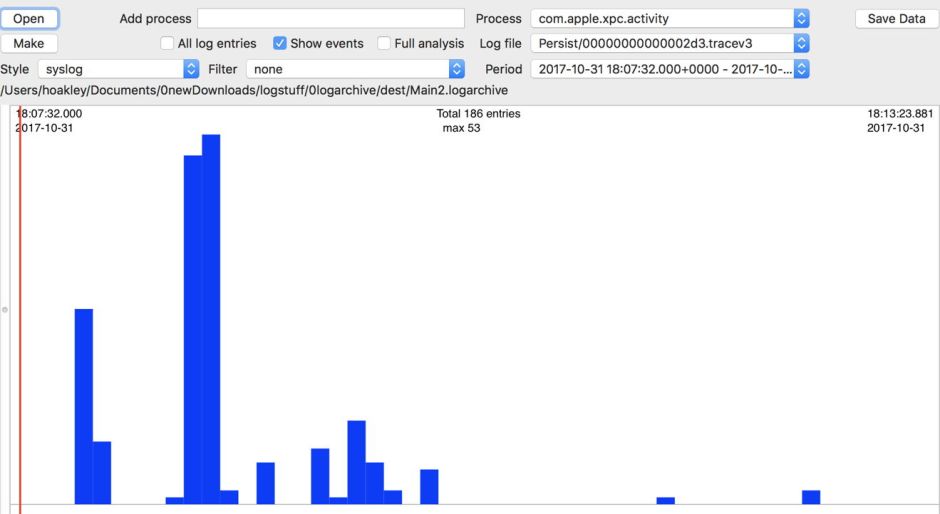
The DAS and CTS/XPC scheduling and dispatching services are set up and running quite soon after startup. CTS/XPC is the first, and starts registering calendar intervals for scheduled processes at about 21.5 seconds after startup. For example:
00:21.458851  localhost UserEventAgent[72]: (TimeMachine) [com.apple.TimeMachine.TMLogInfo] com.apple.backupd-auto launchd job enabled

00:21.563305  localhost UserEventAgent[72]: (com.apple.cts) [com.apple.xpc.activity.calendarinterval] Registered StartCalendarInterval: com.apple.var-db-dslocal-backup.268435464: Saturday, November 4, 2017 at 3:15:00 AM Greenwich Mean Time

00:22.007896  localhost UserEventAgent[72]: (com.apple.cts) [com.apple.xpc.activity.All] Registered XPC Activity: com.apple.backupd-auto

00:22.008051  localhost UserEventAgent[72]: (com.apple.cts) [com.apple.xpc.activity.All] Registered XPC Activity: com.apple.backupd-auto.dryspell

DAS is initialised soon afterwards:
00:22.017116  localhost DuetHeuristic-BM[130]: (DuetActivitySchedulerDaemon) [com.apple.duetactivityscheduler.default] Initializing DASDaemon...

00:22.598645  localhost DuetHeuristic-BM[130]: (DuetActivitySchedulerDaemon) [com.apple.duetactivityscheduler.default] Setting up timers.

00:22.605673  localhost DuetHeuristic-BM[130]: (DuetActivitySchedulerDaemon) [com.apple.duetactivityscheduler.default] Loading saved state.

00:22.653531  localhost DuetHeuristic-BM[130]: (DuetActivitySchedulerDaemon) [com.apple.duetactivityscheduler.default] Soliciting activities for resubmission.

00:22.653600  localhost DuetHeuristic-BM[130]: _DASDaemon started

00:22.655299  localhost DuetHeuristic-BM[130]: (DuetActivitySchedulerDaemon) [com.apple.duetactivityscheduler.default] Submitted Activity: <private>

00:22.655591  localhost DuetHeuristic-BM[130]: (DuetActivitySchedulerDaemon) [com.apple.duetactivityscheduler.scoring] Activity <private>: Optimal Score 0.9828 at <private> (Valid Until: <private>)
But you may not see a Time Machine backup start for a good while afterwards:
16:39.731638 localhost backupd[1142]: (TimeMachine) [com.apple.TimeMachine.TMLogInfo] Starting automatic backup
Miscellaneous services
The daemon responsible for background NSURLSessions, which are used by software update and other services to download content by HTTP, starts adding those services early:
00:21.557554  localhost UserEventAgent[72]: (com.apple.nsurlsessiond) nsurlsessiond_events plugin: adding token 1 for client softwareupdate_download_service

01:09.692378  localhost UserEventAgent[378]: (com.apple.nsurlsessiond) nsurlsessiond_events plugin: adding token 2 for client com.apple.passd

01:09.692439  localhost UserEventAgent[378]: (com.apple.nsurlsessiond) nsurlsessiond_events plugin: adding token 1 for client com.apple.parsecd
NSURLSession is extensively used by third-party products, as it is one of the few services mentioned here which is well-documented.
Messages starts quite early too:
01:10.038927 localhost imagent[392]: (SMS) [com.apple.IDS.Registration] Updating SMS service with number:

Many services register with ApplePushService, for example:
01:12.873637  localhost SafariBookmarksSyncAgent[411]: (CoreDaemon) ApplePushService: Initializing APSConnection <APSConnection: 0x7feef8f03210>: env=production port=com.apple.SafariBookmarksSyncAgent.Push darkWakeEnabled=YES queue=<OS_dispatch_queue_main: com.apple.main-thread[0x7fffc9710a80]>

02:01.346105  localhost SafariDAVClient[554]: (CoreDaemon) ApplePushService: Initializing APSConnection <APSConnection: 0x7feb447067d0>: env=production port=com.apple.safaridavclient.push darkWakeEnabled=YES queue=<OS_dispatch_queue_main: com.apple.main-thread[0x7fffc9710a80]>
Finder, Dock, and other UI entries typically appear in the log quite late:
01:56.741625 localhost Finder[483]: (CacheDelete) [com.apple.cache_delete.client] got a connection for: com.apple.cache_delete
The App Store comes up quite late, with a brash banner in the log:
01:57.849581  localhost App Store[480]: (StoreFoundation) [com.apple.commerce.CKLegacy] --------------------------------------------------------- Begin --

System Version 10.12.6 (Build 16G1036)

"App Store" Version 2.2.1 (584)

-------------------------------------------------------------------
deleted, the cache delete daemon, starts up even later:
02:54.309723 localhost deleted[450]: [com.apple.cache_delete.daemon] Starting up...
Once those first few minutes are over, you can watch the patterns of services like Time Machine’s backup, shown here for a period of eight hours, with its fairly regular hourly automatic backups.
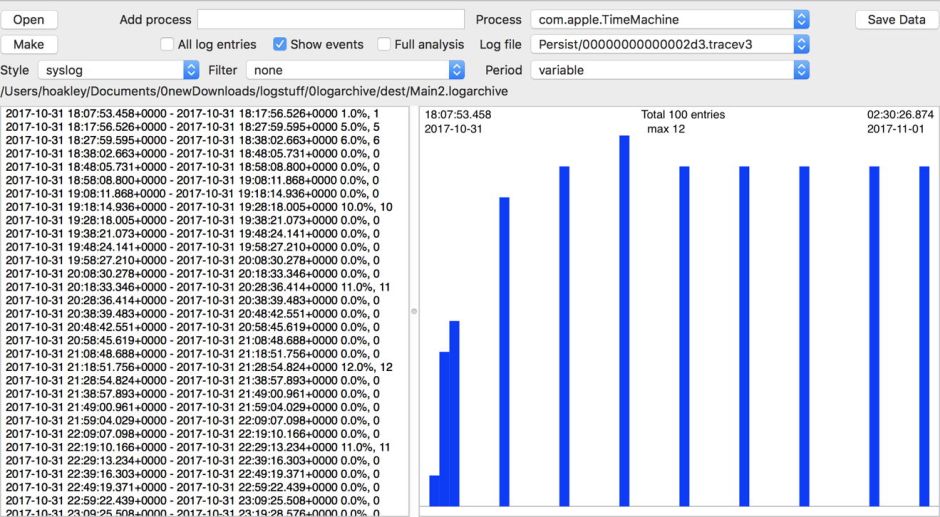
When using Woodpile, you should first look at patterns over time, as I have shown above, and then home into more unusual activity, or periods of high log activity, using Command-click to zoom in and obtain a log excerpt.
Hopefully this has given you insight into the behaviour of systems in macOS which are largely, or completely, undocumented, but which can have great influence over your Mac’s function. In addition to the promised tutorial on keychain problems, I will also examine a High Sierra 10.13.1 startup by way of comparison.
 The Eclectic Light Company