

Fourteen years ago, when most of us were still running Mac OS 8, it was normal to do so without using virtual memory. This meant that the memory allocated to an app was only that set in the Finder, in KB! If you did not have virtual memory turned on, it was not uncommon for apps to run out of memory. This is what we did about it.
Mac Emergency Room: An Application Tells Me That There Isn’t Enough Memory
Symptoms
An application puts up an alert complaining it cannot do something because it has run out of memory.
Solution Sequence
Save your work and quit the application.
Try to allocate the application more memory. Select the application’s icon, and use the Finder’s File/Get Info/Memory menu command to see how much memory is currently allocated. If that is less than the free memory available (see the Apple menu/About This Computer dialog if necessary), increase the Preferred Size. Close the Get Info dialog and try the application again. If it still runs out of memory, quit and allocate more.
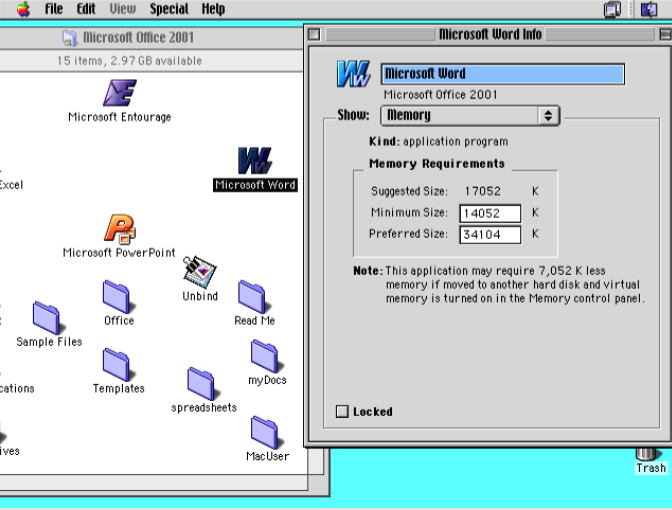 If there’s insufficient free memory available, quit all non-essential applications to see if that frees sufficient memory.
If that doesn’t, but reducing the amount of memory taken by Mac OS could free sufficient, turn off all non-essential extensions and control panels using Extensions Manager, restart, and try again.
If you still cannot free up enough memory to increase that allocated to the application, you’ll either need to add more real (physical) memory, or get by using virtual memory.
 Virtual memory requires a block of hard disk space on your startup volume as large as the total amount of memory set. If disk space is badly fragmented (spread across your hard disk in little bits), virtual memory will be very slow or even unstable. Turn it on using the Memory control panel and restart.
Don’t trash files or folders from your hard disk: increasing free disk storage space doesn’t directly affect the amount of memory (temporary ‘chip’ storage), except indirectly if you’re using virtual memory.
Further Info
All good books on Macs and their troubleshooting.
If you need more memory, Newer Technology’s GURU (from http://www.newertech.com [link no longer works as it used to]) tells you what you need. Dan Frakes’ Mac Pruning pages at mc04.equinox.net/informinit/ [link now broken] help you decide what extensions to turn off to free up memory.
Updated from the original, which was first published in MacUser volume 17 issue 5, 2001. Where have all those gigabytes gone?
 The Eclectic Light Company